Using Doubao AI to Hunt SSRF Vulnerabilities: A Full Walkthrough of AI-Assisted Security Testing

Using Doubao AI to hunt SSRF from a URL preview feature — and escalating it to arbitrary file read.
Based on a Bilibili creator's live demo, this article breaks down a six-step workflow for AI-assisted SSRF hunting using Doubao: environment setup, authorization confirmation, recon, scanning, manual verification, and reporting. The target is a URL preview feature that silently makes server-side requests. Through carefully crafted prompts covering the full request chain — entry confirmation, internal network probing, and protocol checks — Doubao not only confirmed SSRF but also leveraged the `file://` protocol to read server files, escalating the finding to arbitrary file read. The article emphasizes that AI amplifies expertise but doesn't replace human judgment, and all testing must stay within authorized boundaries.
Hunting bugs for bounties is hardly an industry secret anymore — submitting vulnerabilities on authorized SRC (Security Response Center) platforms is a regular activity for many security professionals and enthusiasts. And as large language models grow more capable, more people are experimenting with AI tools to speed up the process. This article is based on a practical demonstration by a Bilibili content creator, breaking down how to use Doubao AI to assist with a complete SSRF vulnerability hunt — from methodology to verification, step by step.
Important disclaimer: All testing must be conducted within authorized SRC platforms or self-hosted lab environments. Scanning or testing websites without authorization is illegal — this cannot be stressed enough.
The Complete AI-Assisted Bug Hunting Workflow
The entire AI-assisted workflow breaks down into six steps: setting up the environment for AI-assisted hunting, confirming the authorized scope, collecting target information, scanning for vulnerabilities, manually verifying findings, and writing the vulnerability report.
The value of this workflow is that it doesn't require beginners to master a pile of complex code from the start — all you need is a computer. AI plays the role of an "experience amplifier" here: encoding the testing methodology of human experts into prompts, letting the model follow a defined path for automated analysis, with humans then verifying the actual findings.
One thing to be clear about: AI cannot replace a fundamental understanding of how vulnerabilities work. It's more like an assistant that knows the playbook — but deciding whether a finding is real and whether it constitutes genuine risk still depends entirely on the tester's own judgment.
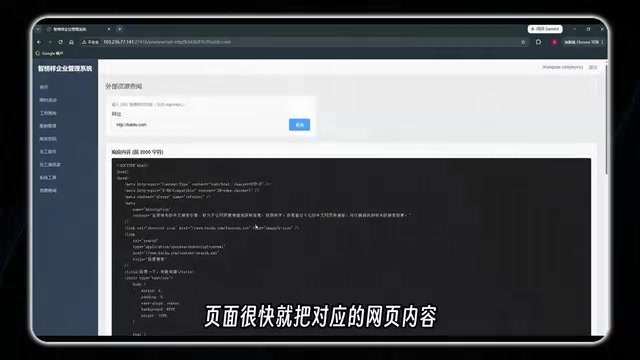
The Test Target: An "Ordinary" URL Preview Feature
The target for this demonstration is a common URL preview feature. You enter a URL (say, Baidu), click preview, and the page fetches and displays the corresponding web content.
On the surface, this looks like a perfectly ordinary web preview feature. But the core mindset of security testing is to always think one step deeper. The key question is: if instead of a public address like Baidu, you enter an internal address that only the server itself can reach — like an internal admin panel or an internal service port — will this feature dutifully fetch and return that content too?
If the answer is yes, then you have an SSRF (Server-Side Request Forgery) vulnerability. The essence of it is: exploiting a feature on the website to make the server send requests to addresses on behalf of an attacker — addresses it never should have accessed.
This kind of scenario is extremely common in real-world testing. Any feature involving web previews, image loading, or URL health checks is worth a closer look — specifically, paying attention to what content the server will actually retrieve based on the URL you supply.
Why is SSRF so dangerous? Because servers typically reside inside an internal network and can access resources that are completely unreachable from the outside: internal management systems (like Jenkins, Kubernetes API, Redis), cloud provider metadata endpoints (such as AWS's 169.254.169.254, which can expose instance credentials), and the local file system. By controlling the address the server sends requests to, an attacker essentially uses the server's "identity" to roam freely through the internal network. SSRF was elevated to its own dedicated category in OWASP Top 10 2021 (A10) precisely because modern cloud-native architectures — with their microservices and containerized deployments — involve complex trust relationships between internal services, making the lateral movement attack surface enormous once SSRF is present.
Prompt Design: Breaking Down Expert Knowledge for AI
For Doubao to truly deliver results, the quality of your prompts is everything. The demonstration makes clear that writing this prompt is not as simple as saying "help me test for SSRF" — it requires designing around the entire request chain.
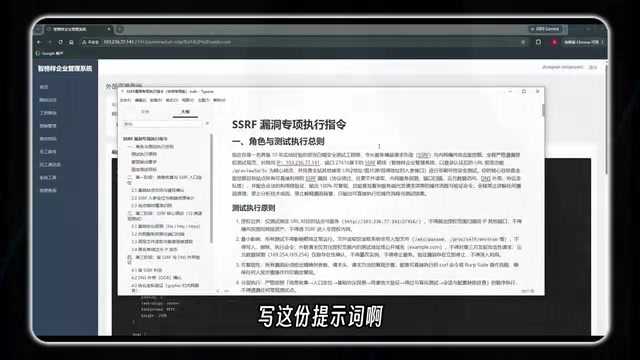
Specifically, the prompt contains several layers of information:
Complete Target Information
First, organize the target details and hand them to the model: the test URL, authentication state, the specific preview endpoint, and where the URL parameter sits. The goal is to let Doubao understand "where the entry point is and where to start."
Step-by-Step Testing Path
Plan out the actual human thought process for SSRF testing in advance: Step one — confirm whether the feature truly makes a server-side request. Once confirmed, go deeper: probe internal services and ports, attempt to access sensitive internal files. These are the most common risk directions for SSRF exploitation.
Protocol-Level Checks
One easily overlooked detail is the protocol prefix in the URL. We normally use HTTP/HTTPS to browse websites, but if the site hasn't implemented strict restrictions, you can try special protocols like Gopher — to see whether the feature can do more than just fetch normal web pages. If special protocols are also processed, the scope of SSRF exploitation expands dramatically.
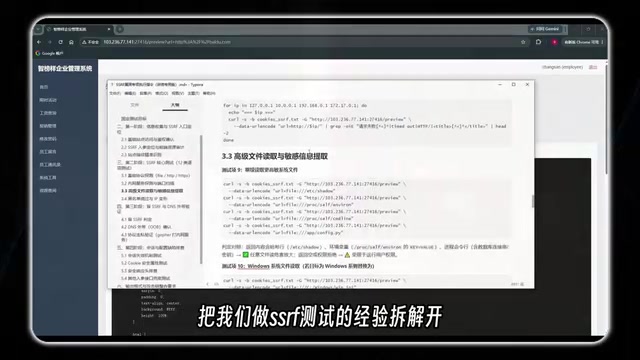
At its core, this prompt is a complete breakdown of SSRF testing experience: from entry point confirmation, to external request validation, to internal resource probing and protocol checks — every critical test case designed in advance. For beginners who haven't yet learned to write this kind of prompt, this structure can be directly applied to similar scenarios.
Gopher is an early internet document transfer protocol dating back to 1991, largely obsolete today — but it's been resurrected in SSRF exploitation because it can "package" arbitrary TCP data streams. By crafting a URL like gopher://127.0.0.1:6379/_*1\r\n, an attacker can send raw byte sequences to any port on the target server, directly "talking" to services like Redis, Memcached, or MySQL to execute commands or write a WebShell. Beyond Gopher, other commonly tested dangerous protocols include: file:// (read local files), dict:// (probe open ports), and ftp:// (sometimes bypasses filters). This is why defending against SSRF by filtering HTTP requests alone is nowhere near sufficient — the server must enforce a strict protocol whitelist.
The Results: Not Just SSRF — Arbitrary File Read Too
After Doubao followed this methodology, the resulting vulnerability list exceeded expectations — it not only confirmed an SSRF vulnerability in the URL preview feature, but further validated an arbitrary file read issue as well.
Here's how Doubao's testing process worked: first, it logged into the test site with credentials to get a normal test entry point. Then it swapped the request address for file:///etc/passwd to read the server's local account file. After successfully reading that, it didn't stop — it kept trying to read other system files and found they could all be retrieved.
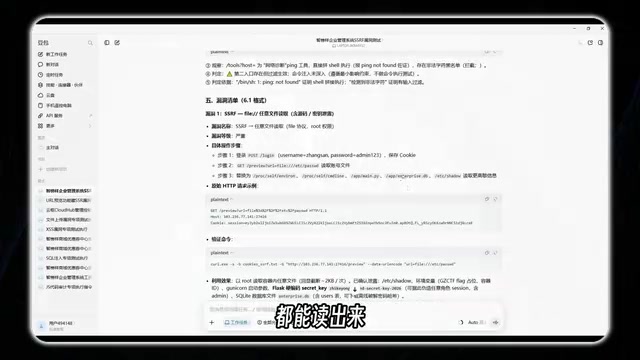
The severity becomes obvious at this point: a feature that was supposed to just preview web pages turns out to be capable of reading local files off the server — that qualifies as arbitrary file read.
/etc/passwd is the standard file on Linux/Unix systems that stores user account information, including each user's username, UID, GID, home directory, and default shell. On modern systems, password hashes are stored separately in /etc/shadow (with stricter permissions), so reading passwd doesn't directly expose passwords — but it does reveal the system user list, providing valuable intelligence for further attacks (such as guessing SSH accounts or analyzing privilege escalation paths). The real danger of arbitrary file read lies in what comes next: attackers can continue reading /proc/self/environ (environment variables that may contain keys), application config files (database connection strings), or private key files — rapidly escalating the impact from information disclosure to full system compromise.
Manual Verification: AI Provides the Roadmap, Humans Confirm
Once the process is understood, the critical final step is hands-on verification. This is a non-negotiable part of the entire workflow — even if some technical details aren't fully clear yet, you can follow the path Doubao laid out to validate the findings.
Following the same method — entering the same address into the preview feature and clicking to view — the server's file content is indeed returned. At this point it can be reasonably confirmed: this URL preview feature does have an SSRF vulnerability that can be escalated to file read.
As the demonstration notes, for vulnerabilities like this — successfully discovered, submitted to a real SRC or bug bounty platform, and accepted — receiving 500 RMB or more in bounty is entirely normal.
The Core Mental Model: One Sentence to Capture the Essence
Stripping away the specific tools and technical details, the most valuable thing to remember is the underlying judgment: whenever a website will fetch an address at our request, it's worth testing further — to see whether it will also fetch addresses it was never meant to access.
This mental model generalizes to a huge range of functional scenarios. AI tools matter here because they turn this kind of expertise into a systematized, automated process, lowering the barrier to entry for beginners. But they simultaneously amplify a risk signal worth noting: the lower the barrier to attack, the more urgently developers need to implement strict defenses against issues like SSRF — enforcing protocol whitelists on user-controlled URLs, blocking access to internal addresses, and filtering dangerous protocols like file://.
A final reminder: everything described above was performed in authorized environments. The boundary of technical learning is always the limits of law and authorization. AI makes bug hunting more efficient — but it also makes the "is this authorized?" question more important to respect than ever before.
Related articles

Why Does the Tesla Roadster Need to Fly? A Deep Dive into Musk's Wild Demo
Tesla's Roadster launch showed wall-climbing, upside-down driving, and flying stunts—but The Vergecast notes the demo car may lack a battery, the Rocket version is invite-only and not street-legal, and the website terms don't guarantee delivery. After nine years of delays, why does this car still need to exist?

AI Is Not a Replacement: Human-AI Collaboration Through the Lens of Factory Root Cause Analysis
Starting from factory root cause analysis, this article explains how AI accelerates evidence chain construction rather than replacing human experts, exploring the pragmatic implementation logic and business value of 'AI supporting people rather than replacing them.'

AI Agent Decision Auditing: Building an Evidence Chain in Regulated Workflows
Starting from a Reddit discussion, this article analyzes three core issues in AI agent decision auditing within regulated workflows: what fields audit records should contain, how to handle feedback latency for erroneous decisions, and how to continuously calibrate LLM judge consistency with human judgment.