Velomask: The AI Coding Orchestration Platform That Lets You Write Code While Swimming

Velomask lets developers send AI coding tasks from their phone and sync results across all devices.
Velomask is a remote Coding Agent orchestration platform that enables developers to send natural language coding instructions from any device, have AI execute tasks on cloud nodes, and sync results in real time across phones and computers. It supports agents like Claude Code and Codex, enabling a truly asynchronous development workflow where you can send a task from your phone and review completed code later on any device.
Writing Code While Swimming? This Isn't a Joke
After the concept of Vibe Coding took off, developers have been exploring ways to let AI write code for them while they just give verbal instructions. This concept was introduced by Andrej Karpathy (former Tesla AI Director and OpenAI co-founder) in early 2025, describing a completely new programming paradigm: instead of writing code line by line, developers describe their intent to AI in natural language, and the AI handles the actual code generation. The developer's role shifts from "coder" to "conductor," with core competencies moving from syntax mastery to requirement articulation and result validation. This idea quickly sparked heated discussion in the developer community and has been hailed as a major milestone in the democratization of software development.
But one Bilibili creator took this concept to the extreme — he demonstrated how to send coding instructions to AI from his phone while at the swimming pool, and by the time he finished a lap, the code was already done.
The core tool behind this is Velomask, an internet-synced remote Coding Agent orchestration platform. Its design philosophy is simple: you send tasks from any device, AI executes them on cloud nodes, and all devices sync results in real time.
Velomask's Core Workflow
Creating a Workspace and Selecting a Coding Agent
Velomask features a card-based interface where each card represents an independent workspace corresponding to a different project. When creating a new workspace, you can choose from different Coding Agents, currently supporting mainstream options like Claude Code and Codex.
It's important to understand the fundamental difference between Coding Agents and ordinary code completion tools. Coding Agents are a class of AI agent systems capable of autonomously completing programming tasks, with full capabilities including understanding project context, planning execution steps, reading and writing files, running commands, and self-debugging. Claude Code is Anthropic's command-line coding agent that can directly manipulate file systems and terminals; Codex is OpenAI's coding agent solution. The core characteristic of these Agents is "autonomy" — you provide the goal, and they determine the implementation path on their own, without requiring manual confirmation at every step.

After selecting an Agent, you also need to choose a model (such as the GPT-4 model used in the demo) and an execution node. The platform supports routing tasks to specific compute nodes. If you have multiple servers, you can flexibly orchestrate workloads. This node scheduling mechanism is essentially a distributed task orchestration architecture — each "node" is a server instance running a Coding Agent, with its own independent file system and compute resources. When a user sends a task, the platform routes the instruction to the designated node, where the Agent executes code generation, file modifications, and other operations within that node's environment. Compute resources are completely decoupled from the interaction interface; the user's device only needs to handle lightweight message sending and receiving, while all heavy computation happens in the cloud — this is the technical foundation that makes it possible for a single phone to handle the operation of "sending coding tasks." The working directory supports both raw directory and Workspace modes.
Send a Task, Then Go Swimming
The entire workflow is extremely streamlined:
- Open Velomask on your phone and navigate to the corresponding project workspace
- Describe your requirements in natural language, such as "Add a user login page and registration page"
- Hit send — the system automatically creates the workspace and begins execution
- Set your phone by the pool and go swimming
The system first checks whether the directory exists on the specified node, then begins calling Codex for code generation. The entire process is fully automated with no manual intervention required.
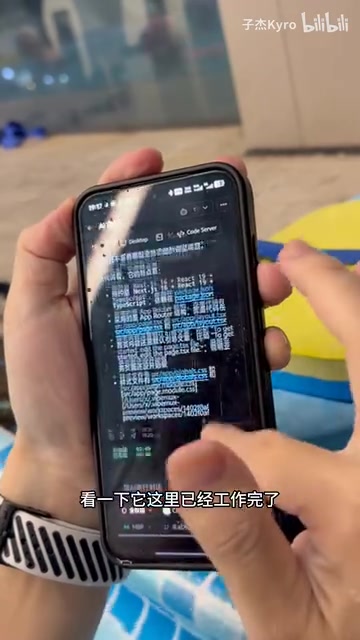
After finishing a lap, pick up your phone, unlock it, and open the app to see the results. The AI not only completes the code but also presents the work process in a collapsible format — you can expand it to view detailed execution steps or collapse it to see only the final output.
Multi-Device Real-Time Sync: Two-Way Communication Between Phone and Computer
A Truly Seamless Cross-Device Experience
Velomask's most compelling design feature is its internet-based bidirectional real-time sync. Tasks sent and results viewed from your phone by the pool appear identically when you get home and log into the same webpage on your MacBook.
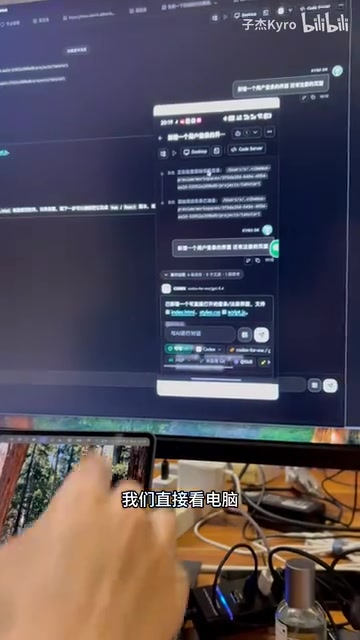
In the demo, the creator mirrored his phone screen to the computer for a visual comparison: the "Add a user login page" task and its results displayed on the phone were identical to those on the desktop web interface. Not only is the full chat history preserved, but you can also continue sending new task instructions from the computer.
Real-World Verification of Two-Way Sync
To verify the real-time nature of the sync, the creator sent a new task from the computer — "Add Google login." Immediately after sending, he switched to the phone to check, and the task status and AI responses were perfectly synchronized across both devices with no perceptible delay.
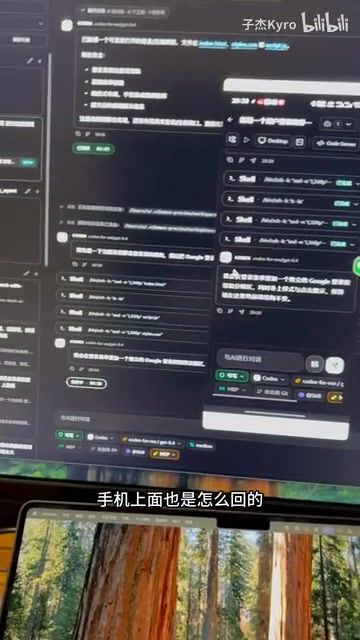
This means your development workflow can achieve truly seamless context switching: send tasks from your phone during your commute, continue refining on your computer at the office, and pick up where you left off on your laptop at home — all context is preserved.
Back at the Computer: The Last Mile from Conversation to Code
When you're back at your desk, Velomask offers deeper development capabilities. Click the top-right corner to open a terminal — since it connects locally to the node, latency is extremely low. More importantly, you can open the project code directly in VS Code to manually modify and fine-tune what the AI generated.
This creates a complete development loop:
- Mobile: Send natural language instructions, view execution results, lightweight interaction
- Desktop: View complete history, continue conversations, open terminal and IDE for in-depth development
- Cloud nodes: Execute actual code generation tasks, store project files
Practical Implications for Developers
The value of this solution goes far beyond the gimmick of "writing code while swimming." It actually addresses a real pain point in the AI coding era: AI takes time to execute tasks, and developers don't need to stare at the screen waiting.
Traditional tools like Cursor and Copilot require you to sit at your computer watching AI generate code line by line. But when a task is sufficiently clear (like "add login and registration pages"), you can hand it off to AI and go do something else. Tools like Velomask make this asynchronous development model viable.
In fact, asynchronous development is becoming an important evolutionary direction for AI coding tools. Traditional AI coding assistants use a "synchronous interaction" model where developers must be present in real time, guiding the AI step by step. But as AI Agent capabilities grow stronger, more and more tasks can be "described once and completed automatically." Products like GitHub's Copilot Coding Agent and Devin are all exploring this direction. The core value of this model lies in freeing up developers' attention — during the time AI spends executing tasks, developers can conduct code reviews, discuss requirements, do other creative work, or even rest and exercise.
Of course, this approach is better suited for tasks with clear functionality and well-defined boundaries. Complex architectural design and debugging that requires frequent interaction still need you at the computer. But for everyday CRUD development, UI page building, and adding feature modules, "send a message and go swimming" might genuinely become a new way of developing.
Key Takeaways
Related articles

Salesforce Acquires Rune for $375M: AI Logistics Tech Bolsters Defense Business
Salesforce reportedly acquires defense tech startup Rune for $375M. Rune's AI logistics tech will strengthen Salesforce's Missionforce defense platform, continuing its M&A spree.

Why Fair Use Benefits Everyone in the AI Era
Starting from a Hacker News discussion, this article analyzes the legal logic and controversies of the fair use principle in AI training and content creation, and its dual impact on creators and the tech ecosystem.

Mistral Large 4 Open-Sources a Trillion Parameters, Microsoft Offers Voluntary Severance to 60,000 Employees
Mistral Large 4 open-sources a trillion-parameter multimodal model with a coding agent score of 48; SanDisk earnings show AI inference reshaping NAND demand; Google Gemini adds in-app file editing, OpenAI raises Codex quotas, and Microsoft offers voluntary severance to 60,000 employees.