Vibe Coding Beginner's Guide: Start with 60 Lines of Code, Stop Gambling with AI

Start Vibe Coding right: verify a minimum viable version first, build up from 60 lines of core code.
This article explains why most people fail at Vibe Coding — they mistakenly think it's just saying Yes/No to AI. Through a long podcast content conversion project, the author demonstrates the correct Vibe Coding workflow: never let AI write a complete plan first. Instead, verify a minimum viable version (PoC) starting from one core function, then gradually assemble the complete project to gain positive feedback and avoid accumulating technical debt in the wrong direction.
Why Most People Give Up on Vibe Coding
99% of people start Vibe Coding because they heard it's simple — just sit in front of a computer, give requirements to an AI Agent, say Yes or No to what it returns, and repeat until you get a working program. But most people eventually give up because they discover it's not that simple at all.
Vibe Coding is a programming paradigm coined and popularized by OpenAI co-founder Andrej Karpathy in early 2025. The core idea is that developers no longer write code line by line — instead, they describe their intent in natural language, and AI Agents (like Claude Code, Cursor, GitHub Copilot, etc.) generate and execute the code while humans only review the results. This concept immediately sparked heated debate because it theoretically lowers the programming barrier to near zero — anyone who can describe what they want can "write" a program. However, in practice, Vibe Coding isn't mindless clicking of Yes. It requires users to have basic engineering thinking: knowing what reasonable output looks like, how to decompose problems, and how to verify results. People lacking these skills often get lost after the AI generates large amounts of code, and eventually give up.
The scenario described above only exists in marketing materials. Real Vibe Coding is full of confusing roadblocks, and many people end up quitting in frustration. This article uses an actual project to show how to properly get started with Vibe Coding — through a small loop, starting from a single function, gradually piecing together a complete project.
Project Background: A Real Need for Long Podcast Content Conversion
This project is a long podcast content conversion program: feed it a 3-hour or even 8-hour podcast, and it generates a Chinese dialogue script with speaker labels, chapter markers, plus a paraphrased article that preserves the original speakers' tone and expression style.
Why do we need such a tool? Three core reasons:
-
High-value information is buried in long content: Podcasts and interviews contain unique perspectives from frontline practitioners, but not every interview is worth listening to in full — you need text to quickly assess content value.
-
AI direct summarization loses the soul: AI tends to speak in a balanced, comprehensive manner, smoothing out anything with edge. The vivid tones, personality traits, and strong opinions from the original video all disappear after AI processing.
-
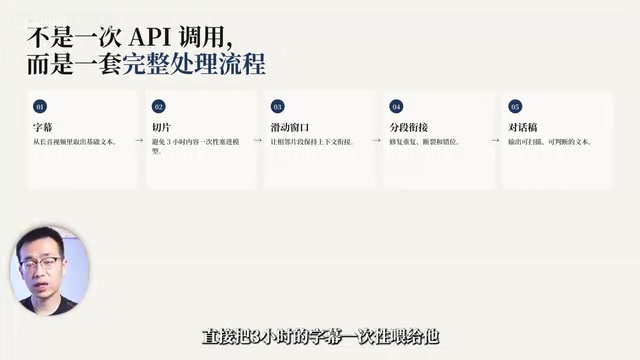
Technical limitations require engineering solutions: AI's context window and compute are limited — you can't just feed 3 hours of subtitles in one go. You need chunking, sliding windows, and segment stitching.
The "Context Window" here refers to the maximum amount of text a large language model can process at once, measured in tokens — 1 token corresponds to roughly 0.75 English words or 0.5 Chinese characters. Even models with the longest context windows currently available (like Gemini 1.5 Pro's 1 million tokens) face two core issues when processing ultra-long content: first, the "lost in the middle" phenomenon where the model's attention to the middle portions of context drops significantly, causing information loss or hallucinations; second, inference costs grow non-linearly with context length, directly impacting speed and cost. A 3-hour podcast subtitle contains approximately 50,000-80,000 English words, or about 100,000 tokens — even if it technically fits, quality cannot be guaranteed. Therefore, engineered chunking and sliding window strategies are the standard approach for processing long text — not an optional enhancement.
The Golden Rule: Always Verify the Minimum Viable Version First
Never Let AI Write a Plan First
Most tutorials tell you the first thing to do is: have AI write a plan, put Claude Code into Plan Mode to write a complete code outline, then write code following that outline.
Never do this. This is where most Vibe Coding beginners crash and burn.
The result is that AI produces a "garbage outline" — looks neat and tidy, with clear modules and proper naming conventions, but when you hand this outline to AI to write code, it immediately builds a code "garbage mountain" on top of this foundation. Then you're fixing bugs in thousands of lines of code, and for beginners, fixing bugs is like gambling: AI gives you a bunch of reasons you can't understand, and the only thing you can do is choose Yes or No. If you're lucky, a few tries will work; if not, you can keep going until you give up.
What Is a Minimum Viable Version (PoC)
Whether you're a programmer or a Vibe Coding beginner, the first thing you should absolutely do is NOT have AI write a plan — it's verify the minimum viable version. In programming terms, this means having AI write the smallest possible function module and verifying that the input produces the desired output.
PoC (Proof of Concept) is a classic methodology in software engineering and product development. It's similar to the lean startup concept of MVP (Minimum Viable Product) but with a different focus: MVP validates market demand with users, while PoC validates core technical feasibility. In traditional software development, PoC's significance lies in eliminating technical risk at minimum cost — before investing substantial resources, use the simplest code to prove "this approach works." Applying this thinking to Vibe Coding is especially critical: the uncertainty of AI-generated code is far higher than manually written code, and the earlier you verify core assumptions, the more you avoid accumulating technical debt in the wrong direction.
In this project:
- Input: YouTube's auto-generated English subtitles
- Output: A dialogue script with speaker labels and chapters
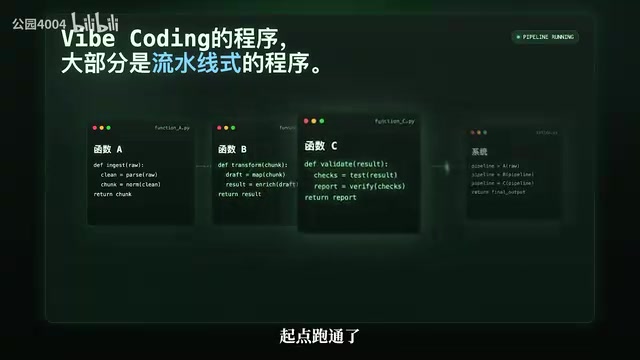
This is the project's core — without this core, everything else is wrong. And the most critical point — implementing this core is easy and easy to verify as correct or incorrect. With verification comes positive feedback, which motivates you to take the next step.
Hands-On Demo: The Correct Vibe Coding Development Flow
Step 1: Brainstorm with AI
Open a new chat window and discuss your requirements clearly with AI. The key is to be specific enough:
"I want to build a project where the input is YouTube's auto-generated English subtitles, and the output is a dialogue transcript with speaker identification. Since feeding 3-4 hours of subtitles into a large language model at once causes hallucinations, I need chunked processing — about 8,000 words per chunk, fed into the LLM separately for dialogue recognition and speaker labeling, then merged at the end."
Since the discussion was detailed enough, AI can already provide a decent architecture. Then ask it to list a code implementation outline — but at this point you must resist the urge: never send the outline directly to Claude Code to write code.
Claude Code is a command-line AI programming tool released by Anthropic in 2025. Unlike IDE plugin formats such as Cursor and GitHub Copilot, it runs as a terminal Agent capable of directly reading/writing files, executing commands, and calling APIs with full codebase manipulation capabilities. Its core advantage lies in deep understanding of complex instructions and execution continuity across multi-step tasks, particularly excelling at module assembly and refactoring on existing code. In the Vibe Coding workflow, Claude Code serves as the "execution layer" — after humans complete requirement decomposition and core logic verification, they hand off tedious work like module assembly, error handling, and code integration to it, significantly boosting efficiency.
Step 2: Only Ask for the Core 60 Lines of Code
Tell the AI:
"Your outline is detailed and comprehensive, but I don't want to hand it directly to a coding agent. I want to implement it in the most minimal viable way, one small function at a time. Now please identify the most core component and write that core code."
Related articles
 Tutorials
ChatGPT Plus Subscription Guide: Are GPT-5.5, image-2, and Codex Worth the Upgrade?
A detailed look at ChatGPT Plus features — GPT-5.5, image-2, and Codex — with a Plus vs Pro comparison and a complete step-by-step subscription guide for users outside the US.
 Tutorials
Harness AI Engineering in Practice: Using Claude Code to Master Enterprise-Level E-Commerce Development
Deep dive into Harness AI Engineering: master enterprise e-commerce development with Claude Code using the Rules, Skills, Wiki, and Changes framework.
 Tutorials
Cursor + Codex Dual-IDE Collaboration: A Practical Methodology for Open-Source Project Customization
A complete methodology for open-source project customization based on real-world experience, detailing the Cursor+Codex dual-IDE workflow, seven-stage process, MVP validation, and AI source code reading techniques.