Vibe Coding in Practice: Rebuilding a Gamified Portfolio with Figma + Framer + AI in Two Days

How one creator used Figma, Framer, and AI to build a gamified, playable portfolio in just two days.
Bilibili creator 紫薯冰粉 used two days of Vibe Coding to transform a standard portfolio into a Steam-style interactive site. By combining Figma-to-Framer design export, Framer's CMS, and AI-generated drag-and-drop card interactions, he built an immersive experience without hand-writing complex code — offering a practical blueprint for designers and indie developers.
When Your Portfolio Becomes a Playable Game
In the conventional sense, a personal portfolio website is little more than an online résumé — a list of projects, a profile photo, and contact details. But Bilibili creator "紫薯冰粉" flipped this tired template on its head with two days of Vibe Coding: combining Framer's visual capabilities with AI-assisted coding, he built an interactive portfolio that looks and feels like a Steam store page you can actually "play."
Vibe Coding is a programming paradigm coined by OpenAI co-founder Andrej Karpathy in early 2025. Its core idea is that developers lead with "vibe" and intent — collaborating with AI through natural language to produce code, rather than hand-writing every line of logic themselves. This paradigm has taken off thanks to rapid advances in AI coding assistants like Cursor, GitHub Copilot, and Claude, which can now generate complete components, pages, and entire feature modules from context — not just autocomplete snippets. Vibe Coding doesn't mean developers are deskilling; it redefines the creator's core competency from "can write it" to "can think it through and judge what's good." In this rebuild, the developer stopped writing code line by line and instead described requirements in natural language, letting AI handle implementation while focusing on creativity and experience design. The real value of this rebuild wasn't building from scratch — it was a comprehensive upgrade at the visual and interactive layer. Most of the content was carried over from previous work, just repackaged into a far more immersive form.

AI-Generated Card Interactions: The Site's Standout Feature
The most eye-catching element across the entire site is a set of game cards that support hover effects and drag-and-drop. This was implemented entirely with AI-generated code — the creator simply described the desired interaction in natural language, and the AI produced a card component with hover responses and drag support.
This perfectly illustrates the typical division of labor in Vibe Coding: creativity and aesthetics stay with the human; tedious interaction logic and front-end implementation go to the AI. For creators with a design background who aren't comfortable hand-coding JavaScript animations, this approach dramatically lowers the barrier to "making what's in your head actually work." Hover-and-drag interactions that once required collaboration with a front-end engineer or days of documentation-diving can now be shipped with a few lines of prompting.
Even more clever is the "game cartridge" concept. The creator used Framer's built-in embed functionality to let visitors select different "game cartridges" and play them directly within the site. Framer started as a high-fidelity prototyping tool for designers, known for supporting complex animations and interaction logic. In recent years it has evolved from a prototyping tool into a full-fledged publishable website builder, adding production-ready features like a CMS, SEO settings, custom domains, and team collaboration. Unlike pure-code solutions, Framer retains component-level code injection, letting developers embed React components or custom JavaScript within the visual editor — which is exactly the technical foundation that made the AI-generated card interactions possible. The idea of embedding mini-games inside a portfolio transforms static showcasing into active experience: visitors aren't just browsing, they're genuinely playing.

The Figma + Framer + AI Workflow
Behind this project is a modern design-development workflow well worth borrowing.
Export Directly from Figma — Skip the Handoff Headache
Most of the site's layout wasn't built from scratch in code — it was designed in Figma and exported directly into Framer. An official plugin bridge between Figma and Framer lets designers migrate layer structures, Auto Layout, and component variants directly onto Framer's canvas while retaining most visual properties. The value here is eliminating "design-to-dev loss" — in the traditional workflow, front-end engineers manually reconstruct styles from design files, errors are inevitable, and communication overhead is high. Figma's Auto Layout is highly compatible with Framer's responsive layout logic, meaning responsive behavior largely survives the export as well. Designers can control pixel-level details in the tool they know best, then move seamlessly into a publishable website environment — completely eliminating the "design handoff" pain point.

CMS for Content Management — Separating Style from Data
For a series of previously written reports, the creator used Framer's CMS to structure images and text so visitors can read full articles directly on the site. Framer's built-in CMS is a lightweight structured content manager that lets users define field templates (title, cover image, body rich text, etc.) and bind those fields to corresponding positions in page components. The key advantage of a CMS is the separation of content from presentation: when adding a new article in the future, you simply input data into the CMS and the page template applies automatically — no re-layout required. Content editors never need to touch code or design tools. This thinking mirrors heavier-weight Headless CMS products like Notion or Contentful, but Framer wraps it in a form that's far more accessible for individual creators and small teams who need to ship fast.
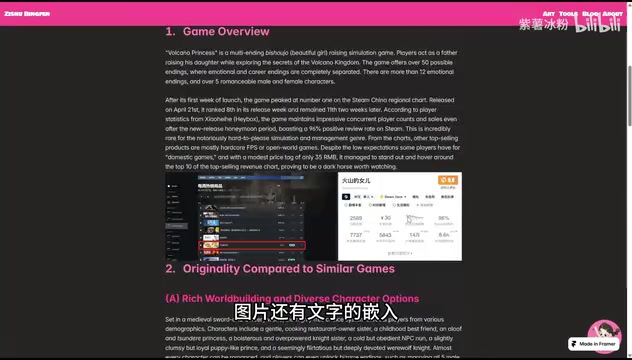
Turning an Annual Review into a Steam Store Page
The creator also embedded his annual review report on the site's homepage, letting visitors scroll through it the way they'd browse a Steam game store page. This design borrows from the core logic of gamification — introducing game design elements like a sense of progression, exploration mechanics, instant feedback, and narrative framing into non-game contexts to boost user engagement. The "Steam store page" information architecture leverages players' existing mental models of game detail pages: screenshot carousels, feature tags, scroll-driven storytelling… These familiar patterns reduce cognitive load while creating the immersive feeling of "learning about a product." Research consistently shows that interactive content drives significantly longer time-on-page and better content recall compared to static pages. Organizing personal growth as a "product detail page" packages a personal narrative into something visitors can "learn more about" — with far more impact and memorability than a generic wall of text and images.
What This Case Study Teaches Us
This two-day rebuild looks like a personal side project on the surface, but it reflects several genuinely important trends in content creation and front-end development.
First, modern toolchains are blurring the line between design and development. Figma handles visuals, Framer handles publishing and content management, AI handles interaction code — a single creator can now run a complete pipeline that once required a designer and a front-end engineer working in tandem.
Second, AI-assisted coding works best when the goal is clear but implementation has a high barrier. Card drag-and-drop is a perfect example: the creator knew exactly what they wanted, but hand-coding it was out of reach. AI bridged precisely that gap.
Third, personal portfolios are evolving toward gamification. Using game metaphors like cartridges and Steam pages to lower reading friction and increase time-on-page is a playbook any creator building a personal brand can draw from. For creative professionals, the form of a portfolio is itself an implicit showcase of aesthetic judgment and narrative ability.
That said, Vibe Coding isn't a silver bullet. AI-generated code still requires human oversight for complex business logic, performance optimization, and maintainability; and while Framer is quick to get started with, it hits a ceiling with highly custom requirements. But for portfolio-type projects that are visually driven and interaction-light, the Figma + Framer + AI stack is genuinely one of the most cost-effective approaches available right now.
Building a portfolio you can "play" in two days is far more achievable than it sounds. The real question may not be whether you can write code — but whether you can clearly articulate what experience you want your visitors to have.
Related articles

Why Does the Tesla Roadster Need to Fly? A Deep Dive into Musk's Wild Demo
Tesla's Roadster launch showed wall-climbing, upside-down driving, and flying stunts—but The Vergecast notes the demo car may lack a battery, the Rocket version is invite-only and not street-legal, and the website terms don't guarantee delivery. After nine years of delays, why does this car still need to exist?

AI Is Not a Replacement: Human-AI Collaboration Through the Lens of Factory Root Cause Analysis
Starting from factory root cause analysis, this article explains how AI accelerates evidence chain construction rather than replacing human experts, exploring the pragmatic implementation logic and business value of 'AI supporting people rather than replacing them.'

AI Agent Decision Auditing: Building an Evidence Chain in Regulated Workflows
Starting from a Reddit discussion, this article analyzes three core issues in AI agent decision auditing within regulated workflows: what fields audit records should contain, how to handle feedback latency for erroneous decisions, and how to continuously calibrate LLM judge consistency with human judgment.