Vibe Coding Interview in Practice: Passing a Programming Interview with Claude Code in One Hour

Passing a Vibe Coding interview using Claude Code and AI collaboration to build a smart agent in one hour.
This article introduces the emerging Vibe Coding interview format through a real case study showing how to develop a Smart Outfit Recommendation Agent using Claude Code + MiniMax M2.1 in one hour. Core strategies include: using Plan Mode to clarify requirements first, letting AI ask questions to fill in boundary conditions, pasting error logs directly when debugging, and shipping an MVP before iterating. The interview fundamentally tests requirements comprehension, AI collaboration, and engineering decision-making ability.
What Is a Vibe Coding Interview?
Vibe Coding is a programming paradigm concept proposed by OpenAI co-founder Andrej Karpathy in early 2025. The core idea is that developers no longer write code line by line. Instead, they describe their intent in natural language and use AI tools to transform their "vibe" into working programs. This paradigm marks a shift in software development from "craftsmanship" to "director-style collaboration" — developers act more like directors, responsible for steering direction, reviewing output, and making decisions, rather than personally handling every technical detail.
Recently, blogger Cao Fa shared a real Vibe Coding interview experience — using Claude Code plus MiniMax M2.1, he completed development of a smart outfit recommendation assistant in one hour and successfully passed the interview.
Vibe Coding interviews are becoming one of the most popular interview formats at AI tech companies. Unlike traditional whiteboard coding, candidates can use any AI tools or search engines to assist with the development task. The focus is no longer on whether you can hand-write algorithms, but whether you can collaborate efficiently with AI to deliver a usable product within a limited timeframe.
Interview Task & Tech Stack Selection
Task Requirements
The interviewer required implementing a Smart Outfit Recommendation Agent with the following core capabilities:
- User inputs a city name, and the Agent returns the day's weather along with outfit recommendations
- Supports multi-turn conversations and casual chat with users
- Can generate and save future weather trend charts
- Must be completed within one hour
Why MiniMax M2.1?
The blogger chose the Claude Code + MiniMax M2.1 combination for three reasons:
- Direct connection in China: No VPN needed, ensuring network stability during the interview
- Compatible with Claude Code: Requires virtually no configuration changes, works out of the box
- Strong Agent capabilities: MiniMax M2.1's agentic abilities are proven, making it well-suited for tool-calling scenarios
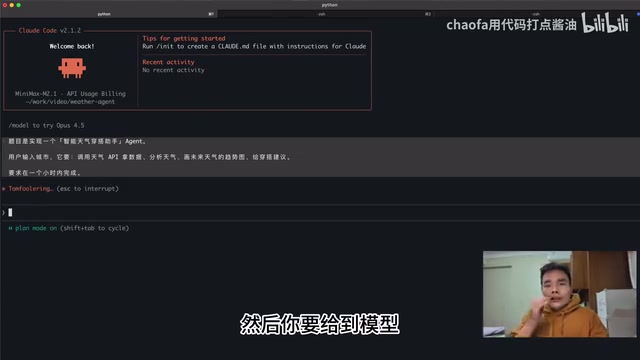
Vibe Coding Interview: Step-by-Step Walkthrough
Step 1: Clarify Requirements Using Plan Mode
The most critical first step in the entire process was using Claude Code's Plan Mode (toggled via Shift+Tab). Plan Mode's value lies in reproducing the software engineering best practice of "requirements clarification first" — in the software engineering field, ambiguous requirements are one of the primary causes of project failure. By forcing the AI to output a structured plan and proactively ask questions before generating code, Plan Mode effectively reproduces two key agile development phases: "user story refinement" and "technical solution review," significantly reducing rework caused by requirement misunderstandings.
In Plan Mode, rather than rushing the AI to write code, you first let it understand the requirements and raise questions. The AI proactively asked several key questions:
- What tech stack to use? → OpenAI-compatible API, implementing a ReAct-pattern multi-turn dialogue Agent
- Which weather API? → OpenWeatherMap
- How to generate charts? → Write Python code directly
- Interaction method? → CLI command-line interaction
Step 2: Two-Way Dialogue to Refine Requirements
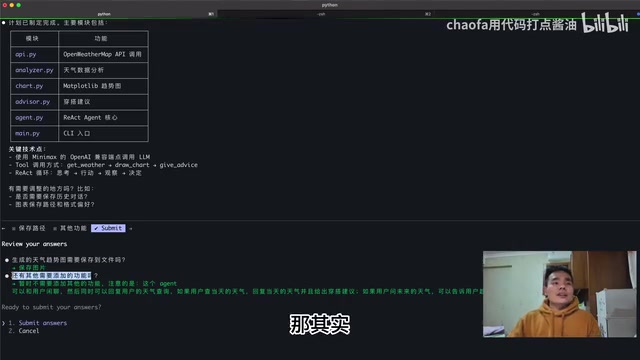
During the planning process, the AI followed up with two more questions:
- Should the generated weather trend charts be saved to a folder?
- Are there any additional features needed?
These questions may seem simple, but they're actually helping you define the boundary conditions of the requirements. After confirming with the interviewer, the following rules were established:
- The Agent can chat casually with users (not limited to weather queries only)
- When users ask about today's weather → Return weather + outfit recommendations
- When users ask about future weather → Return trend analysis + generate trend chart
- Trend charts saved to a local folder
Step 3: Automatic Execution and Debugging
After confirming the requirements, Claude Code automatically listed a TODO checklist (viewable via Control+T), then completed items one by one. The entire code generation process was remarkably fast, ultimately producing a multi-turn dialogue Agent powered by an LLM.
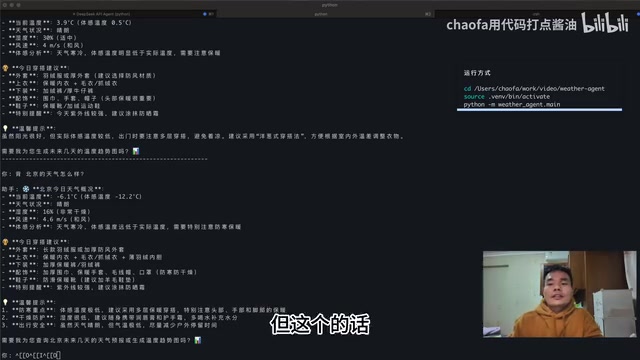
During testing, querying Shanghai's weather returned normal results. Switching to Beijing, the returned results showed around -5°C, which was basically consistent with actual weather conditions.
Code Structure Analysis
The final generated code adopted a standard ReAct (Reasoning + Acting) architecture. ReAct is a classic Agent pattern jointly proposed by Princeton University and Google Research in 2022. Its core idea is to have the model alternate between "reasoning" (Thought) and "acting" (Action) while executing tasks, observing action results (Observation), and forming a loop until the task is complete. In this case, the Agent first reasons "the user wants to check the weather," then calls the OpenWeatherMap tool to fetch data, observes the returned results, and then generates outfit recommendations — forming a complete reasoning-action chain.
The specific code structure includes:
- Defined tool execution logic
- Automatically written System Prompt
- Implemented a function to get current weather
- Implemented a function to generate trend charts
- Overall standard ReAct Agent architecture
Although the AI-generated code was quite lengthy and a complete review might not be feasible in time, in a Vibe Coding interview the priority is to get it running first, then optimize.
Four Core Strategies for Passing

1. Clarify Requirements Before Writing Code
Don't let the AI jump straight into writing code. Spend time communicating clearly with the interviewer about requirements, then spend time accurately conveying those requirements to the AI. This will save you from countless detours.
2. Leverage Plan Mode to Let AI Ask Questions
It's difficult for anyone to articulate all requirements perfectly in one go. Use Claude Code's Plan Mode to let the AI ask you questions instead, forming a two-way dialogue. The questions AI raises often help you discover overlooked requirement details.
3. Paste Error Logs Directly When Debugging
Don't panic when you encounter errors — just paste the error logs or error messages directly to the model. With a sufficiently long context window, AI can typically locate problems much faster than you could troubleshoot on your own.
4. Ship an MVP First, Then Iterate
The Minimum Viable Product (MVP) concept originates from the Lean Startup methodology, systematically articulated by Eric Ries in The Lean Startup. The core principle is to validate key assumptions at minimal cost and iterate after receiving real feedback. In the Vibe Coding interview context, MVP thinking means prioritizing getting core functionality running (weather query + outfit recommendations) rather than pursuing perfect code quality or full feature coverage. Don't aim for perfection on the first pass — time is limited, so let the AI quickly produce a runnable MVP, then gradually optimize based on the interviewer's feedback. This kind of trade-off judgment is itself an important component of what interviewers assess regarding engineering decision-making ability, and it demonstrates your engineering mindset: deliver first, iterate later.
Conclusion
The essence of a Vibe Coding interview isn't testing your ability to hand-write code, but evaluating your requirements comprehension, AI collaboration skills, and engineering decision-making ability. Choosing the right tool combination, mastering methods for efficient communication with AI, and maintaining a calm debugging mindset — these are the real keys to passing.
For developers, MiniMax M2.1's performance in Agent scenarios is definitely worth paying attention to — direct connection in China, OpenAI-compatible interface, great cost-effectiveness, and especially suitable for scenarios requiring stable network environments.
Related articles
 Tutorials
ChatGPT Plus Subscription Guide: Are GPT-5.5, image-2, and Codex Worth the Upgrade?
A detailed look at ChatGPT Plus features — GPT-5.5, image-2, and Codex — with a Plus vs Pro comparison and a complete step-by-step subscription guide for users outside the US.
 Tutorials
Harness AI Engineering in Practice: Using Claude Code to Master Enterprise-Level E-Commerce Development
Deep dive into Harness AI Engineering: master enterprise e-commerce development with Claude Code using the Rules, Skills, Wiki, and Changes framework.
 Tutorials
Cursor + Codex Dual-IDE Collaboration: A Practical Methodology for Open-Source Project Customization
A complete methodology for open-source project customization based on real-world experience, detailing the Cursor+Codex dual-IDE workflow, seven-stage process, MVP validation, and AI source code reading techniques.