VibeCoding Office Automation in Practice: A Complete Guide to Markdown-to-Word, AI Skills, and VBA Macros

Building an office automation knowledge base using VibeCoding: document conversion, desktop packaging, and AI Skills.
This article details the author's complete journey building an office automation knowledge base using the VibeCoding paradigm. It covers the evolution of a Markdown-to-Word tool from a Python script to a React full-stack web application, Electron desktop packaging solutions, and building custom AI Skills based on python-docx to enable LLMs to precisely manipulate Word documents. The author emphasizes how AI programming tools lower the technical barrier for non-professional developers, making domain knowledge and requirement articulation more important than code syntax proficiency.
Why You Need an Office Automation Knowledge Base
From November 2025 to the present, AI programming tools have undergone a rapid shift from "humans guiding AI" to "AI guiding humans." Behind this shift is the rise of the VibeCoding programming paradigm — developers describe requirements in natural language, AI generates most of the code, and humans primarily handle direction-setting and validation. This makes domain knowledge and the ability to articulate requirements more important than code syntax proficiency, enabling non-professional programmers to build complex applications. Based on my hands-on experience with Markdown-to-Word conversion, AI Skills, and VBA macros, I've gradually built a VibeCoding office automation knowledge base, hoping to help more people leverage AI to genuinely improve office productivity.
This knowledge base covers the complete pipeline of document format conversion, desktop application packaging, AI Skills development, and VBA macro automation — a practical guide born from real needs and validated through repeated iteration.
Markdown to Word: From Python Scripts to Full-Stack Web Applications
The Original Pain Point and Solution Approach
When writing technical documents and papers, I prefer Markdown, but my advisor requires Word for review — because Word supports comments and track changes. To bridge this format gap, my initial solution was a desktop conversion tool built on the Python tech stack using the python-docx library.
python-docx is the core library in the Python ecosystem for manipulating Word documents (.docx format), implemented based on the Office Open XML standard. A .docx file is essentially a ZIP archive containing XML files that describe the document's structure, styles, and content. Markdown parsing typically relies on libraries like mistune or markdown-it-py to convert the Markdown AST (Abstract Syntax Tree) into an intermediate representation, which is then mapped to python-docx's object model.
The core technical path is straightforward: parse the Markdown document → generate an intermediate representation → convert to a Word document. Math formula conversion leverages the py2docx library — this is because LaTeX syntax needs to be converted to OMML (Office Math Markup Language) format, which proved quite challenging to implement and involved quite a few pitfalls.
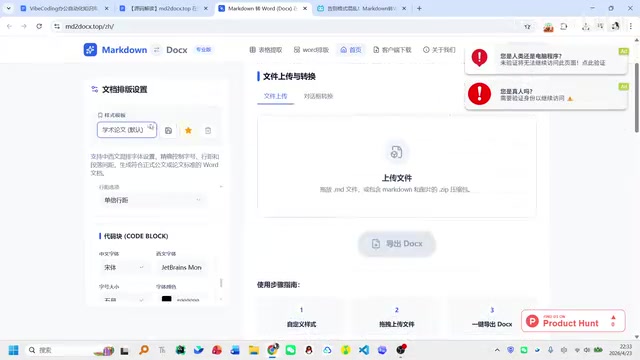
Upgrading to a Frontend Application with AI Programming Tools
As AI programming tools like Cursor and Codex matured, I upgraded this tool into an online web application (MD2Docs.top), switching the tech stack to React + TypeScript + Vite. This combination has become the mainstream choice for frontend engineering in 2024-2025: React provides component-based UI development capabilities, TypeScript's static type system catches errors at compile time, and Vite dramatically improves the development experience with near-instant hot module replacement. More importantly, this tech stack has abundant open-source code for AI to learn from, resulting in higher quality AI-generated code with lower error rates — making it particularly well-suited for VibeCoding scenarios.
The website currently maintains a stable daily traffic of 1,000-2,000 unique IPs, with key features including:
- One-click upload and conversion: Supports converting Markdown files (including image archives) directly to Docs
- Custom formatting: Heading levels, font sizes, line spacing, and other parameters are all adjustable
- Tables and code blocks: Independent formatting settings for tables and code block styles
- Template saving: User-customized formatting configurations can be saved as default templates
- Table format repair: Converts Markdown tables to Excel/Word tables, specifically solving format corruption issues in tables output by LLMs
Honestly, frontend development had an extremely steep learning curve for me — I was unfamiliar with HTML, CSS, and Vue frameworks — but AI programming tools made it all feasible. This project went through forty to fifty iterations before stabilizing.
Desktop Packaging: Electron Solution Explained
Some users need to process documents locally offline. With AI assistance, I found the Electron packaging solution, bundling frontend code into executables for Windows and macOS.
Electron, developed by GitHub, packages the Chromium browser engine together with the Node.js runtime, enabling web technologies to develop cross-platform desktop applications. Its architecture is divided into the main process (responsible for system-level operations like file I/O) and renderer processes (responsible for UI rendering). electron-builder supports generating Windows .exe/.msi and macOS .dmg formats, allowing users to run the application directly without configuring any environment. Well-known applications like VS Code, Slack, and Discord are all built on Electron, proving the maturity of this approach.
The desktop version adds two key features compared to the web version:
- Output folder selection: Adapted for local usage scenarios, allowing users to specify file save locations
- Batch file processing: The web version limits submissions to single files to prevent DDoS attacks, while the desktop version supports batch processing
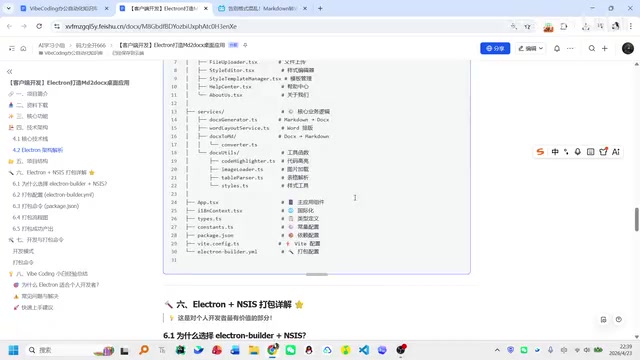
For individual developers, Electron + electron-builder is a software distribution solution worth considering — users can run the application directly without configuring any environment.
AI Skills: Enabling LLMs to Precisely Manipulate Word Documents
From Official Skills to a Custom Skills Library
In early 2025, the concept of AI Skills rapidly gained popularity. AI Skills (also known as Tool Use or Function Calling) is a standardized interface mechanism for large language models to invoke external tools: developers predefine a tool's name, description, and parameter Schema; the model determines during conversation when to call which tool and generates structured parameters; the host program executes the call and returns results to the model.
I initially tried the docx skills provided officially by Claude, but the results were unsatisfactory. I later decided to build my own Word document processing skill set based on the python-docx library.
The core idea is: pre-write script templates based on python-docx, and have the AI reference these templates when generating code, thereby significantly improving generation accuracy and execution speed. This "pre-written templates + AI fills in the details" approach
Related articles
 Tutorials
ChatGPT Plus Subscription Guide: Are GPT-5.5, image-2, and Codex Worth the Upgrade?
A detailed look at ChatGPT Plus features — GPT-5.5, image-2, and Codex — with a Plus vs Pro comparison and a complete step-by-step subscription guide for users outside the US.
 Tutorials
Harness AI Engineering in Practice: Using Claude Code to Master Enterprise-Level E-Commerce Development
Deep dive into Harness AI Engineering: master enterprise e-commerce development with Claude Code using the Rules, Skills, Wiki, and Changes framework.
 Tutorials
Cursor + Codex Dual-IDE Collaboration: A Practical Methodology for Open-Source Project Customization
A complete methodology for open-source project customization based on real-world experience, detailing the Cursor+Codex dual-IDE workflow, seven-stage process, MVP validation, and AI source code reading techniques.