Voice Input + Claude Code: Practical Tips to Double Your Vibe Coding Efficiency

Voice input is an underestimated productivity tool in the era of AI programming.
In the Vibe Coding era, the programming bottleneck has shifted from writing code to expressing requirements quickly. This article recommends using Doubao Input Method's voice input with AI programming tools like Claude Code — long-press the Fn key to trigger voice input at 150-200 characters per minute, far exceeding typing speed while maintaining thought continuity, dramatically improving the fluidity of your AI programming workflow.
Why Typing Code Is No Longer Fast Enough
In the era of AI programming (Vibe Coding), the way we interact with AI is undergoing a fundamental shift. Writing code used to depend on typing speed and syntax fluency, but now it's more about describing requirements in natural language and letting AI generate the code for you.
Vibe Coding is a concept coined by OpenAI co-founder Andrej Karpathy in early 2025. He described an entirely new programming paradigm: instead of writing code line by line, programmers describe their intent to AI in natural language, relying entirely on AI to generate and modify code — without even needing to fully understand the details of the generated code. This idea quickly sparked widespread discussion in the developer community, marking a paradigm shift in software development from "craftsmanship" to "intent expression."
But here's the problem — when programming becomes "having a conversation with AI," typing actually becomes the bottleneck. You've got a long requirement description ready in your head, but your fingers can't keep up with your thoughts. That's when voice input becomes a seriously underestimated productivity tool.

Doubao Input Method: The Perfect Companion for AI Programming Voice Recognition
Why Recommend Doubao Input Method?
The solution recommended by the video author is to install Doubao Input Method, which has built-in voice input functionality. Its core advantages include:
- Extremely high recognition accuracy: Outstanding performance with Chinese technical terminology, with near-zero errors for programming-related vocabulary
- Ultra-simple operation: Long-press the Fn key to trigger voice input — no need to switch applications
- Globally available: Not limited to programming scenarios — works anywhere text input is needed
Modern speech recognition technology is based on end-to-end neural network architectures in deep learning. The introduction of Transformer models in particular has dramatically improved recognition accuracy. Represented by OpenAI's Whisper model, current mainstream speech recognition systems achieve over 95% Chinese recognition accuracy in quiet environments. Doubao Input Method leverages ByteDance's speech AI technology accumulation, with specialized optimization for Chinese technical terminology and mixed Chinese-English scenarios — this is precisely the core requirement in programming contexts, and the key reason it stands out among input methods.

Actual Steps for Voice Input with Claude Code
Claude Code is an AI programming assistant launched by Anthropic, built on the Claude large language model and optimized specifically for code generation, debugging, and refactoring scenarios. Unlike tools such as GitHub Copilot, Claude Code excels at handling complex requirement descriptions with long context and supports multi-file project understanding. This makes it an ideal companion for Vibe Coding — users can describe complex requirements in complete natural language paragraphs rather than breaking them down into short code completion prompts.
The specific workflow is very simple:
- Install Doubao Input Method and set it as the default input method
- In Claude Code or other AI programming tools, long-press the Fn key
- A voice input indicator will appear on screen
- Directly describe your programming requirements by voice
- Release the key, and voice is automatically converted to text
For example, you can simply say: "Please help me create a skill that can automatically publish my latest video to Xiaohongshu, Bilibili, and WeChat Channels."
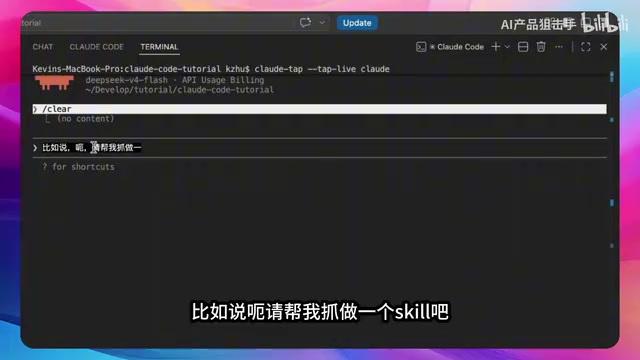
The entire sentence is recognized with essentially no errors — technical terms and platform names are all accurately identified.
The Efficiency Philosophy of Vibe Coding: From "Writing Code" to "Speaking Code"
Why Can Voice Input Boost Programming Efficiency?
The core idea of Vibe Coding is: You don't need to care about how to write the code — you only need to clearly express what you want. Under this paradigm, input efficiency directly determines your output productivity.
From an information theory perspective, "bandwidth" in the field of human-computer interaction refers to the amount of information that can be transmitted between humans and computers per unit of time. The average bandwidth of keyboard input is about 40-60 WPM (words per minute), while voice input can reach 120-180 WPM — roughly a 3x bandwidth improvement. More importantly, voice input reduces "working memory load" — when typing, people need to simultaneously maintain their train of thought, recall spelling, and control their fingers. Voice input concentrates cognitive resources on expression itself, which in neuroscience is called reducing "dual-task interference."
The advantages of voice input are specifically reflected in:
- Speed crushes keyboard: Normal speaking speed can output 150-200 Chinese characters per minute, far exceeding typing speed
- Thought continuity: Your train of thought is less likely to be interrupted while speaking, resulting in more complete requirement descriptions
- Reduced fatigue: During long programming sessions, the burden on fingers and wrists is significantly reduced

More Application Scenarios for Voice Input
This technique applies far beyond AI programming:
- Writing technical documentation: First drafts of READMEs and API docs can be dictated directly
- Code Review: Quickly record review comments by voice, then have AI format them
- Requirements communication: Convert requirements discussed in meetings directly to text via voice input for AI
- Daily searches: Any scenario where you're too lazy to type
Practical Tips for Voice Programming
If you want to try the voice input + Vibe Coding workflow, here are some recommendations:
- Get comfortable expressing technical requirements by voice: It might feel unnatural to "write code" with your mouth at first — practice a few times and it'll feel natural
- Review after speaking: Although recognition accuracy is very high, it's best to double-check key parameters and proper nouns
- Pair with good AI programming tools: Tools like Claude Code and Cursor work best with voice input
- Quiet environments work better: Recognition accuracy drops in noisy environments — consider using a noise-canceling microphone
Summary
In the era of AI programming, the efficiency bottleneck has shifted from "the ability to write code" to "the speed of expressing requirements." Voice input may seem like a small trick, but it solves the most fundamental bandwidth problem in human-computer interaction — when your thoughts can reach AI directly without going through a keyboard, the fluidity of your entire Vibe Coding workflow improves qualitatively.
From Karpathy proposing the Vibe Coding concept, to the maturation of speech recognition technology, to the popularization of tools like Doubao Input Method — this technology chain is quietly reshaping how developers work. The tools themselves aren't complicated; the key is recognizing this efficiency gap and being willing to change your habits. Give it a try — you might find there's no going back.
Related articles
 Tutorials
ChatGPT Plus Subscription Guide: Are GPT-5.5, image-2, and Codex Worth the Upgrade?
A detailed look at ChatGPT Plus features — GPT-5.5, image-2, and Codex — with a Plus vs Pro comparison and a complete step-by-step subscription guide for users outside the US.
 Tutorials
Harness AI Engineering in Practice: Using Claude Code to Master Enterprise-Level E-Commerce Development
Deep dive into Harness AI Engineering: master enterprise e-commerce development with Claude Code using the Rules, Skills, Wiki, and Changes framework.
 Tutorials
Cursor + Codex Dual-IDE Collaboration: A Practical Methodology for Open-Source Project Customization
A complete methodology for open-source project customization based on real-world experience, detailing the Cursor+Codex dual-IDE workflow, seven-stage process, MVP validation, and AI source code reading techniques.