VS Code Claude Code + DeepSeek V4 Pro Configuration Tutorial (5 Steps)

Connect VS Code's Claude Code plugin to the low-cost DeepSeek V4 Pro model via CCSwitch
This tutorial shows how to use the CCSwitch reverse proxy tool to switch the backend model of VS Code's Claude Code plugin to DeepSeek V4 Pro, enabling a top-tier AI coding assistant experience at just 25% of typical costs. The five-step process covers: bypassing Claude login authentication, installing CCSwitch, obtaining a DeepSeek API Key, configuring the model in CCSwitch, and verifying functionality. A critical note is that the Anthropic API format must be used to avoid compatibility issues between Thinking mode and tool invocation.
Want to use the powerful features of the Claude Code plugin in VS Code, but prefer to connect it to the more cost-effective DeepSeek V4 Pro model? This article will walk you through configuring it with the CCSwitch tool, so you can enjoy a top-tier AI coding assistant experience at minimal cost.
Why Connect Claude Code to DeepSeek V4 Pro?
Claude Code is a highly acclaimed AI coding plugin for VS Code, excelling at code generation and tool invocation. Developed by Anthropic, its core capabilities are built on Anthropic's proprietary Tool Use protocol—unlike ordinary code completion plugins, Claude Code supports multi-turn conversational programming, file system operations, terminal command execution, and other "agentic" behaviors, essentially functioning as an AI coding agent running inside your IDE. However, using Claude's official models directly comes with two barriers: overseas account verification and relatively high API costs.
DeepSeek V4 Pro, the latest offering from the Chinese AI company DeepSeek, uses a Mixture of Experts (MoE) architecture. This architecture achieves near-top-tier code generation and reasoning capabilities while activating far fewer parameters than comparable dense models. Through extreme engineering optimization, DeepSeek has compressed inference costs to roughly one-quarter of the industry average, making its API pricing as low as 25% of comparable models—truly the "price-performance king."
With CCSwitch, an open-source tool, we can seamlessly switch Claude Code's backend model to DeepSeek V4 Pro—preserving the plugin's excellent interaction experience while dramatically reducing costs.
How CCSwitch Works: CCSwitch is essentially a local reverse proxy tool. It starts an HTTP service on your machine, intercepts API requests sent by the Claude Code plugin, replaces the authentication information with your configured third-party API Key, and forwards requests to the target model provider's endpoint. Since the entire forwarding process maintains the Anthropic API request/response format, the Claude Code plugin doesn't need to be aware of the backend model change, achieving a "seamless switch."
Step 1: Install the Claude Code Plugin and Bypass Login Authentication
Search for "Claude Code" in the VS Code Extensions Marketplace and click Install. After installation, click the Claude Code icon in the upper right corner—you'll notice it requires login authentication. Since we won't be using Claude's official model, we can bypass this limitation by modifying the configuration.
Press Ctrl + , or press F1 and search for "Settings" to open VS Code's settings interface. Navigate to Extensions → Claude Code, scroll down to find the Settings.json entry, click into it, and paste the appropriate JSON configuration fields.
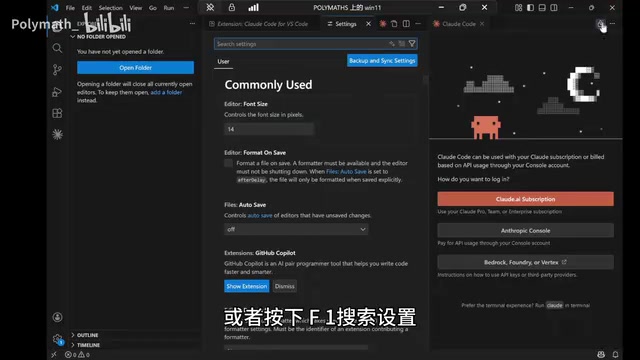
After completing the configuration, open the Claude Code interface again—login authentication will no longer be required.
Step 2: Download and Install CCSwitch
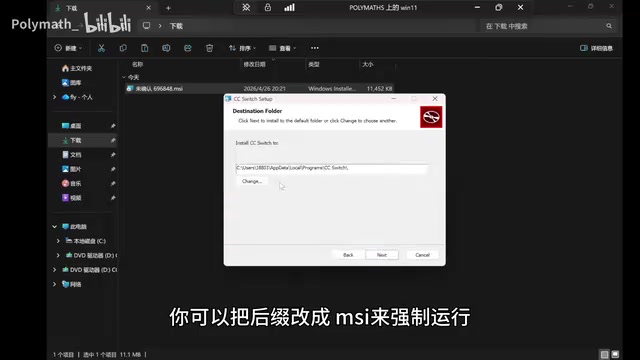
CCSwitch is an open-source tool specifically designed for configuring Claude Code model redirection. Go to its GitHub repository's Release page, find the Windows MSI installer, and download it.
Tip: If Windows warns that the file is unverified, confirm the downloaded file's extension is
.msibefore running the installer.
Choose an appropriate installation directory and complete the installation.
Step 3: Obtain a DeepSeek API Key
Search for "DeepSeek API" in your browser and navigate to the DeepSeek API platform. First-time visitors will need to log in via WeChat QR code scan.
Check API Pricing
Click on the Docs section in the left sidebar to view detailed API documentation, including the Base URL, supported model list, and invocation methods. On the pricing page, you'll see that the DeepSeek API currently offers discounts as low as 75% off, making its price advantage over comparable models quite significant.
Top Up and Create an API Key
Click "Top-up" to add funds—starting with 10 RMB for testing is recommended.

After topping up, click to create a new API Key and enter an easily identifiable name. Important: After creation, don't click "Done" immediately—make sure to click the "Copy" button first to save your API Key, as you won't be able to view the full Key value again afterward.
Why Choose the Anthropic Format?
The DeepSeek API supports both OpenAI format and Anthropic format calling methods. Here, using the Anthropic format is strongly recommended, due to fundamental differences between the two protocols:
The OpenAI format (Chat Completions API) and the Anthropic format (Messages API) are the two mainstream protocol standards in the LLM API space. The Anthropic format processes tool call results (tool_result) as independent message blocks and has dedicated field definitions for Thinking mode reasoning content (thinking blocks). The OpenAI format, when reasoning output and tool calls are enabled simultaneously, mixes the reasoning process into the response stream, causing parsing logic conflicts.
DeepSeek V4 Pro has a built-in "Thinking mode" (Chain-of-Thought reasoning chain) that allows the model to perform internal reasoning steps before providing a final answer, significantly improving accuracy on complex programming tasks. When Thinking mode and tool calls are both enabled, the OpenAI format forces the return of the reasoning process, easily causing compatibility issues; the Anthropic format ensures both capabilities coexist without interference.
Step 4: Configure DeepSeek V4 Pro in CCSwitch
Return to the CCSwitch tool, click the create button in the upper right corner, and fill in the configuration as follows:
- Model Provider: Select DeepSeek
- API Key: Paste the DeepSeek API Key you copied earlier
- Request URL: Use the Anthropic format API address
- Model Name: Enter
deepseek-v4-pro(for the V4 Flash version, refer to the official documentation for the corresponding model name)

After filling in the details, click the "Add" button in the lower right corner, and the DeepSeek model will be officially enabled.
Step 5: Verify the Configuration
Return to VS Code and enter some test prompts in the Claude Code plugin. You can ask it to output the current tool and model information to verify it correctly displays as Claude Code + DeepSeek V4 Pro.
For further testing of tool invocation capabilities: ask it to write the output content to a Markdown file. If the file is successfully created with content written to it, the configuration is fully working and tool invocation is functioning properly.
FAQ and Important Notes
- API Format Selection: Always use the Anthropic format rather than the OpenAI format to avoid compatibility issues with Thinking mode
- Cost Control: The DeepSeek API charges by token—start with a 10 RMB top-up for testing, then adjust based on actual usage
- Model Switching: If DeepSeek releases new models in the future, you only need to change the model name in CCSwitch—no reconfiguration required
- Network Issues: Ensure your network can access the DeepSeek API service normally; users in China generally don't need additional proxy configuration
With these five steps, you've successfully connected VS Code's Claude Code plugin to the DeepSeek V4 Pro model. This solution balances user experience and cost-effectiveness, making it ideal for daily AI-assisted programming.
Key Takeaways
- CCSwitch enables switching the VS Code Claude Code plugin's backend to DeepSeek V4 Pro, dramatically reducing usage costs
- The configuration process involves three critical steps: modifying VS Code settings to bypass Claude authentication, installing CCSwitch, and obtaining a DeepSeek API Key
- The API calling format should use the Anthropic format rather than OpenAI format to avoid compatibility issues between Thinking mode and tool calls
- DeepSeek V4 Pro's API pricing is as low as 25% of comparable models—starting with a 10 RMB top-up for testing is recommended
- After configuration, full code generation and tool invocation capabilities are supported; functionality can be verified by writing to a Markdown file
Related articles
 Tutorials
ChatGPT Plus Subscription Guide: Are GPT-5.5, image-2, and Codex Worth the Upgrade?
A detailed look at ChatGPT Plus features — GPT-5.5, image-2, and Codex — with a Plus vs Pro comparison and a complete step-by-step subscription guide for users outside the US.
 Tutorials
Harness AI Engineering in Practice: Using Claude Code to Master Enterprise-Level E-Commerce Development
Deep dive into Harness AI Engineering: master enterprise e-commerce development with Claude Code using the Rules, Skills, Wiki, and Changes framework.
 Tutorials
Cursor + Codex Dual-IDE Collaboration: A Practical Methodology for Open-Source Project Customization
A complete methodology for open-source project customization based on real-world experience, detailing the Cursor+Codex dual-IDE workflow, seven-stage process, MVP validation, and AI source code reading techniques.