VS Code Multi-Agent Collaborative Development: A Practical Guide to Running Local, Background, and Cloud Agents in Parallel

Microsoft demos three AI Agents working in parallel within VS Code for collaborative development
At the AI Engineer conference, a Microsoft engineer demonstrated running local, background, and cloud AI Agents simultaneously in VS Code for multi-agent collaborative development. Local Agents suit deep human-AI collaboration tasks like writing tests, background Agents run in isolation via Git Worktree for semi-autonomous tasks like building frontend UI, and cloud Agents run in GitHub Actions for fully managed tasks like writing documentation. All three work in parallel with the developer acting as a human orchestrator, representing a paradigm shift from one-shot prompting to multi-agent orchestration.
At the closing keynote of the AI Engineer conference, a Microsoft engineer demonstrated how to run three different types of AI Agents simultaneously in VS Code, working in parallel on three different issues within the same codebase. This isn't a proof of concept—it's a production-ready multi-agent collaborative development workflow.
One-Shot Prompts Can't Handle Complex Development
The speaker opened by pointing out a common misconception: many developers still fantasize about creating a complete application or solving all problems through a single one-shot prompt. This is completely unrealistic.
One-shot prompts were the core paradigm of early LLM usage—users would compress all requirements into a single instruction, expecting the model to output a complete result in one pass. This approach works for simple tasks, but when facing complex engineering problems, it hits context window limitations, reasoning chain breakdowns, and error accumulation. The fundamental shift in the Agent paradigm lies in introducing the "plan-execute-feedback" loop: Agents can decompose complex tasks into subtasks, invoke external tools (such as code executors, file systems, APIs), and dynamically adjust strategies based on intermediate results. This more closely resembles how human engineers actually work, and it's why enterprise investment in AI infrastructure continues to grow while the real returns haven't fully materialized—the tooling paradigm hasn't completed the transition from "prompting" to "orchestration."
An interesting example: someone released an open-source project that made chatbots respond in pirate speak, and it became surprisingly popular because pirate speak's concise expressions effectively reduce token consumption. This shows the community is finding creative ways to optimize AI usage costs.
Three Agent Types: When to Choose Local, Background, or Cloud
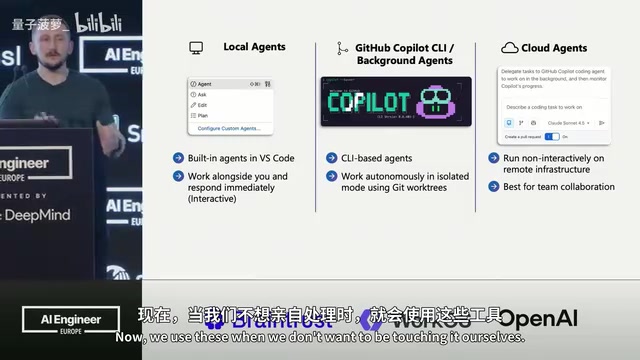
The speaker categorized Agents into three types, each corresponding to different development scenarios and levels of involvement. The reasoning behind this layered design is the industry's realistic assessment of AI reliability: current LLMs still have high error rates in long-running tasks, fully autonomous Agents pose too much risk in production environments, and therefore the degree of Human-in-the-Loop (HITL) involvement becomes the core dimension distinguishing the three types.
Local Agent: Deep Human-AI Collaboration
Runs within the VS Code editor, where the developer works side-by-side with AI, maintaining high levels of human-machine interaction. Ideal for tasks requiring deep understanding of code logic, such as writing unit tests. You need to repeatedly verify code details, requiring continuous human-in-the-loop involvement.
HITL in this scenario means every tool invocation requires developer confirmation, and every piece of code the Agent produces executes under the developer's real-time supervision. While this high-density human-AI collaboration sacrifices speed, such caution is necessary for tasks involving core business logic—incorrect test cases are more dangerous than no test cases at all.
Background Agent: Semi-Autonomous Isolated Development
Runs via GitHub Copilot CLI, operating in an isolated working directory using Git Worktree. Ideal for the 50/50 scenario of "I want to stay informed but don't want to be hands-on with everything," such as creating frontend UI.
Git Worktree is a feature introduced in Git 2.5 that allows the same local repository to simultaneously check out multiple branches into different filesystem directories. In traditional workflows, switching branches modifies the working directory, but Worktree gives each branch its own independent physical directory while sharing the same .git object database. For AI Agents, this means the Agent can freely modify files and run code in an isolated subdirectory without affecting the developer's current working branch. Even if the Agent produces incorrect code changes, it won't pollute the main workspace—this isolation is the technical foundation enabling background Agents to run "semi-autonomously." Background Agents adopt a "checkpoint" model, waiting for human approval at critical decision points (such as before creating a PR), representing a pragmatic balance between efficiency and safety in HITL design.
Cloud Agent: Fully Managed Automated Tasks
Runs in GitHub Actions, fully managed, ideal for tasks the developer doesn't want to handle personally, such as writing project documentation. It has access to the GitHub MCP Server and Playwright MCP Server, enabling screenshot testing and automated frontend testing.
MCP (Model Context Protocol) is a standardized protocol proposed and open-sourced by Anthropic in late 2024, designed to solve the fragmentation problem of integrating AI models with external tools and data sources. Before MCP, every AI application needed to develop a separate integration layer for each tool, making maintenance costs extremely high. MCP defines a unified client-server architecture: MCP Servers encapsulate specific tool capabilities, and MCP Clients invoke these capabilities through a standard protocol. The GitHub MCP Server lets Agents directly operate on Issues, PRs, and repository content; the Playwright MCP Server gives Agents the ability to control real browsers, enabling screenshots, form filling, UI automation testing, and more. MCP's openness means the same tool configuration can be used across different AI service providers.
Live Demo: Three Agents Working Simultaneously on One Codebase
The speaker conducted a complete demonstration using a Python CRUD application (a product store), launching three Agents simultaneously to solve three different problems:
Background Agent Builds the Frontend Page
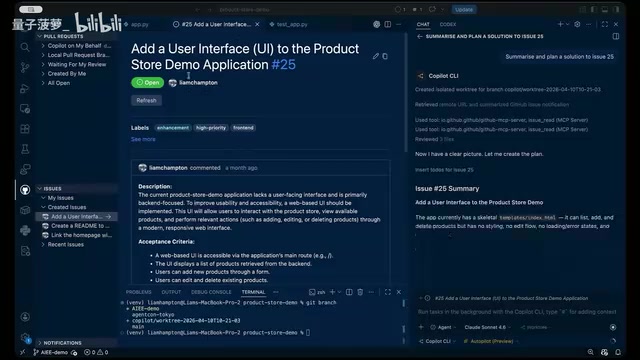
Starting from GitHub Issue #25, using the CLI background Agent with Autopilot mode enabled (a preview feature that automatically executes tool calls without requiring individual confirmations). The instruction: "Summarize and plan the solution for Issue 25, start executing, but pause before creating a PR so I can test locally."
Cloud Agent Takes Over Documentation
While the background Agent is working, a new chat window is opened to launch the cloud Agent with the instruction: "Make this repo open-source friendly—add a README, contributing guidelines, and other necessary files." Then you can completely step away.
Local Agent Writes and Iterates on Test Cases
After discovering the codebase had no test cases, the local Agent is launched using a custom Agent in VS Code (specifically designed to guide writing tests for this Python application). Selecting the Claude Opus 4.6 model with medium reasoning depth, it begins writing unit tests. After the tests pass, the Agent is further instructed to update error handling logic and sync the test updates accordingly.
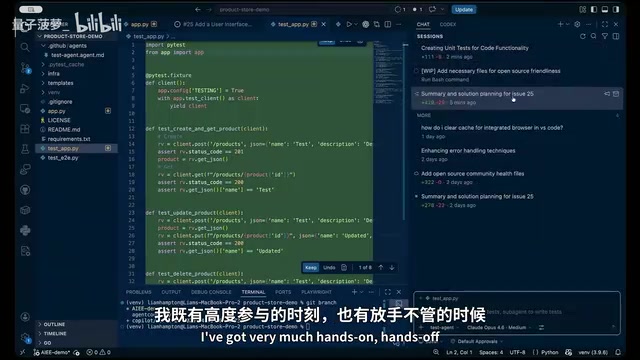
The entire process demonstrates the core value of Multi-Agent Systems—task parallelism rather than sequential execution. VS Code plays the role of a lightweight orchestrator in this architecture: it doesn't directly control inter-Agent communication, but rather provides a unified UI interface that makes the developer the "human orchestrator."
Related articles
 Tutorials
ChatGPT Plus Subscription Guide: Are GPT-5.5, image-2, and Codex Worth the Upgrade?
A detailed look at ChatGPT Plus features — GPT-5.5, image-2, and Codex — with a Plus vs Pro comparison and a complete step-by-step subscription guide for users outside the US.
 Tutorials
Harness AI Engineering in Practice: Using Claude Code to Master Enterprise-Level E-Commerce Development
Deep dive into Harness AI Engineering: master enterprise e-commerce development with Claude Code using the Rules, Skills, Wiki, and Changes framework.
 Tutorials
Cursor + Codex Dual-IDE Collaboration: A Practical Methodology for Open-Source Project Customization
A complete methodology for open-source project customization based on real-world experience, detailing the Cursor+Codex dual-IDE workflow, seven-stage process, MVP validation, and AI source code reading techniques.