WattMate: A Mac Menu Bar Tool That Quantifies Battery Drain in Watts and Minutes

WattMate is a Mac menu bar tool that quantifies per-app battery drain in watts and minutes, for Apple Silicon only.
WattMate is a Mac menu bar app by developer Vitali that addresses macOS's vague battery warnings by showing real-time per-app power draw in watts and estimating exactly how many extra minutes of battery life you'd gain by quitting each app. A standout feature is its two-stage verification: two minutes after you quit an app, it re-measures power consumption and shows the actual before-and-after difference. The tool requires Apple Silicon and macOS 14 or later — a constraint tied directly to the M-series chip's granular per-process power monitoring capabilities. Currently in early stages, it earned 68 upvotes and ranked 11th on Product Hunt at launch, with measurement accuracy and long-term reliability still pending broader user validation.
A Mac Menu Bar Tool Built for Battery Life
For users who rely on their laptops day in and day out, battery life is always a sensitive subject. macOS includes a built-in battery report that flags apps as "using significant energy" — but it only offers vague categories. It can't tell you exactly how much power a specific app is consuming, let alone how many extra minutes you'd gain by quitting it.
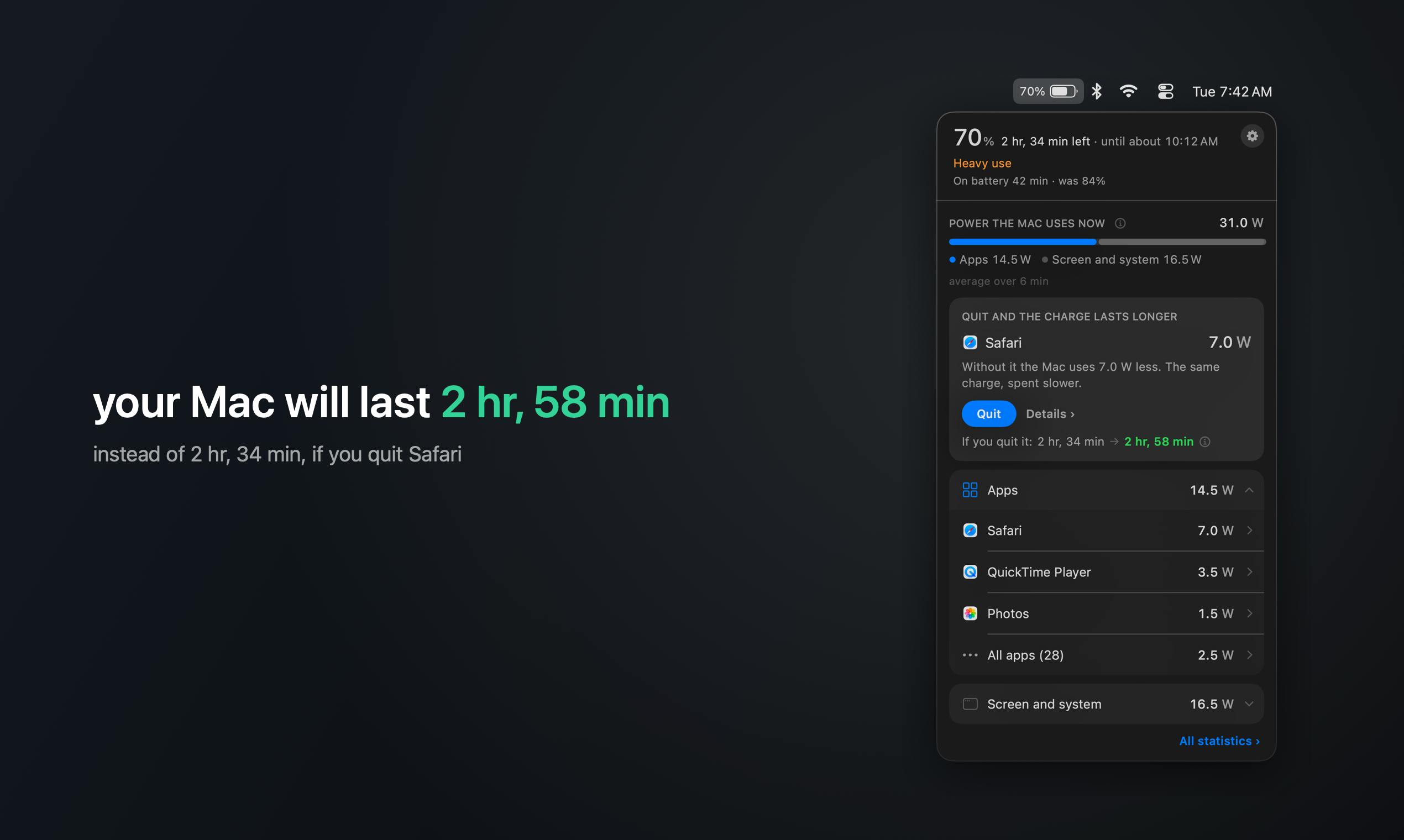
WattMate, which launched on Product Hunt, targets exactly this pain point. The menu bar app lives in your Mac's menu bar and shows you in real time which apps are draining your battery, displaying their actual power draw in watts and estimating how many extra minutes of battery life you'd get by quitting them. It earned 68 upvotes and ranked 11th on its launch day, built by developer Vitali.
Core Mechanism: Quantify, Don't Just Warn
The biggest difference between WattMate and macOS's native features is quantification. It translates the abstract concept of "high energy use" into two metrics users can immediately act on:
- Watts: shows the actual real-time power draw of a given app;
- Minutes saved: estimates how much extra battery life you'd gain by quitting that app.
This design minimizes the mental overhead of deciding whether to close an app. Instead of guessing whether a background process is worth keeping open, you see a concrete payoff — "quitting this saves 25 minutes" — and can decide accordingly.
A Second Measurement After Quitting Verifies Real-World Impact
WattMate has one particularly thoughtful detail: two minutes after you quit an app, it takes another power measurement and shows you what actually changed.
This two-stage verification addresses a common trust problem with power-monitoring tools. Many similar tools only show estimates, but system power consumption is influenced by many factors, and predictions often diverge from reality. By comparing before and after, WattMate lets users see the actual impact of quitting an app — making the data more credible and the tool's value more tangible.
The two-minute window isn't arbitrary. Modern operating system power consumption has a certain inertia: after an app quits, the kernel needs to reclaim its memory pages, terminate related background XPC services, and the GPU requires several scheduling cycles to step its clock frequency back to baseline. Sampling immediately after an app closes will often still show elevated power draw, underestimating the actual savings. Waiting roughly two minutes allows the system to settle into a new steady state, at which point the power delta is far more representative of that app's true cost. Similar delayed-sampling strategies appear in battery health testing and are standard practice in power benchmarking.
Technical Requirements and Compatibility
WattMate clearly states its requirements: Apple Silicon only, and macOS 14 or later.
There's solid technical reasoning behind this. Apple Silicon chips (the M-series) expose much more granular system-level interfaces for power management and monitoring, enabling accurate real-time per-process power readings. Achieving watt-level measurement naturally depends on newer macOS system APIs. This means users on Intel-based Macs currently can't run this tool.
In terms of categories, WattMate sits under Mac, Productivity, and Menu Bar Apps. Its positioning is clear — rather than piling on features, it focuses on making battery life management as intuitive as possible.
Apple Silicon's power monitoring capability stems from its Unified Memory Architecture (UMA) and the tight integration of its system-on-chip (SoC) design. On traditional Intel Macs, the CPU, GPU, and memory are separate chips, making it difficult for the system to accurately track instantaneous per-process power consumption across components. The M-series chips integrate the CPU, GPU, Neural Engine, and memory on a single substrate. Combined with low-level interfaces Apple exposes in macOS — such as IOKit and powermetrics — third-party tools can sample each process's actual power draw across compute units at high frequency, rather than estimating from CPU utilization alone. This is why the powermetrics command-line tool on Apple Silicon can output per-process data down to the milliwatt, while equivalent tools on Intel machines can only provide coarse estimates. WattMate's macOS 14 requirement likely relates to additional power management APIs Apple opened up in that release.
The Value and Limitations of This Approach
WattMate's product logic reflects a pragmatic design philosophy: translate raw system data into information that ordinary users can act on. Compared to the system's vague warnings, concrete metrics like "how many watts" and "how many minutes" are far more likely to prompt users to take action.
That said, based on publicly available information, this tool is still in its early stages. With 68 upvotes and 5 comments, it hasn't yet accumulated meaningful user feedback at scale. The accuracy of its power measurements and how it performs across different usage scenarios still need more real-world data to validate. Whether it can replace more mature system monitoring tools for users who need precision power analysis or professional-grade diagnostics remains to be seen.
For everyday Mac users, WattMate offers a low-friction entry point: no need to understand complex process management — just glance at the menu bar to know which app to quit right now to save battery. That kind of simplicity is exactly what makes a great menu bar app.
Related articles

Gemini 4 Argon Hands-On: AI Builds Board Games, Constructs Temples, and Trains Robots Autonomously
Gemini 4 Argon hands-on roundup: AI autonomously builds a desk racetrack and temple in Blender, writes a ray tracing engine, trains a humanoid robot to sink 7 shots, plus API pricing and developer access.

The Magic Octagonal Coin: Why Only 9% of People Can Predict Its Flip?
Only 9% of people can correctly predict the Magic Octagon coin flip. This article explains its spatial rotation mechanism, common cognitive pitfalls, and a new hypothesis based on Relevance Theory, exploring the limits of human spatial reasoning.

Sam Altman: AI Is Entering the Era of Scientific Discovery — Math Breakthroughs Will Replicate in Biology and Energy
Sam Altman says AI is entering the era of scientific discovery — math breakthroughs will replicate in biology, materials science, and energy to help develop new drugs and energy sources.