Wavepocket: A 4-Track Mobile Music Workstation in Your Pocket for Making Beats Anywhere

Wavepocket packs a synth, drum machine, sampler, and 4-track recorder into one mobile music-making app.
Wavepocket is a mobile music production app by indie developer Matt Sandy that combines a synthesizer, drum machine, sampler, and 4-track tape recorder into a pocket-sized workstation. Key features include waveform slicing for samples, a clip timeline with drag-and-trim editing, unified loop boundaries for automatic track alignment, and a mixer with FX effects. Designed for creators who want to make beats anywhere without complex software.
A Pocket Workstation Redefining Mobile Music Creation
In the world of mobile music production, professional capability and portability are often at odds. Full-featured DAWs (Digital Audio Workstations) tend to have complex interfaces and steep learning curves, while lightweight apps frequently fall short on functionality.
DAW (Digital Audio Workstation) is the core tool of modern music production, encompassing the complete workflow of recording, editing, mixing, and mastering. Leading desktop products include Ableton Live, Logic Pro, FL Studio, and Pro Tools — software that typically demands high-end hardware, extensive plugin libraries, and months or even years of learning. The rise of mobile DAWs began in 2011 when Apple launched GarageBand for iOS, followed by Korg Gadget, BeatMaker 3, Cubasis, and others entering the space. However, these have consistently faced challenges including insufficient touch interaction precision, limited CPU power, and constrained screen real estate.
Wavepocket, which recently launched on Product Hunt, attempts to break this deadlock. Positioning itself as a "pocket workstation," it condenses a synthesizer, drum machine, sampler, and 4-track tape recorder into a mobile app that can be operated with one hand.
Built by independent developer Matt Sandy, the product garnered 72 upvotes after launch, ranking 14th on the daily leaderboard and attracting considerable attention from music creators in the Music and Audio categories.
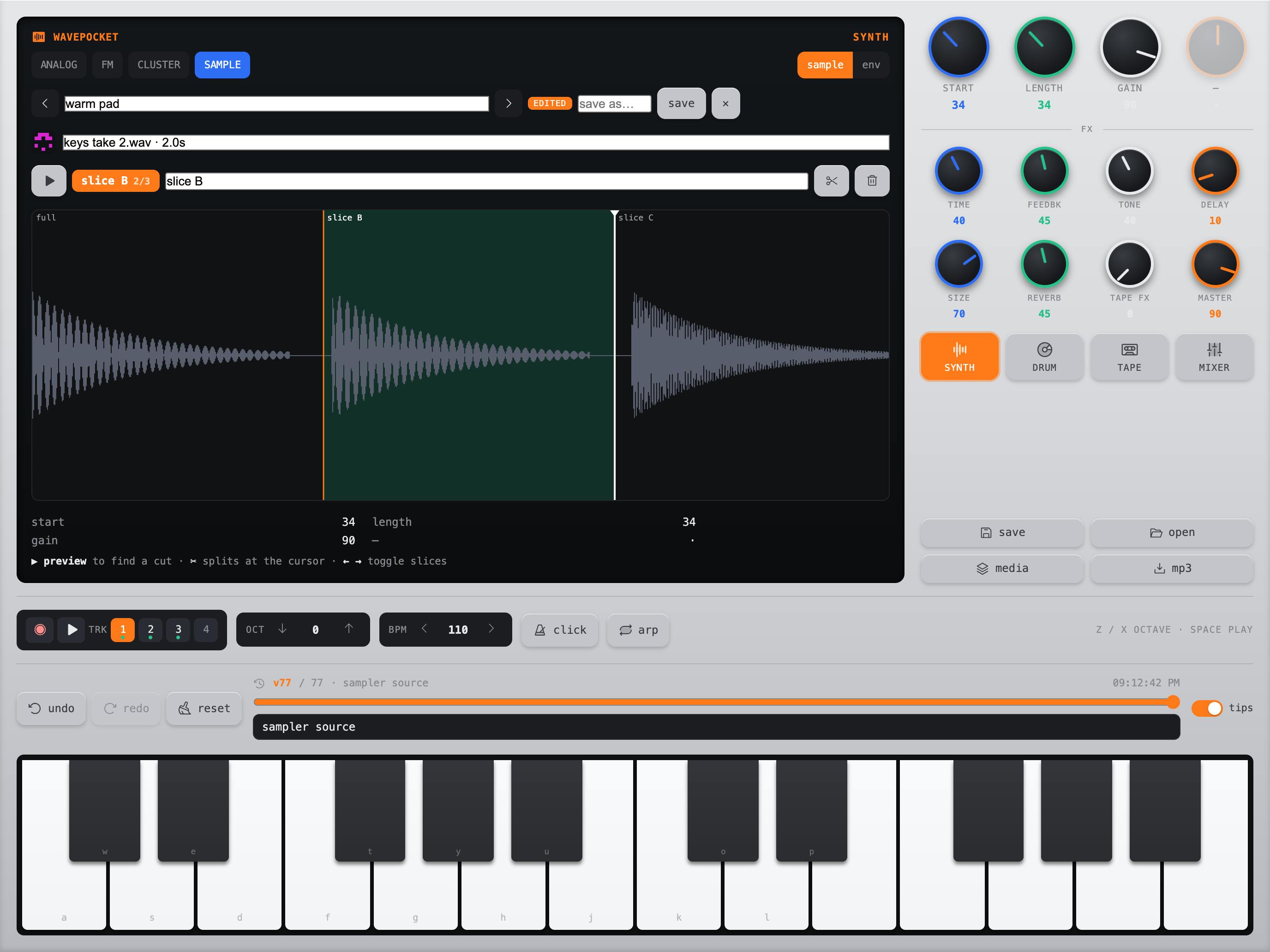
Wavepocket Core Features: A Four-in-One Mobile Music Production Platform
Built-in Synthesizer and Drum Machine Modules
Wavepocket includes two built-in sound source modules: a Synth and a Drum Kit. For mobile music creation, this means users can generate melodies and rhythms directly without relying on external hardware or additional sound source plugins. This "ready out of the box" design lowers the startup cost of creation and is especially suited for capturing ideas the moment inspiration strikes.
Sampler and Waveform Slicing
The sampling feature is a major highlight of Wavepocket. It allows users to slice directly on the waveform, name each slice, and then quickly switch between them. This visual approach to sample editing gives users precise control over the start and end points of each audio segment, enabling flexible organization of sample material into playable sound libraries.
Sampling as a creative technique originated in 1970s Hip-Hop culture, with its core principle being the extraction and recombination of existing recorded fragments for use in new works. Waveform slicing technology was originally popularized by the Akai MPC series hardware samplers and Propellerhead ReCycle software — the principle involves splitting a continuous audio segment into independent pieces at beat points or transients, where each piece can be independently triggered, time-stretched, or pitch-shifted to deconstruct and rearrange the original material. This technique is a foundational production method for Breakbeat, Jungle, Drum and Bass, and other electronic music genres. Wavepocket now brings this classic workflow to mobile.
For Hip-Hop, Lo-Fi, or electronic music creators who embrace sampling culture, this waveform slicing feature is particularly practical.
4-Track Tape Recording: Wavepocket's Core Creative Logic
Clip Timeline and Free Recording
Wavepocket's core design revolves around a "4-track tape recorder" paired with a clip timeline. Users can record sound in any mode, then drag clip segments between different lanes, trim clip edges, or cut at the playhead position.
This design pays homage to the classic 4-track tape recorder — the vintage device that once carried the creative dreams of countless independent musicians. The 4-track tape recorder (epitomized by the Tascam Portastudio series) was born in 1979, making it possible for the first time for independent musicians to complete multitrack recording without renting expensive professional studios. Bruce Springsteen's classic album Nebraska was recorded at home on a 4-track cassette recorder. The limitation of only 4 tracks actually gave rise to a creative working method: musicians had to make choices within limited resources, or use "Bounce" techniques to mix down multiple tracks into one to free up space. This aesthetic of constraint profoundly influenced the sonic aesthetics of Lo-Fi, indie rock, and early Hip-Hop.
Wavepocket digitally reconstructs this classic workflow, preserving the intuitive, linear creative feel of tape recording while adding the flexibility of modern digital editing.
Unified Loop Boundary Design
An easily overlooked but crucial design detail: all elements in Wavepocket share the same loop boundary. This means that regardless of which track a user records on or adds material to, all sound layers automatically align.
In music production, loop boundaries define the start and end points of an audio or MIDI clip's loop. When multiple tracks share the same loop boundary, all layers cycle within the exact same time range, ensuring precise alignment of rhythm and melody. This concept traces back in hardware to the "sync recording" mode of Loop Stations like the Boss RC-505 — the first recorded loop determines the length of all subsequent loops. In software, Ableton Live's Session View employs a similar Global Quantization mechanism to ensure clip synchronization. Wavepocket simplifies this mature design paradigm and brings it to mobile, dramatically lowering the operational barrier to multitrack synchronization.
This mechanism greatly simplifies the process of rhythm alignment and loop creation, allowing users to focus on the creative work itself rather than repeatedly adjusting alignment on the timeline. For creators making beats and loop-based music, this is a feature that significantly boosts efficiency.
Mixer and Effects Modules
Wavepocket also provides a full Mixer with independent control over level, pan, and mute for each track. These are the most fundamental and commonly used mixing operations in music production, helping users balance the relationships between parts and create a sense of space.
Panning refers to the technique of distributing audio signals between left and right channels to create a sense of spatial positioning for each element within the stereo field. The human ear judges sound source direction through Interaural Time Difference (ITD) and Interaural Level Difference (ILD), and pan control leverages this auditory principle. In pop music mixing, common practice is to place vocals and kick drum in the center, guitars panned left and right respectively, and hi-hats slightly to one side, building a wide and clear soundstage. Even when monitoring through headphones on a mobile device, proper panning settings can significantly enhance the professional quality and auditory depth of a production.
Additionally, the app includes a built-in FX effects module. Combined with its pocket workstation positioning, these effects cover common needs from basic Reverb and Delay to modulation effects (such as Chorus and Flanger), giving final productions a more polished feel.
Wavepocket's Product Positioning and Target Audience
Who Is It For
Wavepocket's target users are clear: mobile creators who want to make music anytime, anywhere without being constrained by complex software. Whether it's a hobbyist recording ideas during a commute or a professional musician who needs to quickly build a demo, this app provides a low-barrier, easy-to-learn creative environment.
The Boutique Approach of Independent Development
It's worth noting that Wavepocket was built entirely by independent developer Matt Sandy. Looking at its feature design, it doesn't blindly pursue being "big and comprehensive." Instead, it focuses on a complete yet refined creative chain: synthesis, sampling, recording, and mixing. This restrained and focused product philosophy is precisely what allows many excellent independent apps to stand out in niche markets. In the mobile music app space, similar success stories include the solo-developed Koala Sampler (focused on sampling) and AudioKit's multiple synthesizer apps, all of which won loyal user bases through precise positioning and exceptional experiences.
Summary: An Ideal Tool for Mobile Music Production
Wavepocket represents an ideal form of mobile music production tools: compressing professional-grade creative capabilities into a portable, intuitive mobile interface. With the classic 4-track tape recorder as its inspirational core, supplemented by a synthesizer, drum machine, sampler, and effects, it builds a self-contained pocket-sized music workstation.
For musicians who value the ability to create at any moment and prioritize workflow efficiency, design details like Wavepocket's "unified loop boundary" and "waveform slicing" demonstrate the developer's deep understanding of creative pain points. While it may not replace a professional desktop DAW, as a tool for capturing inspiration and rapid creation, it fills a genuine gap in the mobile music production market.
Related articles

AgentCore in Practice: Connecting Custom Tools and MCP Servers to Agents
DebuggerCafe tutorial shows how to connect custom tools and MCP servers to Amazon Bedrock AgentCore agents, covering tool contract design, MCP reuse, and production concerns.

816B Parameters Scores Only 39? The Real Cost-Effectiveness of the Open-Source LLM Parameter Race
Meta's 816B Muse Spark Open scores just 39 on Artificial Analysis, while 180B Qwen3.8-Flash-Next scores 40. This article analyzes 11 open-weight models' parameters vs. scores, exploring the real impact of activated parameters, quantized size, and deployment cost.

Aerial Manipulators: The Next Step for Drones from 'Seeing' to 'Changing'
Starting from a Reddit discussion, this article analyzes the technical challenges, potential applications, and deployment bottlenecks of aerial manipulators, exploring the key challenges for drones moving from environmental perception to physical manipulation.