Webman Resource Routes: Generate 8 RESTful Endpoints with One Line of Code

Webman resource routes auto-register 8 RESTful endpoints with a single line of code.
Webman's Route::resource automatically registers eight standard RESTful routes covering list queries, creation pages, data storage, detail views, edit pages, updates, soft deletes, and recovery. This article details each route's HTTP method and controller mapping, explains the soft delete and recovery design philosophy, and demonstrates the complete workflow from controller creation to Postman endpoint debugging.
Introduction
Webman is a high-performance PHP framework built on Workerman that natively supports RESTful-style resource routes. With a single call to Route::resource, the framework automatically registers eight standard routing rules covering CRUD operations as well as soft delete and recovery. This article provides a hands-on walkthrough of how to define Webman resource routes, the generated route list, and how to debug endpoints using Postman.
What Are Webman Resource Routes
Resource routes are a core concept in RESTful API design. REST (Representational State Transfer) is a software architecture style proposed by Roy Fielding in his 2000 doctoral dissertation. Its core principles include: resources identified by URIs, standard HTTP methods expressing operation semantics, stateless communication, and uniform interfaces. In RESTful design, GET retrieves resources, POST creates resources, PUT fully updates resources, and DELETE removes resources. This design gives APIs good predictability and self-descriptiveness, reducing communication costs between frontend and backend teams.
In traditional development, each endpoint requires manually writing route rules. Webman's resource routes accomplish full registration with just one line:
Route::resource('user', UserController::class);
The first parameter is the resource name (e.g., user), and the second is the corresponding controller class. With this single declaration, Webman automatically registers eight standard routing rules, each mapping to different HTTP methods and business operations.
The benefits are straightforward: no need to write routes one by one. The framework automatically generates complete route mappings following RESTful conventions, reducing repetitive code while ensuring consistent interface design.
Technical Background: Webman and Workerman
Webman achieves high performance thanks to its underlying dependency on Workerman. Workerman is a high-performance PHP asynchronous event-driven framework that, unlike traditional PHP-FPM mode, runs as a persistent in-memory process, avoiding the overhead of reloading the framework and reinitializing resources on every request. Traditional PHP applications go through a complete lifecycle of "load framework → initialize config → handle request → destroy resources" for each HTTP request, while in Workerman mode the framework loads only once at startup, and subsequent requests reuse already-initialized resources.
Webman is built on top of Workerman, inheriting its high-concurrency, low-latency characteristics while providing a Laravel-like development experience. In performance benchmarks, Webman's QPS (queries per second) is typically dozens of times higher than traditional PHP frameworks, making it ideal for building high-performance API services. Because of the persistent-memory nature, route registration only executes once at startup, and the resource route auto-registration mechanism incurs virtually no additional runtime overhead.
The Eight Routes Auto-Registered by Webman Resource Routes
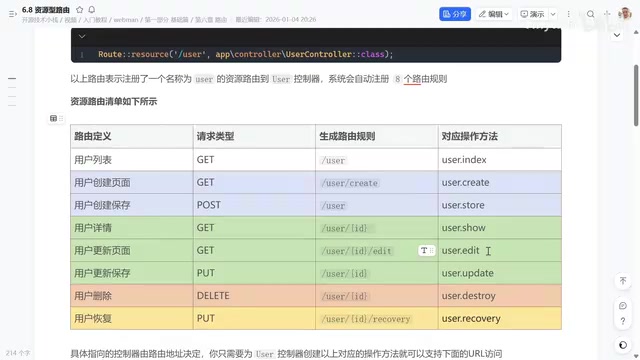
Webman resource routes automatically register eight routes covering the complete lifecycle of a resource from creation to deletion to recovery.
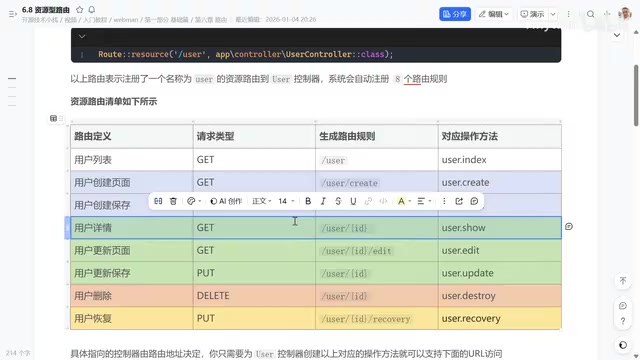
GET /user — Get User List
Maps to the controller's index method for retrieving resource list data. Typical scenarios include loading data for admin user management pages and paginated queries.
GET /user/create — User Creation Page
Maps to the controller's create method, returning the creation page or form initialization data. In frontend-backend separated projects, this endpoint typically returns dropdown options, default values, and other configuration needed for the creation form.
POST /user — Save New User
Maps to the controller's store method. After filling in username, phone number, and other information on the creation page, users submit form data via POST request, and this endpoint handles data persistence.
GET /user/{id} — View User Details
Maps to the controller's show method, retrieving detailed information for a specific user via the {id} URL parameter. Common scenarios include viewing personal profiles after login or viewing other users' public information.
GET /user/{id}/edit — User Edit Page
Maps to the controller's edit method. Similar to the creation page, but this endpoint carries the user ID, first queries existing user data, then returns it for the frontend to render in the edit form.
PUT /user/{id} — Update User Information
Maps to the controller's update method. After modifying information on the edit page, users submit updated data via PUT request. Per RESTful conventions, PUT represents a complete resource update.
It's worth noting that in the HTTP specification, both PUT and PATCH can update resources but have different semantics. PUT represents a complete resource replacement—the client must submit all fields, and the server completely overwrites existing data. PATCH represents a partial update where the client only submits fields that need modification. Webman's resource routes use PUT by default, but developers can flexibly handle this in the controller implementation, updating only fields included in the request to achieve PATCH-like behavior.
DELETE /user/{id} — Delete User (Soft Delete)
Maps to the controller's destroy method. In practice, soft delete is typically used rather than physical deletion. Soft delete works by setting a delete_time field in the database: a default value of 0 means not deleted, while a timestamp indicates the record has been marked as deleted.
PUT /user/{id}/recovery — Recover Deleted User
Maps to the controller's recovery method. This is the complementary operation to soft delete—resetting the delete_time field to 0 restores the deleted user. The request method is also PUT since it's essentially a status update on the resource.
Hands-On: From Controller Creation to Endpoint Debugging
Creating the UserController
Before using resource routes, create a UserController containing the eight methods: index, create, store, show, edit, update, destroy, and recovery. Each method handles specific business logic.
The basic controller structure:
<?php
namespace app\controller;

use support\Request;

class UserController
{
    public function index(Request $request) { /* User list */ }
    public function create(Request $request) { /* Creation page */ }
    public function store(Request $request) { /* Save user */ }
    public function show(Request $request, $id) { /* User details */ }
    public function edit(Request $request, $id) { /* Edit page */ }
    public function update(Request $request, $id) { /* Update user */ }
    public function destroy(Request $request, $id) { /* Delete user */ }
    public function recovery(Request $request, $id) { /* Recover user */ }
}
Viewing Registered Routes in Webman
After Webman starts, you can view all registered routes using the framework's route list command. After defining a resource route, the list automatically displays eight route records, each containing the request method, URL path, and corresponding controller method.
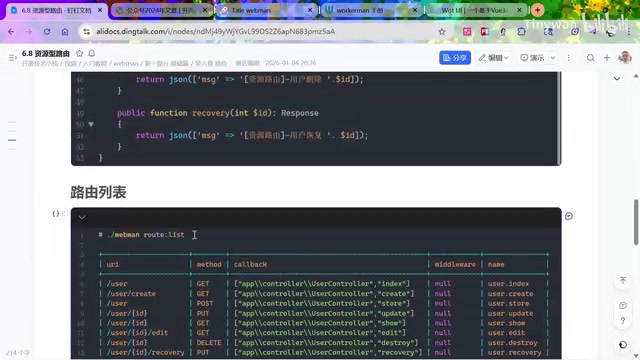
One important note: if the controller class referenced in the route doesn't exist, Webman will throw an error at startup. This is because Webman uses a persistent-memory model where routes are parsed and registered at process startup, and the framework attempts to verify controller class existence. Unlike traditional PHP-FPM mode where errors are only discovered when a request arrives, Webman's startup-time checking exposes configuration issues earlier, but requires developers to ensure controller files are created before defining resource routes.
Debugging RESTful Endpoints with Postman
Using Postman or similar API debugging tools, you can verify each of the eight endpoints:
| Method | URL Path | Operation |
|---|---|---|
| GET | /user | Return user list data |
| GET | /user/create | Return creation form initialization data |
| POST | /user | Save user information |
| GET | /user/2026 | Return details for user ID 2026 |
| GET | /user/2026/edit | Return edit data for that user |
| PUT | /user/2026 | Update that user's information |
| DELETE | /user/2026 | Soft delete that user |
| PUT | /user/2026/recovery | Recover that user |
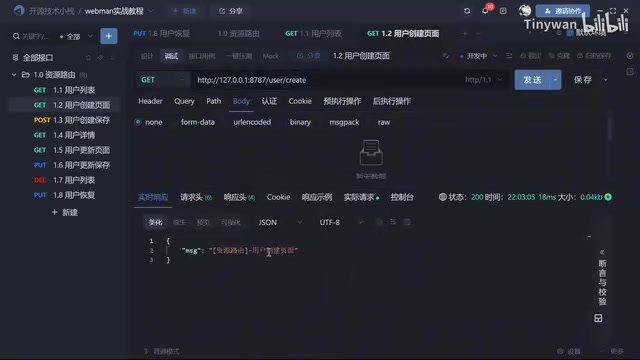
Postman is one of the most popular API development and testing tools, supporting environment variables, pre-request scripts, test assertions, and other advanced features. When debugging RESTful endpoints, it's recommended to create a Collection grouping all endpoints for the same resource, use environment variables to manage base_url and auth tokens, and use the Tests tab to write automated assertions verifying response status codes and data structures. For non-standard methods like PUT and DELETE, pay attention to selecting the correct data format in the Body options (such as form-data, x-www-form-urlencoded, or raw JSON) to ensure the server can correctly parse request parameters.
Each endpoint's request method and URL path strictly follows RESTful conventions with clear semantics, minimizing communication costs in frontend-backend collaboration.
Design Philosophy Behind Soft Delete and Recovery
Among the eight operations in Webman resource routes, delete and recovery are complementary operations whose design philosophy deserves separate discussion.
Two common deletion strategies in databases:
- Physical delete: Directly removes the record from the database; data cannot be recovered once deleted
- Soft delete: Marks deletion status via a
delete_timefield; data remains in the database
Soft Delete is standard practice in enterprise applications. Its core idea is replacing physical deletion with a marker field. Besides the delete_time timestamp approach, there's also a simpler boolean is_deleted field approach. The timestamp approach has the advantage of knowing not only whether data was deleted but also the exact deletion time, facilitating auditing and data analysis. At the query level, globally scoped filters or query middleware typically auto-filter deleted records, avoiding manual where delete_time = 0 conditions in every query.
The advantages of soft delete lie in data traceability and recoverability:
- Delete operation: Set
delete_timeto the current timestamp - Recovery operation: Reset
delete_timeto 0 - Query filtering: Default queries only return records where
delete_time = 0
This pattern is extremely common in user management, content management, and order management scenarios. Many industry regulations (such as financial data retention requirements and GDPR data traceability requirements) also make soft delete a compliance necessity. Webman's inclusion of the recovery operation as a standard resource route demonstrates that the framework was designed with real business needs in mind—this is also a differentiating design compared to other frameworks (e.g., Laravel's resource routes default to only seven routes).
Summary
Webman's resource routes automatically register eight standard routes with a single Route::resource line of code, fully covering common RESTful API operations: list queries, creation pages, data storage, detail views, edit pages, information updates, soft deletes, and data recovery. For PHP projects that need to quickly build CRUD interfaces, resource routes significantly improve development efficiency while ensuring interface design consistency and standardization. Mastering resource routes is an essential foundation for efficiently using the Webman framework in project development.
Related articles
 Tutorials
ChatGPT Plus Subscription Guide: Are GPT-5.5, image-2, and Codex Worth the Upgrade?
A detailed look at ChatGPT Plus features — GPT-5.5, image-2, and Codex — with a Plus vs Pro comparison and a complete step-by-step subscription guide for users outside the US.
 Tutorials
Harness AI Engineering in Practice: Using Claude Code to Master Enterprise-Level E-Commerce Development
Deep dive into Harness AI Engineering: master enterprise e-commerce development with Claude Code using the Rules, Skills, Wiki, and Changes framework.
 Tutorials
Cursor + Codex Dual-IDE Collaboration: A Practical Methodology for Open-Source Project Customization
A complete methodology for open-source project customization based on real-world experience, detailing the Cursor+Codex dual-IDE workflow, seven-stage process, MVP validation, and AI source code reading techniques.