WebMCP Explained: How AI Agents Can Efficiently Understand Web Pages

WebMCP lets web pages proactively expose callable tools to AI browser agents, cutting token costs and boosting task success rates.
Browser AI agents struggle with bloated HTML, Shadow DOM blind spots, and missing semantics — leading to high token costs and poor task completion. WebMCP, an emerging web standards proposal inspired by the MCP protocol, lets developers wrap existing page functionality into agent-callable tools via a JavaScript imperative API or declarative HTML form attributes, using JSON-LD as a unified format. Its core value lies in leveraging the browser's native access to user login state and permissions, bypassing costly backend refactoring, and providing semantically rich UI for human-agent collaboration. Currently a WICG Community Draft, it can be trialed in Chrome 149+ via Origin Trials.
In the age of AI, browser agents are becoming the "new natives" of the World Wide Web. They visit web pages, extract information, and perform actions just like human users — but can they truly "understand" the web applications we've carefully built? The answer is often no. Recently, a nine-year veteran frontend developer and Google Developer Expert (GDE) for the Web shared a systematic breakdown of an emerging web standards proposal — WebMCP — at a Bilibili community event. WebMCP aims to provide a brand-new, high-speed channel for interaction between agents and web pages.
The Browser Agent Dilemma: Why WebMCP Is Needed
To understand the value of WebMCP, we first need to recognize the pain points browser agents face today. A browser agent is an AI agent that runs within a web browser, extracting context from pages rendered via HTML, CSS, and JavaScript, then using tools like navigation, clicking, and form-filling to complete tasks. Prominent examples include Browser Use, Page Agent, and the viral "Qwen ordering bubble tea" demo.
Currently, browser agents are implemented via six main approaches: browser extensions (reading/writing the DOM via Content Scripts), cloud-hosted Chromium (operating headless browsers via the CDP protocol), local CLI daemons, AI-native browsers (embedding the agent at the kernel level), page-injected scripts, and iframe nesting. Regardless of approach, they all fundamentally read the DOM through the CDP protocol or JavaScript — with more advanced solutions reading the Accessibility Tree, or using vision models to parse screenshots.
However, all of these approaches have clear shortcomings. First, token costs explode: the HTML produced by modern frontend frameworks is extremely verbose and bloated. Having an agent extract useful information from this sea of characters, understand interaction patterns, and reason about them is costly, slow, imprecise, and prone to failure. Second, there are blind spots: content inside Shadow DOM and cross-origin iframes is often inaccessible to the browser and completely invisible to the agent. Third, the design bar is high: frontend development's tendency toward unsemantic div soup makes it hard for agents to determine whether an element is a content block or a button — and complex components like date range pickers, multi-step sub-forms, and cascading forms are even more baffling.
The agent's pain points ultimately become the user's pain points — higher token costs, worse task completion rates, and outright task failures.
What Is WebMCP: Giving Agents X-Ray Vision Into Web Pages
Borrowing from the Chrome team's official documentation, WebMCP is a new web standards proposal that turns existing functionality, information, and interactions on a web page into callable tools for browser agents.
While WebMCP is fundamentally different from traditional MCP, it inherits MCP's design philosophy and can be summarized with three keywords:
- Proactive: Actively registers tools or data into the agent's context, explicitly declaring what capabilities the current page supports
- Universal: Uses JSON-LD as a unified communication format, reducing integration overhead and avoiding duplicated effort
- Explicit: Clearly defines input parameter types and output data formats, minimizing ambiguity so agents can make decisions with confidence
Why Not Just Wrap Backend APIs into an MCP Server?
This is often a developer's first instinct. The speaker acknowledged that there are indeed many scenarios where wrapping backend APIs directly into an MCP Server makes sense — for example, fetching data from a database is inherently a server-side operation, so why route it through a web page?
But not all scenarios are suitable for this approach. The core reason is: the user's browser is always the primary scene, naturally holding the most complete context. Valuable context like the user's login identity, account permissions, browsing history, preferences, and saved passwords cannot be moved to the server. Additionally, the web tech stack has an enormous reach — local compute capabilities like WebGPU and WebAssembly, as well as complex interactions that depend on visual presentation, cannot be replicated by wrapping backend APIs. This is especially true in human-agent collaboration scenarios — where a human leads, an agent assists, and a human confirms — where a semantically rich UI is far easier to understand than a stream of scrolling text descriptions. As the saying goes, "a picture is worth a thousand words."
WebMCP Use Cases: Which Businesses Need It Most
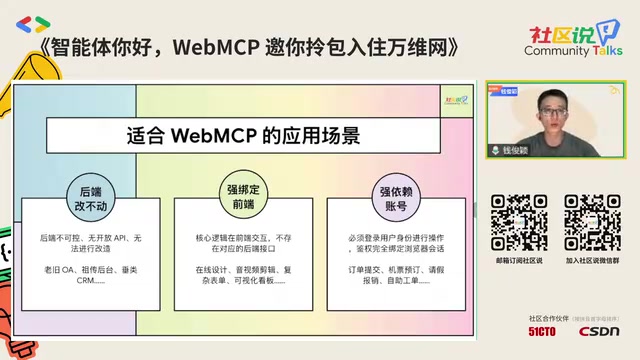
The speaker outlined three categories of scenarios best suited for WebMCP:
- When the backend can't be touched: Legacy OA systems, inherited back-office tools, and niche management systems with no open APIs — where backend refactoring is too costly, a frontend workaround for automation integration is the better path
- When business logic is tightly bound to the frontend: Online design tools, audio/video editors, complex forms, and visualization dashboards — where core logic lives in frontend interactions and can't be easily decoupled to the backend
- When tasks are tightly coupled to account permissions: Order submission, flight booking, leave requests, expense reimbursement — tasks strongly tied to the user's login state and identity permissions
How to Integrate: Imperative and Declarative APIs
WebMCP introduces two new categories of frontend APIs, with the hope that browser vendors will implement them according to the standard.
Imperative API
Uses JavaScript methods as tools. Through a model context object on the global scope, you call registerTool to register a tool. This requires providing a tool name, a description (essentially prompt engineering / semantic labeling), an inputSchema (defining parameter names, types, descriptions, and whether they're required), and an execute callback — the latter reuses existing page logic to perform operations.
Using a to-do list as an example: registering an "add to-do item" tool with a string-type text parameter, where execute adds the data and updates the page state. There's a critical point here: you must update the page state promptly and explicitly return a result — whether success, error, or awaiting user confirmation — otherwise the agent has no way of knowing whether the operation succeeded.

Declarative API
Uses forms as tools. By adding specific attributes to a classic HTML form tag, the browser automatically parses it as a tool. Form fields map to input parameters, and the submit button maps to the tool's execution action. When an agent fills out and submits the form, it effectively executes the form submission.
WebMCP Best Practices: A Developer's Guide

The speaker offered six practical recommendations:
- Semantics first: HTML5 semantic markup once benefited developers and screen readers; today, agents are a major class of web users too. Good semantics significantly reduces agent confusion.
- Single responsibility: Each tool should do exactly one thing, with clear boundaries. Overlapping responsibilities cause agents to hesitate.
- Keep state up to date: Synchronously update frontend cached data and on-screen state after a tool is called.
- Friendly error handling: Whether an operation succeeds, fails, times out, or is unauthorized, communicate it to the agent with clear, semantic messaging.
- Dynamic registration: Don't register all tools at once. Using bubble tea ordering as an example — register only product information tools when browsing items, switch to cart tools when entering the cart, and switch again at checkout. This lets the agent make accurate decisions at each step with minimal cognitive overhead.
- Thorough testing: Because large model outputs are non-deterministic, traditional "expect a popup" style test cases no longer apply. Design proper Evaluations (Evals) to cover the new testing scenarios that arise in the AI era.
Proposal Status and Ecosystem
WebMCP is currently in the Community Group Draft stage — the Chrome team has authored an Explainer document, which is being publicly discussed via GitHub and mailing lists, refined by the WICG community into a draft. It has not yet become a formal W3C standard.

To experiment with it at this stage, three conditions must be met: upgrade Chrome to version 149 or higher; register your domain via Origin Trials (or register a local path for local debugging); and for local debugging, enable the enable-webmcp-testing flag in chrome://flags. One detail worth noting: Origin Trials have an expiration date, after which they may be extended or promoted directly to a stable release.
The ecosystem already has early support: you can enable TypeScript syntax support via webmcp-related npm packages, and both React and Angular have experimentally added WebMCP adapters.
Closing Thoughts: Frontend Isn't Dead — It's Evolving
In response to the narrative that "frontend is dead," this nine-year veteran frontend expert quipped with a humorous "allow me to demonstrate a resurrection." In his view, the web domain in the AI era is actually bursting with vitality, showing no shortage of new possibilities thanks to its flexibility and cross-platform adaptability.
This is precisely where WebMCP's significance lies: it lets developers expose web capabilities as agent tools with just a few lines of JavaScript — no sweeping backend overhaul, no migration of business logic required. Developers control costs, agents improve accuracy, and users get a better experience while spending fewer tokens. It's a win-win-win.
As the speaker put it, there may not be dedicated frontend developers in the future — but everyone will be involved in web development and writing JavaScript to some degree. Understanding these foundational AI web infrastructure pieces and new APIs is what will let us use them well when the moment is right.
Related articles

Microsoft AI Agent Breakthroughs: More Efficient, Better at Code and Weather Forecasting
Microsoft Research Focus Issue 97: ForkPilot cuts agent inference costs, Cabra reveals coding agents' code-understanding gap, Teletune learns workflows from logs, PBC improves extended forecasts, BioEMU-2 opens preview.

Prime Intellect Releases Prime Mega MoE: Trainable Fused MoE Kernel with 3.11x Forward Speedup
Prime Intellect releases Prime Mega MoE, adding backpropagation to DeepSeek's fused Mega MoE kernel for trainability. Up to 3.11x forward speedup and 34% faster Qwen3 MoE training steps in prime-rl.

Meta Quietly Launches AI Fashion App Style Sketch: Build a Virtual Wardrobe from Instagram Photos
Meta quietly launched Style Sketch, an AI fashion app that connects to Instagram to build a virtual wardrobe from shared photos, plus manual entry via camera, video, or gallery upload. This analysis covers its product logic, competitive landscape, and implications for AI app developers.