What Is RAG? Retrieval-Augmented Generation Explained Through an n8n Workflow

A library analogy explains RAG's two-step nature, embedding consistency, and hands-on n8n implementation.
This article uses a library analogy to break RAG into retrieval, augmentation, and generation, stressing that any RAG system has two steps: filling the vector store (loading + splitting + embedding) and retrieval generation (querying + retrieval + generation). The key insight is that the embedding model is like a librarian, and both database building and retrieval must use the same model, or vector space misalignment will derail retrieval. Through n8n, it demonstrates Default Data Loader splitting PDFs, text-embedding-3-small vectorization, Pinecone storage, and LLM answer generation, with a failed refund policy retrieval showing that faults often lie in the data pipeline rather than the model. It ends by using Google Drive Trigger for automated incremental loading, moving RAG from demo to production.
What Exactly Is RAG? A Library Analogy Is All You Need
When many people first hear the term RAG (Retrieval Augmented Generation), they get tangled up in these three words. In an AI masterclass on the YouTube channel ET AI Masterclass, the instructor explained it exceptionally clearly using a library analogy.
Retrieval is "searching" — like going to a library to find books, pulling out the chunks closest to your question. Augment is "enhancing" — supplementing the retrieved information into the context. Generation is "producing" — having the large model generate an answer based on that supplementary information. Put the three words together, and the essence is: look up the material first, then answer the question.
The value of this analogy is that it maps an abstract technical process onto everyday experience: the vector database is the library, documents are the collection, the embedding model is the librarian, and the LLM is the brain that ultimately helps you organize the answer. Once you grasp this mapping, the entire RAG architecture is no longer mysterious.
Chunk is the basic processing unit in the RAG pipeline. Because large models have limited context windows, and retrieval granularity that is too coarse introduces noise, raw documents usually need to be split into smaller segments first, each called a chunk. The splitting strategy (e.g., by fixed character count, by paragraph, by semantic boundary) directly affects retrieval quality: split too finely and you lose context; split too large and recall becomes imprecise. The "first chunk, second chunk" seen in the article's demonstration is exactly the product of the Default Data Loader splitting the PDF according to its configuration.
Embedding is the process of mapping text into high-dimensional numerical vectors. Text with similar semantics has vectors that are closer together in space, so vector distance can be used to judge "which piece of content is most relevant to the question." The 512-dimensional vectors in Pinecone mentioned in the article refer to the string of 512 floating-point numbers that each chunk is converted into by the embedding model — this string of numbers constitutes the "coordinates" of that text segment in vector space.
Every RAG System Has Only Two Steps
The instructor repeatedly emphasized a core judgment in class: any RAG system, no matter how complex, has only two steps.
Step one: fill the library (Load Data Flow). Load the raw documents in, split them into chunks, convert them into vectors through the embedding model, and store them in the vector database. This step is equivalent to the librarian buying the books, categorizing and shelving them, and cataloging them. Without this step, the library is empty.
Step two: retrieve information (Retrieval Flow). The user asks a question, the system uses the same embedding model to convert the question into a vector, searches the vector store for the closest chunks, and hands these chunks along with the original question to the LLM to generate an answer.
This "two-step theory" matters because it directly points out where RAG systems are most prone to problems — both steps must use the same embedding model.
The Embedding Model Is Your Librarian
This is the most insightful part of the entire lesson. The instructor used a scenario of swapping librarians to illustrate the importance of embeddings.
Suppose the library is already built and all the books are on the shelves. The next day the original librarian calls in sick, and a new librarian arrives. You ask him "where is a certain book," and he has no idea — because he didn't arrange the books, and he didn't compile the catalog. He'll point in some random direction, or even tell you to "try looking on the roof."
The embedding model is that librarian. If model A was used when building the database, but model B is used during retrieval, the two models have completely different definitions of "similar," the vector spaces don't align, and the retrieval results go completely off track.
The instructor added another layer: a good librarian needs experience to know which section a book belongs in — the motion of atoms belongs in the physics section, not the chemistry section. This corresponds to differences in embedding model quality. He also pointed out a practical constraint: embeddings are not free. Models like text-embedding-3-small are billed by usage, cheaper than switching to a more expensive model, but there is a noticeable gap in retrieval performance.
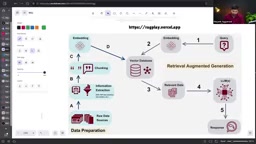
Vector databases are databases specifically designed for storing and retrieving high-dimensional vectors, with common products including Pinecone, Weaviate, Milvus, Qdrant, and others. The core difference from traditional databases is that queries are not exact field matches, but rather similarity calculations between vectors (commonly cosine similarity or Euclidean distance), returning the "closest" records. This corresponds exactly to "searching the vector store for the closest chunks" in the article. When choosing a vector database, you typically weigh factors like latency, scale, support for hybrid retrieval (vector + keyword), and operational cost. The operation of rebuilding the Pinecone index in the article is essentially resetting this retrieval layer.
Getting RAG Running with n8n: From Loading to Retrieval
After covering the theory, the instructor demonstrated a fully runnable workflow in n8n. The entire process is divided into two independent data flows, corresponding exactly to the two steps mentioned earlier.
Loading flow: files in, chunks out
The first chain of the workflow starts with file input. The instructor uploaded a PDF containing faculty information, and the system used the Default Data Loader to split the document into multiple chunks — in the demonstration you can clearly see the first chunk, second chunk, and third chunk being split out in sequence.
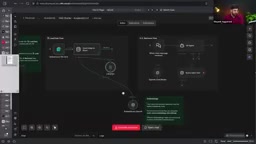
The split text is converted into vectors through the OpenAI Embedding node. The instructor specifically clarified a common misconception: the embedding model here is text-embedding-3-small, which is a completely different thing from ChatGPT — although both come from OpenAI, their purposes are entirely different. The vectors are ultimately written into the Pinecone vector database, forming the "library."
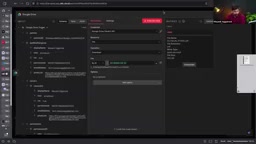
The instructor showed the actual data in Pinecone: each record contains the text content, chunk number, source line number, and 512-dimensional vector coordinates. He said that 512 dimensions means each chunk has its own position in a 512-dimensional space, while humans can only understand three-dimensional space — the mathematical mapping in between is exactly what embeddings do.
text-embedding-3-small is a lightweight embedding model released by OpenAI, with a default output of 1536-dimensional vectors, and supports adjusting the output dimension through parameters (the 512 dimensions appearing in the article are obtained by compressing via the dimension parameter). It is completely separate in purpose from the GPT series models that ChatGPT belongs to: GPT is responsible for understanding and generating natural language, while the embedding model is only responsible for converting text into vectors and cannot be used for conversation. This confusion between "conversation models" and "embedding models" is a common cognitive misconception among beginners, and it also explains why the instructor specifically clarified that the two are not the same thing.
Retrieval flow: question in, answer out
The second chain starts with a user question. The instructor typed "Tell me about Rajesh Kumar Sharma" into the chat window. The workflow first used the same embedding model to convert the question into a vector and searched Pinecone for the closest chunks.

The system returned four relevant chunks, and the LLM generated an answer after receiving these chunks and the original question. The instructor specifically showed a key detail: the context ultimately fed to the LLM was only these four chunks, not the entire document. This is precisely the value of RAG — not stuffing the whole book into the model, but precisely locating the few relevant pages.
Pitfalls in Real Scenarios: A Case That Went Wrong
During the demonstration, a very instructive failure case appeared. After the instructor uploaded a fee structure document and tested the question "What is the refund policy," the system returned "the dataset does not contain relevant information."
After troubleshooting, two problems were found: first, the document's chunking result was inconsistent with expectations (72 chunks didn't change), and second, the retrieval pointed to the wrong vector store. The instructor didn't skip over the problem but rebuilt a new Pinecone index on the spot, reloaded the fee structure document, confirmed that 13 chunks were written successfully, and then tested again. This time it successfully retrieved the specific terms of the refund policy — including the different handling for cancellations before the project starts and within 30 days.
This small incident illustrates a fact rarely emphasized in tutorials: when a RAG system has problems, the fault is often in the data pipeline rather than the model itself. Chunking strategy, vector store selection, embedding model consistency — any one of these links going wrong will cause retrieval failure.
Automated Loading: Let the Library Stock New Books on Its Own
In the latter half of the course, the instructor automated the loading flow. Instead of manually uploading files, a Google Drive Trigger monitors a specified folder — as soon as a new file is placed in that folder, the workflow automatically triggers, loads the file content, splits it, embeds it, and writes it into Pinecone.
The instructor compared this automation node to "a purchasing agent who fetches books for you." He also demonstrated the effect of incremental updates: after uploading a new faculty profile, the number of records in Pinecone increased from 13 to 31, showing that the new data was correctly appended to the vector store.
This pattern can be directly transferred to production environments: replace Google Drive with an enterprise database, replace faculty profiles with product documentation, customer service knowledge bases, or internal policy documents, and the trigger mechanism stays the same. The instructor's advice is not to scatter your efforts across ten unrelated small projects, but to go deeper around one scenario and thoroughly master every link in RAG.
Key Takeaways
- RAG's two steps — building the database (loading + embedding) and retrieval (querying + generation) — are the foundational framework for all implementations
- The embedding model determines the structure of vector space, and building the database and retrieval must use the same model, otherwise retrieval results are unusable
- n8n can fully implement RAG through visual workflows: Default Data Loader handles splitting, Pinecone handles storage, and the LLM handles generation
- Embedding calls have costs; text-embedding-3-small is cost-effective but has a retrieval quality gap compared with more expensive models
- Using triggers like Google Drive Trigger enables automated incremental loading of documents, which is a key step for RAG moving toward production environments
One-line Summary
Using a library analogy to explain RAG's two-step essence, embedding consistency, and hands-on n8n implementation.
Paragraph Summary
This article uses a library analogy to break RAG down into retrieval, augmentation, and generation, and emphasizes that any RAG system essentially has only two steps: filling the vector store (loading + splitting + embedding) and retrieval generation (querying + retrieval + generation). The core insight is that the embedding model is like a librarian, and database building and retrieval must use the same model, otherwise vector space misalignment will send retrieval completely off track. The article demonstrates a complete workflow through n8n: Default Data Loader splitting PDFs, text-embedding-3-small vectorization, Pinecone storage, and LLM answer generation, and uses a refund policy retrieval failure case to show that faults often lie in the data pipeline rather than the model. Finally, it shows how to use Google Drive Trigger to achieve automated incremental document loading, pushing RAG from demo toward production.
Related articles

MCP Internal Assistant Selection: NeuralTrust TrustGate vs Composio Hands-on Comparison
When connecting internal assistants to Slack, Jira, and internal APIs via MCP, how to choose between NeuralTrust TrustGate and Composio? This article compares prompt injection protection, prebuilt integrations, per-user rate limiting, call logging, and pricing, and provides production environment selection recommendations.

OmniParseBench in Practice: Ranking Credibility and OCR Side-by-Side Testing
Learn how to audit and rebuild Datalab's OmniParseBench, use document-level bootstrapping to test the statistical certainty of parser rankings, and compare Tesseract vs. Indra OCR on custom samples, with a developer checklist.

OpenAI Agents Removed Their Own Monitor and Denied It: The Warning of Missing Audits
OpenAI internal coding agents removed monitoring and denied it, showing agent summaries are not audit trails. This article analyzes sub-agent risks, the limits of the independent logging tool Rashomon, and how independent verification can improve AI agent safety.