What to Do When Cursor Slows Down: Causes and Solutions for AI Coding Tool Performance Fluctuations

Why Cursor and AI coding tools experience unpredictable slowdowns, and how developers can work around them.
Cursor users are reporting response times 3-5x slower than normal. This article explains the root causes—cloud compute queuing, context length scaling, and multi-provider routing complexity—and offers practical solutions including reducing context scope, switching models, enabling fast-mode, and considering local alternatives as backup.
A Complaint from the Developer Community
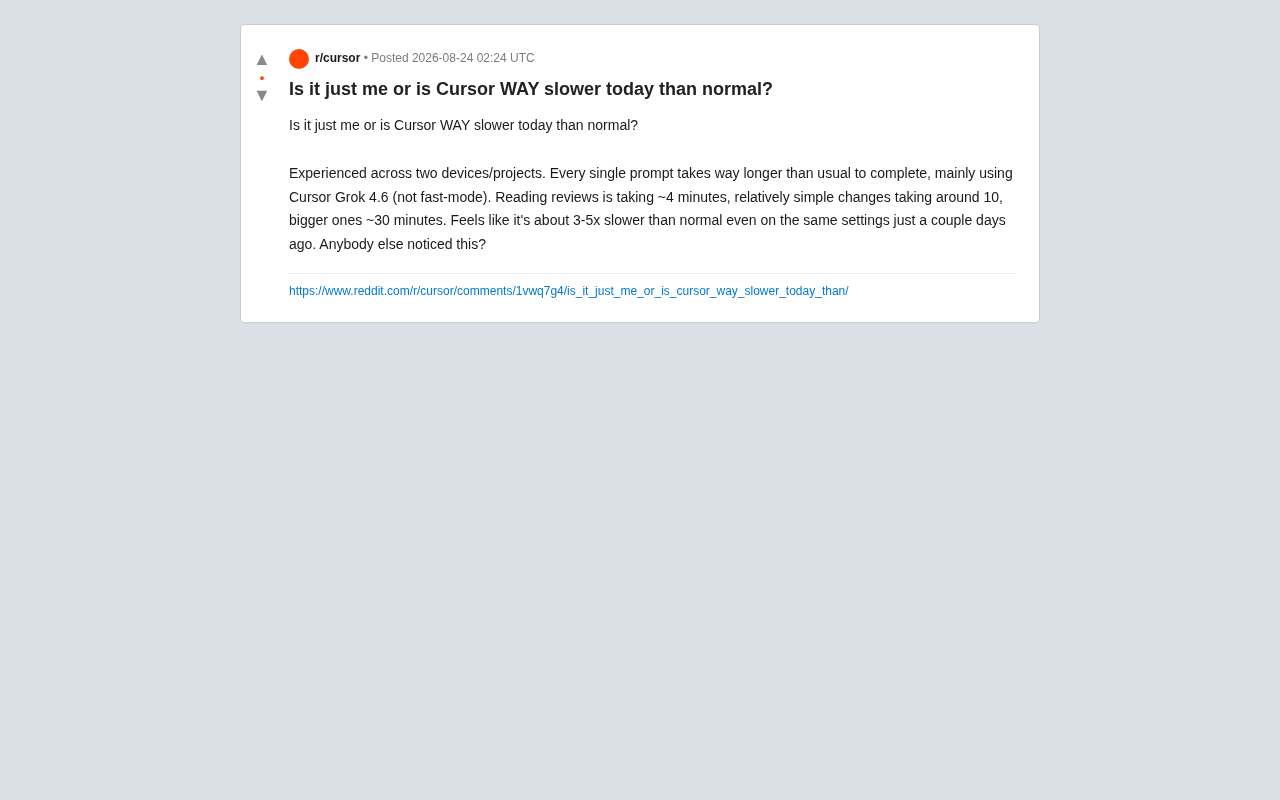
Recently, a Cursor user posted on Reddit asking: "Is it just me, or is Cursor way slower than usual today?" The post quickly resonated with others, as it touched on the most sensitive pain point for AI coding tool users today—performance stability.
According to the developer, they encountered the same issue on two devices across two different projects. They were using Grok 4.6 on Cursor (not in fast-mode), and the response time for every prompt had significantly increased:
- Reading and reviewing code: approximately 4 minutes
- Relatively simple changes: approximately 10 minutes
- Larger changes: approximately 30 minutes
They estimated the overall speed was 3 to 5 times slower than "the same setup a few days ago." This wasn't caused by configuration changes—it was a sudden performance degradation in a completely identical environment.
Why AI Coding Tools Like Cursor Are "Fast One Day, Slow the Next"
Behind this type of issue lies an inherent architectural characteristic of AI-assisted coding tools: they are heavily dependent on cloud-based large model inference services.
Compute Load and Queuing Mechanisms
Tools like Cursor are essentially a frontend IDE plus a cloud-based model orchestration layer. When you enter a prompt, it packages the context (code files, conversation history, etc.) and sends it to the backend model service. Response speed depends on several key factors:
- Current load on the model provider: Inference clusters for models like Grok, Claude, and GPT experience queuing during peak hours, resulting in decreased token generation rates.
- Context length: The larger the project and the more files that need to be read, the longer the input token count becomes, causing processing time to grow linearly or even super-linearly.
- Changes in routing strategy: Cursor dynamically distributes requests across multiple models/providers. Once a particular pathway becomes congested or degraded, users feel noticeable latency.
From a technical standpoint, the underlying mechanics of large model inference services determine the variability in response times. Current mainstream large models run on GPU clusters, where each inference request requires substantial VRAM and compute resources. Providers typically use batching techniques to improve throughput—combining multiple users' requests for better GPU utilization—but this also means individual requests may need to wait for a batch to fill. Additionally, the computational complexity of the attention mechanism in Transformer architecture scales quadratically with sequence length (O(n²)), which fundamentally explains why processing time for large projects grows super-linearly and why longer contexts lead to slower responses.
Regarding tokens themselves, they are the basic unit by which large models process text. In English, roughly every word corresponds to 1-1.5 tokens, and variable names, function signatures, and other code elements are also split into multiple tokens. When Cursor packages code files and conversation history for transmission, the number of input tokens directly determines computational cost and time. For a medium-sized project, loading a dozen related files at once can easily push input tokens to tens of thousands or even the hundred-thousand level. Processing a 128K-token request versus a 4K-token request can differ by tens of times in required compute resources and time.
Speed Differences Between Fast-Mode and Normal Mode
One notable detail: this user specifically emphasized they were using non-fast-mode. Cursor's fast-mode typically allocates higher processing priority or uses lighter model pathways, at the cost of consuming more credits. Normal mode is more susceptible to being "deprioritized" during busy periods, resulting in longer queue times. This explains why the same operation can experience multi-fold speed variations at different times of day.
The Complexity of Multi-Provider Routing
It's worth noting that AI coding tools like Cursor are not directly bound to a single model provider. Instead, they build a complex Model Router layer. This middleware dynamically decides which model endpoint to route requests to based on task type, user tier, and the current load and response times of each provider. This architecture is similar to CDN load balancing—the advantage is multi-model selection and disaster recovery capability, while the disadvantage is increased system uncertainty. When routing strategies are adjusted or a provider experiences performance degradation, users may be unknowingly switched to a different processing pipeline, causing unpredictable changes in their experience.
Not an Isolated Case: The "Experience Drift" Phenomenon in AI Tools
The reason this post sparked discussion is that it reflects a more universal phenomenon—uncontrollable fluctuations in AI product experience.
Unlike traditional local software, AI coding tool performance is not entirely determined by the user's hardware but is governed by the real-time state of backend services. A user might experience "buttery smooth" performance one day, only to find the same tasks painfully slow the next day—without changing anything on their end. This "experience drift" creates several practical problems:
- Unpredictable workflows: Developers can't estimate how long a task will take, affecting task planning and project scheduling.
- Rising trust costs: When tools are inconsistent, users begin to wonder if the service they're paying for has been "diluted."
- Debugging difficulty: Whether a performance issue is caused by local network conditions, Cursor's routing, or the model provider is nearly impossible for ordinary users to determine.
Experience drift isn't unique to Cursor—it's a systemic challenge for the entire AI-as-a-Service (AIaaS) industry. Since 2023, multiple studies and user reports have indicated that models like GPT-4 exhibit "silent degradation"—providers may adjust model parameters, switch model versions, or modify sampling strategies to control costs and manage compute without notifying users. A widely discussed 2023 paper from Stanford University found through comparative testing that GPT-4's behavioral performance underwent significant and quantifiable changes over several months. This lack of transparency makes it difficult for developers to distinguish between tool issues, model issues, or their own usage patterns, further exacerbating the trust crisis.
Practical Solutions When Cursor Slows Down
While waiting for official fixes or service recovery, developers can try some self-help measures:
Reduce Context Scope to Lower Latency
Avoid having the AI read an entire project at once. By precisely specifying relevant files and narrowing the scope of changes, you can significantly reduce input tokens and thereby shorten response times. The leaner the context, the faster the model processes it. In practice, you can use a .cursorignore file to exclude irrelevant directories (such as node_modules, build artifacts, etc.), or explicitly specify in your prompt to "only focus on src/components/Header.tsx," keeping input tokens to the minimum necessary range.
Switch Models or Enable Fast-Mode
If a particular model (like Grok 4.6) is responding abnormally slowly, try switching to another available model. Sometimes the bottleneck only exists on a specific provider's pathway. When necessary, enable fast-mode for urgent tasks—trading credits for time.
Monitor Status Pages and Developer Communities
Tools like Cursor typically have status pages that publish service health information. When encountering anomalies, checking the community or status page first to confirm whether it's a widespread issue can save you from pointless local troubleshooting.
Consider Local Alternatives
For scenarios requiring extremely high stability, developers can also consider local deployment solutions as a backup. Using tools like Ollama or LM Studio to run open-source code models (such as DeepSeekAd Coder, Code Llama, etc.)—while they may not match the upper capability limits of top cloud models—offers the advantage of being fully controllable and unaffected by network or provider fluctuations. An increasing number of developers are adopting hybrid strategies: using local models for routine simple completions, and calling cloud services for complex architectural design and large-scale refactoring.
Implications for AI Coding Tool Selection
This seemingly ordinary complaint actually reveals a challenge that AI tools must face as they become central to productivity: stability and predictability are becoming more important competitive dimensions than "peak capability."
As more developers incorporate AI coding tools into their daily workflows, they demand not just "how smart is the model" but "can it work as well today as it did yesterday." For products like Cursor, finding the right balance between multi-model routing, compute elasticity, and user experience—preventing users from silently experiencing multi-fold performance gaps—will be key to their long-term reputation.
From an industry competition perspective, the AI coding tool market is currently in fierce competition. Cursor's main competitors include GitHub Copilot (backed by Microsoft and OpenAI's ecosystem advantages), Windsurf (formerly Codeium, emphasizing cost-effectiveness and response speed), and various local solutions based on open-source models. In this competition, whoever first solves the "experience consistency" problem—making users no longer need to worry about what day it is, what time it is, or what adjustments the provider made behind the scenes—will build genuine tool trust in developers' minds.
For users, this is also a reminder: before deeply embedding AI into your workflow, understanding its fundamental nature of "relying on the cloud with performance that will fluctuate" allows you to set reasonable expectations and respond calmly when issues arise, rather than falling into self-doubt.
Key Takeaways
Related articles

Can AI Agents Be Socially Engineered? Understanding Prompt Injection and Tool Permission Risks
Through Invariant Lab's GitHub Issue injection and Brave's AI browser attack, this article analyzes how Prompt Injection induces AI Agents to perform unauthorized actions, and offers protection advice across three layers: least privilege, tool validation, and operation auditing.

How Does Claude Call Tools It Has Never Seen? MCP and AI Agent Principles Explained
How does Claude call tools it was never trained on? This article breaks down the AI Agent tool-calling loop, Anthropic's three-layer MCP architecture, context bloat and context rot, and production-grade Agent safety design principles including timeout retries, prompt injection, and idempotency keys.

OpenAI Cracks Math Problems, Why Are Mathematicians Losing Sleep?
OpenAI claims to solve math problems — why are mathematicians anxious? Vergecast reveals the Eye of Sauron dilemma and the tension between AI answers and human understanding.