What to Do When Your Windsurf Free Credits Run Out? A One-Click Account Switching Plugin for Unlimited Refills

A seamless one-click plugin solves the coding interruption pain point when Windsurf free credits run out
This article introduces a seamless account-switching plugin designed for Windsurf that solves developers' pain point of needing to manually switch accounts after free AI credits are exhausted. The plugin achieves millisecond-level one-click account switching by automating local authentication credential operations — no logout, password entry, or Token copying needed — effectively protecting developer flow state. The article also reminds users about multi-account compliance risks and security concerns, recommending paid subscriptions or alternative tools as long-term solutions.
What to Do When Your Windsurf Free Credits Run Out? A Common Pain Point for Developers
Many developers have experienced this scenario: you're in the zone writing code, and suddenly Windsurf pops up with "Your free credits have been exhausted," instantly pulling you out of your flow state.
It's worth explaining why this interruption is so devastating. Flow State is a concept introduced by psychologist Mihaly Csikszentmihalyi, referring to a psychological state of intense focus and high-efficiency output when a person is fully absorbed in an activity. For software developers, flow state is especially precious — in this state, developers can simultaneously maintain complex code logic, architectural relationships, and contextual information in their minds. Research shows that it takes developers an average of 15 to 23 minutes to return to their previous level of focus after being interrupted, and frequent context switching causes cognitive load to spike dramatically, seriously affecting code quality and development efficiency.
In fact, the importance of flow state to developers far exceeds common perception. According to a 2022 study on software engineer productivity published by Microsoft Research, developers spend only about 2-4 hours per day in a true deep coding state, yet the code produced during this time often accounts for over 70% of the day's total work output in both quantity and quality. During flow state, activity patterns in the brain's prefrontal cortex change, and the release of dopamine and norepinephrine puts people into a "super focus" mode capable of handling multiple layers of abstraction simultaneously — from low-level data structures to high-level architectural design. This also explains why many senior developers prefer coding late at night or early in the morning, when external distractions are minimal. One of the core values of AI-assisted programming tools is precisely to help developers maintain flow state longer by reducing time spent on low-cognitive tasks like searching documentation and writing boilerplate code.
What makes it even more frustrating is that if you want to continue using it for free, you have to manually log out, switch accounts, enter passwords, and log back in — a process so tedious it makes you question your life choices.
Some "veterans" have even developed a workflow of copying and pasting Tokens, making each account switch feel like executing a secret mission. The Token mentioned here refers to authentication tokens based on OAuth 2.0 or JWT (JSON Web Token) — when a user logs into Windsurf, the server issues an encrypted Token containing user identity and permission information, and the editor carries this Token in every subsequent API request to prove identity. The practice of manually copying and pasting Tokens essentially bypasses the normal login flow by directly injecting another account's authentication credentials into the current session. But this method is not only inefficient but also error-prone — Tokens typically have an expiration time (TTL), and after expiration they need to be re-obtained through a Refresh Token. One paste mistake or Token expiration means starting over, and there's even the security risk of credential leakage.
It's worth noting that Windsurf's authentication mechanism reflects the evolutionary trend in identity management for modern developer tools. Early desktop IDEs (like Eclipse, IntelliJ) barely needed online authentication — all features ran locally. With the rise of cloud services and the SaaS model, developer tools began introducing online authentication — initially simple username-password verification, later evolving into the OAuth 2.0 authorization framework. OAuth 2.0 uses an Authorization Code Flow where, after the user completes authentication in the browser, the application receives a pair of Access Token and Refresh Token. The Access Token typically has a shorter validity period (15 minutes to 1 hour) for API calls; the Refresh Token has a longer validity period for silently obtaining new Access Tokens after the Access Token expires. Modern developer tools also commonly adopt the PKCE (Proof Key for Code Exchange) extension to prevent authorization code interception attacks. Understanding this authentication mechanism helps developers assess the security risks of account-switching plugins — the plugin is essentially managing and replacing these Tokens, and any oversight could become a security vulnerability.
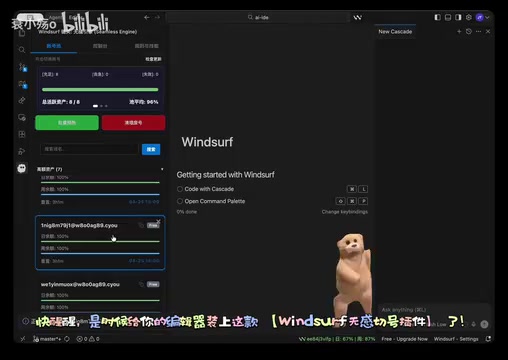
So is there a more elegant solution? The answer is: yes. A seamless account-switching plugin designed specifically for Windsurf is changing the daily experience of many developers.
Seamless Account-Switching Plugin: A One-Click Windsurf Account Management Solution
Core Philosophy: You Don't Need to Do Anything
Before diving into the plugin, here's a brief introduction to Windsurf. Windsurf is an AI-native code editor launched by the Codeium team, built on VS Code's open-source core with deep integration of LLM-driven code completion, code generation, and conversational programming capabilities. Unlike traditional code completion tools, Windsurf's Cascade feature can understand the context of an entire project, enabling cross-file intelligent code generation and refactoring. Its free version provides limited AI call credits (typically measured in "credits"), with each code completion, conversational Q&A, or code generation consuming a certain amount. When credits are exhausted, AI features pause until credits refresh — for developers who rely on AI assistance, this means a cliff-like drop in productivity.
From a broader perspective, the "AI-native editor" that Windsurf represents is the third paradigm shift in code editing tool development. The first was from pure text editors (like Vim, Emacs) to Integrated Development Environments (IDEs like Eclipse, IntelliJ IDEA), with the core breakthrough being the integration of toolchains like compilation, debugging, and version control into a unified interface. The second was the lightweight extensible editor era led by VS Code, which achieved language-agnostic intelligent hints through the Language Server Protocol (LSP). The third is the current AI-native era, where editors no longer merely understand syntax and type systems but comprehend code semantics and intent through large language models. Windsurf's Cascade feature is based on Retrieval-Augmented Generation (RAG) technology, building a vector index of the entire code repository and retrieving relevant code snippets in real-time as context injected into the LLM during coding, enabling cross-file semantic understanding. Precisely because this deep AI integration delivers an unprecedented programming experience, developers' anxiety about credit exhaustion is all the more intense.
Understanding Windsurf's credit consumption mechanism helps developers use their free quota more wisely. Windsurf's credits metering system doesn't simply charge by request count but is based on Token consumption — here, Token refers to the NLP concept of the smallest semantic unit after text is split by a Tokenizer, which is completely different from the authentication Token mentioned earlier. The credit consumption of each AI interaction depends on the total of input Tokens (the user's code context and question) and output Tokens (AI-generated code or answers). A simple code completion might consume only a few dozen Tokens, while a complex code generation request involving multi-file context might consume thousands. Because Windsurf's Cascade feature automatically retrieves relevant files from the project as context, its per-request Token consumption is typically far higher than ordinary inline completions. This means developers can extend their free credit usage period by adjusting their habits — for example, using traditional IntelliSense for simple syntax completions and saving AI credits for complex tasks that truly require semantic understanding.
The design philosophy of this Windsurf account-switching plugin can be summarized in one word — seamless. Traditional account switching requires you to log out, enter new account credentials, and log back in, while this plugin compresses all steps into a single click.
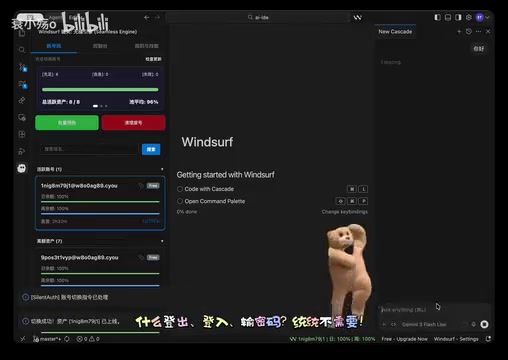
Specifically, here's how it works:
- No manual logout needed: The plugin handles session switching automatically in the background
- No password entry needed: Pre-configured multi-account information is securely stored locally
- No Token copy-pasting needed: The authentication process is fully automated
- No editor restart needed: The switching process is transparent to the editor, with work state fully preserved
How Fast Is the Switch? The Editor Doesn't Even Notice
The most impressive aspect of this plugin is its switching speed. When Windsurf's free credits run out, just one click and the plugin completes the account switch in the background — the entire process is so fast that the editor itself "doesn't even realize" anything changed.
The seamless account-switching plugin's ability to achieve lightning-fast switching that the "editor doesn't even notice" involves an elegant technical implementation. As a desktop application based on the Electron framework, Windsurf's authentication state is typically stored in the application's local data directory (such as ~/Library/Application Support/Windsurf on macOS, %APPDATA%/Windsurf on Windows), including Session Cookies, Access Tokens, and Refresh Tokens. The plugin's core working principle is to directly manipulate these locally stored authentication files — when switching accounts, the plugin saves a snapshot of the current account's credentials, writes the target account's pre-stored credentials to the corresponding location, and triggers the editor's internal authentication state refresh. Since the entire process occurs at the local file system level without network round trips, latency can be controlled at the millisecond level. This approach is similar to how browser Cookie managers work, essentially performing a hot swap between different credential sets.
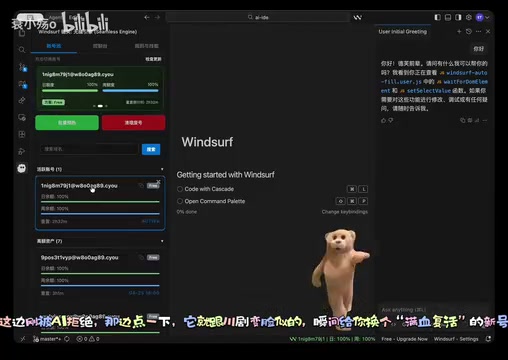
To use an analogy, it's like Sichuan opera face-changing — one second you're the "broke user" being rejected by AI, the next you've transformed into a fully-powered "VIP member." The Windsurf editor even thinks you've been using the same premium account the whole time, completely unaware of the switch happening behind the scenes.
Use Cases and Practical Value of the Windsurf Account-Switching Plugin
Who Needs This Plugin Most?
- Heavy AI-assisted programming users: Those who make extensive daily use of Windsurf's AI features and find the free credits nowhere near enough
- Multi-project developers: Those maintaining multiple projects simultaneously with consistently high AI call frequency
- Developers in the learning phase: Those leveraging AI assistance to learn programming who don't want credit limits interrupting their learning rhythm
- Budget-constrained indie developers: Those who aren't ready to pay for a subscription but can't live without an AI programming assistant
Actual Experience Improvements
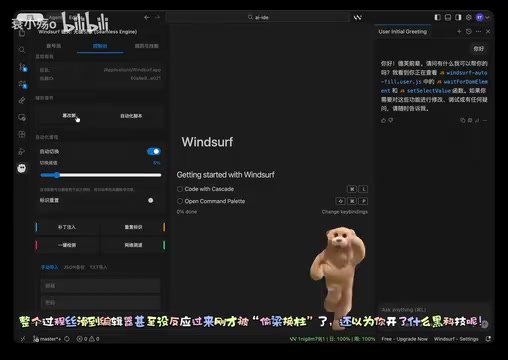
The most intuitive benefit is: your coding flow is no longer interrupted by insufficient credit notifications. For developers, flow state is extremely precious — once broken, it often takes 15 to 30 minutes to get back into the zone. This is also why IDEs and development tools increasingly emphasize a "distraction-free" experience — from full-screen Zen mode to notification silencing, everything is designed to protect developer focus. The value of this Windsurf multi-account switching plugin lies not just in saving time on a few manual operations, but in protecting developers' focus and creativity.
Usage Considerations and Rational Thinking
While this plugin excels in terms of experience, there are a few things to keep in mind before using it:
-
Compliance issues: Using multiple accounts may violate Windsurf's Terms of Service, with the risk of account suspension. It's advisable to carefully read the relevant agreements before use. In fact, most SaaS service Terms of Service explicitly prohibit a single user from registering and using multiple free accounts to circumvent usage limits — this behavior is typically classified as "Service Abuse." Platforms usually detect multi-account behavior through technical means such as Device Fingerprinting, IP address tracking, and browser fingerprinting. Once detected, consequences may include permanent banning of all associated accounts and IP address blacklisting. From a software ecosystem perspective, the design intent behind free credits is to let users experience product value before converting to paid users. Large-scale free credit arbitrage behavior damages the product's commercial sustainability and may ultimately lead platforms to tighten free policies, adversely affecting all users' experience.
It's worth further understanding that Windsurf's Freemium model has deeper economic logic in the developer tools space. The platform offers free credits for users to experience core value, and once users develop dependency on the tool, they naturally convert to paying customers. According to industry data, free-to-paid conversion rates for developer tools typically range between 2%-5%, meaning platforms need a large free user base to support their business model. Behind every AI call are real GPU inference costs — taking a GPT-4 level model as an example, the inference cost of a single code generation request is approximately $0.01-$0.06. For high-frequency users, daily AI call costs can reach several dollars. This is the fundamental reason why free credits must have limits: unlimited free usage is economically unsustainable. Understanding this helps developers view the business logic behind credit limits more rationally.
-
Security considerations: Multiple account credentials stored locally require confirming the plugin's own security and trustworthiness. Especially regarding Token storage — if the plugin's local storage isn't encrypted, or if the plugin itself has security vulnerabilities, account credentials could be stolen by malicious programs.
At the security architecture level, mature credential management solutions typically leverage OS-level secure storage mechanisms: Keychain on macOS, Credential Manager on Windows, and libsecret/GNOME Keyring on Linux. VS Code itself provides encrypted storage capabilities for extensions through the SecretStorage API, which calls these system-level key management services under the hood. If a plugin bypasses these mechanisms and stores Tokens in plaintext in configuration files or SQLite databases, any malware capable of reading the user directory could steal these credentials. Additionally, OAuth 2.0 Refresh Tokens typically have longer validity periods (days to months), and once leaked, an attacker can continuously access the account until the Token expires. Therefore, before using such plugins, it's recommended to check whether their source code is open-source, whether credential storage calls system-level encryption APIs, and whether there are community security audit records.
-
Long-term solution: If Windsurf truly adds value to your work, a paid subscription is the most reliable choice — it supports product development and avoids potential risks.
-
Alternative solutions: There are other free or low-cost AI programming tools available on the market — no need to put all your eggs in one basket. The current AI-assisted programming tool market is highly competitive: GitHub Copilot, launched through GitHub's collaboration with OpenAI and based on the Codex model, was the first AI programming assistant to achieve large-scale commercial adoption, with the individual plan at $10/month; Cursor is another AI-native editor also based on VS Code's core, supporting multiple models including GPT-4 and Claude, known for its powerful codebase understanding capabilities; there's also Amazon Q Developer (offering a free version), Tabnine (supporting local model deployment, suitable for teams with code privacy requirements), as well as Chinese alternatives like Tongyi Lingma and Doubao MarsCode. Each tool differs in model capability, context understanding depth, free credits, and pricing strategy — developers can combine tools based on their own needs and budget.
Conclusion: Find the AI Programming Solution That Works Best for You
This Windsurf seamless account-switching plugin genuinely solves a real pain point — the usage gap after free credits are exhausted. Through an automated account-switching mechanism, it simplifies what was originally a tedious manual process into a single click, greatly improving experience continuity.
However, tools are ultimately just tools. What developers should really think about is: how to find the AI programming solution that best fits their needs within a reasonable budget. Whether it's paying for a Windsurf subscription, trying other AI programming tools, or using plugins like this as a transitional solution, the ultimate goal is to make technology better serve our creativity.
Key Takeaways
- Windsurf free credit exhaustion is a common pain point for AI programming users, with manual account switching being tedious and inefficient
- The seamless account-switching plugin enables one-click automatic account switching without logging out, entering passwords, or copying Tokens
- The switching process is lightning-fast and smooth, preserving the editor's work state and protecting developer flow
- Using multi-account plugins requires awareness of compliance risks and account security issues
- In the long run, paid subscriptions or alternative tools are more reliable solutions
Related articles
 Tutorials
ChatGPT Plus Subscription Guide: Are GPT-5.5, image-2, and Codex Worth the Upgrade?
A detailed look at ChatGPT Plus features — GPT-5.5, image-2, and Codex — with a Plus vs Pro comparison and a complete step-by-step subscription guide for users outside the US.
 Tutorials
Harness AI Engineering in Practice: Using Claude Code to Master Enterprise-Level E-Commerce Development
Deep dive into Harness AI Engineering: master enterprise e-commerce development with Claude Code using the Rules, Skills, Wiki, and Changes framework.
 Tutorials
Cursor + Codex Dual-IDE Collaboration: A Practical Methodology for Open-Source Project Customization
A complete methodology for open-source project customization based on real-world experience, detailing the Cursor+Codex dual-IDE workflow, seven-stage process, MVP validation, and AI source code reading techniques.