Why Claude Prompt Caching Quietly Fails on Bedrock: Five Traps

Claude prompt caching on Bedrock fails silently—five common traps make you pay full price or more.
Bedrock prompt caching failures are silent: requests return 200 but input tokens are recomputed at full price plus a 25% cache write premium. Based on CacheCanary's investigation, the article identifies five recurring failure modes: cache points not advancing in the agent loop; no second cache point after wide tool fan-out, exceeding the roughly 21-22 block lookback limit; per-request content placed before the cache point; cache points vanishing after library upgrades or inference profile ARN switches; and streaming reconstruction altering history structure. It provides detection methods, fixes, and CloudWatch monitoring advice.
Introduction: When the Cache Disappears, the Bill Doesn't Lie
Running Claude agents on Amazon Bedrock, prompt caching can stop working without you noticing—no errors, no unusual status codes, every request returns 200. But the cost is real: you're paying full price to recompute input tokens, plus a 25% cache write premium.
According to Datadog, as of March 2026, 69% of the input tokens tracked across its customers are system prompts: instructions, policies, and tool descriptions sent over and over. Prompt caching is the key mechanism that brings that cost down to roughly a tenth. Yet the author of a tool called CacheCanary, after investigating Bedrock caching issues across a wide range of agent frameworks, found that five failure modes keep recurring. This article breaks down the cause, detection method, and fix for each one.
What Is Prompt Caching? Why Is It So Fragile?
Bedrock's prompt caching lets you reuse the beginning of a request—your instructions, tool list, and early conversation. You mark the end of the reusable content with a cache point, and the next request hits the cache only if two conditions hold: everything before the cache point is byte-for-byte identical, and Bedrock can find the previous cache entry.
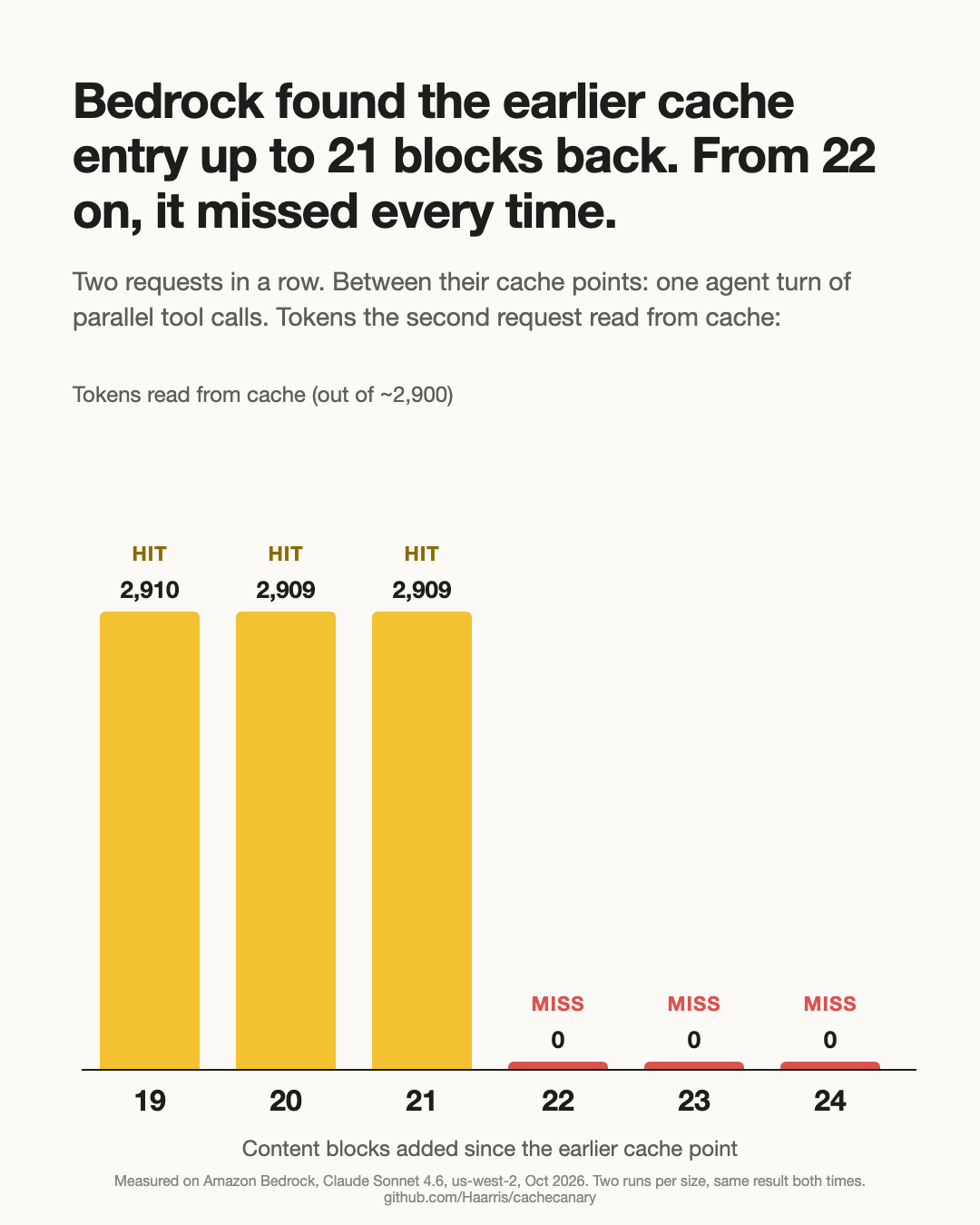
Any failure produces no error. The request completes as usual—you just pay full price for input tokens again, plus the 25% cache write fee. AWS documentation explains the caching rules, but the one that matters most for agents—"Bedrock looks back for old cache entries about 20 content blocks"—is only stated vaguely as "about 20." The author pinned this boundary down empirically to between 21 and 22 content blocks.
A content block is the smallest unit in all the counting logic here. In the Anthropic/Bedrock Messages format, a message's content is an array, and each element is one content block: a piece of text, a tool_use call, a tool_result, an image, or a thinking block from extended thinking. The key difference from Anthropic's own API is how they're counted—on the Anthropic API, a run of consecutive tool calls in an assistant turn is treated as one logical position; on Bedrock, every tool_use and every tool_result counts individually toward the lookback distance. Understand this and it's easy to see why a single turn with ten parallel tool calls consumes over twenty blocks, pushing the old cache point out of reach. Whenever you're debugging cache hit rates, the first step should always be counting how many blocks have accumulated after the cache point.
Trap One: Cache Point Doesn't Advance During the Agent Loop
In an agent loop, most new tokens come from tool calls and tool results, not user messages. If the cache point sits only on the last user message, it stays at the initial prompt position while tool history grows behind it.
This is exactly what happened in Cline 4.1.0. Its Bedrock code placed the cache point on the last message with role "user," but in its message format tool results have their own role. As a result, the cache point never moved past the opening prompt. Users would see one cache write at the start of each session and nothing after (4.0.12 worked fine).
How to detect it: In a long agent session, cache reads should grow incrementally with each call. If reads stop growing while input tokens keep climbing, the cache point isn't moving. The fix is simple: place the cache point on the last content block of the most recent message, regardless of its role.
Trap Two: No Second Cache Point After Wide Tool Fan-Out
When looking for old cache entries, Bedrock only searches forward a fixed number of content blocks from the new cache point. The author measured this boundary: with 21 blocks added since the old cache point, the next request still hits; with 22, it misses every time. Every tool call and every tool result counts as one block, so a single turn with ten-plus parallel tool calls can push the old cache entry out of reach.
pydantic-ai observed the same boundary in its own tests. After 10 parallel calls (21 new blocks), the next request read 6,827 tokens from cache; after 11 calls (23 blocks), the read was 0 and it rewrote 7,534 tokens. A Strands user reported a turn with 18 calls resulting in 0 reads and 134,082 writes. The same request doesn't fail on Anthropic's own API, because there a run of tool calls counts as one position—Bedrock counts each one separately.
How to detect it: Look at the call right after the widest turn. If reads are zero there while reads are normal elsewhere, this is your problem. The fix: when a turn adds more than about 18 blocks, keep the previous cache point. Bedrock allows up to four cache points per request, so there's usually room.
Trap Three: Placing Per-Request Content Before the Cache Point
Caching is prefix matching. A date, request ID, username, or per-item instruction that appears before the cache point makes every request unique—every call writes the cache, and none read it.
An AWS sample app demonstrates this clearly. Across 28 calls reviewing the same document, CloudWatch recorded 196,680 tokens written to cache and 0 reads, because the cache point was placed after each item's own instructions. Moving it after the document, the second item immediately became a 4,624-token read. Subtler versions exist too: in one Mastra configuration, storing messages as a Postgres jsonb column caused attribute keys to reorder on read, changing the prompt bytes and breaking the cache.
How to detect it: Run the same request twice and compare the bytes before the cache point—they must be identical. The fix: put dynamic text after the last cache point, and serialize structured data in a stable order.
Prefix matching is the underlying premise of prompt caching: the cache key is determined by the entire byte sequence before the cache point, and if even one byte differs, the whole cached segment can't be reused. This means that not just explicit dynamic fields (dates, request IDs, usernames) break the cache—runtime serialization differences are just as fatal: dictionary/object key ordering, jsonb read order, float formatting, and whitespace or newline differences all change the bytes. So keeping dynamic content after the last cache point is a basic discipline; for structured data, fix the key order before serialization (e.g., explicitly sort fields, use deterministic encoding) to avoid the same logical content producing different byte representations due to language or library defaults.
Trap Four: Cache Points Silently Disappear After a Library Upgrade
Most teams don't write cache points by hand—the framework or gateway adds them, and usually only for model IDs it recognizes. Upgrade the library, switch to a new model ID, or apply an inference profile ARN, and the cache point can silently vanish.
This is exactly what happened in the LiteLLM incident mentioned earlier: an upgrade changed where the system prompt sits in Bedrock requests, and Claude Code traffic's cache hit rate dropped from about 90% to 25-45%, with daily spend rising 2-3x over six days before it was pinpointed. It's not an isolated case—MLflow's AI Gateway flattens Bedrock chat messages into plain strings and never sends cache points; LangChain's openwiki found its caching middleware skipped inference profile ARNs.
How to detect it: If both cache reads and cache writes are zero, no cache point reached Bedrock. Check this after every library upgrade and model change.
An inference profile ARN is an identifier in Bedrock used for cross-region routing or specifying a particular model variant. Many frameworks' caching logic decides whether to insert a cache point based solely on the model ID string it recognizes; when the request's model field becomes an inference profile ARN, the match fails and the cache point silently disappears. Since the request still returns 200 with no unusual logs, the problem only surfaces through metrics: CacheReadInputTokenCount and CacheWriteInputTokenCount both drop to zero. So after any library upgrade, switch of model ID, or move to an inference profile, do a baseline comparison and make the cache read/write ratio part of your release checklist.
Trap Five: Streaming Reconstruction Alters History Structure
When you stream a response and save it back to the conversation, the library reconstructs the assistant message from the individual chunks. If the reconstruction differs from a single text segment, the history structure changes.
In LangChain.js, streaming with extended thinking enabled on Bedrock loses text block indices, causing one answer to be saved as hundreds of separate text blocks. This pushes the next cache point far past the lookback limit.
How to detect it: Count the content blocks in saved assistant messages. A single reply should be one text block, not hundreds.
How to Check Your Own Account
Two CloudWatch metrics in the AWS/Bedrock namespace tell you most of what you need: CacheReadInputTokenCount and CacheWriteInputTokenCount, broken down by model ID. Under steady traffic, reads should be many times writes. High writes with near-zero reads means caching is on but keeps missing—which is more expensive than not caching at all. Both near zero means no cache points are being sent at all.
If your hit rate drops during busy hours while the prompt stays the same, check cross-region inference. AWS notes that during high-demand periods its routing "may result in increased cache writes," because requests can land in regions that don't hold the cache copy.
To understand why, enable Bedrock model invocation logging. The logs record cache counts per call along with the caller identity.
Cross-region inference routes requests across regions to handle capacity or latency. Caching is inherently region-specific: the cache copy lives in the region that processed the request, and if a subsequent request is routed to another region, it may not find the original cache even if the prompt is identical. AWS documentation also notes that such routing during high-demand periods "may result in increased cache writes." So when hit rates dip during busy hours while prompts stay the same, beyond checking cache point placement and block counts, include routing behavior in your investigation—pin a region if necessary, or watch how the cache read/write ratio distributes over time.
What's Still Missing
Two things. First, cache diagnostics in Bedrock: Anthropic's Console can now explain why a request missed the cache, but Bedrock cannot. Second, precise lookback numbers in AWS documentation rather than "about 20"—because one more or one fewer tool call determines whether an agent pays 0.1x or 1.25x the price for its history.
Conclusion
Prompt caching failures are silent. They don't throw exceptions, don't return error codes—they just leave traces on the bill. The five traps above cover the full chain from cache point placement, tool fan-out, prompt structure, library behavior, to streaming reconstruction. The core advice is just one thing: continuously monitor the cache read/write ratio under steady traffic, and treat cache points as a runtime resource that needs active management, not a one-time configuration.
One-line Summary
Claude prompt caching on Amazon Bedrock fails silently, and five common traps make you pay full price or more.
Paragraph Summary
The article points out that Bedrock prompt caching failures are silent: requests still return 200, but input tokens are recomputed at full price plus a 25% cache write premium. Based on CacheCanary's investigation, the author identifies five recurring failure modes: the cache point doesn't advance with tool history in the agent loop; no second cache point is added after wide tool fan-out, exceeding the roughly 21-22 content block lookback limit; per-request content (dates, request IDs, jsonb attribute order) is placed before the cache point; cache points silently disappear after a library upgrade or a switch to a new model ID or inference profile ARN; and streaming reconstruction of assistant messages alters history structure. The article provides corresponding detection methods and fixes, and recommends continuously monitoring the cache read/write ratio via CloudWatch's CacheReadInputTokenCount and CacheWriteInputTokenCount metrics.
Related articles

Should U.S. College Fraternities Be Banned? A Researcher's Incisive Observations
Why not just ban U.S. college fraternities? A researcher finds the key resistance comes from decision-makers' own fraternity identities and schools' "willful ignorance."

Microsoft Discovery: Accelerating Scientific Discovery with AI Agents
Microsoft's Discovery platform runs specialized AI agents to help researchers screen and prioritize the most promising compounds and experimental paths, reducing experiments and accelerating scientific discovery.

Cambridge Heavy Industries Secretly Develops Desktop-Scale Nuclear Fusion Device
Cambridge Heavy Industries is secretly developing a desktop-scale laser-driven nuclear fusion device, targeting the equipment supply market for fusion power plants. This article analyzes its miniaturization technology path, commercialization logic, and unique positioning in the fusion startup wave.