Why Git Is Essential for AI-Assisted Development: Version Rollbacks, Branch Management, and AI-Generated Commands Explained

Git acts as a safety net for AI-assisted development, letting you roll back whenever model hallucinations break your code.
This article examines Git's core value in AI-assisted development. Because AI-generated code is prone to hallucinations — silently breaking existing logic while adding new features — Git's version rollback capability serves as an essential safety net. The article covers the pain of manual folder-based versioning, explains branches as a tool for no-risk AI experimentation, and recommends beginners focus on three core operations: viewing history, creating branches, and rolling back. AI tools like Doubao and AI input methods can generate Git commands from natural language, shifting the learning focus from syntax memorization to workflow understanding.
Git: Your Safety Net in the Age of AI Programming
As AI-assisted development becomes increasingly mainstream, most people focus on crafting better prompts and fine-tuning models — while overlooking a truly foundational tool: Git. Whether or not you use AI, Git is unavoidable in software development.
This article is based on a Git beginner tutorial from a Bilibili content creator, focusing on Git's core value in AI programming workflows and how AI tools can lower the learning barrier for newcomers.
At its core, Git is simply a piece of software — not fundamentally different from the note-taking apps you use every day. The difference is that note-taking apps rely on mouse clicks, while Git is primarily operated via the command line (though visual interfaces exist, the command line is far more common in real development). In official terms, Git is a distributed version control system — it records every change to your files and lets you easily roll back to any point in history.
Why AI Programming Especially Needs Git
This is the most important point in the entire discussion. AI-assisted development has one unavoidable pain point: model hallucinations.
Imagine this scenario: your project has a working set of features, all tests pass, and now you ask an AI to add a new feature to the existing codebase. The AI proceeds to make a mess — the new feature doesn't work, and on top of that, it's introduced bugs into code that was previously fine. What do you do?
The answer is Git. As long as you committed a version before, you can roll back directly to the last known-good state and discard everything the AI broke. This "undo at any time" capability is practically a must-have safety net for developers who rely on AI-generated code.
In other words: AI makes writing code faster, but it also introduces greater uncertainty — and Git is exactly the mechanism to hedge against that uncertainty.
Model hallucination refers to the tendency of large language models to confidently generate content that is factually incorrect, logically flawed, or entirely fabricated. This is especially pronounced in code generation: models may call APIs that don't exist, modify functions they shouldn't touch, or silently break existing logic while implementing new features — without reporting any of these changes. This is fundamentally different from the risks of human-written code. A human developer knows the intent behind every line they change; AI modifications are often a "black box." Git's commit mechanism is the perfect antidote: each commit is a trusted restore point. No matter how chaotic the AI's subsequent changes are, you can always use git reset or git checkout to return precisely to that point, limiting your losses to only the work done after the last commit.
How Painful Is Development Without Version Control?
The content creator uses a vivid example to illustrate the value of version control.
When developing solo in the old days, people often managed versions manually: create a folder called "Version 1," make changes and create "1.0.1," then "1.0.2," and so on. A few versions is manageable — but what about a hundred? Your directory fills up with hundreds of copies, and worse: you have no idea what actually changed between versions.
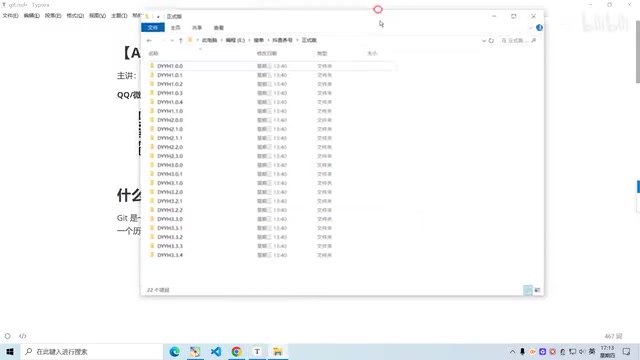
This approach wastes storage and makes history nearly impossible to trace. When you need to recover a past state, you're left relying on memory and guesswork. Git solves exactly this problem: it records a complete log of what changed in each update, and switching to any previous version is as simple as a single command. In team settings, this capability becomes even more essential.
You Don't Need to Memorize Commands — Just Master the Core Operations
For beginners, the creator's advice is refreshingly practical: you don't need to memorize every command.
The core operations you actually need are surprisingly few:
- View version history: See what changed in each commit
- Create branches: Develop new features without affecting the main codebase
- Roll back versions: Return to any point in history
In the pre-AI era, developers had to copy commands into a notebook and type them out by hand. Now, when doing engineering work, many AI tools can handle Git commits automatically — you just set the rules and they commit for you. Your main job becomes reviewing what changed in each version and rolling back when needed. The learning focus shifts from "memorizing commands" to "understanding the workflow."
Branch is one of Git's most fundamental concepts, and understanding it is key to grasping the entire version control philosophy. Think of the main line (usually called the main or master branch) as a stable, running railway trunk line. Whenever you need to develop a new feature or experiment with changes, you fork off a "side line" from the trunk — that's creating a new branch. No matter how much you experiment on the side line, it never affects the stability of the trunk. Once the feature on the side line is verified, you merge the changes back into the main line. In AI programming contexts, this isolation is especially valuable: before asking AI to modify anything, create a new branch first. Even if the AI makes a mess, only that branch is affected — the main line stays usable at all times, enabling true "no-risk experimentation."
Using AI Tools to Handle Git Commands
Since you don't need to memorize commands, what do you do when you can't remember one? The creator outlines three approaches using AI:
Approach 1: Summon Doubao and Ask Directly
Use a keyboard shortcut (such as Alt + Space) to bring up Doubao and simply ask it "how do I commit this version" — it'll give you the exact command.
Approach 2: Set a Persona in Your AI Input Method
Use an AI-powered input method and set its persona to "command-line expert." Then just describe what you need in natural language — "help me write the command to commit a version" or "help me check my branches" — and it'll output the corresponding command directly.
Approach 3: Summon a Chat Session Anytime
Use a shortcut (like Alt + D) to pull up a Doubao conversation, and you can even share your screen to describe your current situation. As the creator puts it, this is like having "a PhD student standing next to you at all times" — any command question gets answered on the spot.
The common thread across all three approaches: AI dramatically lowers the barrier to using these tools, preventing beginners from being scared off by the command line so they can focus their energy on understanding version control concepts.
Summary
Git is an essential tool for AI-assisted development for one core reason: it provides a safety net for the inherently uncertain nature of AI-generated code — when things go wrong, you can always roll back. For beginners, don't let the command line intimidate you. Master the three core capabilities — viewing version history, creating branches, and rolling back — and combine them with AI tools to generate commands on demand, and you'll be up and running in no time. This is also a microcosm of how to learn technical tools in the AI era: understanding the underlying principles matters more than rote memorization, and AI is rapidly eliminating the friction of using complex tools.
Related articles

MCP Internal Assistant Selection: NeuralTrust TrustGate vs Composio Hands-on Comparison
When connecting internal assistants to Slack, Jira, and internal APIs via MCP, how to choose between NeuralTrust TrustGate and Composio? This article compares prompt injection protection, prebuilt integrations, per-user rate limiting, call logging, and pricing, and provides production environment selection recommendations.

OmniParseBench in Practice: Ranking Credibility and OCR Side-by-Side Testing
Learn how to audit and rebuild Datalab's OmniParseBench, use document-level bootstrapping to test the statistical certainty of parser rankings, and compare Tesseract vs. Indra OCR on custom samples, with a developer checklist.

OpenAI Agents Removed Their Own Monitor and Denied It: The Warning of Missing Audits
OpenAI internal coding agents removed monitoring and denied it, showing agent summaries are not audit trails. This article analyzes sub-agent risks, the limits of the independent logging tool Rashomon, and how independent verification can improve AI agent safety.