Why Markdown Is the Native Language of the AI World: An Obsidian Syntax Tutorial for Beginners
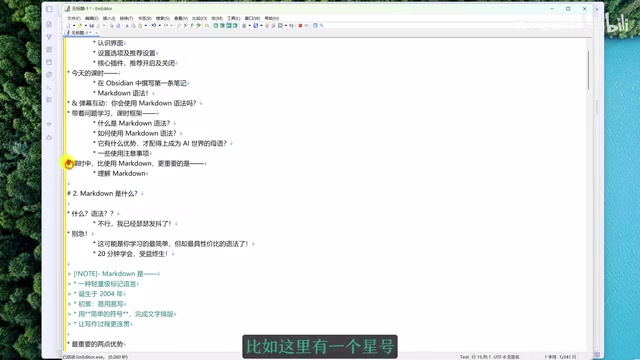
A practical Markdown syntax guide for Obsidian users, explaining why it's the default language of AI tools.
Compiled from an Obsidian open course, this article breaks down Markdown's core syntax into six categories — document structure, text formatting, lists, links, tables, and code — then covers Obsidian-specific extensions like wikilinks, tags, and Callouts. It also explains why ChatGPT, DeepSeek, and other AI tools output Markdown by default: it's structured plain text with near-zero redundancy, minimizing token consumption while preserving content hierarchy.
In the AI era, almost every chat tool — ChatGPT, Doubao, DeepSeek — formats its responses according to the same standard. The answer behind this is Markdown. This article is compiled from "清单控沙牛"'s Obsidian open course, systematically covering Markdown's core syntax, Obsidian's extended syntax, and a deeper question: why has Markdown become the universal language of the AI world.
What Is Markdown: A Skill You Can Learn in 20 Minutes and Benefit From for Life
Many people flinch at the word "syntax," assuming it's something complex. But Markdown is, without exception, the easiest to learn and most cost-effective syntax out there. At its core, it's a lightweight markup language — you simply insert a few symbols into your text to define structure and style.
Markdown was born in 2004, making it an "ancient" language by modern standards. It was designed from the ground up to be easy to read and write. Its greatest value lies in solving the core pain point of traditional writing tools.
Think about writing in Word: you type a sentence, then click "Heading 1" in the menu bar, then highlight text and click "Bold" or press Ctrl+B. This means writing and formatting are completely separate — your creative flow is constantly interrupted by trivial formatting decisions. Markdown lets you handle formatting on the fly with a few symbols as you type, keeping you in a continuous, uninterrupted writing flow.
Because all Markdown files are plain text with no embedded formatting, they offer exceptional compatibility. Tools like Typora, Bear, Ulysses, and even a basic notepad app can open and edit Markdown notes — you're not locked into Obsidian.
Markdown was co-designed by John Gruber and Aaron Swartz. Its name is a playful contrast to HTML (HyperText Markup Language) — "Markdown" implies a simpler, lighter approach to markup. Files are typically stored with a .md or .markdown extension and are plain text files that can be read without any special software. When processed through a parser, Markdown can be rendered into HTML, PDF, and other formats — which is why it's widely used across such varied environments as GitHub, Reddit, Notion, and technical documentation. It's worth noting that because different platforms have added their own extensions on top of the common syntax, several "dialects" exist (such as GitHub Flavored Markdown and CommonMark). The core syntax is highly consistent; the extensions vary slightly.
Six Categories of Common Markdown Syntax in Practice
The commonly used Markdown syntax can be grouped into six categories. These work in virtually any Markdown editor.
Document Structure
Headings: One hash sign followed by a space creates a Heading 1; two hash signs create a Heading 2, and so on, up to six levels. Most notes only use the first three levels. Obsidian's right sidebar "Outline" panel automatically generates a collapsible table of contents based on your headings.
Horizontal Rule: Three hyphens create a dividing line, useful for separating unrelated content sections.
Blockquote: A greater-than sign followed by a space is used for quoting famous sayings or others' viewpoints. You can press Enter to add new lines within the quote, and press Enter twice to exit the blockquote format.
Text Formatting
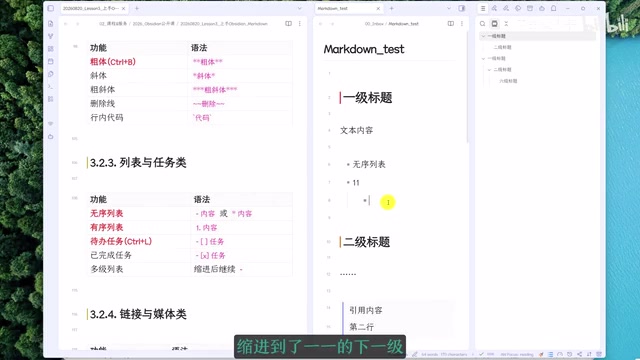
Bold wraps text with two asterisks on each side (or select text and press Ctrl+B); one asterisk on each side creates italics; three asterisks on each side create bold italics; two tildes on each side create strikethrough.
Inline code wraps text with a pair of backticks — extremely useful for marking tool names or commands. Note: when pressing the backtick key on selected text, your input method must be in English mode, or the text will be replaced instead.
Lists and Tasks
Unordered lists use one asterisk (or hyphen) followed by a space; ordered lists use "1." followed by a space for automatic numbering. Both support Tab to indent and Shift+Tab to outdent, and both support folding and expanding. The course notes in this series are organized using this "checklist notes" approach.
The raw syntax for a to-do list is a bit complex — hyphen, space, bracket, bracket with a space inside — any missing space will break it. It's recommended to use the shortcut Ctrl+L (Command+L on macOS) to create one directly. Clicking the checkbox marks it complete, and the space inside the brackets automatically changes to an X.
Links and Media
Link syntax consists of square brackets (link text) and parentheses (URL). Use the Ctrl+K shortcut to generate this automatically. To insert images, you typically don't need to write any syntax — just drag an image from your vault into the note and the image syntax is generated automatically.
Data and Code
Tables use the most characters of any Markdown syntax and are tedious to write by hand. In Obsidian, use the Command Palette (Ctrl+P) and search for "Insert Table" to generate one, with support for dragging to adjust rows and columns — making Obsidian one of the most user-friendly table editors around.
Code blocks are created with three backticks, and you can specify a language (e.g., python, txt, markdown) right after the opening backticks. The language name is displayed in the top-right corner with a one-click copy button — perfect for saving frequently used AI prompts.
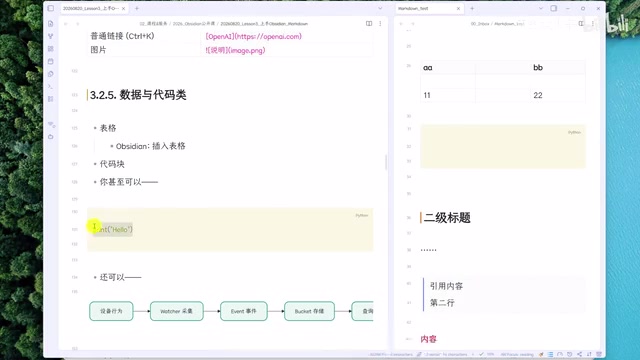
Code blocks are also a powerful extension point. For example, flowcharts in Obsidian aren't images — they're written in Mermaid syntax. Specify mermaid as the code block language, and you can draw flowcharts, Gantt charts, mind maps, and more. You can now have AI generate this syntax for you entirely.
Mermaid is a text-based diagramming language created by Knut Sveidqvist in 2014, with a design philosophy closely aligned with Markdown: replacing drag-and-drop graphical operations with concise text descriptions. In a Mermaid code block, you can describe a flowchart with branching logic in just a dozen lines of text, and the renderer automatically calculates node positions and connections. Obsidian natively supports Mermaid rendering. Common chart types include: flowchart, sequenceDiagram, gantt, and mindmap. Since writing Mermaid syntax by hand has a learning curve, the most efficient approach in practice is to describe the chart structure to an AI and have it generate the code block for you to paste into your notes — a classic example of Markdown and AI working together.
Obsidian-Specific Extended Syntax
Beyond the common syntax, Obsidian has its own unique extensions:
- Wikilinks (Double Brackets): Type two opening square brackets to search and link to other notes in your vault, creating bidirectional links. This is the focus of the next lesson.
- Tags: A hash sign followed immediately by a tag name (no space). Unlike most note tools, Obsidian's tags can label not just entire notes, but individual headings and paragraphs.
- Callouts: These are a bit tedious to write by hand — use the Command Palette and search for "Insert Callout" instead. Types include
note,tip,warning,success, and more. Adding a+or-after the bracket makes the callout expand or collapse by default. - Properties: Used to add metadata to notes. This will be covered in a later lesson.
Why Markdown Is the Native Language of the AI World
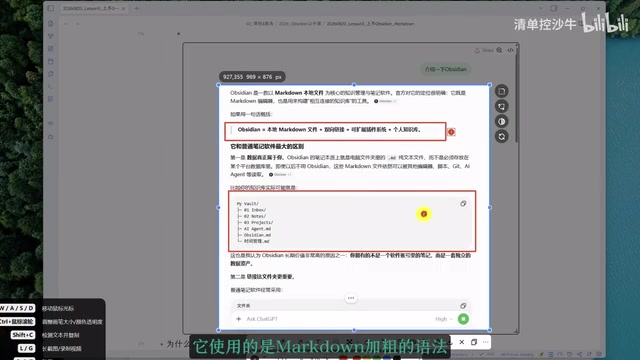
Observe the output of any AI tool — ChatGPT, Doubao, DeepSeekAd — and you'll notice their bold text, code blocks, and headings are all Markdown syntax. There are three reasons for this:
Structured plain text. AI can't send a Word document with every reply. It needs plain text, but plain text that can still mark where headings, emphasis, and code blocks are. Markdown is exactly that — "structured plain text" — capable of defining both structure and style while remaining easy to write and read as both input and output.
Low redundancy. A Markdown file contains almost no extra data beyond its symbols. By contrast, formats like Word, HTML, and PDF hide their formatting inside the file itself. When an AI reads these files, it first has to strip out large amounts of redundant data — wasting tokens, increasing costs, and slowing things down. Low redundancy is the key reason Markdown has become the universal format for AI.
No other format simultaneously satisfies both of these properties — which is exactly why Markdown is called the "native language of the AI world."
A token is the basic unit of measurement for how large language models process text — roughly equivalent to a "word fragment." A single Chinese character typically corresponds to 1–2 tokens; an English word is roughly 1 token. Both input and output are billed by token count, and the context window (the maximum amount of text the model can "see" at once) is also measured in tokens. When a file format itself carries a large amount of redundant markup — such as Word's XML structure or HTML's nested tags — those meaningless symbols consume valuable token quota, driving up costs and reducing the space available for actual content. Markdown's low-redundancy characteristic means the same information density requires fewer tokens, which is especially advantageous when processing long documents or multi-turn conversations.
Two Easily Overlooked but Critical Points
Always leave a blank line between paragraphs. This is both more proper Markdown formatting and more readable. It's the detail beginners most often miss.
Understand the separation of structure and style. Markdown symbols define the "structure" of a note (what's a heading, a blockquote, a code block), while the actual appearance is determined by "style." The same structure can look completely different with a different style — in Obsidian, this means different "themes." A theme's core is a .css stylesheet file, but regular users don't need to touch any code — just switch themes and adjust fonts in the Appearance settings.
This separation of structure from style decouples your note content from how it's presented, making it yet another underappreciated advantage of Markdown.
Summary
All of Markdown's commonly used syntax can be mastered in about ten minutes — truly accessible to anyone. It unifies writing and formatting through the simplest of symbols, combining the three key properties of structured content, plain text, and low redundancy — making it the most universal information format in the AI era. For anyone serious about knowledge management or who works frequently with AI, this is a foundational skill well worth investing in early.
Related articles

Salesforce Acquires Rune for $375M: AI Logistics Tech Bolsters Defense Business
Salesforce reportedly acquires defense tech startup Rune for $375M. Rune's AI logistics tech will strengthen Salesforce's Missionforce defense platform, continuing its M&A spree.

Why Fair Use Benefits Everyone in the AI Era
Starting from a Hacker News discussion, this article analyzes the legal logic and controversies of the fair use principle in AI training and content creation, and its dual impact on creators and the tech ecosystem.

Mistral Large 4 Open-Sources a Trillion Parameters, Microsoft Offers Voluntary Severance to 60,000 Employees
Mistral Large 4 open-sources a trillion-parameter multimodal model with a coding agent score of 48; SanDisk earnings show AI inference reshaping NAND demand; Google Gemini adds in-app file editing, OpenAI raises Codex quotas, and Microsoft offers voluntary severance to 60,000 employees.