Windsurf AI Editor: A Practical Guide to Organizing Thesis Materials for Your Final Year Project

Use Windsurf AI editor to automate thesis material organization in minutes instead of days
This article demonstrates how to use the Windsurf AI editor to automate thesis material organization for final year projects. By preparing three core materials — a sample paper, proposal report, and thesis template — Windsurf can automatically extract reference lists, feature checklists, technology selections, and thesis outline structures in just minutes, dramatically reducing what traditionally takes hours. The guide also covers environment configuration, API key setup, and operational tips, emphasizing that AI serves as a framework-building tool while core thinking remains a human responsibility.
Why Thesis Material Organization Matters
The final year project and thesis writing is a tough battle every college student must face. Many students rush to write the body text right away, only to find halfway through that their references are a mess, their outline structure is chaotic, and their technology choices contradict each other — the time spent reworking ends up being longer than starting from scratch.
The core purpose of material organization is to lay a solid foundation before you start writing: sorting out references, determining the thesis framework, and clarifying functional requirements and technical roadmap. The traditional approach involves manually browsing sample papers and extracting notes one by one, often taking hours or even days. With the Windsurf AI editor, this process can be compressed to just a few minutes.
This article provides a hands-on demonstration of how to use Windsurf to complete thesis material organization — the first step in the entire thesis writing pipeline and a critical factor that determines the efficiency of subsequent writing.
Setting Up the Windsurf AI Editor Environment
Tool Checklist
Before getting started, make sure your development environment is ready:
- Windsurf Editor: The core AI editor responsible for interacting with large language models and driving automated tasks at each step
- Python 3.8+: The base environment for running backend scripts
- Node.js 16+: The runtime environment for frontend-related dependencies
- Docker: Provides a containerized startup environment to ensure components run in isolation
- JDK 8 (optional): Install based on your project's specific tech stack requirements
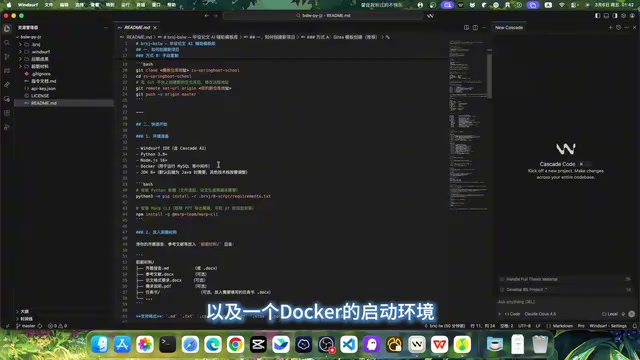
About the Windsurf Editor
Windsurf is an AI-native code editor developed by the Codeium team, deeply customized on top of VS Code's open-source architecture, with a built-in AI agent system called Cascade. Unlike traditional AI code completion tools, Windsurf's Cascade can understand the complete context of a project — including file structure, code dependencies, and user intent — enabling it to execute complex cross-file tasks. It supports integration with multiple large language models (such as GPT-4o, Claude, etc.), allowing users to drive the editor through natural language conversations to perform automated operations like code generation, document processing, and file management. It's precisely this agent-based interaction model that makes Windsurf suitable not only for software development but also for creative applications in structured document generation scenarios like thesis writing.
Why Docker Is Needed
Docker is an OS-level virtualization technology that packages applications and all their dependencies into standardized containers, ensuring consistent execution across any environment. In the thesis writing workflow, Docker's role is to isolate different components — Python scripts, Node.js services, databases, etc. — in their own containers, avoiding compatibility issues caused by local environment differences (such as different operating systems or software versions). Simply put, Docker is like a standardized "shipping container" — regardless of whether you're using Windows, macOS, or Linux, as long as Docker is running, the programs inside will work correctly.
A common pitfall to watch out for: Docker must be started before you begin operations. It's also recommended to install and verify Python and Node environments in advance — don't wait until you're running the actual workflow to discover environment errors.
Three Core Materials Needed for Material Organization
Whether you're helping someone else or writing your own thesis, the material organization phase requires three documents:
- Sample Paper: A well-formatted reference thesis from which the AI will learn thesis structure and writing style
- Proposal Report: A completed research proposal containing background, objectives, and references
- Thesis Template and Formatting Requirements: Your university's specified formatting standards, fonts, sizes, and other normative documents
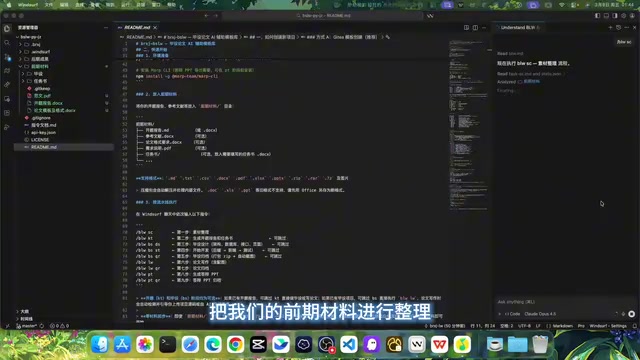
Place these three files in the "前期材料" (preliminary materials) folder within your project directory. After opening the project in the Windsurf editor, simply drag and drop files into the corresponding folder — the operation is very intuitive.
Overview of the Thesis Writing Automation Workflow
The entire thesis completion process is broken down into a clear pipeline, with each step having defined inputs and outputs:
- Material Organization (the focus of this article) — Extract structured information from raw materials
- Generate Proposal Report and Task Brief — Skip if you already have these
- Project Design — Concrete implementation of system functionality
- Thesis Writing — Complete the body text based on all previous materials
This pipeline-style decomposition approach is well worth adopting: breaking down the overwhelming task of "writing an entire thesis" into four manageable sub-tasks. Completing each step produces visible intermediate results, making it easy to intervene and adjust at any point — preventing a cascade of errors from one mistake.
API Key Configuration Explained
Plagiarism Reduction and Literature Search: Two Optional External Tools
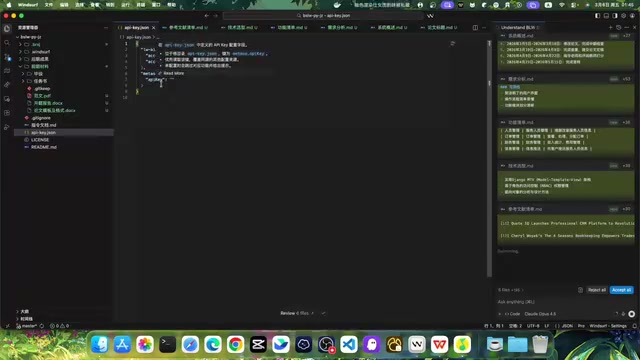
The project includes an api_key.json configuration file that supports integration with two platforms:
- 论文AIGC (Paper AIGC): A plagiarism reduction tool used after the thesis is completed to lower the detection rate of AI-generated content and reduce associated risks
- 密塔 (Mita): An academic literature search tool that can automatically retrieve and cite relevant papers when generating the proposal report
Understanding the Difference Between AIGC Detection and Traditional Plagiarism Checking
It's worth explaining the background of AIGC plagiarism reduction tools here. Traditional plagiarism checking (such as CNKI, VIP/Weipu, etc.) detects text overlap with existing literature databases, primarily to prevent copying. AIGC detection, however, is a newer method that emerged in recent years — it analyzes statistical features of text (such as vocabulary diversity, sentence structure, perplexity, and other metrics) to determine whether content was generated by AI. Currently, many universities in China have incorporated AIGC detection into their thesis review process, and a detection rate exceeding a certain threshold (typically 30%-40%) may result in the thesis being returned. Therefore, the purpose of plagiarism reduction tools is not only to lower traditional plagiarism rates but more importantly to reduce the probability of AI-generated features being identified through rewriting and polishing, making the text more closely resemble natural human writing style.
How Mita Academic Search Works
Mita is an AI-based academic literature search engine. Unlike traditional Google Scholar or CNKI searches, Mita supports programmatic API calls that can automatically return structured bibliographic information (including title, author, publication year, journal name, abstract, etc.) based on input keywords or research topics. In this workflow, when the AI needs to generate a reference list for the proposal report, it automatically searches for academic papers related to the thesis topic via the Mita API and generates reference entries according to citation format standards like GB/T 7714, eliminating the tedious process of manually searching multiple databases and formatting citations one by one.
Configure As Needed — No Need to Set Up Everything at Once
These two APIs don't need to be configured from the start. Handle them flexibly based on your actual situation:
- Already have a proposal report with complete references → Mita can be skipped
- Only doing material organization for now, not yet at the reduction stage → AIGC can be skipped
- Need AI to automatically generate the reference list in the proposal report → Mita API must be configured
- Need to reduce AI detection after the thesis is finalized → AIGC key must be configured
The recommended approach is to get the material organization running first, then add configurations as needed later — there's plenty of time.
Practical Steps for Material Organization
Step 1: Execute the Material Organization Command in Windsurf
In the Windsurf editor, input the material organization command following the first step of the pipeline. The AI model will automatically scan all documents in the "前期材料" folder, performing intelligent parsing and structured extraction.
The entire process runs fully automatically without additional intervention — just wait for the AI to finish processing.
Step 2: Review the AI-Generated Material Files
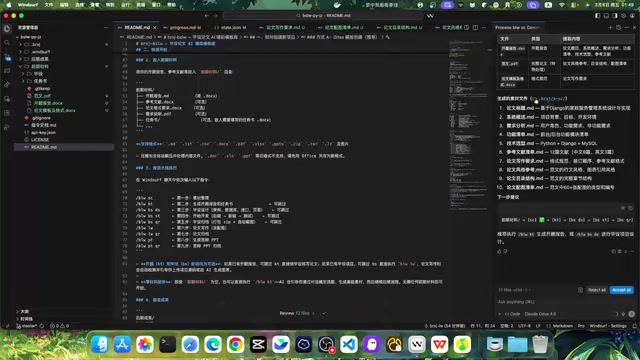
After material organization is complete, all results are saved in the .brxj-sc directory. The AI extracts and organizes the following content from your preliminary materials:
| Generated File | Description |
|---|---|
| Reference List | References extracted from the proposal report |
| Feature Checklist | Functional modules the system needs to implement |
| Technology Selection | The tech stack adopted by the project |
| Thesis Title | The confirmed thesis topic |
| Writing Style | Writing style learned from the sample paper |
| Thesis Outline Structure | Complete chapter outline |
| Figure/Chart List | List of diagrams and tables to prepare |
| Writing Requirements | Formatting and content specifications |
| System Overview and Requirements Analysis | Overall project description |
The Technical Principles Behind Structured Extraction
The core technology behind the material organization process is Structured Information Extraction, an important application area in Natural Language Processing (NLP). Large language models understand input documents semantically, identifying key entities (such as technical terms and feature descriptions), hierarchical relationships (such as chapter structures), and logical chains (such as requirement-to-feature mappings) within the text. They then convert this unstructured natural language content into structured data formats (such as JSON, Markdown tables, etc.). In the thesis material organization scenario, the AI needs to simultaneously process multiple documents in different formats (Word, PDF, etc.), cross-referencing and integrating information from them — this places high demands on the model's long-context comprehension and multi-document reasoning capabilities. This is also why choosing an AI editor like Windsurf that supports full project context is crucial — ordinary chat-based AI tools struggle to process multiple long documents at once while maintaining information consistency.
As you can see, the AI transforms a pile of scattered raw materials into well-organized, categorized material files that can be directly referenced during subsequent thesis writing.
Step 3: Review Results and Modification Tips
This step is crucial: the AI-generated material organization results are fully editable. If you feel certain content isn't accurate enough or want to adjust the direction, simply communicate with the AI through conversation in the editor — it's as natural as chatting with an assistant.
However, there's an important operational note:
- ✅ Click "Accept": Confirms the currently generated content, locks in the results, and moves to the next step
- ⚠️ No action is also fine: It won't affect subsequent workflow execution
- ❌ Never click "Reject": This will immediately clear all generated content, wasting all your progress
The safe approach is: review the content once, click accept if everything looks good; for parts you want to change, have the AI adjust them through conversation first, then accept once you're satisfied. In short, don't let your finger slip onto the "Reject" button.
The Practical Value and Limitations of AI Material Organization
With the Windsurf AI editor and this workflow, the thesis material organization phase has been shortened from hours or even days to just a few minutes. Tedious but necessary tasks like reference extraction, outline planning, and technology selection can all be efficiently completed by AI.
However, it's important to maintain a clear understanding: the real value of AI tools isn't to think for you, but to help you quickly build frameworks and organize materials, so you can spend the time saved on deep content refinement and innovative thinking. After all, the core competitiveness of a thesis still lies in your own understanding and insights.
Material organization is just the first station in the pipeline — subsequent project design and thesis writing phases can similarly benefit from Windsurf's efficiency boost. If you're struggling with your final year project, try starting with material organization using this approach — hand off the repetitive labor to AI, and keep the creative work for yourself.
Key Takeaways
- Windsurf AI editor combined with a structured workflow can decompose thesis writing into four pipeline steps: material organization, proposal report, project design, and thesis writing
- Environment setup requires Windsurf editor, Python 3.8+, Node 16+, and Docker; JDK 8 is optional depending on project requirements
- The material organization step can automatically extract key information from preliminary materials including reference lists, feature checklists, technology selections, and thesis outline structures
- The project supports configuring two API tools — Mita (literature search) and AIGC (plagiarism reduction) — which can be flexibly chosen based on actual needs
- AI-generated results support conversational modification, but never click the "Reject" button during operation to avoid clearing all generated content
Related articles
 Tutorials
ChatGPT Plus Subscription Guide: Are GPT-5.5, image-2, and Codex Worth the Upgrade?
A detailed look at ChatGPT Plus features — GPT-5.5, image-2, and Codex — with a Plus vs Pro comparison and a complete step-by-step subscription guide for users outside the US.
 Tutorials
Harness AI Engineering in Practice: Using Claude Code to Master Enterprise-Level E-Commerce Development
Deep dive into Harness AI Engineering: master enterprise e-commerce development with Claude Code using the Rules, Skills, Wiki, and Changes framework.
 Tutorials
Cursor + Codex Dual-IDE Collaboration: A Practical Methodology for Open-Source Project Customization
A complete methodology for open-source project customization based on real-world experience, detailing the Cursor+Codex dual-IDE workflow, seven-stage process, MVP validation, and AI source code reading techniques.