Windsurf Credit Refill Plugin Hands-On: Auto Credit Refresh + Multi-Window Concurrency Tutorial

Windsurf refill plugin uses script injection for auto credit refresh and persistent conversations, but carries ban risks.
This article provides a detailed breakdown of a third-party Windsurf refill plugin's working principles and usage methods. The plugin achieves seamless account switching, auto credit refresh, and persistent conversations through script injection (rather than the easily-banned MCP approach), while also supporting multi-window concurrency and project memory. The author advises against blindly pursuing ultra-long conversations, recommends breaking tasks into small iterations, and warns about account security, terms of service violations, ban risks, and code security concerns.
Developers who heavily use Windsurf for AI-assisted programming have probably been tormented by credit consumption at some point. Especially when running high-end models like Opus 4.5, credits often run out after just a few rounds of conversation. Opus 4.5 is the largest-parameter, most powerful reasoning model in Anthropic's Claude series. Within Windsurf's credit system, different models consume vastly different amounts of credits per call—lightweight models like Claude Sonnet might only cost 1-2 credits per call, while Opus-level models can consume 10 or more per invocation. This tiered pricing reflects the underlying API cost differences: the larger the model's parameters, the more GPU compute required for inference, and the price per million tokens increases exponentially.
Windsurf is an AI programming IDE developed by Codeium, using a credit-based business model to control how frequently users can call different AI models. This credit system is essentially a pass-through of underlying GPU inference costs—Anthropic's Claude Opus 4.5 costs $15 per million input tokens via API, while the Sonnet series is only $3, a 5x difference. Windsurf's credit tiers are designed precisely around this cost differential. For heavy users, the monthly credit allowance provided by a Pro subscription is often exhausted within a day or two, which has driven strong community demand for various "refill" solutions.
Recently, a third-party refill plugin appeared in the community, claiming to enable automatic Windsurf credit refresh, uninterrupted conversations, and even multi-window concurrent processing across multiple projects. This article breaks down the plugin's working principles, installation and configuration process, and the risks you must understand before using it.
Three Core Features of the Windsurf Refill Plugin
This plugin revolves around three core capabilities: seamless account switching, credit saving, and persistent conversation. The three work together to theoretically deliver a near-unlimited AI conversation experience.
Seamless Account Switching and Auto Credit Refresh
The plugin has a built-in automatic account switching mechanism. After users click the "Switch Account" button, the system automatically completes the account switching process in the Windsurf desktop client. When both the "Seamless Switching" and "Save Credits" toggles are turned on simultaneously, the system automatically refreshes the credit pool when the current account's credits reach a threshold.
In actual demonstrations, after an account's credits dropped from 80 to 55, the system automatically refreshed credits back to 100. In other words, you can use high-consumption models like Opus 4.5 for development without interruption, no longer needing to anxiously watch your credit balance.
Persistent Conversation Mechanism
Persistent conversation is the most critical feature of this refill plugin. To understand its value, you first need to understand Windsurf's token consumption rules: every new conversation consumes tokens from scratch, and Windsurf sets an approximately 200,000 token limit per conversation round. After tokens are used up, the system resets and deducts credits.
Tokens are the basic unit that large language models use to process text—a Chinese character is typically encoded as 1-3 tokens, and an English word corresponds to roughly 1-1.5 tokens. This 200K token limit covers the total of user input, AI responses, and system prompts. More critically, AI coding assistants also need to read project code files as context during each conversation round, and this token consumption often far exceeds the user's text input. When the context window fills up, the model either truncates earlier conversation content or resets the entire session—this is why AI starts "forgetting things" after very long conversations; it's essentially early information being discarded due to context window overflow.
Current mainstream large language models are based on the Transformer architecture, whose core Self-Attention mechanism faces quadratic computational complexity when processing long sequences—meaning when context length doubles, computation grows fourfold. Although models like Claude and GPT-4 have extended their nominal context windows to 128K or even 200K tokens through optimization techniques like sparse attention and sliding windows, multiple studies (such as Stanford's 2023 "Lost in the Middle" paper) have confirmed that model recall for information in the middle of long contexts is significantly lower than for information at the beginning and end. This means that even with technical support for ultra-long contexts, the effective information utilization rate decreases as context length increases—this is the core technical rationale for recommending segmented conversations rather than pursuing ultra-long sessions.
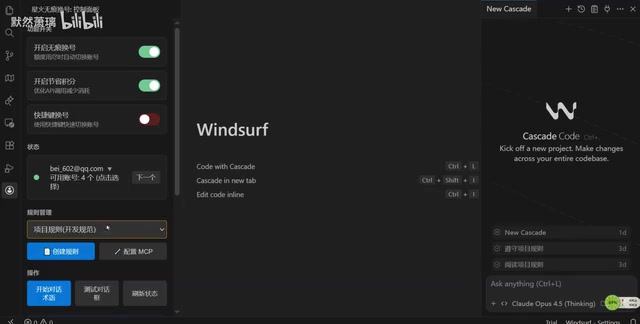
The plugin uses script injection to help the AI continuously understand user command intent during calls, completing more tasks within a single conversation and thereby reducing credit waste from frequently starting new conversations.
Detailed Installation and Configuration Process
Basic Installation Steps
The installation process isn't complicated—just follow these steps:
- Switch Account: Click "Switch Account" in the plugin interface and wait for the Windsurf desktop client to open successfully
- Enable Core Toggles: Turn on both the "Seamless Switching" and "Save Credits" options simultaneously
- Install Conversation Plugin: Click the install button directly. If installation fails, try restarting the software with administrator privileges
- Restart and Verify: After installation, close and restart Windsurf to confirm the plugin is in an enabled state

Rule Configuration System
The plugin provides a multi-level rule configuration scheme:
- System-level rules: Apply globally across all projects
- Project-level rules: Only apply to specific projects
- Persistent conversation rules: Control the behavior mode of persistent conversations (optional)
The system comes with default rules and works fine without any configuration. If you have customization needs, you can adjust settings in the rule configuration interface, then click "Create All Rules" and "Install" to apply.
Script Injection vs MCP Tools: Which Persistent Conversation Approach Is More Reliable?
Currently, there are two main approaches to achieving persistent conversations in Windsurf: MCP tools (like askContinue) and script injection. The differences between them are worth careful comparison.
The Predicament Facing MCP Tools
MCP (Model Context Protocol) is an open standard protocol released by Anthropic in late 2024, designed to provide AI models with a unified external tool calling interface. Through MCP, AI assistants can connect to databases, call APIs, read/write file systems, and more, greatly expanding model capabilities. In the Windsurf ecosystem, community developers have used the MCP protocol to create various enhancement tools—askContinue being a typical example of achieving persistent conversations through MCP tools.
However, Windsurf has recently conducted widespread bans on MCP tool-based persistent conversation solutions. MCP tool invocations are transparent and auditable to the platform because each tool call leaves clear invocation signatures and logs at the protocol layer, allowing the platform to precisely identify and ban specific MCP tools. Beyond ban risk, MCP tools have an inherent flaw—session time limits. When users are inactive for too long, sessions automatically disconnect and conversation context is immediately lost.
Three Advantages of Script Injection
Script Injection is a technical approach that extends functionality by modifying an application's runtime behavior. In desktop applications built on the Electron framework like Windsurf, script injection is typically achieved by modifying the application's JavaScript runtime code. Electron is essentially a desktop application framework with an embedded Chromium browser—mainstream code editors like VS Code, Cursor, and Windsurf are all built on this architecture. Injected scripts can intercept and modify communication data between the application and backend servers, and can also add new interaction logic at the frontend interface layer.
An important characteristic of the Electron framework is that the application's core logic is written in JavaScript/TypeScript, and while the packaged code is obfuscated, it's not compiled to binary—theoretically it can be decompiled and modified. This provides the technical foundation for script injection—injectors can locate the application's main.js or renderer process code and insert custom logic to intercept network requests, modify UI behavior, or tamper with local state. This is the fundamental reason why Electron applications are easier to modify with third-party tools compared to native applications.
Compared to the MCP approach which uses the platform's official protocol channel, script injection operates directly at the client layer without going through the platform's standard interfaces, making it harder for the server side to detect—but this also means that every Windsurf client update could cause injected scripts to fail, requiring the plugin developer to continuously adapt.
Compared to the MCP approach, script injection performs more stably in daily use:
- Not subject to session time limits: Even if you leave overnight, the conversation window remains active the next day
- Stronger ban resistance: Doesn't use the MCP protocol, making platform detection and banning less likely
- Supports multi-window concurrency: You can open multiple conversation windows simultaneously, each independently running different project tasks
Multi-Window Concurrency: A Productivity Tool for Advancing Multiple Projects Simultaneously
The most impressive capability of this plugin is multi-window concurrent execution. You can open multiple Windsurf conversation windows simultaneously, assign different development tasks to each window, and advance all tasks in parallel.
Multi-window concurrency technically means maintaining multiple independent AI session connections simultaneously, with each window having its own independent context window and token counter. The local compute resource consumption is not negligible—each Windsurf window as an independent Electron process typically occupies 500MB-1GB of memory, and opening 3-5 windows simultaneously may require 4GB or more of additional memory. Additionally, multi-window concurrency means credit consumption speed multiplies accordingly—this is precisely why the automatic account switching and credit refresh mechanisms exist. From a development workflow perspective, this concurrency mode is particularly suited for microservice architecture projects—frontend, backend, database migrations, and other tasks can progress simultaneously in different windows, significantly shortening the overall development cycle.
In the demonstration, the author had multiple windows open simultaneously executing development tasks for different projects. Each window runs independently without interference—when you need a particular window to continue working, just switch to it and issue new commands.
Project Memory: Maintaining Context Across Conversations
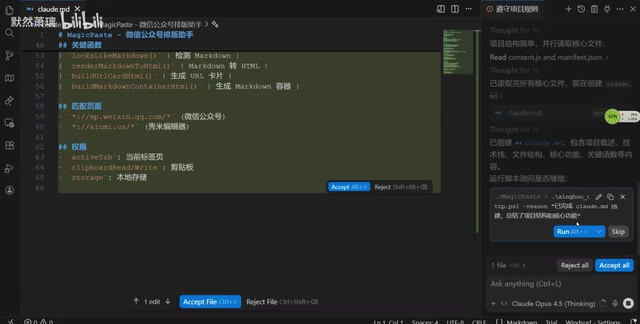
After each task is completed, clicking the "Summarize" button causes the system to automatically generate a project summary and form project memory—covering the project's current state, user habit preferences, problems encountered, and other information. These memories are saved in appended rule form, and the AI can directly read them when starting a new conversation, achieving cross-conversation context continuity.
This feature is essentially a lightweight implementation of RAG (Retrieval-Augmented Generation). RAG is currently the mainstream solution for addressing the "limited memory" problem of large models in AI applications. Its core approach is to persistently store important information in an external knowledge base and retrieve relevant content to inject into the model's context window when needed. In enterprise AI applications, RAG typically involves complex components like vector databases (e.g., Pinecone, Chroma), text embedding models, and retrieval ranking algorithms. This plugin uses a highly simplified RAG implementation: storing project summaries as plain text rule files in the local file system, and directly concatenating the rule file contents into the System Prompt when a new session starts. While this approach lacks semantic retrieval capability (cannot dynamically select the most relevant memory fragments based on query relevance), it wins on simplicity, low latency, and no dependency on external services. GitHub Copilot's .github/copilot-instructions.md and Cursor's .cursorrules files essentially use a similar approach.

Two Critical Points to Note During Use
Don't Blindly Pursue Ultra-Long Conversations
This point is very important in practice: don't relentlessly try to stretch token consumption. Three reasons:
- After 200K tokens are used up, credits are deducted upon reset, and conversation quality noticeably declines
- When token consumption reaches 600K, 800K, or even 1 million, the AI's memory becomes fuzzy, frequently "forgetting things." This is because although current mainstream large models nominally support ultra-long context windows (e.g., 200K tokens), research shows that models' ability to retrieve information from the middle of context is significantly weaker than from the beginning and end—this phenomenon is called the "Lost in the Middle" effect, an inherent limitation of the Transformer architecture's attention mechanism
- A more efficient approach is: end the current conversation after completing each task, and start a new conversation for the next task
Reasonably Break Down Task Granularity
It's recommended to break large projects into multiple small tasks, completing each task within a single conversation round. Use the project memory feature to maintain context continuity rather than trying to accomplish everything in one ultra-long conversation. This "small steps, fast iterations" strategy not only ensures AI output quality in each conversation round but also reduces rollback costs when a single conversation fails—if something goes wrong at round 50 of an ultra-long conversation, you might need to start over; but if the task is split into 5 independent conversations, you only need to redo one of them.
Risk Warning: Must-Know Before Using
Third-party plugins like this carry non-negligible usage risks:
- Account security: Automatic account switching involves multi-account operations that may trigger platform risk controls. SaaS platforms like Windsurf typically detect abnormal account behavior through multiple signals including device fingerprints, IP addresses, and login frequency—frequent account switching is a typical risk control trigger
- Terms of service: The implementation of automatic credit refresh may violate Windsurf's user agreement. Most SaaS platform terms of service explicitly prohibit circumventing usage limits or abusing free quotas through automated means
- Account ban risk: The precedent of widespread MCP tool bans demonstrates the platform's clear stance on such tools
- Client update risk: Since script injection depends on Windsurf client's specific code structure, each client version update could cause the plugin to fail or even crash the application—users must wait for the plugin developer to adapt to new versions
- Code security risk: Script injection means third-party code has elevated privileges in your development environment, theoretically able to access your project source code, environment variables (which may contain sensitive information like API keys), and the local file system. Before using any third-party injection tool, it's advisable to review its source code or at least confirm it comes from a trusted open-source community
It's recommended to make a cautious decision about whether to use this tool based on your own situation after fully understanding the risks.
Conclusion
This Windsurf refill plugin, through mechanisms like script injection, automatic account switching, and credit refresh, does solve the pain points of high AI programming assistant costs and frequent conversation interruptions to a certain extent. Multi-window concurrency and project memory features offer practical value for developers who need to advance multiple projects simultaneously. However, each user needs to weigh the balance between convenience and potential risks for themselves. From a broader perspective, the emergence of such tools reflects a structural contradiction between current AI programming tool pricing models and developers' actual needs—when a tool's usage cost is disproportionate to the productivity gains it delivers, the community will naturally spawn various workaround solutions. In the long run, more reasonable pricing strategies and more flexible subscription plans are the fundamental way to resolve this contradiction.
Related articles
 Tutorials
ChatGPT Plus Subscription Guide: Are GPT-5.5, image-2, and Codex Worth the Upgrade?
A detailed look at ChatGPT Plus features — GPT-5.5, image-2, and Codex — with a Plus vs Pro comparison and a complete step-by-step subscription guide for users outside the US.
 Tutorials
Harness AI Engineering in Practice: Using Claude Code to Master Enterprise-Level E-Commerce Development
Deep dive into Harness AI Engineering: master enterprise e-commerce development with Claude Code using the Rules, Skills, Wiki, and Changes framework.
 Tutorials
Cursor + Codex Dual-IDE Collaboration: A Practical Methodology for Open-Source Project Customization
A complete methodology for open-source project customization based on real-world experience, detailing the Cursor+Codex dual-IDE workflow, seven-stage process, MVP validation, and AI source code reading techniques.