Windsurf Credits Refill Guide: Complete Tutorial on Spark Multi-Account Management & Card Binding Upgrade

A complete guide to using the Spark tool for Windsurf AI coding assistant multi-account credit refills.
This article introduces an auxiliary Windsurf management tool called Spark that helps developers solve the problem of Pro plan credits being consumed too quickly. Core features include quick multi-account switching, Token refresh, semi-automated card binding for Pro plan upgrades, prompt rule management, and built-in account purchase and activation. The article explains each step in detail, with emphasis on security during card binding: use personal cards, maintain stable and consistent IP environments, and avoid triggering platform risk controls that lead to account bans.
Introduction
Windsurf is the primary AI coding assistant for many developers today, but the credit consumption rate of the Pro plan often exceeds expectations—many people find themselves running low by mid-month. How to "refill" credits has become an unavoidable practical problem.
Windsurf (an IDE product launched by the former Codeium team) is one of the rapidly rising AI coding assistants since 2024, competing directly with GitHub Copilot, Cursor, and similar products. It leverages large language models (LLMs) to provide code completion, conversational programming, code refactoring, and other capabilities. Its Pro plan typically uses credits to meter AI model invocations—different models (such as GPT-4o, Claude Sonnet, etc.) consume different amounts of credits per call, with advanced models consuming more. This usage-based billing model means that developers who frequently use advanced models for complex code generation or multi-turn conversations will exhaust their credits far faster than expected.
The AI coding assistant market entered a fiercely competitive phase in 2024-2025. GitHub Copilot holds the largest market share thanks to its first-mover advantage and GitHub ecosystem integration. Cursor has attracted a large number of professional developers with its standalone IDE experience and deep Agent capabilities. Windsurf has carved out its niche with more aggressive pricing strategies and its Cascade (cascading multi-step reasoning) feature. All these tools rely on LLM API calls under the hood, and the compute cost of model inference is very real—for example, GPT-4o costs approximately $2.5-5 per million input tokens, and Claude 3.5 Sonnet falls in a similar range. The credit system is essentially a metering mechanism that passes these API call costs to users, with the credit consumption differences between models directly reflecting the underlying inference cost differences.
This article provides a detailed introduction to an auxiliary Windsurf management tool called "Spark" (星火), covering everything from multi-account management and card binding upgrades to prompt rule configuration—walking you through every step to truly achieve Windsurf credit refills.
Disclaimer: This article is purely a technical tutorial compilation. Readers should comply with relevant terms of service and use tools responsibly.
Windsurf Account Management: Multi-Account Switching & Token Refresh
Quick Multi-Account Switching
After opening the Spark tool, the first thing you see is the account management page. It consolidates several functions that are used most frequently in daily workflow:
- Switch Account: Quickly switch between multiple Windsurf accounts—the most commonly used operation
- Refresh Token: Update the account's authentication token to resolve session expiration issues
- Change Password: An auxiliary function needed occasionally
The Token here refers to an OAuth Authentication Token, a widely used identity verification mechanism in modern web applications. After a user logs into Windsurf, the server issues an encrypted token containing user identity information, and the client carries this token with each subsequent request to prove identity. Tokens typically have an expiration time (TTL), after which a new Access Token must be obtained via a Refresh Token. In multi-account scenarios, the token refresh function ensures that each account's login session remains valid, preventing sudden AI service disconnections during coding due to token expiration.
More specifically, OAuth 2.0 is currently the most mainstream authorization framework for internet applications, and SaaS products like Windsurf universally adopt this mechanism. The complete Token lifecycle works as follows: after a user completes identity verification via username/password or third-party login (such as Google SSO), the authorization server issues a pair of tokens—a short-lived Access Token (typically 15 minutes to 1 hour) and a long-lived Refresh Token (typically 7-30 days). The Access Token uses JWT (JSON Web Token) format, containing user ID, permission scope, expiration time, and other information, transmitted after Base64 encoding and digital signing. When the Access Token expires, the client silently obtains a new Access Token using the Refresh Token, completely transparent to the user. In multi-account management scenarios, each account has an independent Token pair, and the tool needs to securely store these tokens and correctly load the corresponding authentication information when switching.
The tool interface displays the current account's credit balance in real-time, allowing you to instantly judge whether switching is needed. When one account's credits are running low, simply click to switch for a seamless transition—your coding rhythm is completely unaffected.
Windsurf Card Binding & Pro Plan Upgrade: Steps & Security Essentials
Card Binding Upgrade Procedure
Card binding is the key step to upgrade a free account to a Pro plan, and it's the core operation for achieving Windsurf credit refills. The specific process is:
- Find the FREE account that hasn't been bound with a card in the account list
- Click "Bind Card"—the tool will automatically open the browser and fill in the account credentials
- After entering the Windsurf management page, click "Manage Plan" → "Upgrade" in sequence
- Select the $15/month Pro plan to complete the subscription
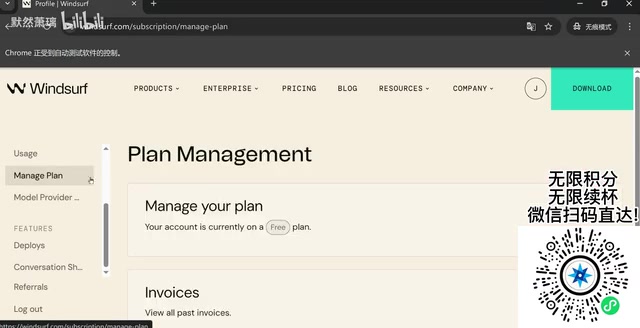
There's an important detail to note: A CAPTCHA (human verification) will be triggered during the login process, and this step must be completed manually. CAPTCHA (Completely Automated Public Turing test to tell Computers and Humans Apart) is a security mechanism that distinguishes human users from automated programs. Windsurf typically uses Google reCAPTCHA or Cloudflare Turnstile and other next-generation verification solutions, which analyze mouse trajectories, click behavior, browser fingerprints, and other multi-dimensional signals to determine whether the operator is a real person. While the tool supports calling third-party APIs (such as 2Captcha, CapSolver, etc.) to automatically solve CAPTCHAs, the cost per solve ranges from $0.001-0.005, which can accumulate into significant expenses with frequent operations—manually clicking a few times is actually more cost-effective.
Security Precautions During Card Binding
After completing verification, the tool will automatically open the card binding link, and you simply proceed with entering payment information. However, there are two critical points to keep in mind:
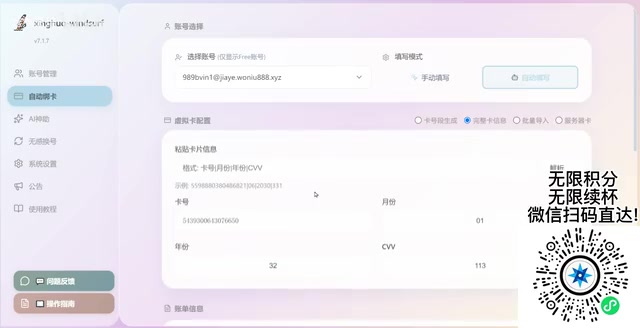
First, prioritize using your own personal card information. While the tool offers an auto-fill feature, binding with your own payment card is more reliable and less likely to trigger fraud detection. Binding the same card to multiple accounts can easily be detected and result in bans from the Windsurf platform.
Second, the IP address absolutely cannot have issues during card binding. The network environment must be stable and consistent—IP anomalies are the number one reason for account bans. The risk control systems of SaaS platforms like Windsurf comprehensively analyze multiple dimensions to determine whether account behavior is abnormal, with IP address being one of the most critical signals. The metrics the risk control system monitors include: whether the IP geolocation is consistent with the registration location, whether multiple accounts are associated under the same IP, whether IP changes occur within a short time, and whether the IP belongs to a data center (rather than a residential network). When the system detects that the same payment card is bound to multiple accounts, or the IP during card binding differs significantly from the daily-use IP, risk control rules are triggered—ranging from requiring additional verification to outright account bans and payment freezes.
Modern SaaS platform risk control systems typically employ a multi-layered defense architecture. The first layer is a rules engine that performs real-time interception based on predefined rules (such as more than N accounts registered from the same IP). The second layer uses machine learning models that calculate risk scores by analyzing user behavior patterns (login frequency, operation time distribution, device fingerprints, etc.). The third layer is graph relationship analysis, which constructs account relationship graphs through associated information such as card numbers, phone numbers, device IDs, and IP addresses to identify batch registrations and abuse behavior. Browser Fingerprint technology is particularly critical—it collects dozens of dimensions of information including Canvas rendering results, WebGL information, installed font lists, screen resolution, timezone, language settings, and more to generate an almost unique device identifier that can track the same device even after IP changes.
Regarding proxy selection, IP addresses are mainly divided into two categories: Datacenter IPs and Residential IPs. Datacenter IPs are assigned by cloud providers (such as AWS, Azure, Alibaba Cloud), with obvious characteristics that are easy to identify—risk control systems can make the determination by querying the IP's ASN (Autonomous System Number) and WHOIS information. Residential IPs are real IP addresses assigned by ISPs (Internet Service Providers) to home users, appearing identical to regular users from the risk control system's perspective. For high-risk operations like card binding, using residential proxy IPs can significantly reduce the probability of being blocked by risk control, but quality residential proxies typically cost 5-10x more than datacenter proxies, with per-GB traffic costs ranging from $1-15. Therefore, ensure your proxy configuration is correct, use stable residential proxy IPs, maintain operational environment consistency, and absolutely do not switch nodes during the card binding process.
Prompt Rule Management: Making Windsurf More Obedient
Difference Between System-Level and Project-Level Rules
Prompt management is another highly practical feature module in the Spark tool. By presetting AI conversation rules, you can ensure Windsurf consistently follows your desired behavior patterns during programming.
Prompt rules essentially leverage the LLM's System Prompt mechanism to constrain AI behavior. In the LLM conversation architecture, messages are typically divided into three roles: System (system instructions), User (user input), and Assistant (AI response). The System Prompt is injected before each conversation begins, has the highest priority, and the model treats it as behavioral guidelines that persist throughout the entire conversation.
From a technical perspective, the System Prompt's working mechanism is closely related to the LLM's Attention Mechanism. In the Transformer architecture, System Prompt tokens participate in the attention computation of all subsequent tokens, effectively setting a persistent contextual anchor for the entire conversation. Effective System Prompts typically contain several key elements: role definition ("You are a frontend engineer proficient in React"), behavioral constraints ("Always use TypeScript instead of JavaScript"), output format requirements ("Code blocks must include language identifiers"), and negative instructions ("Do not use deprecated APIs"). It's worth noting that System Prompts consume the model's Context Window—an overly long rule set will compress the Token space available for actual conversation. Taking Claude 3.5 Sonnet's 200K context window as an example, a 2000-Token System Prompt occupies about 1% of the space—negligible impact—but if the rule set expands to tens of thousands of Tokens, trade-offs need to be considered.
Rules are divided into two levels:
- System-level rules: Apply globally, affecting AI behavior across all projects. For example, you can require the AI to always respond in Chinese, follow specific code styles (such as Airbnb JavaScript conventions), or prioritize using a particular framework's APIs
- Project-level rules: Only take effect in specified projects, suitable for customizing different AI behaviors for different tech stacks. Similar to placing configuration files in the project root directory (like Cursor's
.cursorrules), allowing the AI to adapt to the specific project's tech stack and coding standards
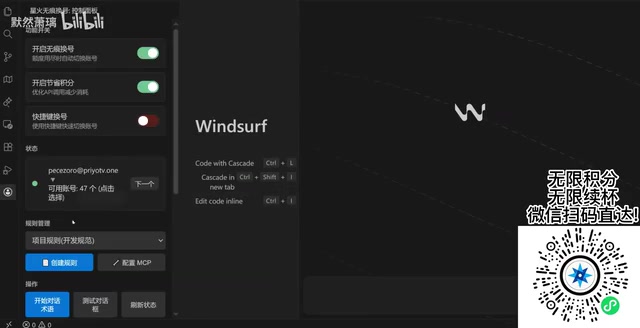
The setup method is straightforward: add rule content in the prompt management interface and select the corresponding effective level. The tool includes some preset templates, such as rule sets specifically optimized for Windsurf. Once configured, the AI will reference these rules in every conversation, maintaining consistent output style and behavior—essentially adding a layer of persistent memory to the AI.
Batch Import Rules to Save Time
If you have multiple rules to configure, adding them one by one is too tedious. The Spark tool provides a "Create All Rules" function that supports one-click batch import of all preset rules. During actual conversations, simply copy the preset prompt templates and paste them into the Windsurf chat box to start using them—the entire workflow is very smooth.
Windsurf Account Purchase & Activation Configuration
Account Purchase Workflow
When all existing account credits are exhausted, you can obtain new accounts through the tool's built-in purchase portal:
- Click "Operation Guide" or "Issue Feedback" to enter the purchase page
- Or select "Purchase Account" directly in system settings
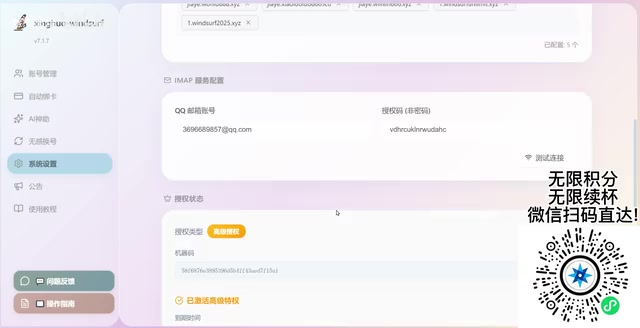
After purchase, go to the "Get Account" page to claim them. The system will display your account quota—for example, if you've purchased a quota of 5 accounts, click to obtain them one by one.
Domain Binding & Activation Configuration
After receiving the account, activation must be completed before normal use:
- Enter your own domain name
- Fill in the email address or authorization code
- Click activate—the system will return the relevant configuration information
This step associates the tool with your usage environment correctly, ensuring stable operation of the Windsurf accounts.
Spark Plugin Installation & Version Updates
One-Click Windsurf Plugin Installation
The Spark tool provides a one-click plugin installation feature. Find the install button on the tutorial page and click to automatically complete the installation. If automatic installation fails, you can also manually select the installation path.
After installation, the tool will automatically read the current account's plan information (FREE or Pro) and display corresponding feature options accordingly.
Keep the Tool Updated
One point requires special attention: The update check function may require a VPN/proxy environment. Network conditions in some regions may cause update detection to fail. If you encounter this situation, first confirm whether your proxy tool is running normally, then retry the update. Keeping the latest version ensures the best compatibility and feature support—regular checks are recommended.
Summary: Complete Solution for Windsurf Credit Refills
The core value of Spark as a Windsurf management tool lies in simplifying complex multi-account management operations into just a few clicks. Let's recap its main features:
- Quick multi-account switching: Seamless switching when credits are exhausted—no coding interruptions
- Semi-automated card binding upgrade: Simplified Windsurf Pro plan subscription process
- Prompt rule management: More controllable AI behavior with more consistent output
- Built-in account purchase & activation: A complete closed loop from acquisition to usage
One final emphasis: always pay attention to IP security and compliant use of payment cards during operation. Don't bind too many accounts to a single card, and maintain a stable network environment during card binding. Get these two points right, and you basically won't encounter account ban issues.
Related articles
 Tutorials
ChatGPT Plus Subscription Guide: Are GPT-5.5, image-2, and Codex Worth the Upgrade?
A detailed look at ChatGPT Plus features — GPT-5.5, image-2, and Codex — with a Plus vs Pro comparison and a complete step-by-step subscription guide for users outside the US.
 Tutorials
Harness AI Engineering in Practice: Using Claude Code to Master Enterprise-Level E-Commerce Development
Deep dive into Harness AI Engineering: master enterprise e-commerce development with Claude Code using the Rules, Skills, Wiki, and Changes framework.
 Tutorials
Cursor + Codex Dual-IDE Collaboration: A Practical Methodology for Open-Source Project Customization
A complete methodology for open-source project customization based on real-world experience, detailing the Cursor+Codex dual-IDE workflow, seven-stage process, MVP validation, and AI source code reading techniques.