Windsurf Pro Free Trial Guide: 14-Day Zero-Cost Experience of the Best Cursor Alternative

Windsurf is a free Cursor alternative where Claude Opus 4 delivers the best code generation results
This article covers how to use Windsurf as a Cursor alternative with a 14-day free Pro trial supporting Claude Opus 4, GPT-5.4x, and Gemini 2.5 Pro. Through an Angry Birds game generation test, Claude Opus 4 Thinking significantly outperformed the others. The guide details the registration process, how to cancel auto-renewal to avoid charges, and auto-execution permission settings.
The Value Battle of AI Coding Tools: What If Cursor Is Too Expensive?
Cursor is currently the hottest AI coding editor, but the Pro membership costs $20/month, the free tier has limited quota, and you can't freely choose your model. For individual developers and students, this expense is quite significant.
AI coding tools (AI Code Editor/AI Coding Assistant) have been the fastest-growing developer tool category since 2023. From GitHub Copilot pioneering the "code completion" paradigm, to Cursor deeply integrating AI into the editor for "conversational programming," to new players like Windsurf and Augment Code entering the arena, this space has become fiercely competitive. Cursor's valuation exceeded $10 billion in 2024, with its core selling point being the deep fusion of large language models with code editors, allowing developers to generate, modify, and debug code through natural language descriptions. However, the high subscription fees and limited free quota have led many individual developers to seek Cursor alternatives.
The good news is that a similar product, Windsurf, currently offers a 14-day free Pro trial supporting top-tier models like Claude Opus 4, Gemini 2.5 Pro, and GPT-5.4x High Thinking — making it arguably the best free Cursor alternative available.
This article will walk you through how to claim the Windsurf Pro free membership step by step, and test each model's real-world performance through actual programming tasks.
What Is Windsurf? Why Is It the Best Cursor Alternative?
Windsurf is an AI coding tool with a similar positioning to Cursor, developed by Codeium. Codeium was previously known for its free AI code completion plugin and had already accumulated a large developer user base. Building on this foundation, Windsurf launched a complete AI coding editor based on VS Code's open-source core (similar to Cursor's technical approach), offering two usage formats:
- Standalone Editor: A complete IDE experience similar to Cursor
- IDE Plugin: Can be used directly within JetBrains IDEs like IntelliJ IDEA and PyCharm, covering developers in the Java, Kotlin, and related ecosystems
The Pro membership supports multiple top-tier AI models, including Claude Opus 4 Thinking, GPT-5.4x High Thinking, and Gemini 2.5 Pro. The quota system uses a daily + weekly dual-limit mechanism — daily limits prevent excessive single-day consumption, while weekly limits ensure total usage remains manageable throughout the week. Compared to Cursor's monthly billing model, this design gives users clearer awareness of their remaining quota. Based on actual testing, the Claude model can be used for approximately 4 hours and 10 minutes per day, which is more than sufficient for most developers' daily work.
Windsurf Pro Free Trial Claim Tutorial (Step-by-Step Guide)
Step 1: Register a Windsurf Account
Visit the Windsurf official website, click "Price" in the top navigation bar, then select "Start Trial." You can register with a Google email or any other email. If you're concerned about privacy, consider using a secondary email for registration.
Step 2: Apply for Pro Trial
After logging in, click the avatar in the upper right corner to open the management interface. Here you can see your current daily and weekly quota information. At this point, your account is still on the free plan and needs to be manually upgraded to Pro.
The upgrade process is as follows:
- Click the upgrade button to enter the subscription page
- Fill in payment information (supports Visa, MasterCard, and other credit cards)
- Confirm the subscription to receive your 14-day free trial
Step 3: Immediately Cancel Auto-Renewal (Critical to Avoid Charges!)
Don't forget this step — you must immediately cancel auto-renewal after subscribing, otherwise you'll be automatically charged after 14 days.
Navigation path: Click avatar in upper right corner → Manage Plan → Cancel auto-renewal. After canceling, your Pro membership benefits remain active until the trial period ends. The system will ask you to fill in a cancellation reason — just write anything.

Special Reminder: After canceling renewal, a button labeled "Enable additional paid credits" will appear on the page — do NOT enable this. This feature means that when your free quota runs out, it will automatically purchase additional credits at cost. Since the goal is to use it for free, there's no need to turn this on.
Hands-On Test: Claude Opus 4 vs Gemini vs GPT-5.4x Code Generation Comparison
Actions speak louder than words. To visually compare each model's AI code generation capabilities, we used "generate an Angry Birds game" as the test task and had each of the three models complete it. Game development was chosen as the test scenario because it comprehensively tests the model's abilities across multiple dimensions including frontend rendering, physics engine simulation, interaction logic design, and systematic architectural planning — far more revealing of a model's true capabilities than simple code snippet generation.
Gemini 2.5 Pro: Mediocre, Lacking Playability
First up was Gemini 2.5 Pro. This is a multimodal large language model from Google DeepMind, renowned for its ultra-long context window (supporting up to 1 million tokens) and powerful multimodal understanding capabilities. In Google's own coding benchmarks, Gemini 2.5 Pro excels at code comprehension and large codebase analysis, but for "creative programming" tasks like generating complete applications from scratch, its performance may not match models specifically optimized for code generation.
The test results confirmed this: the model completed basic requirements analysis and code generation, but the final result was unsatisfactory — the interface was crude, the slingshot mechanism wasn't properly implemented, and the game was basically unplayable. Multiple retries yielded similarly disappointing results. Gemini's strengths are better demonstrated in scenarios requiring processing large amounts of contextual information, such as analyzing entire project codebases or understanding complex API documentation, rather than this type of complete application generation from scratch.
Claude Opus 4 Thinking: One-Shot Generation, Stunning Results
Next came the most anticipated Claude Opus 4 Thinking. This is Anthropic's flagship large language model, the most capable version in the Claude 4 series. The "Thinking" suffix indicates that the model has Extended Thinking enabled — the model conducts a lengthy internal reasoning process before generating its final answer, similar to how humans "think it through before acting" when solving complex problems. This mechanism is particularly effective in code generation scenarios because programming tasks typically require understanding requirements, planning architecture, and considering edge cases before writing high-quality code.
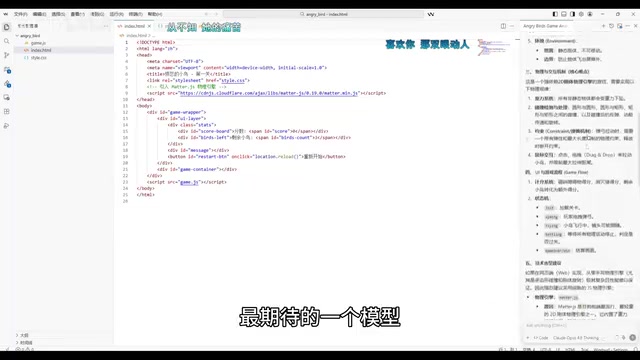
After submitting the requirements, Claude Opus 4 demonstrated clearly superior capabilities:
- Requirements understanding was spot-on, automatically decomposing the game into various functional modules
- Proactively completed the full game logic without requiring repeated prompts or modifications
- Beautiful interface with visual effects far surpassing the output of the other two models
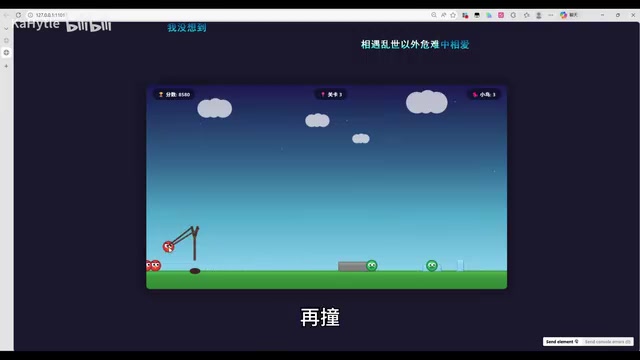
In actual gameplay testing, the game interface was polished and physics collision effects were basically correct. Although there were some deviations in the slingshot trajectory (launch direction didn't perfectly match expectations), overall playability was high — we successfully knocked down multiple targets during testing, and the gaming experience was quite enjoyable. Anthropic specifically reinforced code comprehension and generation capabilities when training the Claude series, and combined with the deep reasoning advantage brought by Extended Thinking, this makes it particularly outstanding in complex programming tasks requiring systematic planning.
GPT-5.4x High Thinking: Below Expectations
GPT-5.4x High Thinking is OpenAI's advanced reasoning variant of the GPT-5 series. "High Thinking" indicates enhanced reasoning depth, similar to the chain-of-thought reasoning strategy from the earlier o1 and o3 series models. The GPT-5 series shows significant improvements over GPT-4 in multimodal understanding, long-context processing, and tool usage, but in specific code generation benchmarks, different models often perform differently depending on task type.
However, in this test, GPT-5.4x High Thinking performed unexpectedly poorly. The generated game interface was rough, the slingshot mechanism wasn't properly implemented, and the overall result was arguably worse than Gemini 2.5 Pro. This may be related to the complex nature of game development tasks that require combining frontend rendering, physics engines, and interaction logic — such tasks demand extremely high "systematic planning ability" from the model, rather than simple code snippet generation. Of course, a single test task cannot fully represent a model's overall capabilities, and GPT-5.4x may perform differently in other programming scenarios (such as API development, data processing, etc.).
Summary of Code Generation Capabilities Across Three Models
| Model | Interface Aesthetics | Feature Completeness | Playability |
|---|---|---|---|
| Claude Opus 4 Thinking | ⭐⭐⭐⭐⭐ | ⭐⭐⭐⭐ | ⭐⭐⭐⭐ |
| Gemini 2.5 Pro | ⭐⭐ | ⭐⭐ | ⭐ |
| GPT-5.4x High Thinking | ⭐ | ⭐ | ⭐ |
Claude Opus 4 Thinking was the clear winner in this test, which is why we recommend prioritizing the Claude model when using Windsurf.
Windsurf Usage Tips: Auto-Execution Permission Settings
There's a minor pain point when using Windsurf: every AI operation requires manually clicking "Allow" to confirm, and frequent confirmations can hurt productivity. This relates to a core security tradeoff in AI coding tools — when AI has the ability to automatically execute terminal commands, modify files, and install dependencies, efficiency improves dramatically, but potential risks exist: AI might execute destructive commands (like accidentally deleting files), install unsafe packages, or modify critical configurations without your knowledge.
Windsurf provides a four-level progressive trust mechanism, allowing developers to flexibly choose the appropriate automation level based on project importance and their trust in AI output:
- Disabled: Completely prohibits auto-execution; every step requires manual confirmation. Suitable for production environments or sensitive projects
- Allow List: Only auto-approves operations on the whitelist, balancing security and efficiency
- Auto: AI decides whether user confirmation is needed — auto-executes routine operations while requesting confirmation for high-risk ones
- Turbo: Fully automatic execution, similar to OpenAI Codex's Full Access mode. Use with full awareness of the risks
We recommend choosing "Auto" mode for daily development, and enabling "Turbo" mode for personal projects where you have high confidence to get the smoothest coding experience. However, for high-risk scenarios involving database operations, deployment scripts, etc., consider downgrading to "Allow List" or "Disabled" mode to ensure safety.
Conclusion: Is the Windsurf Free Trial Worth Claiming?
Windsurf's 14-day Pro free trial provides developers with a zero-cost opportunity to experience a top-tier AI coding tool. Based on our testing results, Claude Opus 4 Thinking performed exceptionally well in code generation tasks, and the 4+ hours of daily usage basically covers typical development needs.
For developers on a budget who want to experience AI-assisted programming, Windsurf is genuinely a worthy Cursor alternative to try. However, keep in mind that the free trial has a time limit — we recommend thoroughly evaluating whether the tool fits your workflow during the trial period before deciding on long-term paid usage. We also suggest keeping an eye on competitive dynamics in this space — as more players enter and model capabilities continue to iterate, AI coding tool pricing and features are changing rapidly, and more cost-effective options may emerge in the future.
Key Takeaways
- Windsurf Pro offers a 14-day free trial supporting top-tier models like Claude Opus 4, GPT-5.4x, and Gemini 2.5 Pro, making it a cost-effective Cursor alternative
- You must immediately cancel auto-renewal and disable the additional paid credits toggle after registration to avoid being charged
- Testing shows Claude Opus 4 Thinking performs best in code generation tasks, with its Extended Thinking mechanism providing clear advantages in complex programming tasks; daily usage is approximately 4 hours and 10 minutes
- Through an Angry Birds game test, Claude Opus 4 far outperformed GPT-5.4x and Gemini 2.5 Pro in both interface aesthetics and feature completeness
- Windsurf supports four progressive auto-execution permission levels; Turbo fully-automatic mode significantly boosts AI-assisted programming efficiency, but security risks should be noted
Related articles
 Tutorials
ChatGPT Plus Subscription Guide: Are GPT-5.5, image-2, and Codex Worth the Upgrade?
A detailed look at ChatGPT Plus features — GPT-5.5, image-2, and Codex — with a Plus vs Pro comparison and a complete step-by-step subscription guide for users outside the US.
 Tutorials
Harness AI Engineering in Practice: Using Claude Code to Master Enterprise-Level E-Commerce Development
Deep dive into Harness AI Engineering: master enterprise e-commerce development with Claude Code using the Rules, Skills, Wiki, and Changes framework.
 Tutorials
Cursor + Codex Dual-IDE Collaboration: A Practical Methodology for Open-Source Project Customization
A complete methodology for open-source project customization based on real-world experience, detailing the Cursor+Codex dual-IDE workflow, seven-stage process, MVP validation, and AI source code reading techniques.