Windsurf Seamless Account Switching Tool "Spark": Auto-Switch Accounts for Unlimited Free Credits

Third-party tool "Spark" enables seamless Windsurf free credit switching via batch account management
This article introduces "Spark," a third-party tool that achieves seamless account switching for Windsurf by batch-registering and managing free accounts, auto-refreshing Tokens, and using a browser plugin to intercept and replace authentication credentials when credits are exhausted. It also leverages the MCP protocol to maintain conversation context continuity. The article warns of risks including ToS violations, account bans, Token leakage, and closed-source software security concerns, recommending developers choose compliant alternatives for AI coding assistance.
Overview of the Windsurf Seamless Account Switching Tool
Windsurf is a popular AI coding assistant, but its limited free credits have long been a pain point for many developers. Windsurf is an AI coding IDE developed by Codeium, deeply customized based on VS Code, with a built-in AI agent called Cascade. Unlike traditional code completion tools, Windsurf can understand the context of an entire project and proactively execute multi-step programming tasks, including cross-file editing, terminal command execution, and code refactoring.
From a technical architecture perspective, Windsurf is deeply customized based on Code-OSS, the open-source version of VS Code—an approach that has become mainstream in the AI IDE space. VS Code is built with the Electron framework, powered by the Chromium browser engine and Node.js runtime. This means IDEs customized on top of it are essentially web applications, with their extension systems, configuration files, and authentication information stored and managed using standard web technology stacks. The core capability of the Cascade agent lies in its Agentic architecture—it can not only respond to single user instructions but also autonomously plan execution steps, invoke tool chains, observe results, and iterate adjustments, fundamentally different from traditional Copilot-style line-by-line completion.
The free version provides users with limited credit quotas (typically a certain number of Flow Action Credits per month), with each AI conversation or code generation operation consuming credits. This credit system is a common SaaS business model designed to guide users toward paid subscriptions. From a unit economics perspective, the inference cost of each AI conversation (including GPU compute and API call fees) represents real expenditure for the service provider, making quota limits a necessary measure for controlling operational costs.
A third-party tool called "Spark" (星火) has emerged in the community, claiming to enable "seamless account switching" for Windsurf—when one account's free credits are exhausted, it automatically switches to the next available account without restarting Windsurf, achieving an uninterrupted AI conversation experience.
This article will detail the tool's working principles and usage workflow based on its demonstration content, while also highlighting compliance risks and security concerns.
Spark's Core Features: Batch Management and Seamless Switching
Batch Account Management
The tool provides an independent account management interface with the following features:
- Batch registration of Windsurf free accounts: One-click batch registration of Free accounts to quickly expand the local account pool
- Automatic Token refresh: Automatically refreshes Tokens after obtaining accounts to ensure each account remains in a usable state. The Token referred to here is an OAuth Authentication Token—an encrypted string issued by the server after user login, used in subsequent requests to prove user identity without requiring username and password entry for each operation.
In the standard OAuth 2.0 flow, after the user's initial login, the server issues two types of tokens: an Access Token (typically valid for 15 minutes to 1 hour) and a Refresh Token (valid for days to months). The Access Token is used for actual API request authentication, while the Refresh Token is used to silently obtain a new Access Token after the previous one expires, without requiring the user to re-enter credentials. This dual-token mechanism achieves a balance between security and user experience. The tool's so-called "automatic Token refresh" essentially intercepts and simulates this standard authentication flow, programmatically calling Windsurf's authentication endpoints to automatically obtain new Access Tokens before they expire, keeping multiple accounts' login states continuously valid.
- Credit quota querying: One-click refresh to view each account's remaining credit balance
- Server account pool synchronization: Pull new available accounts from a remote server via the "Get Accounts" button
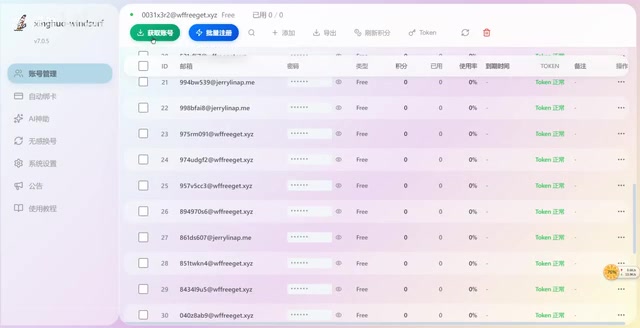
From the demonstration, the tool manages dozens of free accounts, each with 100 credits. When users need more credits, they can fetch new accounts from the server at any time to replenish the local account pool.
Seamless Account Switching Mechanism Explained
Seamless account switching is the tool's core selling point and the feature users care about most. Its working principle can be summarized in four steps:
- Real-time quota monitoring: Continuously monitors the remaining credits of the currently active account
- Automatic account switching: When credits are detected as exhausted, automatically switches to the next available account in the pool
- Seamless background handoff: The entire switching process is completed in the background without restarting Windsurf, with users barely noticing
- Hotkey manual trigger: Also supports manually triggering account switches via keyboard shortcuts
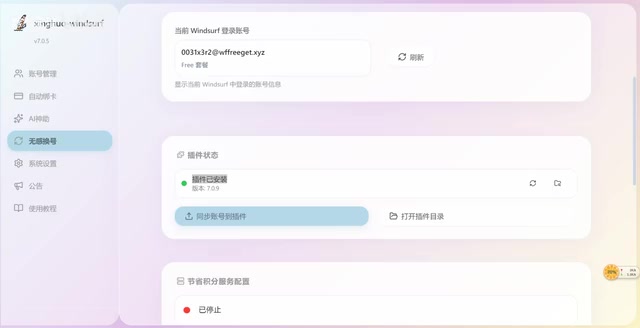
From a technical implementation perspective, the tool requires a browser plugin to work, which involves the underlying mechanisms of browser extensions. Modern browser extensions (such as Chrome Extension Manifest V3) run in isolated sandbox environments but have capabilities including accessing browser storage, intercepting and modifying network requests (via the declarativeNetRequest API), and manipulating page DOM. In this tool's scenario, the browser plugin likely intercepts authentication requests from Windsurf's embedded browser or web interface, replacing the current account's Token with the next available account's Token from the pool, completing the identity switch without restarting the application. While this man-in-the-middle request interception technique is technically feasible, it also means the plugin has significant control over the user's network communications.
Complete Installation and Usage Workflow
Step 1: Install the Spark Main Program
After double-clicking the installer, select the installation path and click install. Once installation is complete, run the software directly, and it will automatically open the management interface. If there are previous usage records, the tool will automatically load historical data.
Step 2: Prepare the Windsurf Account Pool
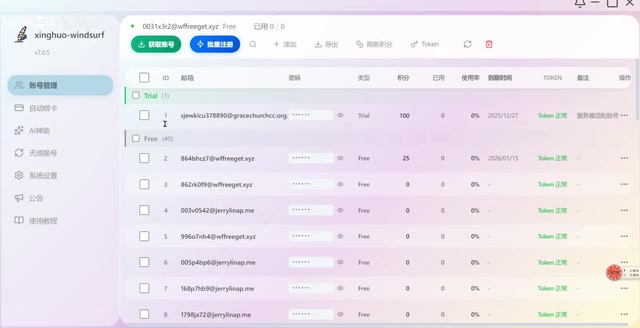
In the account management interface, there are two ways to obtain Windsurf free accounts:
- Batch registration: Use the built-in batch registration function to create new free accounts
- Server retrieval: Click the "Get Accounts" button to pull pre-registered accounts from the tool's server
Obtained accounts will automatically have their Tokens refreshed and display corresponding credit balances.
Step 3: Install the Browser Plugin
The tool requires a companion browser plugin. The management interface can detect whether the plugin is installed:
- If not installed, click the "Install" button to complete installation automatically
- A plugin restart may be required after installation for it to take effect
- Once the plugin is active, sync the accounts from the account pool to the plugin
Step 4: Enable Seamless Account Switching
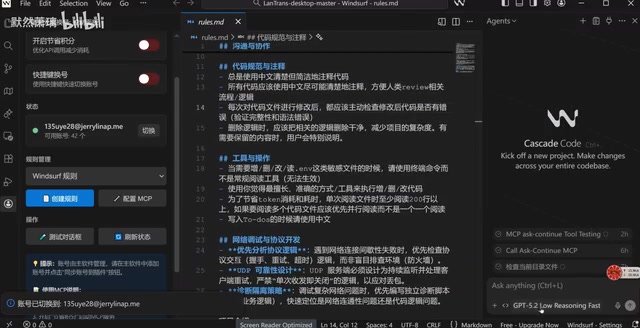
Toggle the "Seamless Switching" switch in the plugin interface, and the tool begins working. The demonstration showed the process of switching from one account (0031) to another (135u)—the switch was nearly instantaneous, and Windsurf's conversation was not interrupted throughout the process.
Leveraging MCP Protocol for Extended Uninterrupted Conversations
Beyond the account switching feature, the tool also mentions the ability to achieve long uninterrupted conversations through the MCP (Model Context Protocol) protocol.
MCP is an open standard protocol introduced by Anthropic in late 2024, designed to establish a unified communication interface between AI models and external data sources and tools. Think of MCP as the "USB-C port" for AI—it defines a standardized way for AI assistants to connect to databases, APIs, file systems, and various other external resources.
From a technical architecture perspective, MCP's design was inspired by the Language Server Protocol (LSP), which dramatically reduced development tool adaptation costs by standardizing communication between IDEs and language analysis tools. MCP similarly uses JSON-RPC 2.0 as its message format and defines three core primitives: Resources (such as file contents, database records), Tools (such as API calls, command execution), and Prompts (prompt templates). MCP uses a client-server architecture where AI applications act as MCP clients initiating requests, while various data sources and tools expose their capabilities through MCP servers. MCP servers can be local processes (communicating via stdio) or remote services (communicating via HTTP+SSE).
In this tool's scenario, the MCP protocol is used to maintain conversation context information during account switches, enabling new accounts to "inherit" the previous account's conversation history and programming task state for seamless continuity. Specifically, the tool likely serializes conversation history and project state into standardized context data, re-injecting this context into the new session via the MCP server during account switches. The principle is to use the MCP protocol to maintain conversation context, avoiding interruptions caused by quota-based switching or session timeouts.
This means users can theoretically:
- Continuously use AI assistance throughout a programming task without being limited by single-account quotas
- Preserve conversation context during account switches, keeping programming flow uninterrupted
- Achieve a near-"unlimited credits" Windsurf experience through multi-account rotation
Risks and Considerations
While such tools have a user base in the community, it's essential to fully understand the following risks before use:
Compliance Risks
- Violation of Windsurf Terms of Service: Batch account registration, Token sharing, and automatic account switching almost certainly violate Windsurf's user agreement
- Account ban risk: The platform may detect abnormal behavior through device fingerprinting, IP addresses, usage patterns, and other means, resulting in mass banning of related accounts. Device Fingerprinting is a technology that uniquely identifies devices by collecting multi-dimensional feature information, including browser type and version, operating system information, screen resolution, installed font lists, WebGL rendering characteristics, Canvas fingerprints, timezone settings, language preferences, and more.
Modern device fingerprinting technology has evolved to a very granular level. Beyond the basic features mentioned above, it also includes AudioContext fingerprints (identifying devices through audio processing differences), local IP addresses leaked via WebRTC, TCP/IP protocol stack characteristics, TLS handshake fingerprints (JA3/JA4 fingerprints), and more. Some advanced anti-detection browsers (such as Multilogin, AdsPower) combat fingerprint identification by virtualizing browser environments. However, as a desktop application, Windsurf's fingerprint collection dimensions may be even richer—including hardware serial numbers, disk identifiers, MAC address hashes, and other OS-level information. This means that even with browser-level isolation, device identifiers at the desktop application level may still expose multi-account behavior. Frequent switching between different accounts under the same device fingerprint is a highly conspicuous abnormal usage pattern, which is the technical reason why batch registration and automatic account switching carry high ban risks.
Security Risks
- Third-party server concerns: The tool retrieves accounts from remote servers, meaning your usage data may pass through third-party servers
- Token leakage risk: Account Tokens transmitted between local and server environments could potentially be intercepted or leaked
- Closed-source software security concerns: The security of third-party closed-source tools cannot be guaranteed and may contain malicious code or backdoors
More Reliable Alternatives
If you genuinely need more AI coding assistant credits, consider these compliant approaches first:
- Subscribe to a Windsurf paid plan: Get officially supported higher quotas with stable service
- Use other AI coding tools in combination: The AI coding assistant market is highly competitive, with major players including GitHub Copilot (co-developed by GitHub and OpenAI, integrated into mainstream IDEs like VS Code, $10/month for individuals), Cursor (an independent AI IDE based on VS Code supporting multiple LLMs, Pro version at $20/month with 500 fast requests), and domestic options like Tongyi Lingma and Doubao MarsCode.
The AI coding tool market experienced explosive growth in 2024-2025. According to statistics, GitHub Copilot's paid users have exceeded 1.8 million, while Cursor's ARR (Annual Recurring Revenue) in 2024 reportedly surpassed $100 million. These tools generally adopt a Freemium model, with free versions offering basic features and limited quotas, while paid versions unlock more advanced models and higher usage limits. Each tool has its strengths and weaknesses in code completion accuracy, context understanding capability, and multi-file editing support. Developers can combine tools based on actual needs to effectively alleviate the quota limitations of any single tool.
- Plan usage strategies wisely: Focus AI assistance on the programming scenarios where it's needed most, improving the efficiency of each conversation
Conclusion
The "Spark" tool demonstrates the community's creativity in facing Windsurf's free credit limitations—achieving "unlimited refills" for Windsurf through batch account management and automatic switching mechanisms. From a technical implementation perspective, its account pool management, automatic Token refresh, and seamless switching features do show considerable engineering ingenuity.
However, such tools are fundamentally exploiting rule loopholes. They not only carry compliance and security risks but are also detrimental to the healthy development of the AI coding tool ecosystem in the long run. For developers, understanding the technical principles as reference is sufficient—in actual practice, choosing compliant methods to obtain the AI coding assistance you need is still recommended.
Related articles
 Tutorials
ChatGPT Plus Subscription Guide: Are GPT-5.5, image-2, and Codex Worth the Upgrade?
A detailed look at ChatGPT Plus features — GPT-5.5, image-2, and Codex — with a Plus vs Pro comparison and a complete step-by-step subscription guide for users outside the US.
 Tutorials
Harness AI Engineering in Practice: Using Claude Code to Master Enterprise-Level E-Commerce Development
Deep dive into Harness AI Engineering: master enterprise e-commerce development with Claude Code using the Rules, Skills, Wiki, and Changes framework.
 Tutorials
Cursor + Codex Dual-IDE Collaboration: A Practical Methodology for Open-Source Project Customization
A complete methodology for open-source project customization based on real-world experience, detailing the Cursor+Codex dual-IDE workflow, seven-stage process, MVP validation, and AI source code reading techniques.