Wispim: The Teleprompter That Listens to Your Voice So You Never Stumble on Camera

Wispim uses speech recognition to drive teleprompter scrolling, letting the tool follow the person rather than making the person chase the words.
Wispim is a voice-following teleprompter launched on Product Hunt. Its core idea is to drive script scrolling by what the user actually says: it waits when you pause, keeps up when you speed up, and won't spiral out of control when you ad-lib, turning "reading a script" into an experience closer to "speaking." Its script can float above Instagram, TikTok, or the camera recording interface, reducing app switching; it covers iPhone, iPad, Android, Mac, and Windows, and offers a free browser entry point. The article notes that speech recognition's adaptability to accents, noise, and technical jargon is the key variable determining the actual experience, and that community data of 72 upvotes and 5 comments indicates the product is still early-stage.
The Teleprompter Problem: Why Traditional Tools Are Distracting
Forgetting your lines on camera is normal, and a teleprompter is supposed to solve that. But most traditional teleprompters scroll text at a fixed speed—you pause and it keeps running; you speed up and it can't keep pace. The result is either staring at the screen chasing words or being forced to read in an unnatural cadence. Wispim tries a different approach: let the teleprompter follow the person, rather than the person chasing the teleprompter.
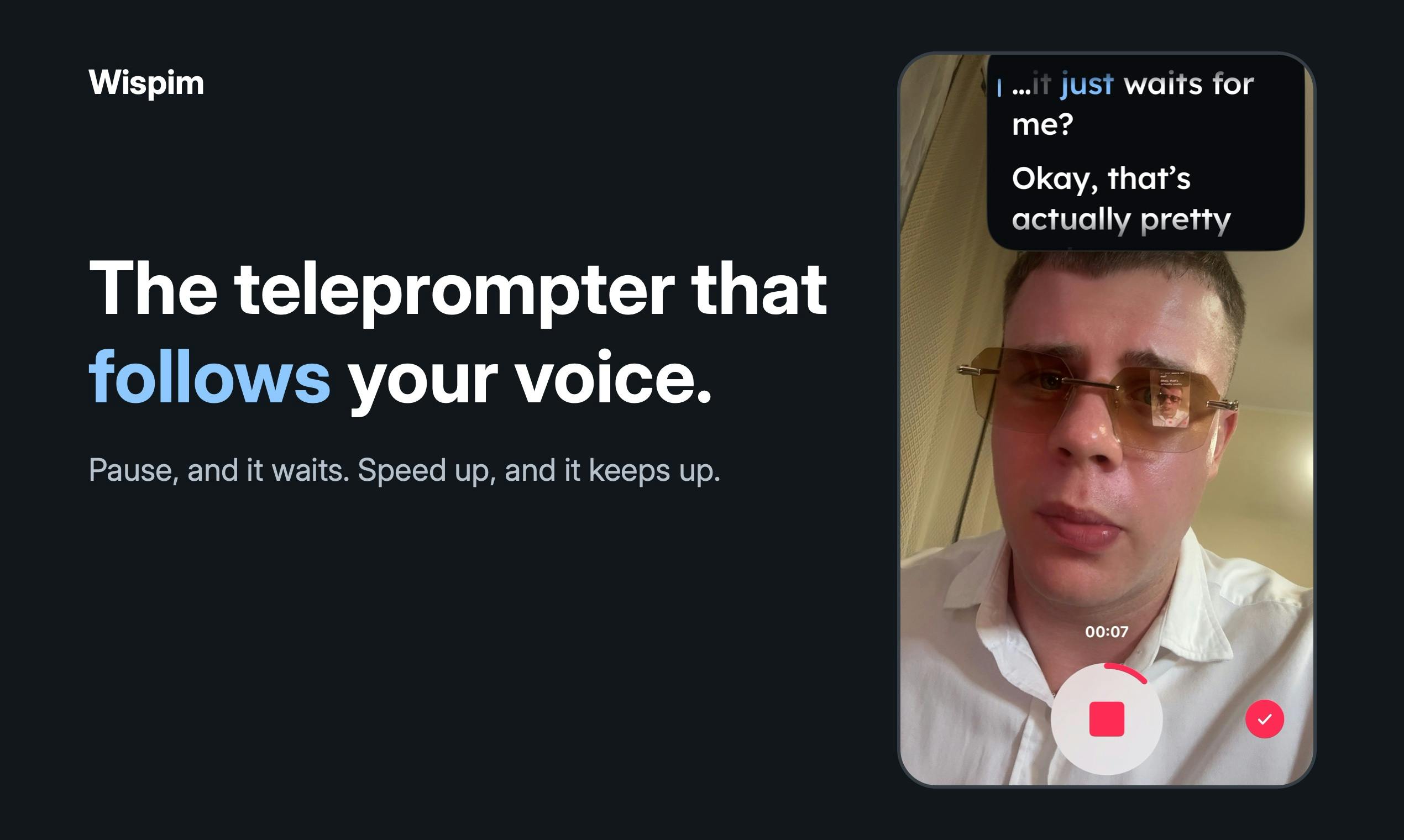
This tool, launched on Product Hunt, has a straightforward tagline—"a teleprompter that follows your voice." Its core logic is speech-recognition-driven scrolling: the script advances to wherever you actually speak. When you pause, it waits; when you speed up, it keeps up. This shift in interaction turns "reading a script" into something closer to "speaking."
How Voice Following Works
According to the product description, Wispim listens in real time to what the user says and matches the recognition results against the script. Jump to a section and it locates the corresponding position; insert an ad-lib and it won't spiral out of control.
The practical value of this mechanism is fault tolerance. Real speech naturally includes pauses, repetitions, and improvisation. Fixed-speed teleprompters treat all of these as "deviations," while voice following treats them as normal input. For creators who record talking-head content frequently, reducing the number of retakes is itself an efficiency gain.
That said, the accuracy of speech recognition directly affects the experience. Accents, ambient noise, and technical jargon can all cause matching errors, and how well it actually performs requires hands-on testing.
Speech-recognition-driven scrolling relies on real-time automatic speech recognition (ASR): the system slices the audio stream captured by the microphone into short segments, transcribes each one, and then aligns the text with the preset script. Alignment is usually not an exact character-by-character comparison but a fuzzy match that allows a certain edit distance—if the similarity between the recognition result and a script segment exceeds a threshold, the system determines that the user has reached that position and scrolls there. It's precisely because of fuzzy matching that occasional misrecognized or dropped words don't cause the view to jump around; but for the same reason, once technical terms, names, and foreign words are recognized as common words with similar pronunciation, the match can drift to the wrong section. Ambient noise lowers the signal-to-noise ratio and further amplifies these errors—which is the technical reason voice-following tools are sensitive to the recording environment.
Floating Above the Recording Interface
Another design point of Wispim is that it floats the script over the recording view. The product description mentions that the script can float above Instagram, TikTok, or the camera interface, meaning you don't need to switch back and forth between the teleprompter and the recording app.
This is especially relevant for mobile creators. Many people's workflow is to shoot directly on their phone, and setting up a separate teleprompter device is costly and cumbersome. The floating-window approach overlays the prompting function directly on the capture view, lowering the barrier to entry.
On mobile, floating windows are typically implemented using the system's Picture-in-Picture or overlay permissions: the app draws a semi-transparent window on top of the main capture interface, with the script scrolling inside, while the camera or short-video app underneath continues framing and recording as usual. The advantage of this approach is that it doesn't require deep integration with third-party apps like Instagram or TikTok, so compatibility is good; the cost is that the overlay occupies part of the frame, and some systems require additional authorization for overlay permissions, which must be manually enabled on first use. For creators, this means the prompt text and the capture view are visible on the same screen, so their eyes don't have to dart between two apps, reducing noticeable gaze shifts on camera.
Multi-Platform Coverage and a Free Browser Entry Point
Wispim covers iPhone, iPad, Android, Mac, and Windows, and is free to use in the browser. Multi-platform coverage means creators can get started with the devices they already have, without buying dedicated hardware for a particular platform.
The free browser version is worth noting. Teleprompter tools are highly commoditized, and a free entry point that lowers the cost of trying is a pragmatic way to acquire initial users. As for the functional boundary between the free and paid versions, the current product information doesn't specify.
The free browser version is largely made possible by the maturation of speech recognition on the web. Modern browsers can perform audio transcription locally or near-locally via the Web Speech API or WebAssembly-based speech recognition models, without requiring users to install a native app, and it also reduces server-side compute costs. This makes "open a webpage and start prompting" possible, which is especially friendly to users who just want to try it out quickly. However, the recognition accuracy and latency of browser-based solutions are affected by device performance, differences in browser implementations, and network conditions, and generally lag somewhat behind native clients; professional creators who want more stable following behavior often still need the desktop or mobile native versions.
Who Should Use It, and Who Can Wait
Judging from its positioning, Wispim targets talking-head creators with a steady video output cadence, self-media operators, and people who need to record courses or demo content. If you frequently re-record because you forget your lines, the voice-following prompting approach is worth a try.
But if you record in noisy environments, or your script contains a large number of proper nouns and foreign words, the reliability of speech matching is questionable. In addition, the 72 upvotes and 5 comments on Product Hunt indicate that the product is still at an early stage, with a limited sample of community feedback; its feature maturity and long-term maintenance remain to be seen.
Teleprompters aren't a new category, but the "follow your voice" interaction does hit a real pain point. Whether it can make speech recognition robust enough will determine whether it's a novelty tool or a productivity tool that sticks around.
One-line Summary
Wispim uses speech recognition to drive teleprompter scrolling, letting the tool follow the person rather than making the person chase the words.
Paragraph Summary
Wispim is a voice-following teleprompter launched on Product Hunt. Its core idea is to drive script scrolling by what the user actually says: it waits when you pause, keeps up when you speed up, and won't spiral out of control when you ad-lib, turning "reading a script" into an experience closer to "speaking." Its script can float above Instagram, TikTok, or the camera recording interface, reducing app switching; the product covers iPhone, iPad, Android, Mac, and Windows, and offers a free browser entry point. The article notes that speech recognition's adaptability to accents, noise, and technical jargon is the key variable determining the actual experience, and that community data of 72 upvotes and 5 comments indicates the product is still early-stage, with maturity and long-term maintenance yet to be observed.
Related articles

Nothing CMF Buds 2A Drops to $17.89 on Black Friday: A New Low for ANC Earbuds
Nothing CMF Buds 2A wireless earbuds Black Friday deal: just $17.89 on Amazon, about $11 off retail and a record low. ANC earbuds at an entry-level price.

When AI Creation Gets Accused of "Spitting": Hacker News Heats Up Over the Glaude Controversy
A Hacker News post, "Spitting in the Face of Glaude," sparks debate on AI creation transparency and attribution ethics. This analysis examines the blurred creator identity behind the controversy and offers practical advice for AI content production.

Akai Embraces Custom Firmware: MPC Sample 1.4 Lets Users AI-Program Their Sampler
Akai embraces the modding community with MPC Sample 1.4 firmware, supporting vibe-coded custom firmware and effects. We analyze the impact of this open strategy on music hardware and AI-assisted programming.