Wokyintosh: Turn Your Idle Mac Screen into a Retro System Dashboard
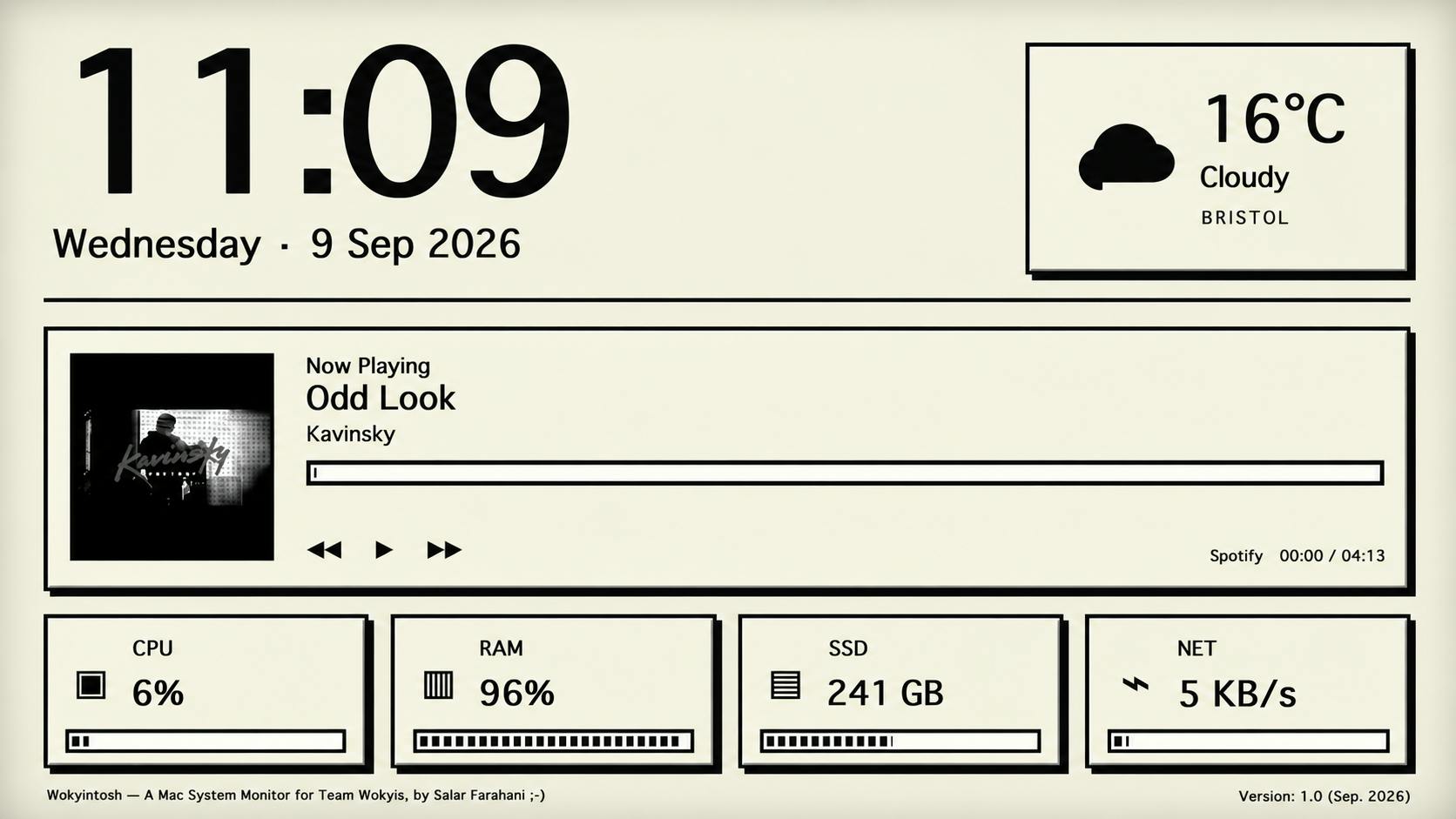
Wokyintosh is a free, open-source macOS retro dashboard combining clock, weather, music, and hardware monitoring for idle screens.
Wokyintosh is a free, open-source macOS tool built by developer Salar Farahani after failing to find a satisfying dashboard app, inspired by the classic Macintosh aesthetic. It combines a clock, local weather, Apple Music and Spotify Now Playing (with album art), and real-time CPU, RAM, SSD, and network monitoring into a full-screen retro interface designed for always-on display on secondary screens or Retro Dock Station setups. Its core value lies in pairing practical information density with a beautiful retro look, filling a niche that paid solutions missed. The project earned 74 upvotes on launch day on Product Hunt and is fully open source.
A Second Life for an Idle Screen
Many people have an old monitor sitting around, or a secondary display that rarely gets used. Wokyintosh offers a straightforward solution: turn it into a retro-style system monitoring dashboard. This free, open-source macOS app draws inspiration from the classic Macintosh interface, bringing together time, weather, now-playing music, and real-time hardware stats all on one screen.
Developer Salar Farahani introduced the project on Product Hunt, explaining that it was originally built for his own Wokyis M5 Retro Dock Station. After spending months unable to find a satisfying dashboard app — even among paid options — he decided to build one himself. The app launched to 74 upvotes and 9 comments, landing at #11 for the day.
What's Actually on the Dashboard
Wokyintosh brings several categories of information together in a single retro-styled interface. The core features break down into three areas.
Time and Environmental Info
The main focus of the interface is a large clock and date display, paired with local weather. This kind of information is ideal for a secondary screen meant to be glanced at rather than clicked — you get the info just by looking up, which fits the "dashboard" concept perfectly.
Music Playback Status
The app supports Now Playing displays for both Apple Music and Spotify, complete with album artwork. For anyone using a secondary screen as an ambient display, this section offers both practical value and visual appeal — album art paired with a retro UI has a genuinely decorative quality.
Real-Time Hardware Monitoring
What really gives Wokyintosh its "developer tool" character is its live stats for CPU, RAM, SSD, and network usage. Developers, video editors, or anyone running heavy workloads can dedicate a screen to system status, keeping an eye on machine load without switching over to Activity Monitor or similar tools.
Why It's Worth Trying
Wokyintosh has a clear positioning: rather than competing as the most feature-complete system monitor, it combines an attractive retro aesthetic with a practical information density, filling a gap that other tools haven't addressed.
A few things worth noting:
- Free and open source: The GitHub tag in its listing means the code is auditable and modifiable — interested users can customize it to their needs.
- Designed for secondary screens and dock stations: The author originally built it as companion software for a Dock Station, making it best suited for always-on display on a secondary monitor.
- Consolidated information: By putting time, weather, music, and system status into one interface, it reduces the need to switch between multiple apps.
The developer's motivation is telling — paid solutions on the market didn't meet the need, so he chose to build and open-source his own. These "itch-driven" indie projects often nail the details and aesthetic sensibilities that resonate with a specific audience.
Who It's For
If you happen to have an idle Mac display lying around, or you're using a device like a Retro Dock Station, Wokyintosh is essentially a zero-cost thing to try. Users who love the classic Macintosh visual style and want to put a secondary screen to good use will be its most natural audience.
For casual users, it's more of a vibe-enhancing desktop accessory; for developers and power users, the real-time hardware monitoring is where the practical value lies. As an open-source project, its future development is worth watching — whether the community can add more data sources and customization options may ultimately determine how far it goes.
Related articles

Salesforce Acquires Rune for $375M: AI Logistics Tech Bolsters Defense Business
Salesforce reportedly acquires defense tech startup Rune for $375M. Rune's AI logistics tech will strengthen Salesforce's Missionforce defense platform, continuing its M&A spree.

Why Fair Use Benefits Everyone in the AI Era
Starting from a Hacker News discussion, this article analyzes the legal logic and controversies of the fair use principle in AI training and content creation, and its dual impact on creators and the tech ecosystem.

Mistral Large 4 Open-Sources a Trillion Parameters, Microsoft Offers Voluntary Severance to 60,000 Employees
Mistral Large 4 open-sources a trillion-parameter multimodal model with a coding agent score of 48; SanDisk earnings show AI inference reshaping NAND demand; Google Gemini adds in-app file editing, OpenAI raises Codex quotas, and Microsoft offers voluntary severance to 60,000 employees.