WorkBuddy AI in Cross-Border Logistics: Full Walkthrough of 6 Key Business Scenarios

WorkBuddy AI platform walkthrough: 6 cross-border logistics scenarios plus automated scheduled tasks.
This article covers WorkBuddy's desktop AI platform applied to six high-frequency cross-border logistics scenarios and automated scheduled tasks. Using a three-step framework — role definition, business scope, output format — teams can build custom AI Agents for document verification, HS code classification, freight quoting, overseas warehouse exception handling, inquiry email responses, and preliminary contract review. Scheduled tasks can scan in-transit risks, generate daily/weekly reports, and push results to WeCom or Feishu, with four key deployment principles: accurate data sources, fixed schedules, no-data suppression, and human review of sensitive outputs. MCP integration connects the platform to external enterprise systems.
Cross-border logistics professionals deal with a complex mix of daily tasks — import/export document verification, customs clearance, freight rate calculation, overseas warehouse operations, inquiry responses, and contract reviews. These tasks are high-frequency, repetitive, and information-heavy. Handling them manually is not only time-consuming but also error-prone. This article is based on a hands-on industry demonstration of WorkBuddy's desktop AI office platform, covering six high-frequency application scenarios in cross-border logistics and how to implement automated scheduled tasks.
Building Enterprise Agents: Anyone Can Create a Custom AI Assistant
WorkBuddyAd provides an enterprise-grade backend that allows companies to build their own proprietary AI Agents internally. The presenter emphasized that writing an application-level prompt follows a three-step core logic: first, define the role (e.g., "cross-border logistics office assistant"); second, specify the core business scenarios and capability boundaries; and finally, establish output formats and interaction conventions.
Using this framework, any department or role within an organization can create its own AI Agent. When publishing, admins can choose between company-wide access or access restricted to specific personnel. This "anyone can build an Agent" capability enables standardized, reusable, high-quality content output across everyday business processes — without having to write prompts from scratch each time.
The fundamental difference between an AI Agent and a regular chatbot lies in the Agent's goal-oriented autonomous planning capability. An Agent can break a complex task into multiple sub-steps, invoke tools (such as reading files, querying databases, or sending messages), and then consolidate the results. Enterprise-grade Agent platforms typically add permission controls, audit logs, and knowledge base binding on top of this foundation, keeping AI behavior and enterprise data assets fully within a controlled scope. Compared to interacting directly with a general-purpose large language model, an enterprise Agent pre-configured with role definitions and business scenarios significantly reduces the cost of users re-explaining their context each time. It also ensures consistent output style when different employees invoke the same Agent, enabling standardized reuse of business processes.
Six High-Frequency Business Scenarios in Practice
The demonstration covered six of the most common scenarios across the cross-border logistics value chain, each with reusable preset prompts.
Import/Export Document Verification and Customs Clearance Assistance
The first scenario involves verifying and reconciling import/export documents. Users simply provide a local file directory or upload materials along with a prompt, and WorkBuddy can perform a consistency check on import documents. In the demo, five files were uploaded — a commercial invoice, sales contract, export customs declaration, bill of lading, and packing list. The system automatically identifies which documents are consistent and which contain discrepancies, then provides corrective suggestions and explains the potential impact — for example, inconsistent information could lead to misrouted shipments or the need to amend documents. The tabular output makes review results immediately clear, dramatically improving efficiency on tasks that previously required manually comparing documents one by one.
The second scenario focuses on intelligent assistance for cross-border customs clearance and inspection. For shipments to different countries, the system can generate a compliance requirements checklist, HS code classification references, and a customs inspection response package. Using Bluetooth earbuds as an example, it identifies compliance risk areas such as radiation standards and battery safety, provides a classification rationale for both HS codes 8517 and 8518 along with MFN base tariff references, and appends a checklist of required documents — commercial invoice, specification sheet, traceability report — plus suggested language for communicating with customers.
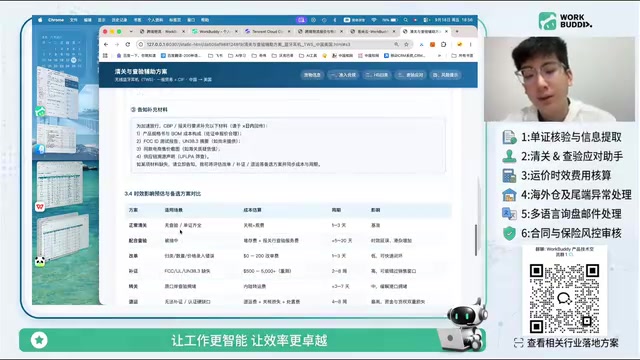
The HS Code (Harmonized System Code) is an internationally standardized commodity classification system developed by the World Customs Organization, consisting of a 6-digit base code plus country-specific additional digits (China uses 10 digits). Classifying the same product under different HS codes can result in significantly different tariff rates, import licensing requirements, and anti-dumping measures. For Bluetooth earbuds, the distinction between 8517 (telephone sets and other devices for transmitting/receiving voice, images, or data) and 8518 (microphones, loudspeakers, and headphones) hinges on whether the product's primary function is communications transmission or audio reproduction — different core functions mean different applicable tax rates and inspection standards. Misclassification can result in back taxes and late filing penalties at best, or being deemed smuggling at worst. AI-assisted HS classification can lower the barrier to manually consulting the General Rules for the Interpretation of the Harmonized System, but final classification recommendations still need to be confirmed by a licensed customs broker or customs consultant.
Freight Rate Calculation and Quotation
The third scenario — route pricing comparison and surcharge calculation — is the feature most frequently used by sales staff. Once a customer provides product details, quantities, unit prices, and weights, the system can quickly generate a quotation. In the demo, using 500 Bluetooth earbuds shipping to the US West Coast as the example, the output included an inquiry summary, recommended shipping route (Yantian Port, Shenzhen to Los Angeles), multiple transit time options, a detailed freight cost breakdown, a required documents checklist, compliance reminders, and even ready-to-send customer communication copy.
In the multi-country route rate and transit time comparison demo, the system evaluated eight routes and presented the lowest-cost option (full ocean freight, approximately 10–45 days), a balanced option (rail + ocean + air), and the fastest option — with pricing and reasoning for each. If a company already has a rate sheet or a list of preferred carriers, they can also build a knowledge base using Aicode or Lexiang (both Tencent ecosystem products), allowing the AI to generate more precise quotes based on historical partnership data.
Overseas Warehouse Operations, Inquiry Responses, and Contract Review
The fourth scenario covers overseas warehouse operations and last-mile exception handling — specifically exception response scripts, liability determination, resolution timelines, compensation calculations, and customer communication templates. The presenter specifically noted this is a semi-automated feature: WorkBuddy can integrate with DingTalk, Feishu, and other office platforms, allowing customer service staff to invoke internal knowledge bases from external group chats to generate response scripts for exceptions, enabling semi-automated customer follow-up management.
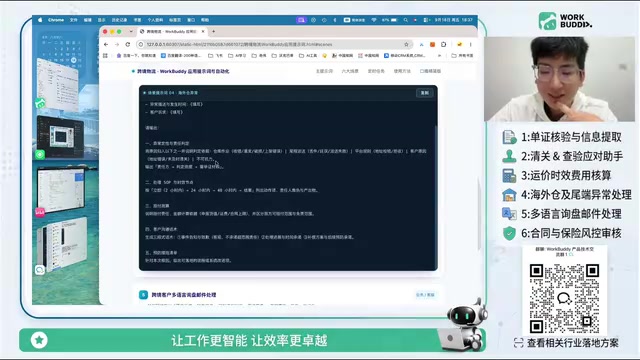
The fifth scenario addresses structured replies to customer inquiry emails. WorkBuddy can connect to real inboxes on QQ Mail, Feishu, WeCom, and DingTalk, read incoming emails, and generate reply scripts in bulk — or even send them automatically. The demo also showcased a "7-Step Inquiry Conversion SOP," covering everything from responding within five hours and pricing multipliers to differentiation and overcoming objections — well-suited for sales teams looking to establish a standardized deal-closing process and train new staff.
The sixth scenario is contract review. Leveraging the model's built-in legal expertise, the system can conduct a preliminary review of contracts. The presenter also demonstrated generating a Chinese-language situation report in Word format, which — combined with human-AI collaboration — can be directly edited in the document.
Automated Scheduled Tasks: Letting Repetitive Work Run on Its Own
Beyond on-demand tasks, WorkBuddy supports configuring scheduled tasks to handle daily or periodic recurring work. The presenter outlined more than ten scheduled task scenarios with a complete suggested workflow:
- In-transit risk scan: Automatically scans the in-transit order table, generates a daily report with specific flagged items
- Inquiry first-response checklist: Scans pending reply emails daily and generates a summary
- Overseas warehouse operations daily report: Tracks the status and timeliness of exception resolution
- Document verification evening report / freight rate and transit time weekly report: Generates the latest multi-country route pricing and transit time data
- Insurance and contract expiry reminders: Prompts timely renewals to mitigate risk
Scheduled task results can be pushed to WeCom, Feishu group chats, or the WorkBuddy WeChat Mini Program.
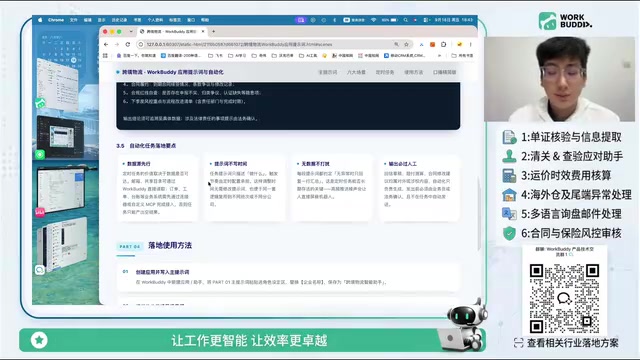
Four Key Principles for Deploying Scheduled Tasks
The presenter summarized the critical success factors for automation deployment:
First, you must have accurate data sources. Clarify where data comes from — order records, customs declarations, etc. — which can be pulled from online spreadsheets, local documents, or connected enterprise systems. If the system has an API, data can be accessed via MCP (Model Context Protocol); if not, a custom MCP integration is required. Without this, task outputs will be imprecise.
Second, set a fixed execution frequency and time. Scheduled tasks require a clearly defined recurrence schedule, or they will not run as planned.
Third, avoid over-pushing when there is no data. Data notification rules must be configured to prevent meaningless messages from creating noise.
Fourth, sensitive outputs must be reviewed by a human. For sensitive content such as outbound email replies, compensation calculations, and contract modifications, AI is responsible only for generating the content — it cannot guarantee 100% accuracy. Sales staff or legal personnel must conduct a secondary review, and high-frequency outbound sensitive actions should not be fully automated.
MCP (Model Context Protocol) is an open standard protocol that enables large language models to securely invoke external tools and data sources. It was proposed by Anthropic in late 2024 and has been adopted by the broader community. Its core concept is to decouple "model inference" from "data/tool access": the model declares through an MCP server what capabilities it can invoke (e.g., reading a database, calling an API, executing a script), and the client dynamically passes context with user authorization — avoiding the need to embed all sensitive data directly in the prompt. For enterprise systems without open APIs, a custom MCP server can be written as an adapter layer to convert internal data structures into a format the model can consume. This mechanism is the underlying foundation that enables WorkBuddy's "precise data retrieval for scheduled tasks" — the more standardized the data sources and the more complete the MCP integration, the higher the quality of automated task outputs.
Getting Started: Onboarding and Initial Configuration
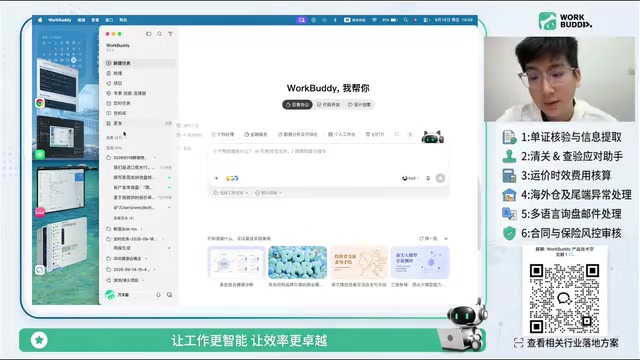
As a desktop-based local AI office platform, WorkBuddy has permission to read local files and folders (requiring user authorization for a specified scope). New users should complete the initial setup after downloading: configure usage preferences in settings (such as allowing background operation and enabling memory), tell the AI your company, role, and responsibilities so it can get to know you like a work partner, then personalize your response style, welcome messages, custom instructions, and preferred name. The data management section lets you view all generated, shared, and archived files.
The complete usage workflow can be summarized in four steps: create an enterprise AI Agent application → use the six scenario prompt templates to generate content → upload source materials (e.g., an Excel rate sheet) to produce a plan → configure scheduled tasks by selecting data sources, connectors (via MCP), and push channels, then manually review outputs.
For cross-border logistics professionals, WorkBuddy's value lies in handing off high-frequency, repetitive tasks — document verification, customs clearance checks, freight rate calculations — to AI, freeing sales staff to focus on higher-judgment activities like final confirmation and client communication. That said, most scenarios in the demo used broad example prompts; real-world deployment will still require customization based on each company's own data sources, system integrations, and business SOPs.
Related articles

OpenAI Partners with Shield: How the Astra Agent Revolutionizes IT Troubleshooting
OpenAI and Shield launch the Astra agent, which autonomously logs into computers and legacy systems to fix IT issues in real time, 35-40% faster than traditional models, with humans involved only when judgment is needed.

iPhone Duo Battery Life Tested: One Charge a Day Is Unavoidable, and the Large Screen Is the Culprit
iPhone Duo battery test: heavy use needs at least one charge a day, and about 30% remains after 6.5 hours of screen-on time. How often the large screen is unfolded is key; a MagSafe battery pack helps, and long-term degradation is also worth watching.

Kimi K3.1 Pro Open-Sourced: 2.8 Trillion Parameters Close In on Opus
Moonshot releases the open-source MoE model Kimi K3.1 Pro, with 2.8T total parameters and 104B activated, trailing Opus 5.5 by under 1 point on Terminal Bench 4.0.