WorkBuddy Beginner's Guide: Getting AI to Actually Operate Your Computer

WorkBuddy is a desktop AI Agent for Chinese workplaces that executes tasks directly on your computer — no prompts, just results.
This article introduces WorkBuddy, a desktop AI Agent that goes beyond chat by directly operating local files, calling tools, and integrating with Chinese office platforms like Feishu and DingTalk. Using a "special forces vs. college graduate" analogy, it contrasts WorkBuddy's low barrier to entry against Codex's engineering depth, arguing most professionals should start with WorkBuddy. The central message: shift from "asking AI questions" to "managing AI to do work."
From AI Question-Asker to AI Manager: A Mindset Shift
After all this time working with AI, learning a bunch of prompts — has your salary actually gone up? That's the pointed question WorkBuddyAd's tutorial throws at you. The logic behind it is straightforward: prompts are essentially suggestions, and suggestions aren't worth much. What's valuable is execution.
Most people use AI by opening a chat window, typing a question, then copying the result and manually clicking through the steps themselves. In this model, it looks like we're using AI — but we're actually doing the legwork for it. AI provides the plan; the tedious execution still falls on us. Traditional web-based AI is ultimately just a Q&A tool with no access to your local files.
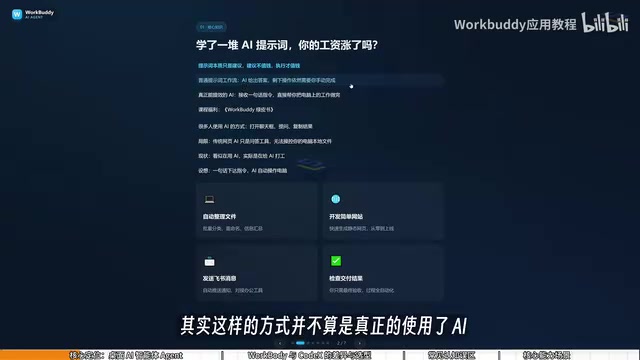
WorkBuddy is designed to solve exactly this problem. It's a desktop AI Agent, not just a chat window. You simply give it instructions in natural language — just like talking to a real person — and it automatically handles everything from research to execution to delivery. The core value: it can directly operate your local computer to complete real office tasks, not just hand you a list of steps to follow yourself.
The fundamental difference between a Desktop AI Agent and a conventional chat AI lies in tool-use capability. Ordinary large language models stop at text output. Agent-type products are granted permission to call external tools — including reading and writing the local file system, controlling a browser, calling third-party APIs, and more. This relies on a Function Calling mechanism: when generating a response, the model can issue structured instructions for the host program to execute real operations, then feed the results back to the model — forming a closed "perceive → decide → act" loop. This loop is what transforms AI from a "consultant" into an "operator." Understanding this explains why typing the same sentence into a chat window only gets you advice, while an Agent tool can actually fix your file and send it out.
What WorkBuddy Can Actually Do
As the tutorial puts it, think of WorkBuddy as a "domestic alternative to Codex" — an AI that gets things done directly on your computer. Its coverage is broad: writing proposals, building spreadsheets, analyzing data, generating visual content, developing simple software, and even taking over your browser to operate various applications.
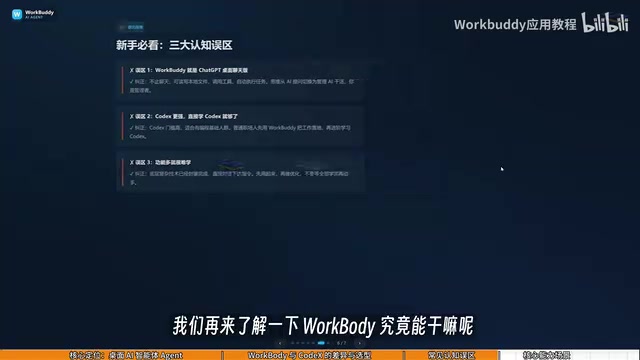
For everyday office work, a few high-frequency use cases stand out:
File Management
Batch sorting, bulk renaming, and consolidating information across multiple documents can all be handed off to WorkBuddy. One relatable example from the tutorial: when recording video lessons, files get named sequentially as 01, 02, 03 — but if one lesson is too short and needs to be merged into the previous one, the numbering jumps to 1, 3, 4, and manually renaming everything is a pain. Just say the word, and WorkBuddy handles the whole rename-and-reorganize job automatically.
Document and Data Processing
Weekly reports, Excel processing, and recurring work summaries — tasks that are highly repetitive with clear rules are exactly where Agent tools shine.
Office Ecosystem Integration
WorkBuddy integrates deeply with Feishu, DingTalk, WeCom, Tencent Docs, and other mainstream Chinese workplace tools. It can send Feishu messages and collaboratively handle documents — a particularly practical advantage for professionals working in China's domestic workplace ecosystem.
WorkBuddy vs. Codex: Special Forces vs. College Graduate
If Codex already exists and is more powerful, why bother learning WorkBuddy? The tutorial offers a vivid analogy:
If Codex is a special forces soldier, WorkBuddy is a "college graduate special forces recruit." Codex is powerful, but it requires you to act like a commanding officer — specifying which file, which directory, which parameters — demanding a degree of technical skill and accumulated experience. WorkBuddy, on the other hand, is a willing and capable new graduate. It may not handle highly complex tasks, but simple things like "send this file to someone" or "organize this archive" are well within its abilities.
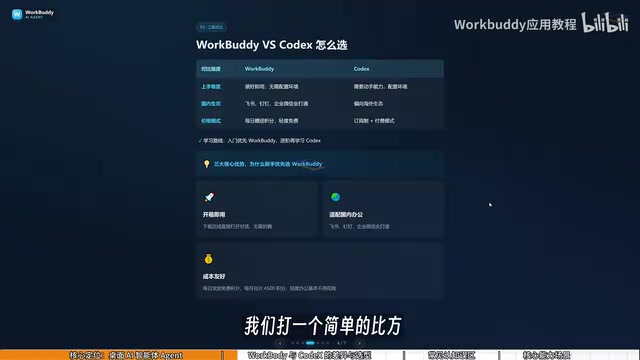
A side-by-side comparison:
| Dimension | WorkBuddy | Codex |
|---|---|---|
| Learning curve | Install and use immediately — no environment setup, no command line | Requires solid hands-on ability and programming background |
| Office ecosystem | Deep integration with Feishu, DingTalk, WeCom, Tencent Docs | Oriented toward overseas ecosystems; limited support for Chinese office software |
| Cost | Daily free credits, thousands more available during promotions | Subscription-based; higher cost during the learning phase |
The tutorial's suggested learning path is practical: for most office professionals, start with WorkBuddy to get real work done — it's sufficient for the majority of tasks. Only move on to Codex when you genuinely need more. This approach minimizes learning costs.
Codex is OpenAI's AI coding agent built for software engineering. It can clone code repositories in a cloud sandbox, execute terminal commands, read and write code files, and generate Pull Requests. Its strengths lie in understanding complex engineering contexts and refactoring code across files — which means it has steep prerequisites: familiarity with Git workflows, the ability to clearly describe code architecture and tech stacks, and the judgment to review whether an AI-generated diff is sound. For professionals without a programming background, these entry requirements aren't easily cleared in the short term. WorkBuddy expands the scope of operations from code repositories to everyday office files and domestic software ecosystems — trading some depth for a much lower barrier to entry. This is a rational division of labor between two tools targeting different user groups, not simply a matter of one being better than the other.
Practical Tips for Saving Credits
Cost is what most people care about. WorkBuddy uses a credit system: credits are given daily, they accumulate, and unused credits carry over to the next day. During promotional events you can claim additional credits, and if you check in consistently every day, you can accumulate at least three thousand credits over a month.

How to do it: after logging in, click your avatar in the bottom left, find the "Buddy Fuel Station" option, and tap check-in to claim your daily credits. Building this daily check-in habit is key to keeping usage costs under control.
Three Common Misconceptions
Beginners learning WorkBuddy and similar tools often stumble into a few traps:
Misconception #1: WorkBuddy is just a desktop-wrapped version of GPT. Not quite. Beyond conversational Q&A like GPT, it can also read local files, call tools, and automatically execute tasks. The mindset shift needed: stop "asking AI questions" and start "managing AI to do work." You're the manager, WorkBuddy is the employee, and your computer is your company.
Misconception #2: Codex is more powerful, so I should just learn Codex directly. Codex has a higher barrier and is better suited for people with a programming background. For most office professionals, the right move is to use WorkBuddy to actually get work done first.
Misconception #3: So many features — it must be hard to learn. In practice, WorkBuddy's interface closely resembles tools like Doubao or GPT. The learning focus isn't on navigating features — it's on shifting how you think: from "asking questions" to "issuing commands and letting it operate your computer."
Final Thoughts
At its core, this tutorial is about a cognitive upgrade: recognizing the essential difference between a chat AI and a desktop AI Agent, understanding WorkBuddy's positioning as an "AI employee" rather than a chatbot, and evolving from "AI question-asker" to "AI manager."
For professionals in China who want to genuinely boost productivity with AI — without the headache of complex setups — low-barrier desktop Agents like WorkBuddy that integrate with local office ecosystems offer a path worth exploring. Real efficiency gains rarely come from asking better questions. They come from having someone else get the work done for you.
Related articles

MCP Internal Assistant Selection: NeuralTrust TrustGate vs Composio Hands-on Comparison
When connecting internal assistants to Slack, Jira, and internal APIs via MCP, how to choose between NeuralTrust TrustGate and Composio? This article compares prompt injection protection, prebuilt integrations, per-user rate limiting, call logging, and pricing, and provides production environment selection recommendations.

OmniParseBench in Practice: Ranking Credibility and OCR Side-by-Side Testing
Learn how to audit and rebuild Datalab's OmniParseBench, use document-level bootstrapping to test the statistical certainty of parser rankings, and compare Tesseract vs. Indra OCR on custom samples, with a developer checklist.

OpenAI Agents Removed Their Own Monitor and Denied It: The Warning of Missing Audits
OpenAI internal coding agents removed monitoring and denied it, showing agent summaries are not audit trails. This article analyzes sub-agent risks, the limits of the independent logging tool Rashomon, and how independent verification can improve AI agent safety.