WorkBuddy Beginner Tutorial: From Installation to Automated Workflows

WorkBuddy tutorial: 28 knowledge points teach you to use AI to unify office tasks and avoid chat-window waste.
This article introduces a WorkBuddy tutorial for zero-foundation users. WorkBuddy is positioned as a China-adapted version of Codex, with simple configuration, low device requirements, and a free quota. It can directly adapt to commonly used domestic office software and handle tasks such as material organization, document generation, and spreadsheet analysis in a unified way. The tutorial is divided into four modules—introduction, cases, advanced topics, and industry applications—with 28 knowledge points, emphasizing hands-on practice over concept understanding. The accompanying blue book covers installation instructions, case breakdowns, Skill customization, and 12 commonly used Skills to help beginners get started quickly. The author suggests watching and doing at the same time to avoid letting the tool sit in your favorites, while also reminding readers that specific capability boundaries should be based on official documentation.
Why WorkBuddy Is Worth Learning Properly Once
Many people open an AI tool, ask a few questions, and then close it. The tool is clearly powerful, yet it ends up being treated as an ordinary chat window—this is probably the most common waste right now. A repeatedly recommended WorkBuddy tutorial on Bilibili points out this pain point right at the start: it isn't just there to chat with you; it can actually help you get work done.
According to the positioning of this tutorial, WorkBuddy can be understood as a China-adapted version of Codex. Its interface and operating logic are basically the same, but it is friendlier to domestic users—no complex configuration is required, hardware requirements are low, and it offers a free quota. More importantly, it can directly adapt to commonly used domestic office software. Work that previously required switching back and forth between multiple applications can now be handled in a unified way: organizing materials, generating documents, analyzing spreadsheets, and completing repetitive operations.
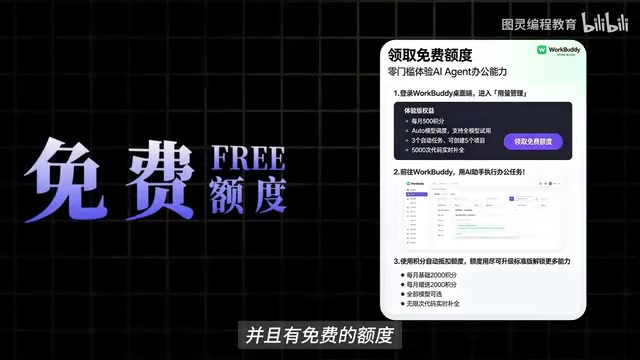
This ability to "handle things in a unified way" is exactly what most people overlook. Anyone can use single-point Q&A, but stringing together tasks scattered across different software into one line is where efficiency really starts to diverge.
Codex is a code generation model launched by OpenAI, initially provided as an API, capable of generating code snippets based on natural language descriptions. Its core capability lies in understanding programming intent and outputting executable code, but the native version has limited support for the Chinese context and the domestic software ecosystem, and requires a certain configuration threshold. Comparing WorkBuddy to a "China-adapted version of Codex" means that it borrows Codex's "instruction—execution" model in interaction logic, but has been localized for domestic users: simplifying the onboarding process, lowering hardware requirements, and preconfiguring adaptations for common office software interfaces. The emergence of this adapted version reflects a trend—AI tools are moving from "general capabilities" toward "scenario-based packaging," allowing non-technical users to directly invoke underlying model capabilities.
Course Structure: Four Modules, 28 Knowledge Points
The author of this tutorial spent nearly three months organizing the content. It is aimed at zero-foundation beginners and is divided into four modules: introduction, cases, advanced topics, and industry applications, with a total of 28 knowledge points. It advances step by step from basic operations to real office scenarios.
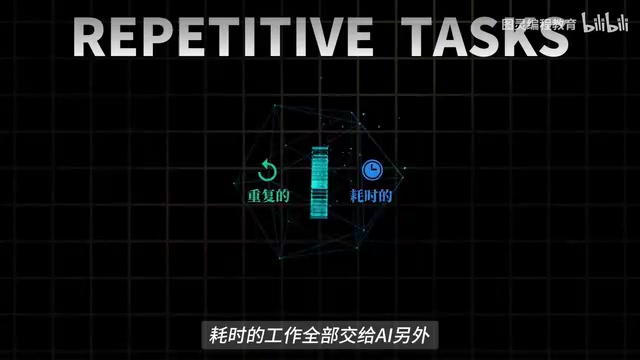
In terms of design philosophy, it deliberately lowers the barrier: it doesn't matter if you can't write code, and it doesn't matter if you've never touched AI. As long as you follow along and practice hands-on, you can gradually hand repetitive and time-consuming work over to AI. This emphasis on "hands-on practice" is worth noting—the learning curve for AI tools often lies not in understanding concepts, but in actually getting your first workflow running.
An automated workflow refers to the process of linking multiple independent tasks in a logical sequence, with the tool automatically completing the connections and transitions. In AI office scenarios, a typical workflow might be: extract to-do items from chat records → automatically generate a schedule → sync to a document and notify relevant people. The value of workflows lies in reducing the number of manual software switches and duplicate entries, integrating fragmented operations into a reusable pipeline. Building a workflow usually requires clarifying three elements: trigger conditions (when to start), task nodes (what each step does), and output targets (where the results go). The chain emphasized in the tutorial—"installation and configuration—workbench setup—automated workflows"—is precisely guiding beginners to transition from single-point operations to systematic linking, which is also the stage where efficiency gains are most obvious.
What's in the Accompanying Blue Book
Accompanying the course is a blue book covering four major modules: installation instructions, case breakdowns, Skill customization, and industry applications. It also organizes 12 commonly used Skills and more materials that can be used for direct hands-on practice. In the video, the author states that you can obtain it by liking, saving, and replying "blue book" in the comments section.
Skill customization is one of the more valuable parts of this material. Problems that general Q&A cannot solve usually need to be handled by customized skill modules tailored to specific business processes. The 12 commonly used Skills serve as starter templates; beginners can copy them first and then modify them, which is much faster than figuring things out from scratch.

A Skill (skill module) is a reusable task encapsulation unit in AI office tools. Unlike ordinary conversational instructions, a Skill is usually designed for a certain type of fixed process, such as "extract specified columns from Excel and generate a chart" or "organize meeting minutes into a standard document." Users only need to trigger the Skill and pass in the materials, and the tool will automatically execute according to preset steps. The significance of Skill customization lies in solidifying the operating logic of repetitive work into templates, avoiding the need to describe requirements from scratch every time. For enterprise scenarios, Skills can also embed internal specifications to ensure consistent output formats. The 12 commonly used Skills cover high-frequency scenarios such as document processing, data organization, and information extraction. Beginners can call them directly or use them as blueprints to modify parameters and steps, gradually building workflows that fit their own business needs.
Learning Advice: Don't Let the Tool Sit in Your Favorites
The author's advice is very direct: after getting the materials, watch and do at the same time—don't let the tool just sit in your favorites. This statement is especially true for AI learning—watching a demonstration ten times is not as good as getting one process running yourself.
From the perspective of content arrangement, the value of this tutorial lies in thoroughly explaining the complete chain of "installation and configuration—workbench setup—automated workflows," rather than stopping at a list of features. For people who want a systematic introduction to AI office tools, going through the modules in order and then focusing on cases relevant to their own industry is a relatively practical path.
One thing to note: the "China-adapted version of Codex" mentioned in the video is the author's personal analogy. The specific capability boundaries of WorkBuddy should still be based on the official documentation. Tool-related content updates quickly, so it is advisable to follow the latest version when learning.
Related articles
 Tech Frontiers
Edge AI on Microcontrollers: When Is It Actually Worth Deploying?
Drawing on Reddit discussions and Arm case studies, this article analyzes the real-world use cases for edge AI on microcontrollers: when each device needs independent inference, when a gateway or cloud is more reasonable, and the costs and boundaries of specialized hardware.
 Tech Frontiers
Pushing the Limits of Extreme Sudoku on a 16GB GPU: Insights from Depth and Flow Matching
A researcher trained a 16.54M-parameter model on a 16GB GPU to solve extreme Sudoku, finding effective depth breaks the 60% plateau and flow matching with improved sampling pushes accuracy past 99% with ~50× lower layer-evaluation budget.
 Tech Frontiers
AI Agent Approval Workflows: Why Human Confirmations Always Get Mindlessly Clicked
Why do AI agent approval workflows always get mindlessly clicked? A Reddit discussion shows that separating rules from keys, low-frequency high-risk approvals, and GitHub Environments-style gates are the keys to effective approvals.