WorkBuddy Complete Guide: Master Your Office AI Agent in 7 Days

WorkBuddy is a desktop agent focused on office scenarios, targeting non-technical users with out-of-the-box usability and Tencent ecosystem connectivity.
Based on a Bilibili creator's tutorial video, this article breaks down the positioning and core advantages of the desktop AI agent WorkBuddy. It notes that most desktop agents focus on coding, while WorkBuddy targets office scenarios, taking over the browser, operating software, and completing tasks like writing proposals, building spreadsheets, and analyzing data. Its four advantages are: one-click installation with zero-configuration out-of-the-box experience; tiered workspace permissions and sandbox execution for security; one-click access to Tencent products like WeChat, Tencent Meeting, and Tencent Docs; and high completeness through connectors, built-in experts, and GUI operations. The target users are office workers who don't understand environment setup and want AI to directly handle repetitive office tasks, but the product's performance in real office scenarios still needs practical verification.
Desktop AI agents are expanding from coding scenarios into office scenarios, and WorkBuddy (spoken as "workbody" in the video, same below) is one with a distinctly clear positioning. In the tutorial, the Bilibili creator calls it "the domestic alternative to Codex" and emphasizes its lower barrier to entry and out-of-the-box usability. Based on that video's content, this article breaks down WorkBuddy's product positioning, core advantages, and target audience, helping you decide whether it's worth adding to your daily workflow.
1. What Is WorkBuddy: A Desktop Agent for Office Scenarios
According to the creator, WorkBuddy can be understood as "an AI digital workhorse that gets things done right inside your computer" — no network environment required, no complex configuration, and friendly to new machines. It covers writing proposals, building spreadsheets, analyzing data, creating content-style posters, developing software, and even taking over the browser to operate various apps on your behalf, ultimately placing the results right in front of you.
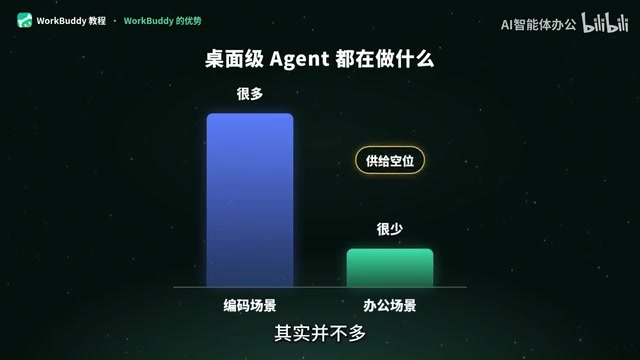
The cleverness of this positioning lies in how it segments scenarios. The creator points out that while there are many desktop agent products, most focus on coding scenarios, and few truly target office scenarios — and WorkBuddy is "the first desktop agent in China focused on office scenarios." The name itself conveys the product's intent — to be a great partner in your work.
For non-technical users, this positioning hits a real pain point: they don't need to spend energy on environment setup and tool configuration; instead, they pick a ready-made product and get started directly, letting it handle business scenarios for them. Simple, direct, and easy to use — these are the keywords the creator repeatedly emphasizes.
Desktop Agent vs. cloud agent: the key difference lies in where it runs. A desktop agent is installed directly on the user's local computer and has operating permissions over the local file system, installed software, and browser interface, so it can complete tasks across applications (such as scraping data from a webpage into Excel, or batch-renaming local files). This is fundamentally different from a chatbot that can only generate text in a web dialog box. The trade-off is that it requires stronger security isolation mechanisms and depends on the vendor's adaptation to operating system interfaces. Most desktop agents on the market today target developers (e.g., code generation and terminal operations), and products for general office scenarios are relatively scarce — which is exactly the differentiated space WorkBuddy claims.
2. Breaking Down Four Core Advantages
1. Out of the Box, Avoiding the Pitfalls of Environment Configuration
The creator compared several deployment paths: deploying "Lobster" requires first installing the base environment, then connecting a model, and also connecting Feishu or WeChat as the conversation entry point; deploying Codex requires solving network issues, purchasing an account, and binding a credit card — a step that deters many beginners. In contrast, WorkBuddy is a one-click install after download — double-click, and you can start chatting right away.

This "zero-configuration" experience is its most intuitive competitive edge. For office workers without a development background, the installation process itself is the first screening threshold, and WorkBuddy clearly wants to lower that threshold as much as possible.
2. Security Design: Permission Control and Sandbox Execution
The creator mentions that WorkBuddy is a mature product that considered security from multiple dimensions at the design stage — for example, different levels of permission control within the workspace, and a sandbox execution environment — all aimed at letting it "safely help you get your work done."
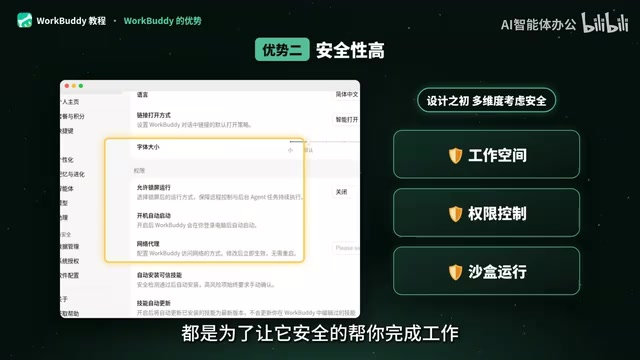
Desktop agents need to access local files and various software, so security boundaries are especially important. The combination of sandboxing and tiered permissions means the agent has certain isolation and constraints when performing operations on the user's behalf — which is particularly critical for enterprise office scenarios.
Sandbox is an isolated execution environment where the code, file reads/writes, and program calls executed by the agent are confined to a controlled area. Even if a misoperation or malicious instruction occurs, it is difficult for it to affect system files outside the sandbox. What usually accompanies a sandbox is tiered permission control: different access levels are divided by workspace — for example, read-only, writable, or allowed to execute external programs — authorized by the user or administrator. For desktop agents, this mechanism determines whether they can be accepted by enterprise IT departments — it must be able to "get hands-on" with local resources while being promptly blocked when it crosses the line. When evaluating such products, it's worth paying attention to whether permission granularity can be refined down to specific directories and specific applications.
3. A Complete Ecosystem: One-Click Access to Tencent Products
Ecosystem is another card WorkBuddy plays. The creator listed Tencent's own product matrix — WeChat, Mail, Tencent Meeting, Tencent Docs, MA Knowledge Base, Tencent Surveys — which can be connected with just a few button clicks in WorkBuddy, and there are even more tools available in the connectors.
For teams already deeply using Tencent's office suite, this native connectivity means lower migration costs and a smoother collaboration chain. The creator also says plainly that the only product that can compete with it right now is Codex from abroad, but Codex can't be used in China, and even if it could, it would "not adapt well to the local environment" because its ecosystem and plugins are all designed around foreign products.
Connector is a standardized interface layer between the agent and external services: it encapsulates the APIs of systems such as email, meetings, documents, and knowledge bases into capabilities the agent can call, enabling the agent to read context and write results without requiring users to manually move data around. The value of ecosystem connectivity lies in reducing migration costs — users' existing schedules, documents, and communication records can directly become the agent's input, and the output can flow back into the original workflow. Conversely, this is also the source of ecosystem barriers: an agent designed around foreign products often lacks usable connectors in the domestic office software environment, and even if its features are stronger, it is hard to implement.
4. High Completeness: Connectors, Experts, and GUI Operations
The fourth point the creator summarizes is high completeness: you can operate it with a single click in the interface, connectors can link to various platforms, and many experts are built in. Together, these three point to one conclusion — the product is complete enough to support direct hands-on use, rather than remaining at the demo stage.
3. Who It's For: An Office Productivity Path for Non-Technical Users
Based on the creator's analysis, WorkBuddy's target user profile is quite clear: office workers who don't need to understand environment setup, don't want to hassle with accounts and network configuration, and hope AI can directly take over repetitive office tasks. Writing proposals, building spreadsheets, analyzing data, making posters, developing small tools, operating the browser — all these tasks can be handed over to it.
One thing to note is that the video tutorial this article is based on focuses on product positioning and advantages. The specific installation steps, Skill customization methods, and industry implementation cases are covered more fully in the video's companion materials. If you're preparing to get started, it's recommended to proceed step by step along the path of "installation and configuration — case practice — Skill customization."
From an industry perspective, competition among desktop agents for office scenarios has only just begun. With its combination of "out-of-the-box usability + ecosystem connectivity + secure sandboxing," WorkBuddy has taken a route different from coding-oriented agents. Whether this route can gain a firm foothold in real office scenarios still needs more practice to verify.
Related articles

Why Microsoft CEO Nadella Still Backs Nvidia After Jensen Huang's Departure
Microsoft CEO Nadella publicly expresses confidence in Nvidia interim CEO Colette Kress. This article analyzes Nvidia's power transition after Jensen Huang's departure, Microsoft's compute dependency, and the trust logic of the AI supply chain.

Nadella: Critical Infrastructure Is 'Unpatchable' as AI Cybersecurity Arms Race Escalates
Microsoft CEO Nadella addresses AI cyberattack fears, saying much critical infrastructure is unpatchable, downplaying the Outlook outage, and analyzing AI's dual role in cybersecurity.

Musk Backs Jensen Huang: Firing Him Is Like Cutting Jordan
Musk says Jensen Huang is loyal to the U.S. and likens firing him to cutting Michael Jordan—highlighting politicization anxieties in the AI chip industry and defending talent value.