WorkBuddy Complete Guide: Tencent's AI Agent for End-to-End Office Automation

WorkBuddy is Tencent's desktop AI agent that actually executes tasks on your computer, not just answers questions.
WorkBuddy is a desktop AI agent from Tencent that upgrades AI from "talking" to "doing" — it can directly read and write local Word, Excel, and PDF files, automatically plan and execute complex multi-step tasks, run scheduled jobs in the background, and accept remote commands via WeChat. Unlike ChatGPT or similar conversational AIs that only provide advice or code snippets while leaving execution to the user, WorkBuddy delivers finished results end-to-end. The tutorial illustrates this with an HR scenario: processing 80 resumes into a structured spreadsheet automatically. WorkBuddy also supports MCP-based integration with Tencent Docs, WeCom, and external databases, plus Skill pack extensions for browser control and more.
What Is WorkBuddy: An AI That Acts, Not Just Advises
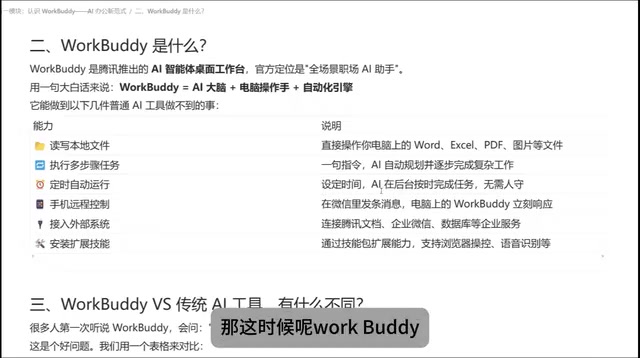
WorkBuddyAd is a desktop AI agent released by Tencent, officially positioned as a "full-scenario workplace AI assistant." In plain terms, it can be broken down into three components: an AI brain that thinks, a set of "hands and feet" that can operate your computer, and an automation engine that ties it all together. This combination lets it break free from the fundamental limitation of traditional AI tools — being able to talk but not act.
The Bilibili tutorial covered here positions WorkBuddy as a "domestic alternative to Codex," with its main selling point being a lower barrier to entry — no complex network setup, no tedious configuration, and a relatively beginner-friendly experience. Whether you need to write proposals, build spreadsheets, analyze information, generate visual posters, develop software, or even take over browser and application control, WorkBuddy aims to deliver finished results directly to the user.
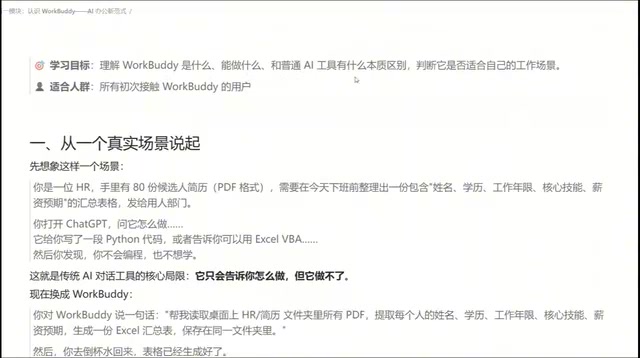
One HR Scenario That Reveals the Fundamental Difference
The tutorial uses a concrete scenario to illustrate the gap: an HR professional has 80 candidate resumes on hand and needs to compile them into a spreadsheet — with fields like name, education, years of experience, core skills, and salary expectations — before the end of the workday, so the hiring team can start screening.
With a traditional conversational AI like ChatGPT, Doubao, or Qianwen, you'd typically receive a Python script or a suggestion like "you could use this tool to do it." But the actual execution — reading the files, extracting fields, generating the table — still falls entirely on you. In other words, these tools can tell you how to do something, but they can't do it for you.
With WorkBuddy, the user simply issues a command: read all candidate resume PDFs in a given directory, extract name, education, years of experience, core skills, and salary expectations, generate an Excel summary, and save it to a specified folder. WorkBuddy interprets the request, reads the local data, and automatically produces the file — all the user needs to do is pour a glass of water while it works, then come back and check whether the results meet expectations.
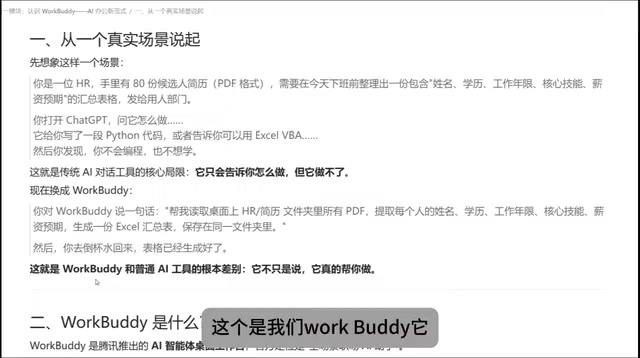
This is the fundamental difference from question-and-answer AI: a traditional AI is like a "renowned consultant" who gives you the answer; WorkBuddy adds a "capable employee" on top of that — one with hands and feet who can actually get things done on your computer.
Key Capabilities: From Local Files to Scheduled Tasks
Based on the tutorial, WorkBuddy can handle a range of tasks that are difficult or impossible for traditional AI tools:
Operating Local Files
It can read and write local files, handling formats including Word, Excel, PDF, images, and more. Essentially any file type you can work with on your computer, WorkBuddy can take over.
Automatic Multi-Step Task Planning
For complex requests, WorkBuddy automatically plans an execution path and completes the task step by step. If it encounters a problem mid-execution and realizes the original plan won't work, it can redesign its approach and continue along a new path — this ability to adapt when blocked is what sets it apart from simple scripts.
Scheduled Tasks and Background Execution
Using its automation engine, users can configure recurring actions as scheduled tasks. For example, automatically compiling and sending a weekly report every week — as long as WorkBuddy is running on the computer, it handles everything in the background with no need to supervise.
Remote Control
Through the WorkBuddy mini program or WeChat client, users can send commands remotely. As long as the desktop application remains open, WorkBuddy can execute operations on the computer and return results to either the desktop or mobile device.
External System Integration via MCP
It supports connecting to external systems — for instance, retrieving data from Tencent Docs, connecting to WeCom (Enterprise WeChat), or even databases. This kind of integration via MCP significantly extends WorkBuddy's capability boundaries.
What Is MCP? MCP (Model Context Protocol) is an open protocol standard proposed by Anthropic and now widely adopted across the industry. It standardizes how AI models connect to external data sources and tools — think of it as the "USB port" of the AI world. As long as a tool or service exposes an MCP-compatible interface, an AI agent can connect to it in a unified way, without needing custom integration code for each system. For desktop agents like WorkBuddy, MCP dramatically reduces the cost of connecting to new systems: once Tencent Docs, WeCom, or a third-party database provides an MCP-compatible interface, WorkBuddy can call it directly — rather than relying on fragile automation approaches like screen capture and simulated clicks. This is one of the core battlegrounds in today's AI agent ecosystem.
Skill Pack Extensions
Through Skill packs, users can extend WorkBuddy's capabilities — for example, enabling browser navigation and screenshots, or turning a voice recording into a written summary.
A Note on AI Agents WorkBuddy belongs to a product category commonly called "AI Agent" or "Agentic AI." The fundamental distinction from ordinary chatbots is whether the system has action capability. A traditional large language model (LLM) is essentially a text-in, text-out system. An agent adds a tool-calling layer on top: it can call file read/write APIs, execute code, control browsers, trigger external services, and decide its next step based on results — forming a "perceive → plan → act → feedback" loop. This architecture transforms AI from an advisor into an executor, and it's been one of the hottest directions in AI application development over the past year or two. OpenAI's Codex, Microsoft Copilot's automation features, and WorkBuddy all fall into this category.
Side-by-Side Comparison with Traditional AI Tools
The tutorial compares the two along several dimensions: core positioning, file operations, multi-step tasks, unattended execution, output types, and suitable task categories.
Traditional conversational AI is limited to one question, one answer — it can't read or write local files, and it struggles to chain data across sequential steps. Every interaction requires a human to be at the keyboard, and the output is almost always text. WorkBuddy, by contrast, can read and write local files, execute tasks automatically step by step, run unattended via scheduled tasks, and deliver finished files — Word documents, Excel spreadsheets, PDFs — directly to the user.
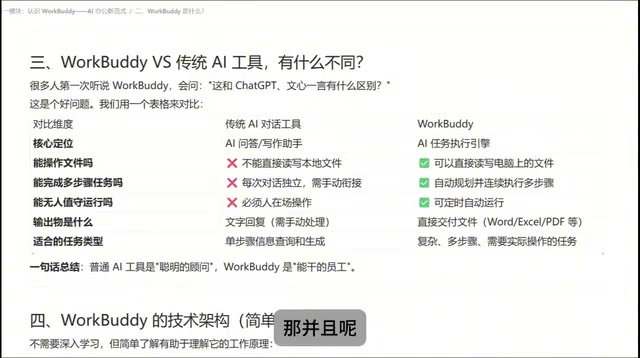
The one-line summary: ordinary AI is a consultant who gives you answers; WorkBuddy is an employee with hands and feet who actually gets the work done.
Final Thoughts
This tutorial does a solid job of clarifying WorkBuddy's core positioning, typical use cases, and capability boundaries — making it a good starting point for anyone completely new to agent-type tools. For office workers who regularly deal with repetitive document processing and information organization, desktop agents like WorkBuddy genuinely offer a new way of thinking about work. That said, real-world performance and reliability on complex tasks still need to be verified through hands-on use in actual workflows.
Related articles

Gemini 4 Argon Hands-On: AI Builds Board Games, Constructs Temples, and Trains Robots Autonomously
Gemini 4 Argon hands-on roundup: AI autonomously builds a desk racetrack and temple in Blender, writes a ray tracing engine, trains a humanoid robot to sink 7 shots, plus API pricing and developer access.

The Magic Octagonal Coin: Why Only 9% of People Can Predict Its Flip?
Only 9% of people can correctly predict the Magic Octagon coin flip. This article explains its spatial rotation mechanism, common cognitive pitfalls, and a new hypothesis based on Relevance Theory, exploring the limits of human spatial reasoning.

Sam Altman: AI Is Entering the Era of Scientific Discovery — Math Breakthroughs Will Replicate in Biology and Energy
Sam Altman says AI is entering the era of scientific discovery — math breakthroughs will replicate in biology, materials science, and energy to help develop new drugs and energy sources.