WorkBuddy for Absolute Beginners: A Hands-On AI Agent Tutorial

WorkBuddy is an AI agent that actually executes tasks, with its four-layer architecture and localized ecosystem as core advantages.
Based on a Bilibili tutorial, this article systematically reviews the positioning, architecture, and real-world performance of the AI agent WorkBuddy. It highlights that WorkBuddy's essential difference from traditional chat tools is its ability to call tools, operate files, and chain multi-step tasks, verified via a PPT-to-PDF demo. Its technical foundation spans four layers—large model, engineering, entity, and platform—with the real difference lying in engineering and entity-layer capability encapsulation. For Chinese users, key advantages include no special network needed, a free quota, and integration with Tencent tools and Feishu. The course offers ten lessons and about twenty-eight knowledge points for beginners, while cautioning that complex workflow stability and multi-machine collaboration remain in exploration.
WorkBuddy for Absolute Beginners: A Hands-On AI Agent Tutorial
With AI tools emerging one after another, most products are still stuck at the "conversational assistant" level—you ask, it answers, it offers suggestions, but you still have to do the work yourself. WorkBuddy's arrival makes it possible for "AI to actually do the work for you." Based on a systematic tutorial series on Bilibili, this article walks through WorkBuddy's core positioning, technical architecture, and real-world performance to help you decide whether it deserves a place in your workflow.
What WorkBuddy Really Is: From "Advisor" to "Executor"
According to the definition given by the Bilibili creator in the tutorial, WorkBuddy is an AI agent that can genuinely execute tasks for you. Its essential difference from traditional AI chat tools is that it can not only understand requirements and answer questions, but also call tools, operate files, execute tasks, and even chain multiple steps together to complete complex workflows.
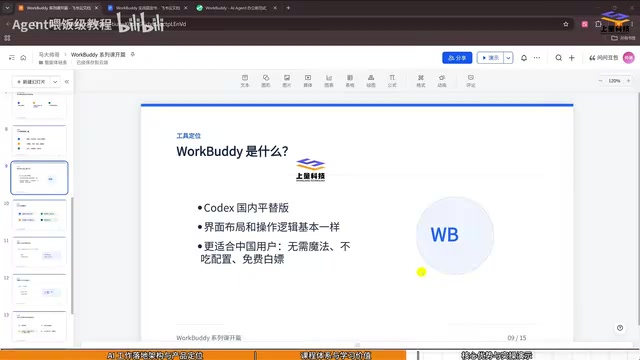
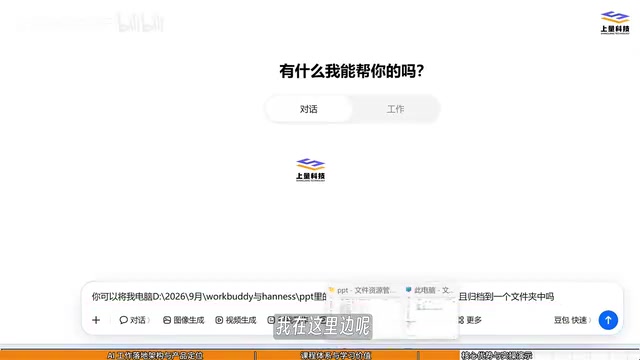
This difference in positioning comes through very clearly in the actual demo. The tutorial sets up a comparison experiment: when asked to convert all the PPT files on a computer into PDFs, Doubao can only tell you the steps for "how to do it"—it remains, in essence, an advisor. Give the same instruction to WorkBuddy, and it will first inspect the local files, locate the PPTs, install the appropriate scaffolding, attempt to call Office or WPS for processing, switch methods after a failure, and ultimately produce nine PDF files for real.
The creator's summary: past AI was a "strategist," while WorkBuddy is starting to feel like it has "hands." It targets everyday office scenarios and can be understood as the prototype of a new kind of operating system—a complete productization of scenario-based intelligent workflows.
The Four-Layer Architecture: Understanding WorkBuddy's Technical Foundation
The tutorial breaks down the technical logic of this class of products using a "four-layer structure," from bottom to top:
Large Model Layer (LLM): Responsible for language understanding, reasoning, and generation. Models such as MiniMax and DeepSeekAd sit at this layer.
Engineering Layer: Provides context, memory, tool calling, loop orchestration, and similar capabilities. The creator notes that with these engineering capabilities, using agents becomes much more convenient.
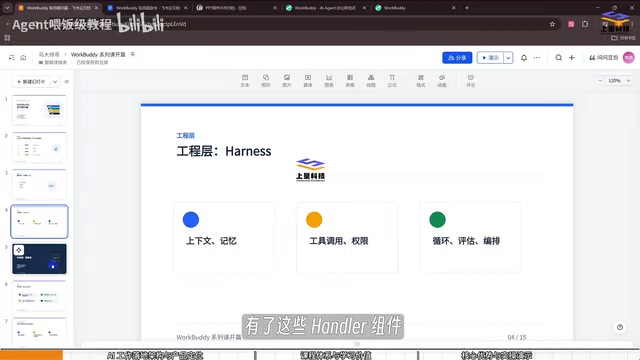
Entity Layer: Individual "digital employees" capable of independently completing tasks—that is, agents.
Platform Layer: Products formed by a collection of multiple agents. WorkBuddy belongs to this layer, alongside similar products such as Codex and Alibaba's Wukong. According to the creator's observation, WorkBuddy currently holds the highest market share in China and is the most popular, partly because it is integrated with WeChat, Tencent Docs, Tencent Meeting, and other tools, making it convenient to use.
This architecture explains a key question: why, when both call large models, WorkBuddy can "take action" while chat tools cannot—the difference lies not in the model itself but in the capability encapsulation at the engineering and entity layers.
Agents and Tool Calling
An agent refers to an AI system that can perceive its environment, plan autonomously, and execute actions to accomplish goals; its core lies in "autonomy" and "closed-loop execution." Tool calling is the interface mechanism through which large models interact with the outside world: based on task requirements, the model outputs structured instructions to invoke external functions such as search, code execution, and file reading/writing, then returns the results to the model for continued reasoning. It is tool calling that turns chatbots from "all talk" into "able to act," while loop orchestration (chaining multiple tool calls into a workflow) determines how complex a task an agent can handle.
Context Window and Memory Mechanisms
The context window refers to the upper limit of text a model can process in a single pass, determining how much information an agent can "remember" within one task; memory mechanisms persist key information through external storage (such as vector databases and file systems), enabling agents to stay coherent across sessions and long-running tasks. The engineering layer's ability to manage context and memory directly affects the stability and accuracy of an agent executing multi-step tasks—and this is one of the key reasons why different products calling the same large model deliver vastly different experiences.
Three Practical Advantages for Chinese Users
The tutorial repeatedly emphasizes three ways WorkBuddy is friendly to Chinese users, which constitute its core competitiveness against overseas counterparts (such as Codex, Cloud, and others):
- No special network environment required: No "magic," no complex configuration—lowering the barrier to entry.
- Free quota provided: Free to use, further reducing the cost of trying it out.
- High ecosystem integration: Compatible with mainstream domestic office software and integrated with Feishu and Tencent tools. No need to switch between multiple applications—you can handle materials, generate documents, and compile statistics in one place.
The creator also offers a slightly tongue-in-cheek example: when you can't figure out why you've had a fight with your girlfriend, you can export the chat history to WorkBuddy for analysis, and it might just serve as a relationship expert—though of course, this is more about illustrating the generality of its text-processing capabilities.
What API, Quota, and Ecosystem Integration Actually Mean
"Free quota" usually refers to the free number of calls or tokens a product provides per account, with usage-based billing beyond that. For tasks like agent work that require multiple model calls and tool executions, quota consumption is far higher than single-turn conversations, so the size of the free quota directly determines the cost of trying it out. "Ecosystem integration" refers to a product connecting to third-party services such as WeChat, Tencent Docs, and Feishu through official APIs or plugins, allowing users to have the agent read materials, generate documents, and sync schedules without switching applications. This level of integration both reduces operational friction and creates a localization barrier that overseas counterparts find hard to replicate.
Real-World Scenarios and Course Structure
The tutorial consists of ten lessons divided into three parts: installation and understanding of workspaces/work modes; multimodal expert skills and connector usage; and automation (global instructions, memory, automated workflows)—about twenty-eight knowledge points in total. The course is designed for absolute beginners and emphasizes that "no programming is needed": just follow the steps and you can hand repetitive work over to WorkBuddy.
The creator frankly notes that more than sixty percent of work may be repetitive labor, and freeing up that time is precisely where the value of agents lies. The tutorial also mentions more imaginative advanced use cases, such as connecting WorkBuddy to a home camera for chore management, or deploying WorkBuddy on multiple computers to have them collaborate on work—content that will continue to be updated in the course resource library.
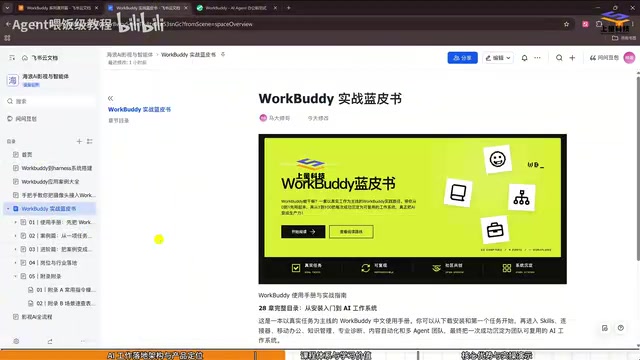
The accompanying materials include a hands-on blue book, twelve common scenario cases, and ten sets of case materials. The creator guides viewers to obtain them by liking, favoriting, and sharing ("one-click triple") and replying with a specified keyword in the comments.
A Rational View: Who It's For and Who It's Not
Judging from the tutorial demos, WorkBuddy's strengths lie in local file operations, format conversion, material organization, repetitive task execution, and other office scenarios. For roles such as finance, product management, programming, and teaching, if you can map out clear repetitive processes, there is real room for efficiency gains.
But two things need to be clearly understood: first, the demos in the tutorial are still basic capability showcases, and the stability of complex workflows needs real-world verification; second, agent task execution depends on tool-calling chains, and environment differences or software compatibility issues may require human intervention. The creator also acknowledges that more complex capabilities (such as multi-machine collaboration and device linkage) are still in the ongoing exploration stage.
For users who want to get started with AI agents, the value of this tutorial lies in providing a complete path from installation to hands-on practice, and in using comparative demos to clearly explain the essential difference between "agents" and "chatbots." It is recommended to first get the materials, run through one actual task, and then decide whether to incorporate it into your daily workflow.
Common Risk Points in Agent Deployment
Agent task execution depends on a closed loop of "perception—planning—invocation—verification," and an error at any stage can lead to task failure or deviations in results. Common risks include: environment differences causing tool-call failures (such as incompatible interfaces across different versions of Office/WPS), erroneous operations caused by model hallucinations (such as accidentally deleting files), lost context in long workflows leading to skipped steps, and data security risks from improper permission management. Therefore, in actual deployment, it is advisable to start with low-risk, rollback-friendly tasks, retain a human review step, and check whether the product provides operation logs and permission controls.
One-line Summary
WorkBuddy is an AI agent that can actually execute tasks, with its four-layer architecture and localized ecosystem as its core advantages.
Paragraph Summary
Based on a Bilibili tutorial, this article systematically reviews the positioning, architecture, and real-world performance of the AI agent WorkBuddy. It points out that WorkBuddy's essential difference from traditional chat tools is its ability to call tools, operate files, and chain multi-step tasks—verified through a PPT-to-PDF comparison demo. Its technical foundation can be broken down into four layers: large model, engineering, entity, and platform. The difference lies not in the model itself but in the capability encapsulation at the engineering and entity layers. For Chinese users, the main competitive advantages are no special network environment required, a free quota, and integration with Tencent tools and Feishu. The tutorial has ten lessons and about twenty-eight knowledge points, aimed at absolute beginners. The article also cautions that stability of complex workflows and advanced capabilities such as multi-machine collaboration are still being explored, so real-world results should be evaluated rationally.
Related articles

Former Huawei Genius Youth Open-Sources AI Agent Guide: 90+ Hands-On Case Studies
Former Huawei Genius Youth Li Bojie open-sources AI Agent Book, the most systematic Chinese Agent learning repo on GitHub, with 90+ runnable examples covering context compression, memory frameworks, MCP tool calling, prompt injection attack and defense, and other enterprise-level hands-on content.

The Most Detailed FDE Tutorial on Bilibili: Case-Based Teaching from Business Practice to Interviews
B站UP主推出FDE从入门到面试实战教程,讲师深入业务一线,用马氏学习平台真实案例讲解FDE岗位要求。本文分析案例教学法、笔记策略与私密信息处理,为AI岗位求职者提供参考。

518 Dance Motion Chains + H3 Relay: Long-Video Choreography Breaks the Duration Limit
The open-source dance motion library adds 518 motion chains for choreography without reference videos. The H3 workflow combines AddGuide relay, CF Lift acceleration, and VDN to enable 30–60s long-video generation, breaking single-segment duration limits with independently controlled segmented prompts.