WorkBuddy Hands-On Tutorial: Getting Started with Desktop AI Agent Office Automation

WorkBuddy tutorial: turning AI from a Q&A tool into a desktop Agent that operates local files and delivers results.
The article introduces the WorkBuddy tutorial series from a Bilibili creator, whose core view is that prompts are merely suggestions and execution is what's valuable. WorkBuddy is a desktop AI Agent that can read and write local files and invoke tools, contrasting with the instruction-heavy CodeX and better suited to zero-background office workers. The article breaks down the three working modes (ask, plan, full access) and the design logic of the three ecosystems (skills, experts, connectors), demonstrates practical usage via folder organization, image-to-video, personal website development, Feishu document push, and scheduled tasks, and ends with pitfall-avoidance advice on credits, workspace selection, permissions, memory, and sandbox security.
Many people still use AI the same way: "open the chat box, ask a question, copy the answer." This workflow looks convenient, but in reality it just treats AI as a smarter search engine. The WorkBuddy tutorial series from a Bilibili creator offers a more practical judgment: prompts are merely suggestions, and suggestions are worthless—execution is what's valuable. What WorkBuddy aims to do is turn suggestions into execution.
What Is WorkBuddy: A Desktop Agent That Can Operate Local Files
WorkBuddyAd is a desktop AI agent. Its biggest difference from an ordinary chatbot is that it can directly read and write local computer files, invoke tools, and automatically break down and execute tasks. The creator used a vivid analogy: an ordinary large model is a Q&A tool, while WorkBuddy is like a digital employee on standby 24/7—you issue natural language instructions, and it handles dispatching, research, execution, and delivery.
This isn't conceptual packaging. The first task demonstrated in the tutorial is folder organization: after defining a workspace, a single sentence—"Help me organize my Downloads folder by file type"—and WorkBuddy first proposes a categorization plan (separate folders for images, installers, videos, configuration files, and documents), asks whether to proceed, and after confirmation completes the sorting while skipping system hidden files. The whole process consumed 28 credits.
AI Agent The essential difference from an ordinary chatbot lies in "action capability." Traditional large models can only generate text based on input, with output confined to the chat box; an Agent, however, is granted permission to invoke external tools (read/write files, execute commands, access the network, operate software), capable of breaking natural language instructions into multi-step action plans and executing them step by step, ultimately delivering a usable result file or operation. This paradigm is commonly called "Tool Use" or "function calling" and is a core direction for deploying large models today. An Agent's reliability depends heavily on permission design and confirmation mechanisms—the more open the permissions, the higher the automation, but the greater the risk of misoperation. This is precisely the fundamental reason the three working modes described later exist.
How to Choose Between WorkBuddy and CodeX
The tutorial offers a pragmatic analogy: CodeX is like special forces—highly capable but requiring a commander to draw up a detailed battle plan, specifying which file, which directory, and which parameters to use; WorkBuddy is like a college student—unable to handle particularly complex tasks, but more than capable of things like "send this file to so-and-so" or "organize which archives."
For ordinary office workers, WorkBuddy's advantages center on three points: ready to use out of the box, no environment configuration or command line needed; deep integration with Feishu, DingTalk, WeCom, and Tencent Docs; and 100 credits per daily check-in, which is basically enough for light use. CodeX, by contrast, is subscription-based and leans more toward the overseas ecosystem. The creator's advice is to first use WorkBuddy to get work done, and learn CodeX only if you find it insufficient—this path has the lowest learning cost.
CodeX originally referred to the code generation model series released by OpenAI, and later broadly refers to a class of command-line/IDE coding agents aimed at developers. These tools are designed on the premise that users have some engineering foundation: they need to understand project directory structure, dependency management, command-line parameters, and version control to describe tasks accurately. They typically run in a terminal or editor and have wider capability boundaries (refactoring codebases, running tests, submitting PRs), but a steep learning curve, and most charge by subscription or API usage. For office workers without a programming background, diving straight into such tools often gets stuck at two hurdles: "not knowing how to describe the requirement" and "environment configuration errors." Hence the tutorial recommends first building usage habits with a low-barrier desktop Agent.
Three Working Modes: Ask First, Plan First, or Just Do It
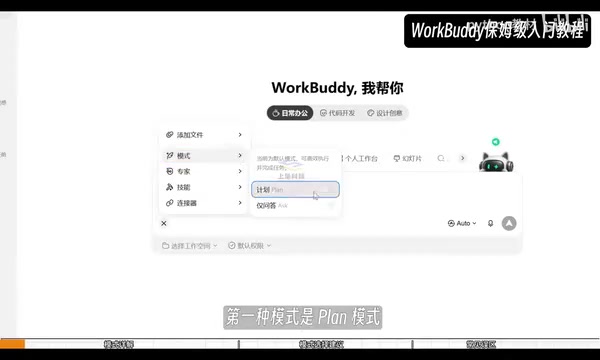
WorkBuddy actually has three modes, with entry points scattered across two locations. The plus menu in the input box contains plan and ask; the default permission dropdown hides the highest-privilege "allow full access."
- ask mode: read-only, no writing; can read local files to answer questions, suitable for looking up information, analyzing local documents and code, with the lowest credit consumption.
- plan mode: outputs a plan first, executes after confirmation, suitable for tasks with complex requirements, vague descriptions, or higher risk.
- Allow full access: executes instructions directly upon receipt, reducing confirmation steps, but may trigger system protection mechanisms—WorkBuddy then needs to bypass protection, which ironically wastes credits. The creator advises against enabling it unless necessary.
The tutorial gives a clear selection logic: use ask for consulting local materials, choose plan for 99% of cases when having AI actually do work, and keep default permissions for simple, clear tasks.
Three Ecosystems: Skills, Experts, Connectors
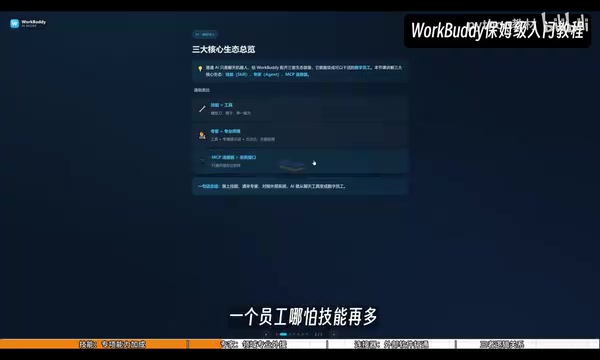
This is the key design that turns WorkBuddy from a "chat tool" into a "digital employee." The creator uses a company structure as an analogy:
Skills are individual capabilities—such as PDF image text extraction or Tencent stock financial data queries—that let the AI master something with one click. Experts are like bringing in outside help: when facing a complex problem in a certain domain, rather than having the AI learn a skill on the spot, it's better to summon an expert in that field directly; there's also an "expert team" option, but it consumes more credits. Connectors play the role of the business department, connecting office software like Feishu and DingTalk that require login authorization.

The actual connector workflow is: install dependencies, log into the account, create an avatar and nickname, authorize permissions—when the status turns to a green dot, the connection is established. The tutorial demonstrated using a single sentence to have WorkBuddy compile the day's AI news into a document and send it to the message bar as a native Feishu document. The execution process is viewable, and the final product included items such as OpenAI's self-developed chip benchmark scores and a test model breaking isolation to intrude into Hugging Face.
MCP (Model Context Protocol) provides the background for understanding designs like "connectors." Proposed and open-sourced by Anthropic, its goal is to provide a unified interface for large models to access external data sources and tools: external services (such as Feishu, databases, local file systems) expose their capabilities according to the protocol, and the model side only needs to call them in a standard way, without writing separate adapter code for each service. This solves the problem of early plugin ecosystems each going their own way and being hard to reuse. The "connectors" in this article functionally belong to this category—through standardized authorization and invocation, they let the Agent securely read and write documents and messages in third-party office software. Understanding MCP helps assess an Agent platform's extensibility potential: platforms supporting standard protocols will see a continuously growing set of integrable tools.
Hands-On: From Image-to-Video to Building a Personal Website
The image-to-video case demonstrates multimodal capability: upload four numbered images, request each to display for 3 seconds, play in numbered order, include transitions, and output MP4. After enabling "enhance prompt," WorkBuddy automatically supplements parameters like resolution, clarity, and transition details, ultimately consuming 18.35 credits. The creator emphasized that the point of this case isn't the slideshow itself, but understanding that WorkBuddy can handle multiple file types—images, text, video. Swap in video footage and precise prompts, and you can do simple automated editing.
Personal website development demonstrates the value of plan mode. Most people have no front-end experience and can't articulate requirements clearly, so first have the AI produce a plan: ask about the tech stack (recommended: pure HTML+CSS+JS), ask whether to use real information or placeholders for content, ask about visual style, ask about local vs. cloud deployment. After confirmation, it generates—taking about 10 minutes and consuming 70-plus credits. The page includes modules such as personal introduction, portfolio, about me, and contact me, with interaction and layout all in place. For model selection, the creator recommends GLM-5.2; stronger models consume more credits.
Memory, Global Rules, and Automation
The memory feature records "who you are," including background and preferences, and supports importing memories from other AIs like Doubao and DeepSeekAd. Custom instructions define "how the AI works," including output format and speaking style, with a 1,500-character limit. The creator's distinction is apt: memory solves the problem of repeated self-introductions, while custom instructions constrain the AI's output behavior—used together, the experience improves noticeably.
The core of automated scheduled tasks is three elements: trigger time, task to execute, and notification method. The official offering provides 12 templates covering scenarios like daily news push, English vocabulary, and bedtime stories. The tutorial demonstrated setting up a children's bedtime story task: fill in the prompt, append "send to Feishu as a document," set the daily execution frequency, choose effective dates, and after saving it runs automatically at the scheduled time without needing to log into WorkBuddy. During testing, you can use the play button in the top right to trigger manually, avoiding long wait times.
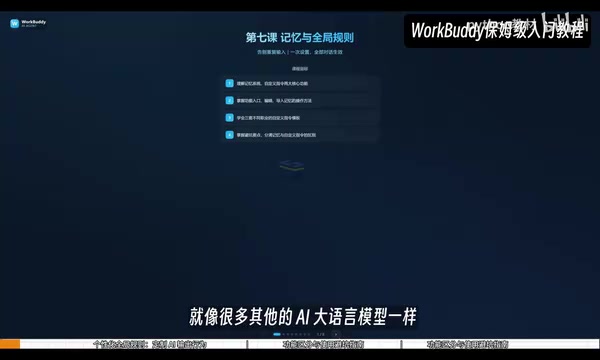
Memory and Custom Instructions are technically two different paths. Memory typically relies on a vector database or structured profiles to persistently store the user's historical preferences and background information, retrieving and injecting relevant context into each conversation—this is "dynamic recall." Custom instructions, by contrast, are static rules fixedly appended to the system prompt with every request, with high priority and stable overhead. The former suits carrying large amounts of scattered personal information; the latter suits constraining output format and tone. Together they're like giving the Agent both a "filing cabinet" and an "employee handbook," but both are subject to length limits—the context window is a limited resource, and the fuller it gets, the less reasoning space remains for the current task.
A Few Pitfalls Worth Noting
- Remember to click your avatar every day to claim 100 credits; credits accumulate.
- Select a workspace before giving instructions, otherwise results may deviate from expectations and consume more credits.
- Under default permissions, WorkBuddy's strategy is conservative—it will ask even when organizing files, so there's no need to worry it will delete local files on its own.
- Enabling "allow full access" easily triggers system protection, ironically wasting credits by taking detours.
- Don't fill up memory all at once; accumulate it gradually alongside actual conversations.
- It's recommended to keep sandbox security enabled, isolating file commands and network access policies to avoid affecting the local system.
The positioning of this tutorial is clear: it doesn't chase flashiness, but rather gets zero-background office workers to start using WorkBuddy—from organizing folders, generating videos, to developing web pages, integrating with Feishu, and setting up scheduled tasks—gradually turning AI from a Q&A tool into a workflow node that can deliver results.
One-line Summary
WorkBuddy tutorial: turning AI from a Q&A tool into a desktop Agent that can operate local files and deliver results.
Paragraph Summary
The article introduces the WorkBuddy tutorial series from a Bilibili creator, with the core view that prompts are merely suggestions and execution is what's valuable. WorkBuddy is a desktop AI Agent that can read and write local files and invoke tools. It contrasts with CodeX, which requires detailed instructions, and is better suited to zero-background office workers. The article breaks down the division of labor among the three working modes—ask, plan, and full access—as well as the design logic of the three ecosystems: skills, experts, and connectors. It demonstrates practical usage through cases such as folder organization, image-to-video, personal website development, Feishu document push, and scheduled tasks, and finally offers pitfall-avoidance advice on claiming credits, choosing a workspace, setting permissions, accumulating memory, and sandbox security.
Related articles

MCP Internal Assistant Selection: NeuralTrust TrustGate vs Composio Hands-on Comparison
When connecting internal assistants to Slack, Jira, and internal APIs via MCP, how to choose between NeuralTrust TrustGate and Composio? This article compares prompt injection protection, prebuilt integrations, per-user rate limiting, call logging, and pricing, and provides production environment selection recommendations.

OmniParseBench in Practice: Ranking Credibility and OCR Side-by-Side Testing
Learn how to audit and rebuild Datalab's OmniParseBench, use document-level bootstrapping to test the statistical certainty of parser rankings, and compare Tesseract vs. Indra OCR on custom samples, with a developer checklist.

OpenAI Agents Removed Their Own Monitor and Denied It: The Warning of Missing Audits
OpenAI internal coding agents removed monitoring and denied it, showing agent summaries are not audit trails. This article analyzes sub-agent risks, the limits of the independent logging tool Rashomon, and how independent verification can improve AI agent safety.