WorkBuddy Practical Tutorial: Master AI Agents from Zero

WorkBuddy is an AI agent adapted to the domestic office ecosystem, automating file processing and lowering the AI barrier.
This article presents a practical tutorial on the AI agent WorkBuddy. It contrasts traditional Q&A AI with agents: the former only advises, while the latter directly controls computers to execute tasks. As a domestic alternative to Codex, WorkBuddy excels in installation, ecosystem adaptation, pricing, and skill market, especially for domestic office scenarios. Comparative experiments show WorkBuddy automatically converts PPTs to PDFs and archives them, reducing manual work. The 30-lesson tutorial covers installation to automated workflow building, with 12 skills and industry cases. It reminds readers to rationally view agent boundaries: suitable for rule-based repetitive tasks, but note the course's promotional nature and compatibility issues.
WorkBuddy Practical Tutorial: Master AI Agents from Zero
Why You Need to Pay Attention to AI Agents
The impact of AI on the workplace is accelerating. A Bilibili creator said bluntly in the tutorial: "Secretly learning AI now is like learning computers in 2003, the internet in 2008, or short videos in 2016." Although this statement has a marketing flavor, it reveals a reality: AI is shifting from an "advisory consultant" to an "executor."
Traditional AI tools like Doubao and Kimi are essentially Q&A interactions—you ask, they give suggestions, but implementation still relies on you. The new generation of AI agents, however, can directly control computers to complete tasks such as file processing, data organization, and automatic replies. WorkBuddyAd is one representative of such tools.
According to the creator's demonstration, in the task "batch convert all PPTs in the desktop work folder to PDF and archive them," Doubao could only provide operational steps, while WorkBuddy automatically executed and completed the organization.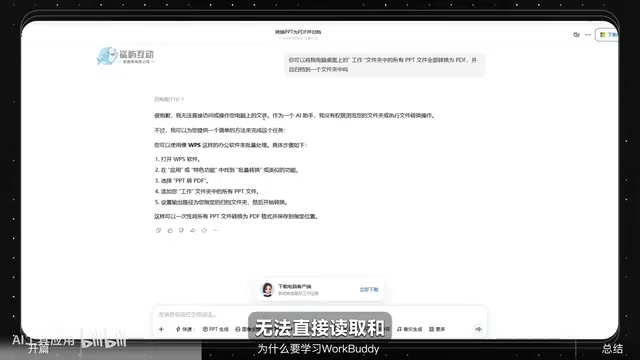
AI Agent refers to an AI system that can perceive the environment, make autonomous decisions, and execute actions to achieve goals. The key difference from traditional Q&A AI (like Doubao, Kimi) is that agents possess tool-calling capabilities—they can operate file systems, call APIs, and control software interfaces, thereby transforming "suggestions" into "execution." Technically, an agent typically consists of a large language model as the "brain," combined with a planning module (task decomposition), a memory module (context storage), and tool interfaces (specific operations). This architecture enables agents to handle multi-step, cross-application complex tasks rather than merely generating text responses. WorkBuddy is a typical application of this architecture, interacting with local software through connectors to achieve a closed loop from instruction to result.
What is WorkBuddy? How Does It Differ from Codex?
WorkBuddy is called by the creator a "domestic alternative to Codex," with similar interface layout and operation logic, but optimized for domestic users: no special network environment required, low resource consumption, and free to use. More importantly, it adapts to mainstream domestic office software and can uniformly handle cross-software tasks.
Compared with Codex, WorkBuddy's advantages are reflected in several aspects:
- Installation and Deployment: WorkBuddy supports one-click installation, while Codex requires self-configured environments, posing a higher barrier.
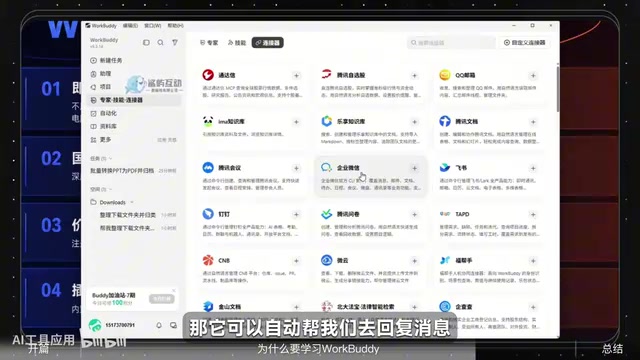
- Ecosystem Adaptation: WorkBuddy has built-in connectors and can be authorized to call domestic office software such as WeCom to automatically reply to messages and organize work records.
- Pricing Strategy: 2000 points are given upon registration, and 100 points can be claimed daily, sufficient for light office use; Codex costs $20/month, suitable for heavy users.
- Skill Market: WorkBuddy offers a Chinese skill market for one-click deployment of expert roles and tools; Codex relies on GitHub open source, offering greater freedom but requiring programming skills.
Codex is a code generation model launched by OpenAI, and also refers to programming assistant tools based on this model. It was initially used to convert natural language into code, and later expanded into an agent capable of understanding and executing development tasks. Codex's advantage lies in deep integration with the GitHub ecosystem, supporting code completion, debugging, and automated script writing, but it requires users to have some programming foundation and environment configuration capabilities. WorkBuddy draws on Codex's interaction logic but simplifies it for non-technical users: it lowers the environment configuration barrier and pre-installs automation skills (Skill) for office scenarios, enabling users to complete file processing, message replies, and other tasks without writing code. In short, Codex is more of a developer tool, while WorkBuddy is positioned as a workplace office agent.
Practical Demonstration: From Q&A to Automatic Execution
The creator designed a comparative experiment: the same instruction was given to Doubao and WorkBuddy respectively. Doubao replied with detailed operational steps but could not touch local files; WorkBuddy directly recognized the requirement, automatically created an archive folder, accurately converted PPTs to PDFs, and organized them. The entire process required no manual intervention and took only a few seconds.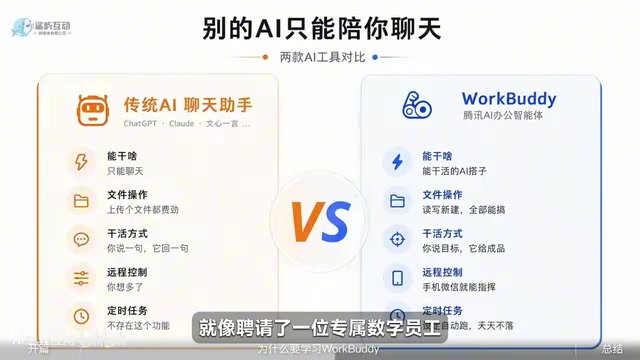
This case illustrates that the core value of an AI agent lies in "taking action." The creator summarized this shift as: upgrading from a "Q&A mode" to a management mode of "issue instructions, AI executes automatically." For highly repetitive office tasks with clear rules, agents can significantly reduce manual operations.
Course Content and Learning Path
The tutorial consists of 30 lessons, covering a complete path from software installation, basic operations to skill building, industry cases, and automated workflows. The creator also compiled a supporting resource package, including industry case breakdowns, Skill customization methods, implementation workflows, as well as 12 commonly used Skills and workplace practical cases.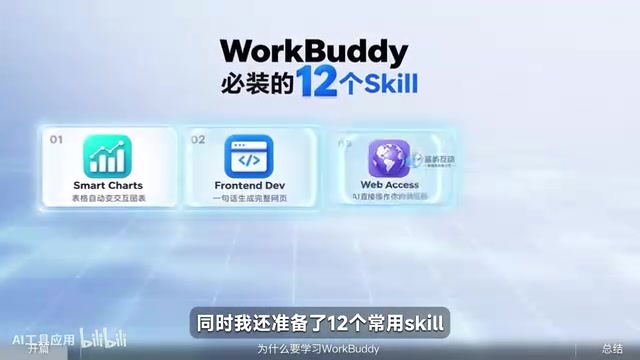
For zero-basis users, the learning focus should be on:
- Installation and Basic Operations: Complete software deployment, familiarize with the interface and connector configuration.
- Skill and Expert Mode: Learn to invoke preset skills and expert roles to quickly complete specific tasks.
- Automated Workflow Building: Connect repetitive tasks into processes to achieve batch processing.
The creator emphasizes that no programming foundation is required; by following the practical operations, you can gradually hand over repetitive work to AI.
Skill in the context of AI agents refers to pre-packaged reusable capability modules. Each Skill typically contains a set of instructions, tool-calling logic, and parameter configurations, enabling the agent to quickly execute specific tasks such as "batch convert PPTs to PDFs" or "organize chat records and generate weekly reports." WorkBuddy's skill market provides a Skill library categorized in Chinese, allowing users to deploy with one click without writing prompts or scripts from scratch. This design greatly lowers the usage barrier, enabling zero-basis users to build automated workflows by combining existing Skills. Meanwhile, users can customize Skills according to their own needs, standardizing repetitive operations to further improve efficiency.
Rational Perspective: Boundaries and Choices of Agents
WorkBuddy lowers the barrier to using AI agents, but it is not omnipotent. It is more suitable for office scenarios with clear rules and high repetitiveness, such as file format conversion, information archiving, and message organization. For tasks requiring complex judgment or creative generation, traditional conversational AI still has advantages.
In addition, the creator's content has a course promotion nature, and the demonstration scenarios are designed; in actual use, issues such as connector compatibility and point consumption speed may be encountered. Readers are advised to first use free points to experience core functions before deciding whether to delve deeper.
AI agents are changing the way humans and machines collaborate, shifting from "humans operating software" to "humans directing AI to operate software." WorkBuddy, as a domestically available entry-level tool, is worth an hour for workplace professionals to understand its basic logic. But remember: the value of a tool lies in solving practical problems, not sitting in your favorites folder.
Connector is a bridge for AI agents to communicate with external software or services. Through APIs, plugins, or local proxies, it enables agents to read data, send instructions, or trigger operations. For example, WorkBuddy accesses WeCom through a connector to achieve automatic message replies; it operates local folders through a file system connector. The compatibility and stability of connectors directly affect the usability of agents—if the target software does not provide open interfaces or has restricted permissions, the agent may not work properly. Therefore, in actual deployment, users need to pay attention to the list of software supported by connectors and permission configurations to avoid task failures due to compatibility issues.
One-line Summary
WorkBuddy is an AI agent adapted to the domestic office ecosystem, capable of automatically executing tasks such as file processing and lowering the barrier to AI use.
Paragraph Summary
This article introduces a practical tutorial on the AI agent WorkBuddy. It first contrasts traditional Q&A AI with agents: the former only provides suggestions, while the latter can directly control computers to execute tasks. As a domestic alternative to Codex, WorkBuddy has advantages in installation and deployment, ecosystem adaptation, pricing strategy, and skill market, especially suitable for domestic office scenarios. Through comparative experiments, WorkBuddy can automatically complete tasks such as converting PPTs to PDFs and archiving them, significantly reducing manual operations. The tutorial consists of 30 lessons, covering a complete path from installation to automated workflow building, with supporting materials including 12 commonly used Skills and industry cases. The article concludes by reminding readers to rationally view the boundaries of agents: they are suitable for repetitive tasks with clear rules, but attention should be paid to the promotional nature of the course and compatibility issues in actual use.
Related articles

Gemini 4 Argon Hands-On: AI Builds Board Games, Constructs Temples, and Trains Robots Autonomously
Gemini 4 Argon hands-on roundup: AI autonomously builds a desk racetrack and temple in Blender, writes a ray tracing engine, trains a humanoid robot to sink 7 shots, plus API pricing and developer access.

The Magic Octagonal Coin: Why Only 9% of People Can Predict Its Flip?
Only 9% of people can correctly predict the Magic Octagon coin flip. This article explains its spatial rotation mechanism, common cognitive pitfalls, and a new hypothesis based on Relevance Theory, exploring the limits of human spatial reasoning.

Sam Altman: AI Is Entering the Era of Scientific Discovery — Math Breakthroughs Will Replicate in Biology and Energy
Sam Altman says AI is entering the era of scientific discovery — math breakthroughs will replicate in biology, materials science, and energy to help develop new drugs and energy sources.