WPForms Lite Backdoor Controversy: A Deep Dive Into the Open-Source Plugin Trust Crisis
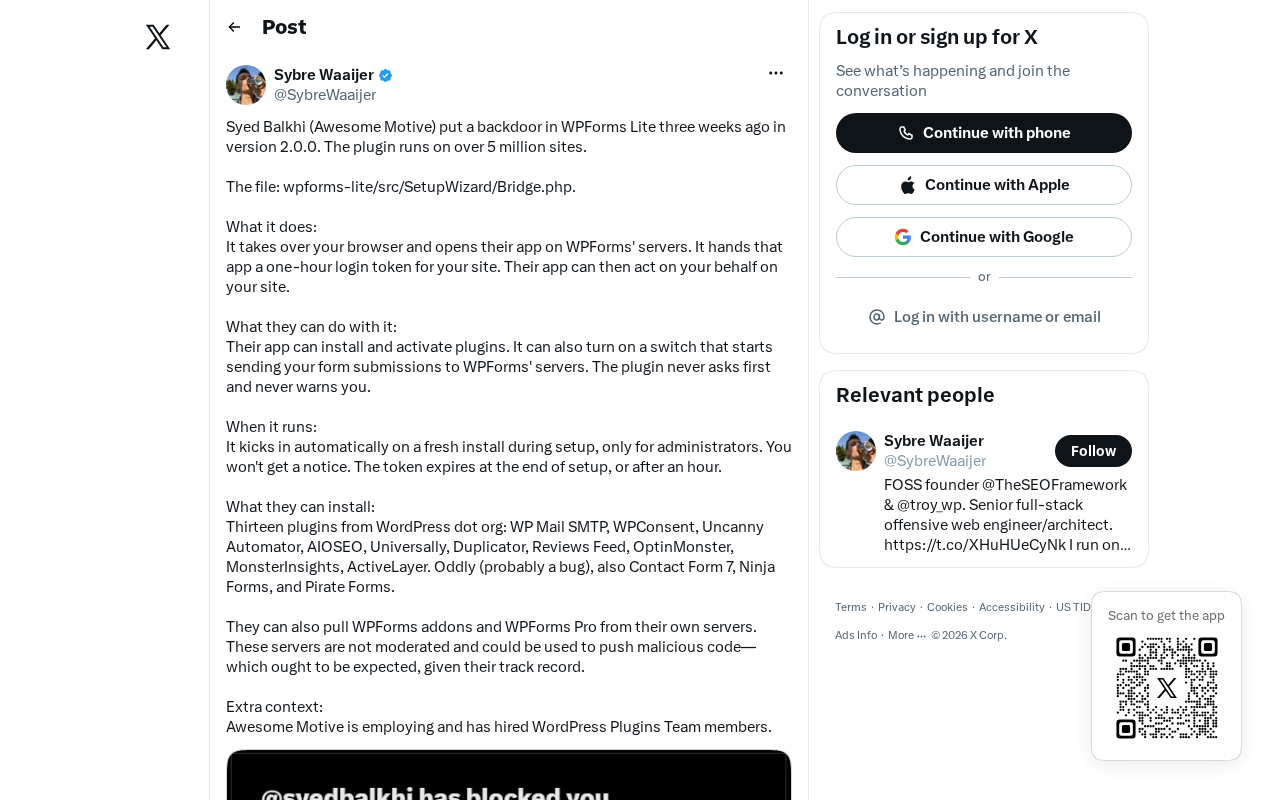
The WPForms Lite backdoor scare exposes a deeper supply chain trust and transparency crisis in the WordPress plugin ecosystem.
The WPForms Lite plugin was reported to contain suspected backdoor functionality, igniting debate across the tech community. The article distinguishes between malicious backdoors and controversial commercial features, arguing the core issue is whether undisclosed code logic was added without user consent. Auto-updates and the freemium model create fragile trust conditions where millions of sites can be silently altered overnight. The piece advises site owners to adopt a least-trust principle and highlights open-source transparency as a key safeguard, calling on developers and the broader community to prioritize supply chain security.
WPForms Lite Backdoor Incident: An Overview
Recently, WPForms Lite — one of WordPress's most popular form plugins — was reported to contain suspected "backdoor" code, sparking widespread discussion across technical communities including Hacker News. As a free plugin with millions of active installations, any security-related controversy quickly ripples through the developer and site owner community.
WPForms is one of the most widely used drag-and-drop form builders on the WordPress platform, with its Lite (free) version deployed across countless personal blogs and small-to-medium business websites. That's precisely why attaching the word "backdoor" to it instantly amplifies the perceived security risk for an enormous number of sites.

What Is a Software Backdoor? Understanding the Nature of the Threat
Before diving into the incident itself, it's worth clarifying what a "backdoor" actually means. In software security, a backdoor typically refers to a hidden access channel — planted by a developer or third party — that bypasses normal authentication or authorization mechanisms.
The Difference Between a Malicious Backdoor and a Controversial Feature
It's worth noting that the term "backdoor" is often used loosely in community discussions. It can refer to two very different situations:
- A genuinely malicious backdoor: such as unauthorized remote code execution, hidden admin accounts, or secretly exfiltrating site data.
- A controversial compliance or commercial feature: for example, a plugin silently collecting telemetry data, sending usage statistics to an official server, or embedding upsell and upgrade prompts. These features aren't necessarily malicious, but without transparent disclosure, users may still view them as a betrayal of trust.
In the case of the WPForms Lite incident, the community's core concern is: did an open-source, free plugin introduce code logic beyond its stated functionality without users' knowledge?
Why the Open-Source Plugin Trust Model Is So Fragile
The WordPress plugin ecosystem is built on an implicit trust relationship. When a user clicks "Install" in the dashboard, they're effectively handing over partial control of their website to the plugin author.
Auto-Updates: Convenience and Risk in One
Modern WordPress supports automatic plugin updates, which speeds up security responses — but it also means a single code push can instantly reach millions of sites. If a problematic version slips through, its propagation speed and reach can be staggering.
This is the most alarming aspect of incidents like this: users have virtually no opportunity to review code before it lands on their servers. The vast majority of site owners never read through plugin source code line by line — they rely on the plugin's reputation and WordPress's official directory review process.
Blurring Lines Under Commercial Pressure
WPForms Lite follows a classic "freemium" model — the free version drives user acquisition, while the paid version generates revenue. Under this commercial logic, plugins often need to communicate with official servers to push upgrade prompts, collect usage data, or validate licenses. The line between these features and a "backdoor" depends entirely on whether they are transparent, whether user consent is obtained, and whether they can be disabled.
When a plugin falls short on any of these fronts, criticism from the technical community will follow.
Security Recommendations for Site Owners and Developers
Regardless of whether the WPForms Lite incident is ultimately classified as malicious behavior or a communication failure, it serves as yet another warning about open-source supply chain security.
Adopt a Least-Trust Principle
For those running websites, the following WordPress security practices are recommended:
- Keep your plugin count lean: Every additional plugin introduces another potential risk. Regularly audit and remove plugins you no longer use.
- Pay attention to changelogs: Watch for "new features" in plugin updates that seem unrelated to core functionality, especially changes involving data collection or remote communication.
- Use security monitoring tools: Tools like Wordfence can help monitor for abnormal outbound requests and unexpected file changes.
- Be cautious with auto-updates: For critical production environments, consider validating updates in a staging environment before applying them manually.
Open Source's Built-In Self-Correction Mechanism
It's worth acknowledging a silver lining: it was precisely because parts of WPForms Lite's code could be reviewed that the community was able to discover and publicly discuss the issue in a timely manner. This reflects a core strength of the open-source model — collective oversight enabled by transparency. Compared to the near-invisible hidden behavior possible in closed-source software, the open-source ecosystem at least gives users and researchers a fighting chance to find problems.
Conclusion: What the WPForms Incident Tells Us About the Future of Supply Chain Security
The WPForms Lite controversy is, at its core, a microcosm of the software supply chain trust problem. In a modern web ecosystem assembled from countless third-party components, a breach of trust at any single point can be amplified into a systemic risk.
For plugin developers, transparency and informed consent should be non-negotiable baselines. For users, it means cultivating a more mature security mindset — one that no longer equates "popular" with "trustworthy." The deeper issues this incident surfaces deserve ongoing reflection from the entire WordPress community and the open-source world at large.
Related articles

Xmind 2027 Launches: Mind Mapping Evolves into an AI Thinking Partner
Xmind 2027 launches on Product Hunt as an "AI thinking partner." It adds Xmind Agent for research with local documents and mind maps, and connects mind map context to ChatGPT, Claude, and other AI workflows via MCP. This article analyzes its product logic, differentiation, and open questions.

Display 1.0: Build Docs and Apps with Any Agent
Display 1.0 launches on Product Hunt, letting any Agent create docs, prototypes, and apps in one workspace, organized via Spaces and Folders into a team knowledge base with flat pricing.

UnleashX: Hire AI Employees Like People and Turn Conversations into Deliverables
UnleashX launched on Product Hunt with a pitch to hire AI employees like people: choose a role, connect CRM and tools, set rules, execute workflows end to end, and involve humans only when needed. This article analyzes its positioning, configuration logic, and human-AI collaboration boundaries.