XREAL Aura, the First Wired AR Glasses for Android XR, Launched
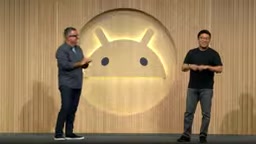
Google unveils XREAL Aura, the first wired Android XR AR glasses, as the developer toolchain goes stable.
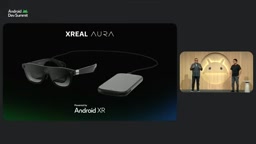
At the Android Dev Summit, Google launched the XREAL Aura, the first wired AR glasses powered by Android XR. Weighing under 95 grams, it moves compute and battery into a separate Compute Pack. It uses optical see-through with micro OLED displays, supports electrochromic dimming, and introduces USB-C wired mirroring that shows laptop and console screens as spatial windows alongside native XR apps. Gemini is deeply integrated at the system level. Crucially, Jetpack XR SDK, the emulator, and Unity, Unreal, and Godot support all reached stable, and existing phone and tablet apps run unmodified. Aura starts at $1,279, with an early-bird price of $1,070 before year-end, marking Android XR's official opening to developers.
Google officially unveiled the XREAL Aura at the Android Dev Summit — the first wired AR glasses powered by the Android XR platform. The device packs spatial computing capabilities into a frame weighing under 95 grams, and Google also announced that the core Android XR developer toolchain has reached stable release. For mobile developers, this means a brand-new spatial computing distribution channel is now ready.
One Platform, Two Form Factors: From Immersive Headsets to Everyday Glasses
Android XR's positioning has been clear from the start: cover the entire XR device spectrum with a single platform to avoid codebase fragmentation. In the keynote, Google emphasized that existing headsets are suited for fully immersive scenarios, but users aren't always sitting in a fixed room — they're on planes, at hotel desks, on couches, where the physical boundaries of traditional screens become a limitation.
XREAL Aura is precisely a response to this gap. It runs the exact same Android XR platform as headsets, supporting the same gesture and voice inputs. For developers, the most direct benefit is "day-one reach": existing phone and tablet apps and games run on Aura without modification, and users get millions of Google Play apps out of the box, plus over 150 titles built specifically for XR.

Optical See-Through vs. Video See-Through are the two core technical approaches for AR glasses, and understanding their differences is key to grasping Aura's positioning. With optical see-through, users look directly at the real world through transparent lenses, and virtual images are overlaid onto the field of view via optical elements such as waveguides or prisms; its advantages are zero latency for the real environment, natural brightness, and less dizziness during extended wear, but virtual content lacks pure blacks and the field of view is typically limited. Video see-through, by contrast, captures the external scene through cameras, composites it with virtual content, and displays it on an enclosed screen (similar to a headset); its strengths are more precise blending of virtual and real imagery and the ability to achieve full occlusion, but it introduces camera latency and a sense of enclosure. Aura chooses optical see-through precisely to preserve everyday usability — "seeing your keyboard, seeing someone approaching" — at the cost of less immersion than a headset. This is also why it needs electrochromic dimming to compensate for the viewing experience.
Hardware Design: Moving the Compute Off Your Face
XREAL CEO Chi Xu revealed Aura's core engineering decision on stage: to keep the frame under 95 grams, the team "decoupled" the main processing unit and battery from the face, placing them in a portable disc-shaped Compute Pack. This design philosophy is fundamentally different from mainstream all-in-one headsets — shifting weight and thermal pressure to a pocket or desktop in exchange for comfort during extended wear.
Aura is also the first device on the market to use Qualcomm's next-generation Snapdragon Reality Elite platform. According to Chi Xu, this platform provides ample performance headroom for "reach-through devices," capable of supporting high-quality 3D rendering and multi-window applications while delivering hours of "professional-grade performance."
The Compute Pack also integrates a touchpad, effectively carrying a mouse with you. During the demo, Product Manager Asier Rios used a Bluetooth keyboard plus the touchpad to open apps, arrange windows, and play music — all without a controller.
Optical Solution: Transparent Lenses and Electrochromic Dimming
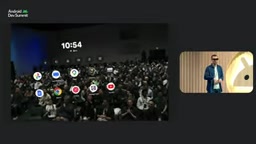
Aura uses an optical see-through approach. Users can always see the real environment through the transparent lenses, while spatial apps and 3D UI elements are overlaid on the real-world view. The value of this approach was repeatedly emphasized in the demo: when you need to look at your laptop keyboard, or when someone walks up, you don't need to take off the glasses.
The device features high-quality micro OLED displays and supports Electrochromic Dimming. When enabled, the lenses darken, allowing users to switch from "augmented reality" to a near "fully virtual" viewing mode. The presenter also showed a detail: when the user starts walking, the system automatically detects this and moves session content to the side, so the user retains awareness of the real environment.
Micro OLED (OLED-on-Silicon) is a display technology in which the OLED light-emitting layer is fabricated directly on a silicon CMOS driver backplane. Unlike ordinary OLED, its pixel size can be as small as a few micrometers, enabling extremely high resolution on a panel the size of a fingernail. This makes it an ideal display solution for AR glasses — the optical module is small, power consumption is low, contrast is high, and black pixels can be completely turned off. However, micro OLED brightness typically ranges in the thousands of nits, and display performance suffers under strong outdoor light — one reason Aura includes electrochromic dimming: darkening the lenses reduces ambient light interference, thereby improving the contrast and readability of virtual imagery. Understanding this display principle helps assess the experience differences between Aura's indoor productivity scenarios and outdoor use scenarios.
Plug and Play: The Differentiated Wired Mirroring Approach
Aura's most distinctive feature is USB-C wired mirroring. When a laptop or game console is connected via USB-C, the screen appears directly as spatial windows in front of you, displayed side by side with native Android XR apps — no additional software required.
In the demo, Asier Rios connected a MacBook to Aura, edited video in DaVinci Resolve, and used Aura's transparent view as a secondary screen for previewing content. He also revealed that he hadn't used a physical office monitor in six months.
USB-C DP Alt Mode (DisplayPort Alternate Mode) is the key technology behind Aura's "plug and play" capability. The USB-C interface itself can negotiate pin usage, simultaneously transferring data and power while outputting DisplayPort video signals directly to an external display device. This means any laptop or game console supporting DP Alt Mode video output can send its screen to Aura — no drivers or additional software required, and no reliance on wireless casting protocols. Compared with wireless solutions, wired mirroring offers lower latency, more stable image quality, and immunity to Wi-Fi congestion, making it particularly suitable for latency-sensitive productivity scenarios such as video editing and coding. Its limitations are that the cable restricts movement range, and not all USB-C ports support video output — a compatibility detail users should confirm before purchasing.
Gemini as a System-Level Companion
Gemini on Android XR is not a standalone app but a capability layer woven throughout the entire system. It can "see what you see" — users can point at any object in front of them and ask questions, keeping their hands free.
Several scenarios in the demo were particularly representative: while editing in DaVinci Resolve, Gemini was asked about the cut shortcut and answered Command+B; while playing the board game Demeo, the user long-pressed the Gemini button on the controller to share the screen, and Gemini automatically identified the game name and pulled up the corresponding tutorial video — without the user needing to say the game's name. XREAL also launched its first game controller developed in collaboration with Google, featuring a dedicated Gemini button.
Developer Toolchain Goes Stable
Equally important as the hardware launch is the software-side news. Google announced that the core Android XR developer foundation has reached stable release, including the Jetpack XR SDK core libraries and the Android XR Emulator, providing production-grade APIs with built-in backward compatibility. Developers can extend familiar Compose apps into 3D space and anchor panels alongside spatial elements.
On the engine side, the Android XR Engine Hub has simultaneously reached stable status on Unity, Unreal Engine, and Godot. This means hardware, platform, and tools are all in place.
Jetpack XR SDK is Google's development framework for Android XR, whose core abstractions are "Spatial Panels" and "spatialized Compose." Traditional Compose apps run in 2D windows, whereas Jetpack XR allows developers to declare Compose UI as panels anchorable in 3D space, organized into multi-window layouts using spatial containers (SpatialBox, SpatialPanel). The key is that it reuses the existing Compose programming model and state management mechanisms — developers don't need to learn an entirely new rendering pipeline to migrate existing interfaces into spatial scenarios. The SDK reaching stable means API signatures are frozen and backward compatibility is guaranteed, giving enterprises confidence to invest in production development. For existing Android app teams, this greatly reduces the engineering cost of experimenting with XR, and is also the tooling-level support for Google's "list without modification" strategy.
Pricing and Availability
XREAL Aura starts at $1,279, with orders opening the same day in the US, Canada, and South Korea; pre-orders open in Japan on November 2, with shipping starting mid-November. Orders placed before the end of the year can take advantage of an early-bird price of $1,070. Accessories include a complete bundle with the Gemini-button game controller and a wireless portable keyboard.
On the content side, the launch lineup includes over 30 new experiences built specifically for XR, such as Project Hail Mary, Journey Among the Stars, Galapagos: The Last Eden narrated by Margot Robbie, and Nevitas created by Andy Serkis. Nevitas is a timed exclusive on the Android XR platform, free for the first six months.
Analysis: Android XR's Ecosystem Bet
Aura's significance goes beyond a single piece of hardware. It demonstrates Android XR's platform strategy — not competing head-on with headsets, but using the same platform to cover the full spectrum from immersive devices to lightweight glasses, making phone and tablet apps a natural content pool for XR. For developers, "list without modification" lowers the barrier to experimenting with spatial computing; for Google, millions of existing apps are Android XR's biggest chip in competing against other spatial computing ecosystems. The combination of wired mirroring and transparent lenses also precisely targets users' real productivity needs at the current stage, rather than chasing fully immersive sci-fi narratives.
Related articles
 Tech Frontiers
Edge AI on Microcontrollers: When Is It Actually Worth Deploying?
Drawing on Reddit discussions and Arm case studies, this article analyzes the real-world use cases for edge AI on microcontrollers: when each device needs independent inference, when a gateway or cloud is more reasonable, and the costs and boundaries of specialized hardware.
 Tech Frontiers
Pushing the Limits of Extreme Sudoku on a 16GB GPU: Insights from Depth and Flow Matching
A researcher trained a 16.54M-parameter model on a 16GB GPU to solve extreme Sudoku, finding effective depth breaks the 60% plateau and flow matching with improved sampling pushes accuracy past 99% with ~50× lower layer-evaluation budget.
 Tech Frontiers
AI Agent Approval Workflows: Why Human Confirmations Always Get Mindlessly Clicked
Why do AI agent approval workflows always get mindlessly clicked? A Reddit discussion shows that separating rules from keys, low-frequency high-risk approvals, and GitHub Environments-style gates are the keys to effective approvals.