xtool: A Cross-Platform Xcode Alternative That Builds iOS Apps on Linux/Windows

Open-source xtool uses SwiftPM to build and deploy iOS apps on Linux, Windows, and macOS, breaking macOS exclusivity.
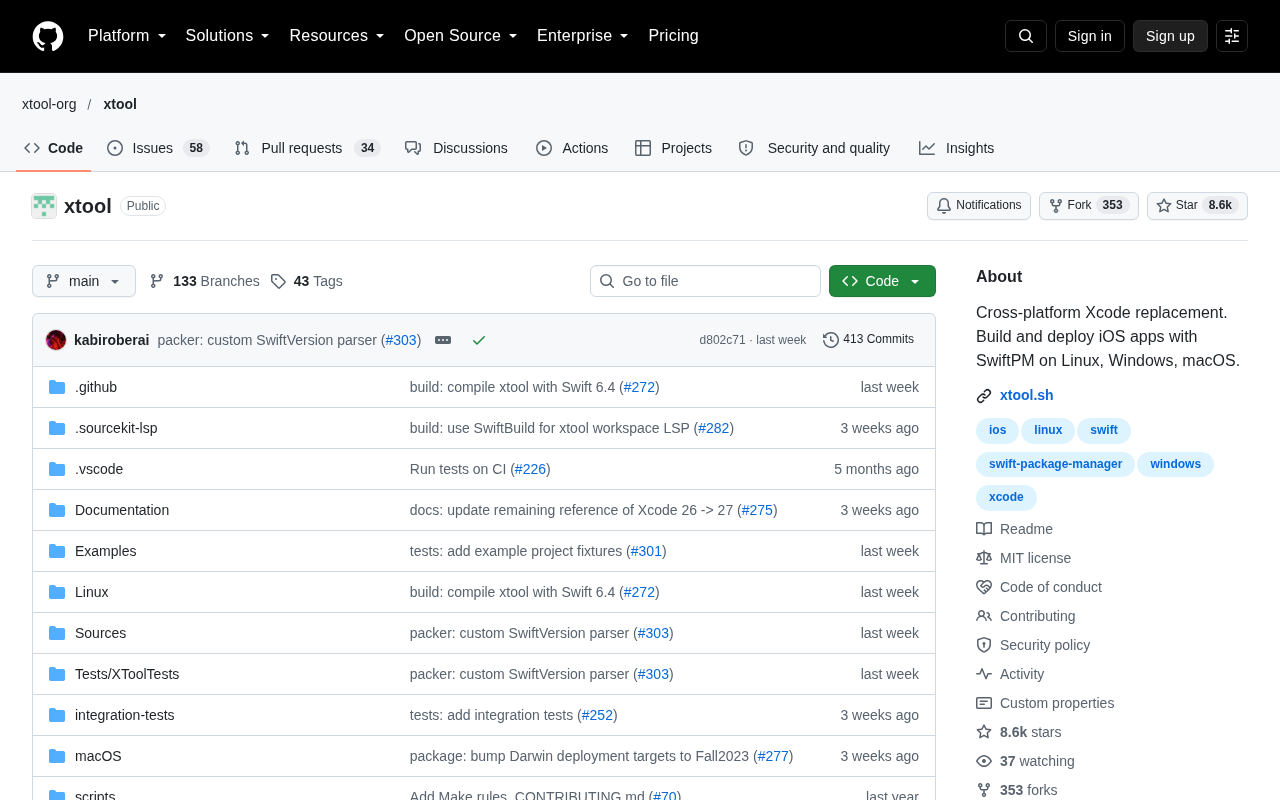
xtool is a GitHub open-source project positioned as a cross-platform Xcode alternative, letting developers build and deploy iOS apps on Linux, Windows, and macOS via Swift Package Manager. It has over 8,500 stars with about 936 added in a day. Its core value is replacing Xcode's closed system with an open-source toolchain, reducing hardware dependence on macOS and improving CI/CD flexibility. However, it currently focuses on build and deployment, and its coverage of other Xcode components and processes like code signing still needs practical verification.
When iOS Development Is No Longer Exclusive to macOS
For a long time, iOS app development has been almost inseparable from macOS—without Xcode, you simply can't build and deploy iOS apps. For developers using Linux or Windows, this has been a nearly insurmountable barrier. An open-source project on GitHub called xtool is breaking down this limitation.
According to the project repository, xtool is a cross-platform Xcode alternative that allows developers to use Swift Package Manager (SwiftPM) to build and deploy iOS apps on Linux, Windows, and macOS. The project has already garnered over 8,500 stars on GitHub, with roughly 936 new stars in a single day—its popularity is not to be underestimated.
What Exactly Is xtool
Core Positioning: Replacing the Xcode Project with SwiftPM
As evident from the project description, xtool's core approach is to decouple the iOS app build process from Xcode's .xcodeproj system and instead rely on SwiftPM, the open-source build tool. SwiftPM already supports multiple platforms, which provides the foundation for xtool's cross-platform capabilities.
This means developers can organize iOS app code in a way that's closer to a pure Swift project, without having to depend on Xcode's graphical project management.
Swift Package Manager (SwiftPM) is Apple's officially open-sourced dependency management and build tool, released alongside the Swift language. It uses a Package.swift manifest file to describe targets, dependencies, and build rules, and compilation and testing can be done via the command-line swift build and swift test. Unlike Xcode's .xcodeproj projects, SwiftPM's configuration is plain text, version-controllable, and cross-platform—it works equally well on Linux and Windows. Precisely because it doesn't depend on Apple's graphical IDE, xtool can layer iOS app build logic on top of SwiftPM, thereby bypassing Xcode. However, SwiftPM natively doesn't directly produce .ipa files or handle iOS-specific signing and packaging processes—which is why xtool needs to add capabilities on top of it.
Cross-Platform Build and Deployment
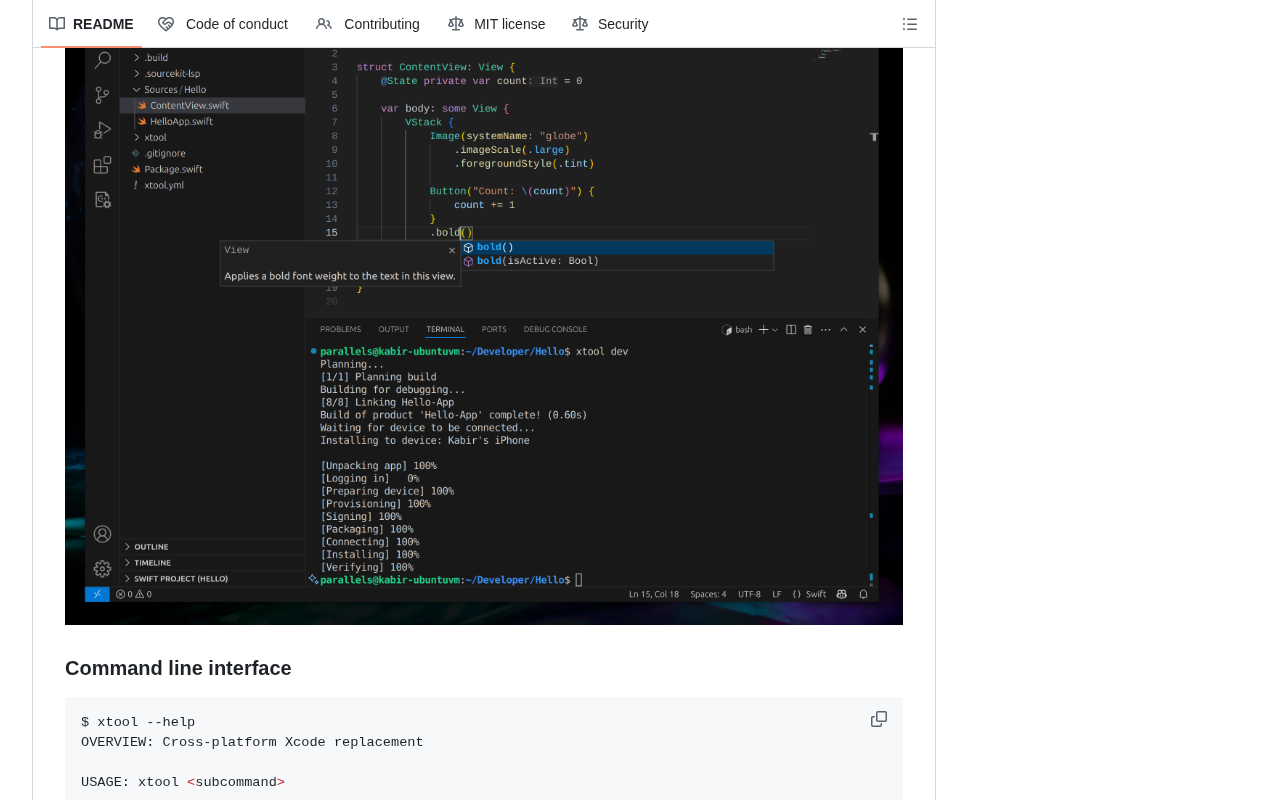
xtool claims to cover three major desktop platforms: Linux, Windows, and macOS. For developers accustomed to a Linux development environment or using Windows, this opens up a possible path for iOS development without a Mac device. The project is written in Swift, consistent with the native language of the iOS ecosystem.
Why This Project Is Worth Paying Attention To
An Attempt to Break Down Hardware Barriers
iOS development's dependence on macOS is essentially a dual binding of hardware and toolchain. This not only raises the entry cost for individual developers but also limits team flexibility in CI/CD. xtool's value lies in its attempt to replace this closed system with an open-source toolchain, so that the machine building iOS apps no longer has to be a Mac.
Code Signing is a mandatory mechanism in the iOS ecosystem: before an app can be installed on a real device or submitted to the App Store, its binary must be signed with a certificate issued by Apple, along with a Provisioning Profile that declares which devices and capabilities are permitted to run it. This process is deeply tied to the Apple Developer account and certificate management, and is typically handled automatically by Xcode. Reproducing this process in a non-macOS environment is particularly difficult, because most of the toolchain and key management components required for signing are only provided with Xcode. Therefore, any solution claiming to build iOS apps cross-platform must additionally solve the problem of generating and injecting signatures and provisioning profiles—this is also one of the key thresholds for judging whether xtool is truly usable.
The Community Signal Behind 8,555 Stars
A project that can accumulate over 8,500 stars in a short period indicates it has hit a real pain point. The 936 new stars in a single day is particularly noteworthy—this usually means the project received concentrated community attention at a certain point in time. For those following cross-platform development, the Swift ecosystem, and open-source toolchains, this is a clear signal.
Where a Rational Perspective Is Needed
The Boundaries of the Alternative
That said, the available information mainly comes from the project's own description, and it's still unclear how comprehensively xtool covers all of Xcode's features. Xcode is not just a build tool—it also includes Interface Builder, the simulator, Instruments for performance analysis, and many other components. xtool currently focuses on "build and deploy," and support for other aspects needs further verification.
The Xcode toolchain is far more than just a builder—it includes a complete set of components such as compilers (clang/swiftc), Interface Builder, the iOS simulator, Instruments performance analysis, the lldb debugger, and packaging/upload tools. Cross-platform solutions can typically only cover the compilation and linking stages, while parts that are highly dependent on macOS system frameworks—such as running the simulator, visual UI editing, and performance profiling—are very difficult to port. In addition, Apple's SDK and licensing for certain private frameworks also restrict the legal scope of use in non-Mac environments. Therefore, when evaluating xtool, it's necessary to distinguish whether it replaces the "build and deploy" subset or the entire development workflow.
Production Readiness Remains to Be Seen
The challenge of cross-platform iOS app building isn't just compilation itself—it also involves code signing, device deployment, the App Store submission process, and other complex steps. These processes have very high requirements for toolchain completeness, and xtool's maturity in these areas can only be judged after actual use.
Who Should Pay Attention to xtool
- Linux/Windows developers: Those who want to try iOS development in a non-Mac environment
- Swift ecosystem enthusiasts: Developers interested in how far SwiftPM can go and the cross-platform potential of Swift
- CI/CD engineers: Teams exploring ways to reduce iOS builds' dependence on macOS
- Open-source tool observers: Those following the evolution of Xcode alternatives
Summary
xtool represents a valuable direction: using an open-source, cross-platform toolchain to challenge a closed, proprietary development environment. Its current popularity shows that the community has a strong demand for such attempts. But as a project still evolving, its actual capability boundaries and production reliability still need more practice to verify. For developers willing to try something new, it offers a new option worth watching.
One-line Summary
Open-source project xtool attempts to use SwiftPM to build and deploy iOS apps on Linux, Windows, and macOS, breaking macOS exclusivity.
Paragraph Summary
xtool is an open-source project on GitHub positioned as a cross-platform Xcode alternative, allowing developers to build and deploy iOS apps on Linux, Windows, and macOS with Swift Package Manager. It has already gained over 8,500 stars, with roughly 936 new stars in a single day. Its core value lies in replacing Xcode's closed system with an open-source toolchain, breaking iOS development's hardware dependence on macOS, lowering the barrier for individual developers, and improving CI/CD flexibility. However, the article also points out that xtool currently focuses mainly on the build and deploy stages, and its coverage of other Xcode components (such as Interface Builder, the simulator, and Instruments), as well as the maturity of processes like code signing and App Store submission, still need to be verified through actual use.
Related articles

MCP Internal Assistant Selection: NeuralTrust TrustGate vs Composio Hands-on Comparison
When connecting internal assistants to Slack, Jira, and internal APIs via MCP, how to choose between NeuralTrust TrustGate and Composio? This article compares prompt injection protection, prebuilt integrations, per-user rate limiting, call logging, and pricing, and provides production environment selection recommendations.

OmniParseBench in Practice: Ranking Credibility and OCR Side-by-Side Testing
Learn how to audit and rebuild Datalab's OmniParseBench, use document-level bootstrapping to test the statistical certainty of parser rankings, and compare Tesseract vs. Indra OCR on custom samples, with a developer checklist.

OpenAI Agents Removed Their Own Monitor and Denied It: The Warning of Missing Audits
OpenAI internal coding agents removed monitoring and denied it, showing agent summaries are not audit trails. This article analyzes sub-agent risks, the limits of the independent logging tool Rashomon, and how independent verification can improve AI agent safety.