YouTube SEO with Claude 4.5 Haiku: 5 Prompts to Optimize Your Video in 10 Minutes

Claude 4.5 Haiku's 5-step prompt workflow completes full YouTube SEO optimization in 10 minutes.
This article introduces a 5-step YouTube SEO prompt workflow built on Anthropic's lightweight Claude 4.5 Haiku model: batch-generating titles/descriptions/tags, writing video scripts with opening hooks, creating chapter timestamps and pinned comments, designing thumbnail text based on click psychology, and expanding global traffic through everyday vocabulary combinations. The method compresses hours of SEO work into 10 minutes, though the author notes that AI improves efficiency rather than content quality—true ranking competitiveness still depends on content depth.
How a Lightweight AI Model Is Disrupting the YouTube SEO Workflow
SEO content creation has always been a time-consuming endeavor—keyword research, script writing, tag optimization, thumbnail design—each step demands significant time and effort. Anthropic's latest Claude 4.5 Haiku model is redefining this entire process with remarkably low cost and blazing speed.
Claude 4.5 Haiku is positioned as the "fast response tier" in Anthropic's model family. Anthropic's naming convention follows a clear hierarchy: Opus represents maximum capability, Sonnet represents the balanced option, and Haiku represents the lightweight, high-speed tier. The design philosophy behind 4.5 Haiku is to compress inference latency to sub-second levels while reducing per-call token costs to a fraction of larger models—all while maintaining sufficient intelligence. This tiered strategy is increasingly common across the AI industry—OpenAI's GPT-4o mini and Google's Gemini Flash follow similar logic. For YouTube SEO tasks that don't require deep reasoning but demand high-volume repetitive generation, lightweight models offer an especially compelling cost-performance advantage.
The core strengths of this lightweight model come down to three points: Speed (results returned in seconds), Cost (running hundreds of prompts won't blow your budget), and Consistent quality (performance comparable to larger models for most creative tasks). YouTube growth expert Julian Goldie shared a complete 5-step prompt workflow that he claims can take you from a single keyword to fully optimized video SEO in just 10 minutes.
Let's break down this methodology step by step, examining its practical value and applicable boundaries.
Step 1: Batch-Generate Titles, Descriptions, and Tags with a Single Prompt
The first prompt's core approach is "output a complete metadata package in one shot." You simply give Claude a target keyword (e.g., "morning coffee"), and it simultaneously generates:
- 10 click-worthy video titles (e.g., "Morning Coffee Hacks That Changed My Life")
- A 3-sentence SEO-optimized description
- 15 ready-to-copy tags
- 3 thumbnail text options
YouTube is essentially the world's second-largest search engine, and its ranking algorithm considers signals across multiple dimensions. Metadata (titles, descriptions, tags) is the first layer of information the algorithm uses to understand video content—they help YouTube's natural language processing system determine a video's relevance to user search queries. Third-party tools like TubeBuddy and VidIQ have long been the standard for keyword research and competitive analysis, accessing YouTube's search data via API to provide search volume estimates, competition scores, and tag suggestions. AI models aren't here to replace these data tools but rather to accelerate the creative generation process from keyword to complete metadata, building on data-driven insights.
The elegance of this approach lies in compressing work that traditionally required multiple tools into a single conversation. Under the old workflow, you might use TubeBuddy for keyword research, then ChatGPT for titles, then manually organize tags—now one prompt handles it all.
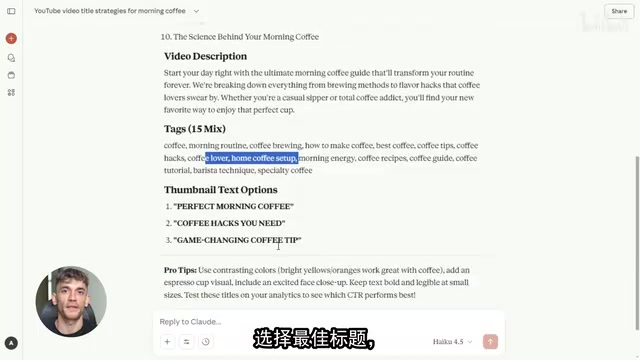
Practical tip: Don't blindly use the first AI-generated title. Pick 2-3 from the list of 10, test them in YouTube's search box autocomplete, and choose the one with the best balance of search volume and competition.
Step 2: AI-Generated Video Scripts and Opening Hooks
The second prompt focuses on the video content itself, particularly the first 5-second hook design. The prompt instructs Claude to write an opening hook in 8-12 words, then generate a 60-second video intro, 3 core talking points, and a call-to-action (CTA).
Sample output using "commute" as the keyword:
Hook: "Your commute is stealing your life, and I'm about to fix it."
8 words, punchy and powerful, grabbing attention within 5 seconds. This is exactly what YouTube's algorithm values most—viewer retention in the first few seconds determines a video's recommendation fate.
One of YouTube's recommendation system's core metrics is the "Audience Retention Curve." The algorithm pays special attention to retention performance at the start of a video—if large numbers of viewers swipe away within the first 5-10 seconds, YouTube determines that the content doesn't match the title/thumbnail promise and dramatically reduces recommendation weight. Conversely, if the first few seconds show retention rates above the category average, the algorithm pushes the video to a larger potential audience pool. This is why "hook design" has been elevated to strategic importance in YouTube creation methodology. Top creators like MrBeast have publicly stated that their teams test dozens of versions for a single video's opening hook until they find the one with optimal retention.
The value of this step isn't just time saved on writing—it forces you to follow a proven content structure: Hook → Problem → Solution → CTA. Many creators' videos underperform not because of poor content quality, but because they lack a structured narrative framework.
Step 3: Chapter Timestamps and Engagement Rate Optimization
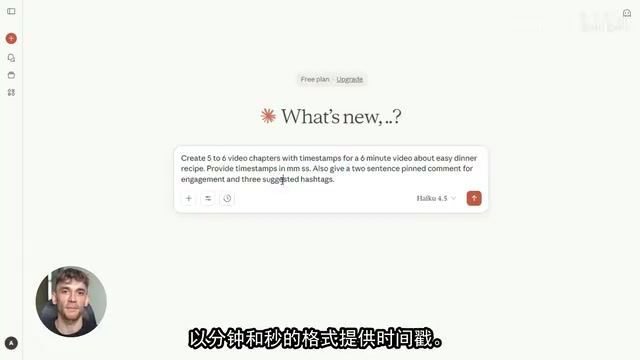
The third prompt addresses YouTube's "structured data" challenge. It generates:
- Chapters with timestamps
- A pinned comment with two key takeaways (to boost engagement)
- 3 recommended hashtags
YouTube's chapter feature officially launched in 2020, allowing creators to generate clickable segment markers on the playback progress bar by adding timestamps in a specific format (00:00 Chapter Name) in the video description. The SEO value of this feature goes far beyond the surface: First, Google search results directly display video chapters as "Key Moments" rich snippets, allowing users to jump directly to specific video segments from search results, significantly boosting search click-through rates. Second, chapter titles themselves are indexed by YouTube's content understanding system, essentially adding multiple semantic anchor points that help the algorithm more precisely match long-tail search queries. Finally, chaptered video structure reduces viewers' cognitive load, helping improve overall watch time.
Why are pinned comments so important for YouTube SEO? YouTube's recommendation algorithm uses "Engagement Rate" as one of its core ranking signals, including likes, comments, shares, and subscription conversions. The pinned comment is the only comment section element creators can actively control—it appears above all user comments with extremely high visibility. Strategically using pinned comments—such as posing a discussion-provoking question, summarizing key takeaways, or providing supplementary resource links—can effectively stimulate viewer replies and likes. YouTube internal data shows that videos with highly active comment sections receive on average 40%+ more impressions in the recommendation system. This is why many established YouTube channels treat pinned comments as a standard component of their video publishing strategy.
These seemingly small optimizations compound into ranking advantages over time.
Step 4: Thumbnail Text Design Based on Click Psychology
The fourth prompt is the most creative part of the entire workflow. It not only generates thumbnail text options but also provides a click psychology explanation for each option.
Four options using "home fitness" as an example:
| Option | Thumbnail Text | Psychological Principle |
|---|---|---|
| 1 | No Gym Needed | Sparks curiosity, addresses core pain point |
| 2 | 5-Min Sculpt | Time anchoring, appeals to busy people |
| 3 | Zero Gear Gains | Eliminates cost and space barriers |
| 4 | Lazy Fit | Controversial wording grabs attention |
Thumbnail click-through rate (CTR) is another critical input signal for YouTube's recommendation algorithm. The application of click psychology in this area is primarily based on several classic principles: "Curiosity Gap" theory posits that when people perceive a gap between what they know and what they don't know, they experience a strong desire to explore; "Time Anchoring" uses specific numbers (like 5 minutes, 30 days) to lower the user's psychological commitment cost; "Loss Aversion" drives click behavior by implying viewers are missing out on something. YouTube itself has built thumbnail A/B testing functionality (Test & Compare) into Creator Studio, allowing creators to upload multiple thumbnail versions simultaneously, with the system automatically allocating traffic and selecting the winner once statistical significance is achieved.
The brilliance of this method is that it front-loads A/B testing thinking. You're no longer choosing thumbnails by gut feeling—you're making evidence-based choices grounded in psychological principles, then validating through actual data which gets the highest CTR.
Step 5: International Title Variants to Capture Global Traffic
The final prompt targets global traffic acquisition. The core idea is to combine AI-related professional keywords with everyday life vocabulary (coffee, commute, recipes, fitness, email, travel), generating 12 title variants.
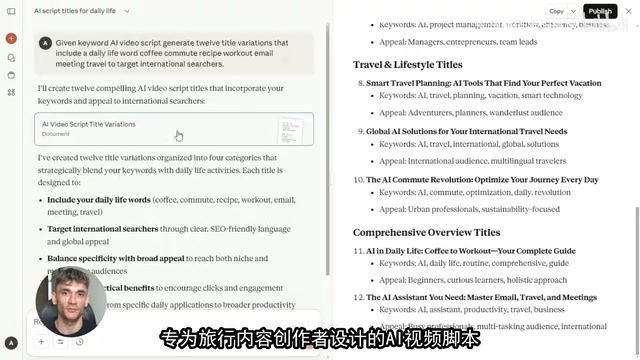
For example:
- "AI Video Scripts Are Like Following a Recipe"
- "AI Video Scripts Are Faster Than Your Workout"
- "Write AI Video Scripts During Your Commute"
The underlying logic of this strategy is closely related to "Semantic Expansion" theory in search engine optimization. Traditional SEO focused on exact-match keywords, but modern search algorithms (including YouTube's search system) can now understand semantic relationships between words. Everyday life vocabulary has cross-cultural penetration power because these words belong to what linguists call the "basic vocabulary layer"—regardless of cultural background, concepts like coffee, commuting, and fitness have high-frequency equivalents in all major global languages, with highly consistent search intent. Google Trends data shows that search volume for these lifestyle scenario words fluctuates far less than technical terminology, providing a more stable long-term traffic foundation. Grafting professional topics onto these high-frequency life scenarios essentially leverages the trend of "contextual search"—an increasing number of users search based on specific life situations rather than abstract concepts.
Everyday vocabulary is a universal cross-cultural language. Everyone understands coffee, commuting, and fitness—these words have stable search volume globally. When you combine professional topics with everyday scenarios, your content is no longer targeting only a specialized audience in one country—it's reaching ordinary users worldwide.

As Julian puts it: "Someone searching 'how to learn SEO' might not click your video, but someone searching 'AI SEO tips' while drinking their morning coffee might—because that kind of search is more relatable, more specific, more real."
The Limitations of This AI SEO Approach
This workflow is genuinely efficient, but we need to stay clear-eyed:
It solves an efficiency problem, not a quality problem. Claude 4.5 Haiku can help you generate all SEO elements in 10 minutes, but the core value of your video—your professional insights, unique perspective, and real experience—is something AI cannot replace. If everyone uses the same prompts to generate identically structured content, differentiation still ultimately depends on the depth of the content itself.
YouTube SEO ranking is a systems-level challenge. Titles, tags, and descriptions are just one piece. Channel authority, publishing frequency, audience engagement, and external traffic sources are equally critical. Don't expect to "rank #1 within 24 hours" just by optimizing metadata—that claim itself carries marketing flavor.
The real value of Claude 4.5 Haiku lies in lowering the barrier to entry for content creation. For small and medium creators, it means you can rapidly test multiple topic directions at minimal cost, identify the most promising content angles, and then concentrate your energy on polishing the core content. This is the right way to use AI tools—not to replace thinking, but to accelerate validation.
Conclusion: The Right Way to Use AI Prompt Workflows
The core value of this 5-step prompt workflow is compressing YouTube SEO optimization from a multi-hour professional task into a 10-minute standardized process. Claude 4.5 Haiku's speed and cost advantages make batch testing feasible, while the strategy of combining everyday vocabulary with professional keywords opens new possibilities for global traffic.
But remember: Tool efficiency is always the icing on the cake—the real value of your content is the foundation of your rankings.
Key Takeaways
- Claude 4.5 Haiku completes full SEO workflow optimization at minimal cost and maximum speed, including titles, scripts, tags, thumbnails, and chapter generation
- 5 prompts form a complete workflow: Topic generation → Script creation → Chapter timestamps → Thumbnail psychology design → International title variants
- Combining everyday vocabulary (coffee, commute, fitness, etc.) with professional keywords effectively expands global search traffic
- Thumbnail text design incorporates click psychology principles, supporting data-driven A/B testing thinking
- AI tools improve efficiency, not content quality itself—true ranking competitiveness still depends on content depth and the creator's unique value
Related articles
 Tutorials
ChatGPT Plus Subscription Guide: Are GPT-5.5, image-2, and Codex Worth the Upgrade?
A detailed look at ChatGPT Plus features — GPT-5.5, image-2, and Codex — with a Plus vs Pro comparison and a complete step-by-step subscription guide for users outside the US.
 Tutorials
Harness AI Engineering in Practice: Using Claude Code to Master Enterprise-Level E-Commerce Development
Deep dive into Harness AI Engineering: master enterprise e-commerce development with Claude Code using the Rules, Skills, Wiki, and Changes framework.
 Tutorials
Cursor + Codex Dual-IDE Collaboration: A Practical Methodology for Open-Source Project Customization
A complete methodology for open-source project customization based on real-world experience, detailing the Cursor+Codex dual-IDE workflow, seven-stage process, MVP validation, and AI source code reading techniques.