YuE2 Music Generation Model: Complete Windows Local Deployment Guide

Deploy YuE2's open-source AI music model locally on Windows with low-VRAM GPUs using ComfyUI.
YuE2 is a 3B-parameter open-source AI music generation model developed by a Hong Kong team, targeting commercial tools like Suno V5/V6. Its two-stage pipeline — generating an ABC score from style prompts and lyrics, then producing audio from that score — enables controllable melody reuse. While the official recommendation is 24 GB VRAM, this ComfyUI portable script approach runs the FP16 version on Turing-architecture GPUs with 12–22 GB VRAM, generating a full song in roughly ten minutes. Key deployment steps include isolated environment management via a `we2env` folder, correct model path placement, and running a 30-second smoke test before full generation.
What Is YuE2: The Open-Source Music Generation Model Targeting Suno
YuE2 (pronounced "Yuè Èr") is an AI music generation model jointly developed by a Hong Kong team in collaboration with Hong Kong universities. According to a Bilibili creator who covered this model, it claims to rival commercial offerings like Suno V5 and V6, with the goal of letting users generate complete AI songs directly from text prompts and structured lyrics.
Unlike many music generation models, YuE2's standout feature is its two-stage generation logic: it first generates an ABC music score, then produces the audio based on that score. This means once you're happy with a particular score, subsequent generations stay musically consistent — you can specify that score for continued composition, giving you much stronger control in practice.
The model itself has 3B parameters, occupies about 6.8 GB on disk, plus a VAE model of roughly 0.5 GB — bringing total weights to around 7.3 GB. While the model isn't particularly large, its VRAM consumption at runtime is significantly higher.
ABC notation is a lightweight text-based music format that originated in folk music communities in the 1980s. It uses ASCII characters to represent pitch, duration, key signatures, and more — for example,
|: G2 A2 | B4 :|can describe a short melody. The format produces tiny files and lends itself naturally to language-model-style learning and generation. YuE2's choice to generate ABC notation first is essentially treating melody skeleton generation as a "text generation" problem, then passing the structured score to an acoustic decoder — separating melodic controllability from timbral expressiveness. Compared to end-to-end waveform generation, this two-stage design makes it far easier for users to intervene at the melody level and reuse musical material.
The Full Generation Pipeline: From Prompt to High-Quality Audio
Understanding YuE2's workflow helps with troubleshooting during deployment. The full pipeline breaks down into roughly these stages:
- Style prompt + structured lyrics input
- ABC score generation
- Semantic transformation and autoregressive frame-by-frame output
- Acoustic generation
- VAE decoding → final high-quality audio output
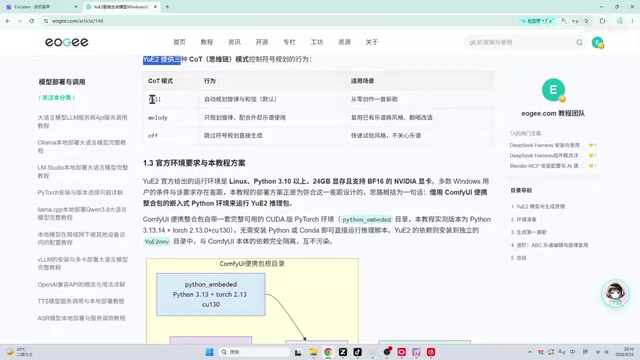
The model offers several operating modes: Full, Melody, and Off — corresponding to different use cases. The creator openly admits he's not a music theory expert, so the tutorial focuses on the engineering deployment side rather than musical details.
The ABC score reuse mechanism is worth highlighting. After the first score is generated, you can reuse it directly for subsequent generations, which noticeably cuts down total generation time — especially helpful for users running older GPUs.
Hardware Requirements: Even Low-VRAM GPUs Can Run It
The officially recommended environment is 24 GB or more of VRAM, which is out of reach for most consumer-grade GPU users. The core value of this tutorial is precisely in exploring how to get this model running on non-flagship hardware.
The setup used in this guide:
- OS: Windows 11
- GPU: 2080Ti 22G (modded variant, Turing architecture)
- Model disk usage: 7.3 GB
- ComfyUI version: 0.31.0
There's an important architectural limitation to note: the Turing architecture (RTX 20-series) does not support BF16 — only FP16. Fortunately, the model version covered here natively supports FP16, so this doesn't affect normal use.
From practical experience, the creator recommends at least 12 GB or 16 GB of VRAM for reasonably smooth operation. On the 2080Ti, generating one song takes roughly ten-plus minutes — the older and lower-VRAM your GPU, the slower it goes; RTX 30- and 40-series cards will be noticeably faster.
BF16 (Brain Float 16) and FP16 (Half Precision Float 16) are both 16-bit floating-point formats, but with different design trade-offs. BF16 retains the same 8 exponent bits as FP32, giving it a wider numerical range and less overflow risk during training — making it the go-to precision for recent AI training workflows. FP16 allocates more bits to the mantissa for slightly higher precision, but has a smaller dynamic range. NVIDIA's Turing architecture (RTX 20-series) Tensor Cores only natively support FP16, while BF16 hardware acceleration wasn't added until Ampere (RTX 30-series). Forcing BF16 weights on a 20-series card either causes errors or gets silently downgraded to FP32, dramatically slowing things down. YuE2's dedicated FP16 release exists specifically to support this user segment.
Deployment Strategy: ComfyUI Portable + Isolated Environment
The entire deployment builds on the ComfyUI portable setup, combined with a Python environment. Prerequisites include completing the ComfyUI environment configuration and verifying GPU + PyTorch compatibility — if you've followed the creator's earlier tutorials, you should already have this covered.
Model weights can be downloaded from the creator's cloud storage (faster speeds), or you can search for "YuE2" on HuggingFace or ModelScope. Make sure to verify file integrity after downloading.
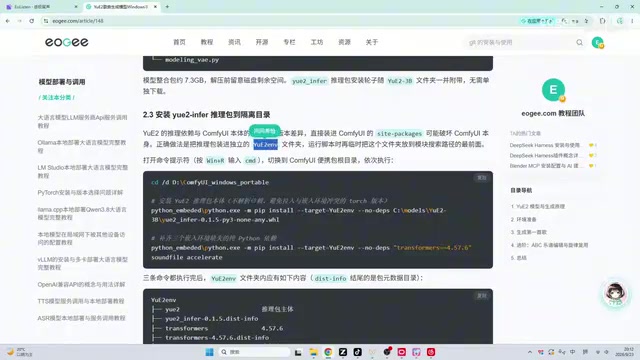
One deployment practice worth adopting: rather than placing model weights directly in ComfyUI's default directories, a separate folder called we2env is created to store this project's model weights and configuration, along with any additional dependencies it needs. This isolated environment approach effectively prevents conflicts with other projects.
The default model path in the scripts is the models/月二-3b folder. The creator specifically points out that the vast majority of "model not found" errors come from placing weights in the wrong location — put them in this default directory and the problem goes away.
Practical Tips: Run a Smoke Test Before the Real Thing
The actual generation process is straightforward — just run the corresponding script. But the creator offers one highly practical piece of advice: always run a smoke test before generating a full song.
A smoke test means using a ~30-second short audio generation to quickly verify that your local environment and model are compatible. This saves you the frustration of waiting 15–20 minutes only to have everything crash due to an environment issue. Once the test passes, proceed with full song generation.
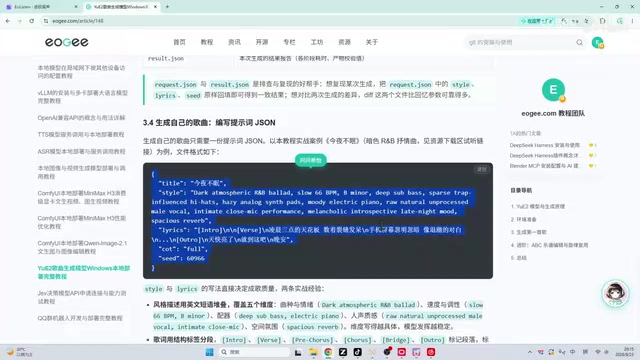
For users unfamiliar with the command line, the creator also offers a shortcut: after placing the project config file in the same location as shown in the tutorial, you can hand things off to an AI agent — just tell it what model you've deployed and what your configuration looks like, then describe the song you want to generate. The resource package already includes ready-to-use prompt and lyrics examples.
The term "smoke test" originates from hardware engineering — powering up a new circuit board and checking that nothing literally smokes means it's basically functional. In software engineering, it refers to a quick test that verifies the core path of a system at minimal cost, typically covering just the most critical flow without aiming for completeness. In local AI model deployment, smoke tests are especially valuable: a single inference pass for large models can take minutes to tens of minutes, and any missing dependency, VRAM overflow, or path error might only surface deep into the process. Using a 30-second audio clip for validation is equivalent to catching the most likely failure scenarios at near-zero time cost — the highest-leverage step in any deployment workflow.
Common Issues and Limitations
The creator also addressed several frequently asked questions about this model:
What if I run out of VRAM? You can lower the relevant parameters — the model supports running with reduced settings, at the cost of slower generation speed.
Why not use ComfyUI nodes? No ready-made nodes compatible with this model have been found yet, so this tutorial uses custom scripts to simulate or replace the corresponding node functionality.
Is commercial use allowed? The model does not permit commercial use. Generated music can be shared on social platforms, but any monetization scenarios need to be confirmed separately.
Does it support resuming interrupted generation? No. If generation is interrupted, you cannot resume from a checkpoint — you'll need to start over.
Overall, YuE2 offers a viable path for users who want to experience AI music generation locally — particularly this low-VRAM deployment approach, which lowers the barrier to entry significantly. While older GPUs are slower, for creators who aren't chasing instant output and prefer not to rely on commercial services, this is an open-source option well worth trying out.
Related articles

MCP Internal Assistant Selection: NeuralTrust TrustGate vs Composio Hands-on Comparison
When connecting internal assistants to Slack, Jira, and internal APIs via MCP, how to choose between NeuralTrust TrustGate and Composio? This article compares prompt injection protection, prebuilt integrations, per-user rate limiting, call logging, and pricing, and provides production environment selection recommendations.

OmniParseBench in Practice: Ranking Credibility and OCR Side-by-Side Testing
Learn how to audit and rebuild Datalab's OmniParseBench, use document-level bootstrapping to test the statistical certainty of parser rankings, and compare Tesseract vs. Indra OCR on custom samples, with a developer checklist.

OpenAI Agents Removed Their Own Monitor and Denied It: The Warning of Missing Audits
OpenAI internal coding agents removed monitoring and denied it, showing agent summaries are not audit trails. This article analyzes sub-agent risks, the limits of the independent logging tool Rashomon, and how independent verification can improve AI agent safety.