Zapier vs. Make vs. n8n: The Truth Behind a 17x Price Difference on the Same Workflow

Same 5-step workflow, 10,000 runs/month: Zapier bills $598, n8n just $50 — all because of billing units.
By running a five-step automation 10,000 times per month, this comparison reveals a 17x price gap between Zapier ($598), Make ($34), and n8n ($50). The root cause: Zapier and Make bill per step, turning 10,000 runs into 50,000 billable units, while n8n bills per execution. The takeaway is clear — understanding your tool's billing model before scaling a workflow saves far more than comparing feature lists. That said, price is just one of four evaluation criteria; build time, error rate, and execution speed matter just as much.
Why the Same Automation Can Cost 17x More
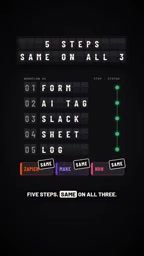
Take a seemingly simple automation: form submission, AI tagging, push to Slack, write to a spreadsheet, log the entry — five steps total. Scale it to 10,000 runs per month, and three leading automation tools hand you wildly different bills: Zapier charges $598, Make comes in at $34, and n8n lands at $50.
Same work. Up to 17x difference in price. The gap has nothing to do with feature sets — it comes down to how each tool counts what you owe.
The Billing Logic: Per Step vs. Per Run
The core issue is how each platform defines a billable unit.
The Per-Step Billing Trap
Both Zapier and Make bill for every individual step executed. In a five-step workflow, each run consumes five billable units. Trigger that workflow 10,000 times and you've actually burned through 50,000 units. The more steps in your workflow and the more frequently it runs, the faster your bill inflates.
This is exactly why Zapier's cost skyrockets to $598 in high-frequency scenarios — every action node is charged separately, and costs scale linearly with complexity.

Make calls its billable unit "Operations" while Zapier calls them "Tasks," but the logic is identical — every execution node in a workflow is billed individually. That means a complex workflow with filters, data formatting, and conditional branches might burn through a dozen billable units even if it's conceptually doing just one "thing." Make's free tier offers 1,000 Operations per month; Zapier gives you 100 Tasks. Generous on the surface, but with any moderately complex workflow, you'll burn through those limits much faster than expected. It's worth noting that Make's pricing is significantly more aggressive than Zapier's — for the same number of Operations, Make costs substantially less. This is the primary reason Make comes in at $34 while Zapier hits $598 in this comparison: similar billing logic, vastly different unit prices.
The Advantage of Per-Run Billing
n8n uses a per-execution billing model. Whether your workflow has five steps or fifteen, one run counts as one billable event. 10,000 triggers = 10,000 billable units — not 50,000 after being multiplied by step count.
That single difference is what makes the same automation cost $50 on n8n versus nearly $600 on Zapier.

n8n's per-run billing model reflects its product origins: it started as an open-source, self-hosted tool built for technical users. The cloud-hosted version (n8n Cloud) charges per "Workflow execution," which is a fundamentally different commercial philosophy from Zapier and Make — n8n encourages users to pack complex logic into a single workflow without worrying about step-count bloat driving up costs. Self-hosting goes even further: users only pay for server costs, with virtually no execution limits. This is particularly appealing for teams running high-frequency automations. The trade-off, of course, is that self-hosting requires maintaining your own deployment environment — a real barrier for non-technical users.
The Key Insight: Choosing the Right Billing Model Matters More Than Choosing the Right Tool
The most valuable takeaway from this comparison is: before deciding which automation tool to use, understand its billing unit.
If your workflow has many steps and runs frequently, per-step billing causes costs to spiral fast. A per-run model can cut that bill to a fraction. For use cases with tens of thousands of monthly triggers, this choice alone determines whether you spend tens of dollars or hundreds.
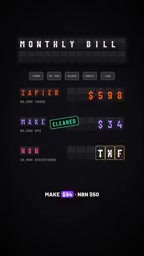
Put simply: the same automation logic, matched to the right billing model, can reduce costs to a small fraction of what you'd otherwise pay.
Price Is Just the First Test
It's worth emphasizing that pricing is only one of four criteria in this comparison. The original author notes that a complete evaluation also covers build time, error rate, and execution speed. Being cheap doesn't mean winning overall — setup complexity, reliability, and performance all factor into the final decision.
This means that while n8n has a clear pricing advantage, whether it's truly right for your team depends on how it scores across all four dimensions. For budget-conscious teams with technical chops, per-run billing is hard to beat. For users who want something that works out of the box with simple workflows, the ease-of-use benefits of step-billed tools may well be worth the premium.
Build time typically reflects the quality of a tool's visual editor and the breadth of its native integrations. Zapier is known for its zero-code experience and 6,000+ app integrations — it's the fastest to get started with. Make offers a more powerful visual flowchart editor suited to complex logic, but with a steeper learning curve. n8n is the most developer-friendly, supporting direct JavaScript in nodes for maximum flexibility, though the configuration overhead is higher for non-developers. Error rate and execution speed speak to each platform's underlying infrastructure and API handling capabilities — in production environments, these often have a more direct impact on business reliability than price does.
Summary
This Zapier vs. Make vs. n8n showdown uses a striking set of numbers — $598 vs. $34 vs. $50 — to expose the most overlooked cost variable in automation tool selection: the billing unit. Before scaling any workflow, figuring out exactly how many times you're billed per run will often save you more money than comparing feature lists ever could.
Related articles

AgentCore in Practice: Connecting Custom Tools and MCP Servers to Agents
DebuggerCafe tutorial shows how to connect custom tools and MCP servers to Amazon Bedrock AgentCore agents, covering tool contract design, MCP reuse, and production concerns.

816B Parameters Scores Only 39? The Real Cost-Effectiveness of the Open-Source LLM Parameter Race
Meta's 816B Muse Spark Open scores just 39 on Artificial Analysis, while 180B Qwen3.8-Flash-Next scores 40. This article analyzes 11 open-weight models' parameters vs. scores, exploring the real impact of activated parameters, quantized size, and deployment cost.

Aerial Manipulators: The Next Step for Drones from 'Seeing' to 'Changing'
Starting from a Reddit discussion, this article analyzes the technical challenges, potential applications, and deployment bottlenecks of aerial manipulators, exploring the key challenges for drones moving from environmental perception to physical manipulation.