Zero-Basics Vibe Coding Tutorial from Bilibili: Master Codex, ClaudeCode, and Cursor in Six Steps

Bilibili's zero-basics AI coding tutorial breaks down a six-step learning path covering mainstream tools and hands-on practice.
The article introduces a zero-basics AI coding (Vibe Coding) tutorial on Bilibili for ordinary people who want to build products with AI but don't code. It highlights common beginner failures—not knowing the tools, poor results, and messing up the computer—and breaks learning into six steps: tool usage, prompts, practice projects, advanced techniques, large projects, and exclusive tips. It emphasizes learning to build products with AI rather than mastering a specific coding AI, covering Codex, ClaudeCode, and Cursor, and recommends finishing the framework first, then troubleshooting via prompts and tool usage when results fall short.
AI coding (Vibe Coding) is becoming a shortcut for ordinary people to build products, but most beginners get stuck the first time they use AI to write code—they don't know how to use the tools, the results are poor, and they may even mess up their computer. This zero-basics-to-hands-on tutorial launched on Bilibili breaks the learning path into six steps, covering mainstream tools such as Codex, ClaudeCode, and Cursor, with the goal of enabling non-programmers to fully use AI to build products and complete work.
Why Many People Fail When Using AI to Write Code
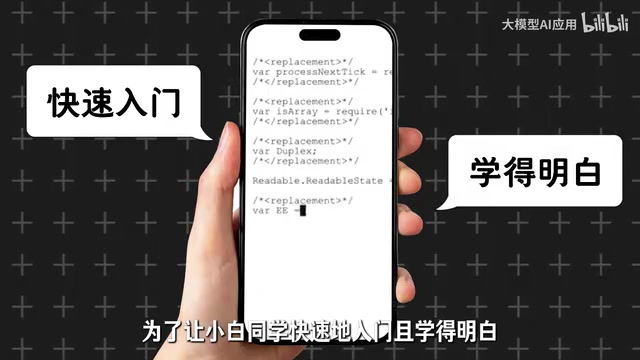
The video opens by directly pointing out common pain points: people have heard of AI coding and Vibe Coding, but when they actually try it, they don't know how to use the AI tools, the generated results are very poor, and they may even mess up their computer environment. These problems pile up and cause many people to give up at the入门 stage.

The tutorial is positioned not as "learning a particular coding AI," but as "truly learning to use AI to build products." This distinction is crucial: tools will iterate, and Codex, ClaudeCode, and Cursor each have their own usage, but the methodology around requirement breakdown, prompts, and project validation is universal.
The essence of Vibe Coding: This term was coined by Andrej Karpathy in early 2025, referring to a development approach where "coding is entirely handed over to AI, and humans are only responsible for describing intent and accepting results." It differs from traditional assisted programming where "humans write code and AI completes it"; the core is transforming natural language requirements into runnable programs, with humans playing more of a product manager and tester role. Precisely because humans no longer review code line by line, whether the tools are used correctly, whether enough context is provided, and how generated results are verified directly determine success or failure—this is also the root cause of beginners easily "messing up their computer environment": AI may install dependencies in directories you are unaware of, overwrite configuration files, or execute destructive commands.
Three forms of AI coding tools: The Codex, ClaudeCode, and Cursor mentioned in the article represent different product forms. Cursor is an AI-native editor that integrates conversation and code modification into the IDE, suitable for watching and modifying at the same time; ClaudeCode is a command-line agent that can autonomously read and write files and run commands. It is powerful but requires more cautious permission control; Codex is OpenAI's code model/agent product line. The interaction methods, context windows, and executable scope of the three differ greatly, and understanding these differences is the prerequisite for "learning how to use the tools."
Six-Step Learning Path: From Tools to Large Projects
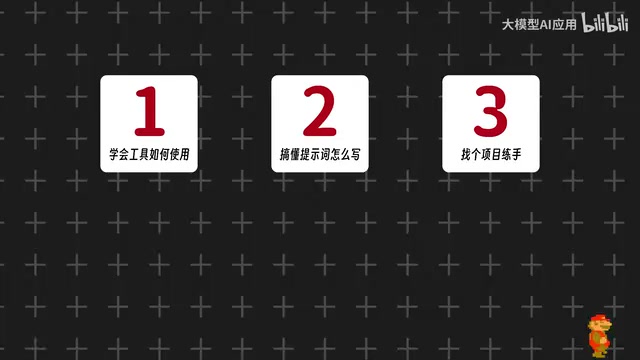
The author breaks Vibe Coding learning into six progressive stages, forming a complete chain from zero to one:
- Learn how to use the tools
- Understand how to write prompts
- Find a project to practice with
- Learn the fancy ways to use skills
- Build a large project
- Take away the author's exclusive secrets
The first two steps solve the problem of "whether you can use it," the middle two steps solve the problem of "whether you can use it smoothly," and the last two steps point toward complex projects and experience accumulation. For zero-basics learners, this layering lowers the starting threshold—you don't need to become a programmer first, but you need to complete each layer in order.
Prompts and Tools: The Two Most Underestimated Links
Among the six steps, tool usage and prompt writing are placed first, which exactly corresponds to the two places where beginners are most likely to have problems. At the tool level, different AI coding products differ significantly in interaction methods, context management, and the scope of code modification, so unfamiliarity can easily lead to "AI messing up files." At the prompt level, the vaguer the requirement description, the more room AI has to improvise, and the higher the probability that the result deviates from expectations.
The tutorial emphasizes "finish watching the video before AI writes code," essentially hoping that learners establish the correct way of working before starting, rather than trying and stepping into pitfalls along the way.
Why context management is critical: The effectiveness of AI coding tools depends largely on how much relevant information it "sees." The context window is limited. If the entire project is stuffed in at once, the model can easily lose focus; if only a vague requirement is given, it will fill in the blanks on its own. A common practice in practice is: first let AI read the relevant files and directory structure, then propose specific modification requirements step by step, and check the diff after each round of modification. So-called "AI messing up files" is often not due to insufficient model capability, but because the context is given incorrectly or permissions are set too broadly.
Key points of prompt engineering in coding scenarios: Unlike chat scenarios, coding prompts need to specify the target file, expected behavior, constraints (such as not modifying a certain module, using existing dependencies), and acceptance criteria. Breaking requirements into multi-turn conversations of "describe first, confirm next, execute last" is more reliable than throwing out a large chunk of requirements all at once. This is also why the tutorial places prompts after tools and before practice projects—it is the bridge connecting tool capabilities and real requirements.
Fancy Ways to Use Skills and Large Project Practice
The fourth step, "learn the fancy ways to use skills," is a stage many people overlook. Basic usage can only complete small scripts, while integrating AI coding tools into real workflows—such as staged generation, local refactoring, and multi-round validation—is what enables handling more complex requirements.
The fifth step enters large projects, which is the watershed from "playing around" to "being able to deliver." Large projects have far higher requirements for requirement breakdown, module division, and error troubleshooting than practice projects, and they are also the standard for testing whether the first four steps have been truly mastered. The final step, the exclusive secrets, is the author's personal experience wrapped up.
Who It Is For and How to Use It
This tutorial is aimed at people with zero basics who want to use AI to build products, not developers who want to systematically study programming theory. Its value lies in breaking Vibe Coding into executable steps and using tools such as Codex, ClaudeCode, and Cursor as carriers. For learners, a reasonable approach is to first go through the six-step framework completely, then pick a small requirement of your own to verify hands-on; when results are poor, return to the two links of prompts and tool usage to troubleshoot, rather than frequently switching tools.
The tutorial itself also reminds viewers that if they don't have time to finish watching, they can bookmark it first, but the real threshold is not finishing watching—it is completing the six steps and finishing a project of your own.
One-line Summary
A zero-basics AI coding tutorial from Bilibili breaks down a six-step learning path, covering mainstream tools and hands-on practice.
Paragraph Summary
The article introduces a zero-basics AI coding (Vibe Coding) tutorial launched on Bilibili, aimed at ordinary people who want to use AI to build products but don't know how to code. The tutorial points out common failure points for beginners: not knowing how to use tools, poor generated results, and messing up the computer environment. To address this, the author breaks the learning path into six steps: learn to use tools, understand prompts, find a project to practice with, learn fancy ways to use skills, build a large project, and take away exclusive secrets. The article emphasizes that the tutorial is positioned not as learning a particular coding AI, but as learning to use AI to build products, covering tools such as Codex, ClaudeCode, and Cursor, and suggests finishing the six-step framework before hands-on verification, and returning to prompts and tool usage for troubleshooting when results are poor.
Related articles

Nvidia CEO Removal Saga: Trump Intervenes Over the Weekend, Jensen Huang Reinstated Monday
Vergecast podcast reveals Nvidia CEO drama: earnings call said he wouldn't return and a new CEO was being sought; Trump intervened over the weekend, with J.D. Vance brokering a security guarantee to the board; Jensen Huang reinstated at 9 a.m. Monday.
Semantic Caching Explained: Reusing the Same Answer for Similar Questions
Semantic caching uses embeddings to judge whether queries are similar in meaning and reuses cached results for similar prompts. This article explains how it works, the difficulty of threshold tuning (such as the risk of misjudging negations), and its applicable boundaries.

How Did Trump Personally Turn Nvidia into the "Twelfth Board Member"?
A YouTube political commentary offers a sharp view: behind Nvidia's market cap milestone, Trump's deep involvement earns him the title of "twelfth board member." The article breaks down the commentator's logic on stock market achievements, the break from small-government tradition, and power display.