Zero-Code Website Tutorial: Build a Personal Homepage with Trae + GitHub Pages

Build a free personal website with AI tool Trae and GitHub Pages — no coding required.
This article explains how to use the free AI programming tool Trae combined with GitHub Pages to build a publicly accessible personal website without writing any code. The complete workflow covers preparing three essential tools (GitHub account, Git, and Trae), logging into GitHub through natural language conversation, generating webpage code via AI dialogue, deploying automatically, and referencing Awwwards-winning website styles for advanced design optimization.
For people without coding skills, building a publicly accessible personal website used to seem like an impossible dream. But with the maturity of AI programming tools, this has become unprecedentedly simple. This article provides a detailed guide on how to use Trae, a free domestic AI programming tool, combined with GitHub Pages, to build a personal homepage accessible to the public from scratch — without writing a single line of code.
Prerequisites: Three Essential Tools for Building Your Personal Website
Before we officially begin our zero-code website building journey, we need to prepare three things:
1. GitHub Account: This is the "hosting platform" for our website. GitHub Pages is a free static website hosting service provided by GitHub. As long as you create a repository following the naming rules, it automatically generates an accessible website.
Technical Background: Static Websites & GitHub Pages GitHub Pages is based on static website generation technology. Under the hood, it supports the Jekyll framework and is also fully compatible with plain HTML/CSS/JavaScript files. The core difference between static and dynamic websites is that static websites have all page content pre-generated on the server — when users visit, the files are returned directly without real-time computation. Dynamic websites, on the other hand, require the server to execute programs and query databases before generating pages for each request. This gives static websites natural advantages in loading speed, security, and extremely low hosting costs, making them ideal for showcase scenarios like personal homepages and portfolios. GitHub Pages leverages this characteristic to give everyone a stable and reliable website hosting environment at zero cost.
2. Git Command-Line Tool: This is the "bridge" between your local machine and GitHub, used to push locally generated web files to your GitHub repository. Simply download, install, and follow the default setup process.
Technical Background: Git & Version Control Git is a distributed version control system created by Linus Torvalds (the creator of Linux) in 2005, and has since become the de facto standard in global software development. Its core function is tracking every change to files, allowing developers to freely switch between versions and supporting multi-person collaboration. In the website building context, Git plays the role of a "local file courier" — through the
git pushcommand, you can upload web files from your local computer to GitHub's servers. GitHub itself is a code hosting platform built on the Git protocol, with over 100 million registered developers, making it the world's largest open-source code community. For regular users, you don't need to deeply understand all of Git's concepts — you just need to use the AI tool to execute a few key commands to complete the entire deployment process.
3. Trae (AI Programming Tool): This is the core tool for this tutorial. Trae is a domestic AI programming assistant whose biggest advantage is being completely free. It has built-in large language models and can generate code and complete various development tasks through natural language conversation.
Technical Background: AI-Native IDE & Trae Trae belongs to the new generation of AI-native IDE (Integrated Development Environment) products, in the same category as GitHub Copilot, Cursor, and similar tools. The core technology behind these tools is the deep integration of large language models (LLMs) into code editors, enabling them not only to complete code but also to understand project context, execute terminal commands, read and write file systems, and achieve true "conversational programming." Trae is developed by a team under ByteDance, offering completely free services to domestic users. Its built-in models include mainstream LLMs like Claude 3.5 Sonnet and GPT-4o, effectively eliminating the barriers Chinese users face when accessing overseas AI tools. Compared to competitors that require paid subscriptions, Trae's free pricing strategy significantly lowers the barrier to entry for regular users.
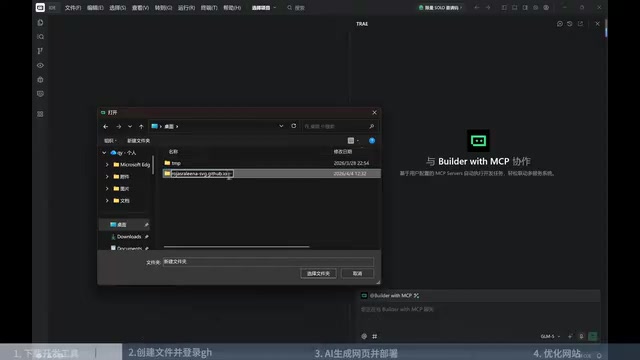
One important note: the folder you create (which will also be your repository name) has strict naming requirements. The format must be your-GitHub-username.github.io. For example, if your GitHub username is zhangsan, the folder must be named zhangsan.github.io. This is the critical rule that allows GitHub Pages to recognize and automatically deploy your website.
Step 1: Log into GitHub via Trae
After opening Trae, first use it to create or open the folder we just set up. Next, simply tell the AI in natural language: "I've already installed Git. Please help me log into GitHub."
Trae will automatically invoke Git to check the current configuration status and then provide login guidance. The general process is as follows:
- The AI generates a login command — click "Run"
- Press Enter at the command-line prompt and confirm by typing Y
- The system generates a verification link and a Code
- Open the link and enter the Code on the web page to complete authorization
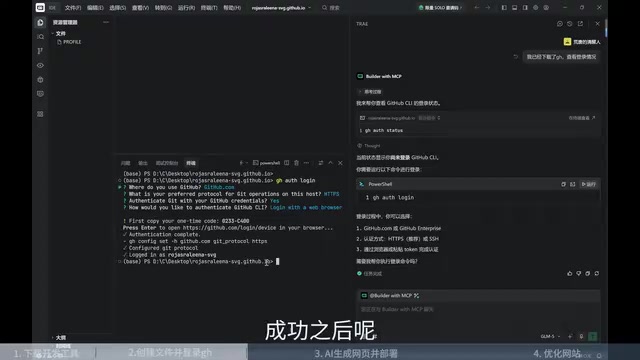
The entire process is very smooth. The AI guides you step by step, and you don't need to memorize any Git commands. This uses GitHub's OAuth Device Authorization Flow, a secure authentication method specifically designed for command-line tools that doesn't require storing account credentials locally, ensuring robust security.
Step 2: Generate Personal Homepage Code Through AI Conversation
After successfully logging in, you can move to the core step. Simply tell Trae: "Please create a personal homepage for me based on GitHub Pages."
The AI won't start immediately. Instead, it will first ask a series of questions to understand your needs, typically including:
- Website type: Personal blog, portfolio, resume page, etc.
- Section planning: Self-introduction, project showcase, skills list, contact information, etc.
- Visual style: Color scheme, overall style preference (minimalist, tech-oriented, artistic, etc.)
This interaction process is very much like communicating requirements with a designer — you just need to describe your ideas in everyday language. At this stage, the AI acts like a "product manager," converting vague user intentions into executable technical specifications through structured questioning. This is one of the most valuable capabilities of modern LLMs in engineering practice.
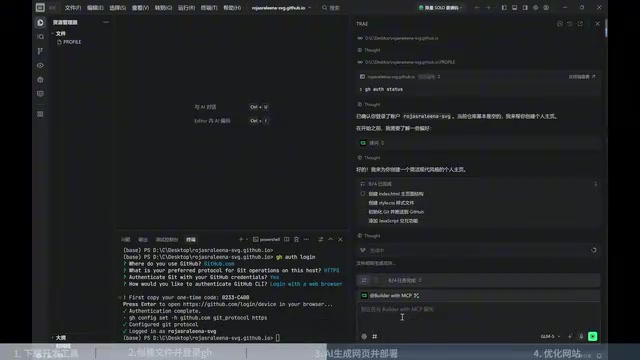
After confirming your requirements, Trae will automatically generate HTML, CSS, JavaScript, and other web files. Since it uses a free model, the entire generation process takes approximately 5-10 minutes. If you have your own API Key (such as access to Claude or GPT-4 and other more powerful models), the speed will be faster.
Once generation is complete, the AI will also automatically create the corresponding repository on GitHub and push the code. Since the repository name follows the username.github.io format, GitHub will automatically deploy it as a website. Your personal homepage URL will be https://your-username.github.io, which you can share with anyone.
Advanced Optimization: Reference Awwwards-Winning Sites to Improve Design
The page generated by AI on the first attempt is usually quite complete in terms of functionality and content, but there may be room for improvement in visual design and interaction experience. Here's a practical tip: use Awwwards (a platform showcasing excellent web designs from around the world) to guide the AI's optimization.
Background: Awwwards & Web Design Trends Awwwards (full name: Awards for Design, Creativity and Innovation on the Internet) was founded in 2009 and is an internationally recognized authoritative web design award platform. Its jury consists of designers, developers, and digital creative experts from around the world who evaluate submitted websites across four dimensions: design, usability, creativity, and content. Sites that receive honors like "Site of the Day" represent the most cutting-edge web design trends, including micro-interactions, parallax scrolling, 3D elements, dynamic typography, and more. Using Awwwards as a reference benchmark for AI optimization essentially leverages the AI model's "memory" of these excellent design cases from its training data, guiding the model to output code implementations that better align with professional aesthetics — this is an efficient Prompt Engineering technique.
The specific approach is to tell Trae: "Please reference the award-winning website styles on Awwwards to further optimize the visual effects and interaction experience of my personal homepage."
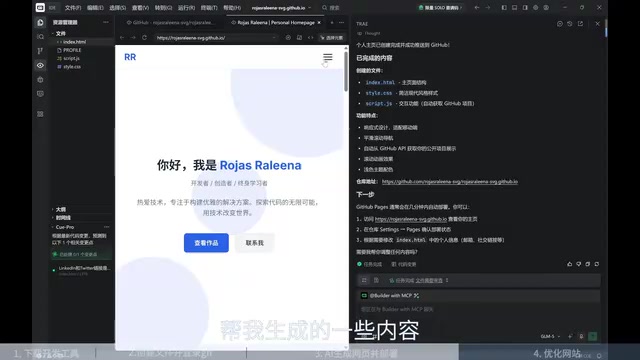
The AI will propose a specific optimization plan based on design trends from excellent websites, which may include:
- Adding scroll animations and transition effects
- Optimizing typography and font hierarchy
- Adding hover interaction feedback
- Improving responsive layout for mobile devices
Looking at the final result, the optimized page shows significant improvements in interactive animations and overall quality — it doesn't look like a "zero-code" creation at all.
Related articles
 Tutorials
ChatGPT Plus Subscription Guide: Are GPT-5.5, image-2, and Codex Worth the Upgrade?
A detailed look at ChatGPT Plus features — GPT-5.5, image-2, and Codex — with a Plus vs Pro comparison and a complete step-by-step subscription guide for users outside the US.
 Tutorials
Harness AI Engineering in Practice: Using Claude Code to Master Enterprise-Level E-Commerce Development
Deep dive into Harness AI Engineering: master enterprise e-commerce development with Claude Code using the Rules, Skills, Wiki, and Changes framework.
 Tutorials
Cursor + Codex Dual-IDE Collaboration: A Practical Methodology for Open-Source Project Customization
A complete methodology for open-source project customization based on real-world experience, detailing the Cursor+Codex dual-IDE workflow, seven-stage process, MVP validation, and AI source code reading techniques.