Deep Dive into Kiro: What Makes Amazon's AI IDE and Its Spec-Driven Development So Powerful?

Amazon AWS launches AI IDE Kiro, generating production-grade code via Spec-driven development.
Amazon AWS has released Kiro, an AI coding tool built on VS Code and powered by the Claude 4 model. Its core innovation is a Spec-driven development mode that strictly follows the software engineering workflow of requirements → technical design → task breakdown → coding → testing, setting it apart from conversational coding tools like Cursor. Through structured context management, Kiro generates more engineered code suitable for complex project iteration. Currently in preview with pricing starting at $19/month, its stability and speed still have room for improvement.
Amazon AWS has launched a brand-new AI IDE called Kiro. Its slogan is "from prototype to production," and it's designed to generate production-ready code. Unlike AI coding tools such as Cursor, Kiro adopts a "Spec-driven" development paradigm that more closely mirrors real-world software engineering workflows. Kiro is currently in preview, powered by the Claude 4 model under the hood, with future pricing starting at $19/month.
Notably, AWS's choice of Claude 4 as Kiro's underlying engine is closely tied to Amazon's strategic investment in Anthropic — AWS has invested over $4 billion in Anthropic to date, with the two companies deeply integrated at the cloud computing and AI infrastructure level. Claude 4 leads on mainstream coding benchmarks like SWE-bench, which also means Kiro enjoys competitive advantages in model inference costs and API priority, giving it greater flexibility for future pricing strategies.
Kiro's Core Philosophy: Plan First, Don't Just Wing It
Kiro is also built on VS Code. After opening a project, you can initialize it through the Agent feature in the sidebar. It automatically identifies the product description, project structure, and technical architecture — similar to Claude Code's Init mode.
But what truly sets Kiro apart is how it approaches coding. Kiro offers two modes: Vibe Coding, for rapid prototyping, and Spec mode, which is its killer feature.
Spec mode strictly follows standard software engineering workflows: Requirements Document → Technical Design → Task Breakdown → Code Implementation → Testing & Verification. This perfectly mirrors the typical backend development process of "receive requirements → write design docs → break down modules → code → test."
The Engineering Roots of Spec-Driven Development: Spec-Driven Development is not a concept invented by Kiro. It's the revival of decades of software engineering best practices in the AI era. In traditional software engineering, specifications serve as the core bridge between business requirements and technical implementation — the IEEE 830 standard defined the standard format for software requirements specifications as early as 1998. Kiro's innovation lies in combining this rigorous engineering methodology with the code generation capabilities of large language models, transforming AI from an "improvising musician" into a "professional performer following a score." The core value of this paradigm is that when requirements, designs, and tasks are explicitly documented, every output from the AI model has clear constraint boundaries, dramatically reducing the probability of "hallucinations" and deviations from expectations.
Hands-On Demo: Adding Google Login to a Project with Kiro
Let's walk through a practical example of Kiro's Spec mode — adding Google login functionality to an existing AI assistant project and building a complete user system, with MySQL as the database.
Step 1: Natural Language Automatically Converted to Requirements Document
After entering a natural language description, Kiro first takes on the role of "product manager," transforming the requirements into a structured requirements document. The document includes User Stories, feature breakdowns, and detailed descriptions for each requirement. For example: "As a user of the legal assistant, I want to log in via my Google account..."
User Stories are a core concept in Agile development methodology, originating from Extreme Programming (XP) practices. They describe requirements in the format "As a [role], I want [feature], so that [value]," emphasizing defining feature boundaries from the user's perspective rather than a technical one. Kiro's automatic conversion of natural language into standard User Story format is essentially performing "requirements engineering automation" — something that traditionally requires product managers and business analysts to spend significant time completing.

Step 2: Automatic Generation of Technical Design Documents
With the requirements document in place, Kiro automatically moves into the design phase. It generates:
- Architecture Overview: Authentication layer, user management layer, data management layer, API layer, frontend layer
- Architecture Diagrams: Visual representations of relationships between layers
- Sequence Diagrams: Describing the complete interaction flow
- Component Design: Detailed design for each module
These design documents are stored in the project's .kiro directory, similar to Claude Code's memory storage mechanism, ensuring the Agent always understands the project context and task progress.
Step 3: Task Breakdown and Step-by-Step Execution
Kiro breaks down the technical plan into specific development tasks. For the Google authentication module, for instance, tasks span frontend, backend, and database management, split into a total of 12 subtasks.
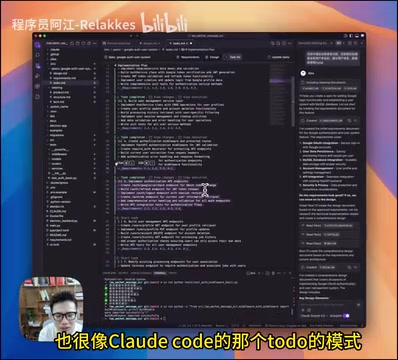
Each completed task is automatically checked off, and a task is only considered done when all tests pass. This is similar to Claude Code's todo mode, but the key difference is: Kiro operates from the perspective of a backend developer or standard software engineer, strictly following the requirements document → design → tasks pipeline, rather than simply responding to instructions.
Kiro's Code Quality and Context Management Advantages
Since it also uses the Claude 4 model under the hood, Kiro's coding capabilities are roughly on par with other similar AI coding tools. But its unique advantage lies in context management.

A core topic in the current AI coding space is "Context Engineering" — virtually all Code Agent scenarios depend on context to function. The output quality of large language models is highly dependent on the quality and completeness of input context: the model needs to know "what to do" (requirements), "how to do it" (design), and "where things stand" (task status) to generate high-quality code. Kiro's .kiro directory is essentially a structured context storage system that persists requirements documents, design documents, and task states, solving the core pain point of context loss during long conversations — this aligns with the philosophy behind RAG (Retrieval-Augmented Generation), except the retrieval targets shift from external knowledge bases to the project's own engineering documentation.
Through its Spec paradigm (requirements → design → tasks), Kiro progresses layer by layer, ensuring each coding step has sufficient context support, resulting in more engineered and structured code.
Looking at the actual code output, Kiro modifies a large number of files and automatically runs tests after coding is complete, ensuring all tests pass before moving on to the next task. This mechanism effectively reduces the common AI coding problem of "write and run without caring about quality."
Kiro's Current Shortcomings and Pricing Plans
As a preview product, Kiro currently has some notable shortcomings:
- Stability issues: Occasional interruptions during tool calls like file editing, requiring manual copy-pasting to continue
- Slower speed: Due to finer-grained planning (e.g., 12 subtasks), overall execution time is longer
- Limited free quota: Approximately 50 uses per month during the preview period
Regarding pricing, Kiro plans to offer paid tiers in the future:
- $19/month: 1,000 requests per month
- $39/month: Higher quota (details TBD)
Compared to Cursor's $20/month pricing, Kiro's entry-level price has a slight edge, but the actual value proposition depends on how well the features are polished in the official release.
AI IDE Market Competitive Landscape: The current AI IDE market is undergoing rapid differentiation — Cursor focuses on conversational coding with over 1 million monthly active users; GitHub Copilot leverages the Microsoft ecosystem to dominate the enterprise market; Windsurf (formerly Codeium) emphasizes a lightweight experience; and Claude Code targets professional developers as a command-line tool. Kiro's entry signals that AWS views AI coding tools as a critical gateway to its cloud service ecosystem: once developers get accustomed to building projects in Kiro, they'll naturally lean toward deploying applications on AWS, creating a complete loop from development to deployment. This strategic logic of "using the IDE as a hook and cloud services for monetization" is virtually identical to Microsoft's playbook of funneling GitHub Copilot users toward Azure.
Conclusion: Why Spec Mode Deserves Developers' Attention
Kiro's biggest innovation is integrating software engineering best practices into the AI coding workflow. Compared to the "conversational coding" approach of tools like Cursor, Kiro's Spec mode is better suited for complex project feature iteration and production-grade code development. It doesn't simply have AI write code — it has AI work like a senior engineer: first understand the requirements, complete the design, break down tasks, and then implement step by step.
Of course, as a preview product, there's significant room for improvement in stability and speed. But this "plan first" approach represents a promising direction for AI-assisted development.
Related articles
 Product Reviews
The Programmer's Desk Setup Guide: Building a Workspace That Feels Like Home
Discover how programmers build productive, comfortable workspaces. From multi-monitor setups to ergonomic design, explore the desk philosophy that drives focus and flow.
 Product Reviews
Qoder vs Cursor Real-World Comparison: Which $20/Month AI IDE Is Better?
Hands-on comparison of Qoder vs Cursor AI IDEs: Agent autonomy, human interaction count, and architecture decisions. Qoder needed only 2 interactions vs Cursor's 8.
 Product Reviews
Cursor Cloud Agent Demo: Eliminating Bottlenecks Across the Entire Software Development Lifecycle
Deep analysis of Cursor's Cloud Agent demo showing how cloud VMs, automated test artifacts, and a full-chain control plane systematically eliminate human bottlenecks across the software development lifecycle.