DeepSeek V4 Flash vs Pro Programming Test Comparison: 5 Scenarios to Help You Choose

Hands-on programming comparison of DeepSeek V4 Pro vs Flash across 5 real coding scenarios.
DeepSeek released its V4 series models including Pro (Expert Mode) and Flash (Quick Mode), both supporting 1M context. Through hands-on testing across game development, tool applications, and UI components, Pro clearly excels in code completeness, UI aesthetics, and feature details, while Flash responds faster and performs comparably in smaller applications. Use Flash for daily iterations and Pro for production projects.
Introduction
After half a year, DeepSeek has finally released its brand-new V4 series models, including DeepSeek V4 Pro (Expert Mode) and V4 Flash (Quick Mode). Both models support a million-level (1M) context window and are now fully available on the web, app, and API.
This article conducts hands-on testing across multiple programming scenarios—including game development, tool applications, and UI components—to provide an in-depth comparison of how these two models actually perform in frontend development and code generation, helping you figure out which one to use.
DeepSeek V4 Model Overview & Official Positioning
The two models in the DeepSeek V4 series have clear positioning: V4 Pro corresponds to the official "Expert Mode," while V4 Flash corresponds to "Quick Mode." Both support 1M context, meaning you can input approximately 1.5 copies of Journey to the West in a single prompt (the novel contains roughly 710,000–750,000 Chinese characters)—a massive improvement for scenarios requiring large code documentation processing.
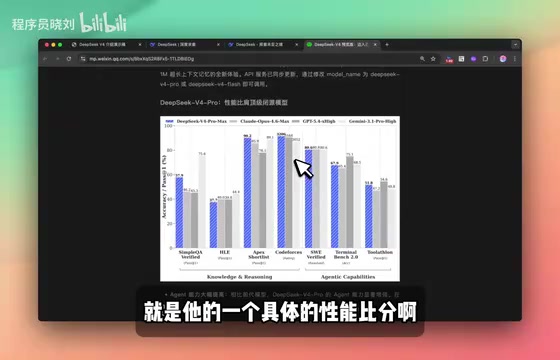
Based on the official performance benchmarks, DeepSeek V4 Pro was compared horizontally against flagship models like OpenAI o4.6 and Gemini 5.4. The team candidly acknowledged that V4 Pro slightly underperforms o4.6 in some benchmarks but outperforms Sonnet 4.5. However, in terms of cost-effectiveness, DeepSeek V4 completely dominates the competition. One thing you might have missed: this release does not yet support multimodal capabilities, focusing solely on text-based abilities.
Game Development Capability Test: Flash vs Pro Code Generation Comparison
Flash Mode: Basically Functional but with Flaws
The FPS-style game generated by V4 Flash has basic functionality working—the character can walk, jump, and shoot enemies. However, there are some obvious issues, such as abnormal jump height. The total code output was 988 lines.

Pro Mode: Polished Details, Complete Experience
The similar game generated by V4 Pro performed excellently: not only were the basic functions well-implemented, but it also automatically added a sound effects system (shooting sounds, explosion audio), and the jump feel was much more reasonable. The code reached 1,456 lines, indicating the model thought more deeply and delivered a more complete implementation. Of course, the trade-off is noticeably slower generation speed compared to Flash mode.
Tool Application Development Comparison
JSON Formatting Tool
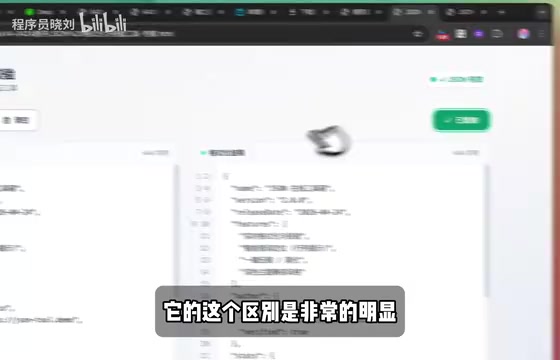
Both models perfectly implemented the core functionality of a JSON formatting tool: format, compress, copy, and clear operations all worked correctly. However, at the UI level, Pro mode's interface design was more refined and polished, and it thoughtfully included operation confirmation popups.
Resume Collection Form
This test produced an interesting reversal. The resume form generated by Flash mode lacked a logo but had a clean, practical layout with smooth rendering—worth an 80/100 score. Pro mode added more elements (logo, additional decorations), but in certain details it actually fell short of Flash mode's implementation.
This leads to an important conclusion: Flash is not weaker than Pro in every scenario—in some small application scenarios, it can even outperform Pro, with faster response times.
In-Depth UI Component Generation Comparison
Login Page Generation
The login page generated by Flash mode was already quite good, automatically implementing Google and GitHub third-party login buttons. Pro mode further enhanced the visual effects on top of this, delivering a more polished and professional overall appearance.
Memory Card-Flip Game
Flash mode implemented basic card-matching functionality, while Pro mode added sound effects and a timer feature, creating a more complete gaming experience.

Timezone Conversion Tool
Both models successfully implemented timezone conversion functionality. Flash mode's interface was decent but unremarkable, while Pro mode presented a cleaner, more refreshing design style.
Quote Generator
Pro mode's performance in this scenario was impressive—it not only completed the basic quote generation functionality but also automatically added a "Print" button, demonstrating a deep understanding of real business scenarios. This ability to proactively add features based on actual user needs is a core advantage of Pro mode.
Progress Tracking Dashboard
In generating the progress tracking component, V4 Pro's UI aesthetics were particularly outstanding, with a refined interface design and complete functionality—a clear quality improvement over Flash mode.
Conclusion: How to Choose Between DeepSeek V4 Flash and Pro?
After multiple rounds of hands-on testing, here are the conclusions:
When to Use DeepSeek V4 Pro (Expert Mode)
- Generates more code with more complete feature implementations
- Noticeably better UI aesthetics and detail handling
- Proactively considers additional features like sound effects and print functionality
- Best suited for production projects with high quality requirements where speed isn't the top priority
When to Use DeepSeek V4 Flash (Quick Mode)
- Faster response times with shorter wait periods
- Performs on par with or even better than Pro in some small application scenarios
- Best suited for rapid prototyping and daily development iterations
Compared to previous-generation models, the DeepSeek V4 series shows very significant improvements in programming capabilities. For developers, the recommendation is to flexibly switch based on actual needs: use Flash for daily rapid iterations, and Pro for important project deliverables. Using both in combination is how you maximize AI-assisted programming efficiency.
Related articles
 Product Reviews
The Programmer's Desk Setup Guide: Building a Workspace That Feels Like Home
Discover how programmers build productive, comfortable workspaces. From multi-monitor setups to ergonomic design, explore the desk philosophy that drives focus and flow.
 Product Reviews
Qoder vs Cursor Real-World Comparison: Which $20/Month AI IDE Is Better?
Hands-on comparison of Qoder vs Cursor AI IDEs: Agent autonomy, human interaction count, and architecture decisions. Qoder needed only 2 interactions vs Cursor's 8.
 Product Reviews
Cursor Cloud Agent Demo: Eliminating Bottlenecks Across the Entire Software Development Lifecycle
Deep analysis of Cursor's Cloud Agent demo showing how cloud VMs, automated test artifacts, and a full-chain control plane systematically eliminate human bottlenecks across the software development lifecycle.