Ollama + OpenCode Local AI Coding: A Complete Zero-Cost Alternative to Cursor

Deploy Qwen3 Coder locally with Ollama + OpenCode for free AI-powered coding
This article presents a completely free local AI coding solution: deploying the Qwen3 Coder 30B model via the Ollama framework and pairing it with the open-source terminal tool OpenCode for complete code generation, automatic debugging, and one-click execution. The setup requires no paid subscriptions or internet connection, keeps code privacy fully under your control, and runs smoothly on a regular PC with 32GB RAM and 8GB+ VRAM.
AI Coding for Free: Running a Local LLM Is All You Need
Using Cursor or GitHub Copilot for coding is undeniably satisfying, but the $10–20 monthly subscription can be a real pain point for individual developers. The good news is that with open-source LLMs improving at breakneck speed, you can now set up a completely free AI coding environment on your own machine—and the results are surprisingly competitive.
This article walks you through using the Ollama + OpenCode combo to locally deploy the Qwen3 Coder programming model, enabling code generation, automatic debugging, and one-click execution—all without spending a dime.
What Are Ollama and OpenCode?
Ollama: Run LLMs with a Single Command
Ollama is an open-source local LLM runtime framework—think of it as "Docker for large language models." Once installed, a single command downloads and runs various open-source models. No fiddling with Python environments, no manual CUDA configuration—extremely beginner-friendly.
The Docker analogy is apt because Ollama encapsulates the complex steps of model downloading, quantization, and inference runtime into a unified command-line interface. Before Ollama existed, running LLMs locally typically required manually configuring Python virtual environments, installing matching PyTorch versions, setting up CUDA and cuDNN drivers, and downloading and converting model weight formats—a daunting gauntlet for anyone outside the AI field. Under the hood, Ollama is built on the llama.cpp inference engine, a pure C/C++ implementation that supports the GGUF quantization format and can efficiently run large language models on consumer hardware. The "quantization" mentioned here is a critical model compression technique that reduces model parameters from 32-bit floating point to 4-bit or 8-bit integer representations, dramatically reducing memory usage and computation while preserving as much inference capability as possible. This is exactly why a 30B-parameter model that originally requires 60GB of VRAM can run on consumer GPUs with just 16GB or even 8GB after quantization.
Ollama's model library currently offers a wide selection of coding-specific models. From our hands-on testing, Qwen3 Coder at 30B parameters delivers impressive results—it runs smoothly on a regular home PC and produces code quality sufficient for everyday development needs.
Qwen3 Coder is a code-specialized large language model from Alibaba Cloud's Tongyi Qianwen team, part of the Qwen3 series. Unlike general-purpose LLMs, coding-specific models are fine-tuned during training on massive amounts of programming-related data including GitHub repositories, Stack Overflow Q&A, and technical documentation, achieving significantly better performance on tasks like code generation, code completion, bug fixing, and code explanation compared to general models. The 30B (30 billion) parameter count is currently a "sweet spot" for local deployment—it offers stronger logical reasoning and long-context understanding than 7B models while not being as hardware-demanding as 70B or larger models. On programming benchmarks (such as HumanEval and MBPP), Qwen3 Coder 30B performs at or even above the level of some earlier commercial closed-source models—a testament to how rapidly open-source models have been catching up in recent years.
OpenCode: A Free Terminal-Based Cursor Alternative
OpenCode is an open-source AI coding tool positioned similarly to Cursor, but with native support for calling locally deployed open-source models. In other words, when paired with Ollama, you don't need any API key and won't incur any costs.
To understand OpenCode's positioning, it helps to first understand Cursor, its commercial counterpart. Cursor is currently one of the most popular AI coding IDEs, built as a deep modification of VS Code with built-in AI features for code generation, smart completion, and multi-file editing. However, its core functionality relies on cloud-based closed-source model APIs like GPT-4 and Claude, requiring a paid subscription. OpenCode takes a different approach—it's an AI coding assistant that runs in the terminal, using a TUI (Text User Interface) interaction model with native support for connecting to local models via the OpenAI-compatible API format. Since Ollama exposes an OpenAI API-compatible interface on local port 11434 by default, OpenCode connects seamlessly without additional configuration. This "terminal-first" design may not be as visually intuitive as a graphical IDE, but for developers comfortable with the command line, it's actually more efficient and consumes minimal resources.
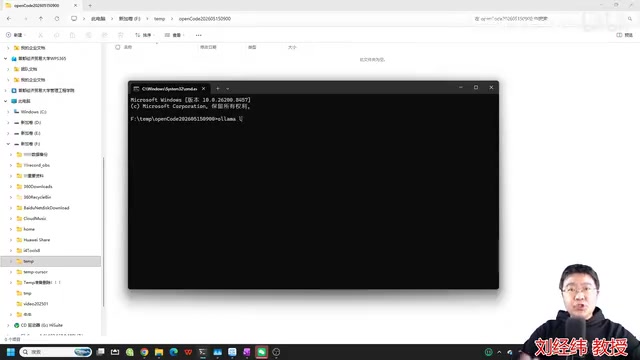
Installation is dead simple—download and it's ready to use.
Hands-On Tutorial: Three Steps to a Local AI Coding Environment
Step 1: Install Ollama and Download Qwen3 Coder
The entire setup requires just two things:
- Install Ollama: Head to the Ollama website, download the installer for your OS, and accept all defaults during installation.
- Download the coding model: After installation, search for "Coder" in the Ollama model library, find the Qwen3 Coder 30B version, and download it with a single command.
Step 2: Install OpenCode and Connect to Your Local Model
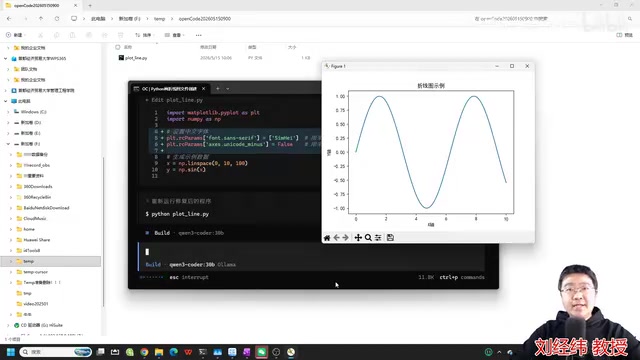
After downloading and installing OpenCode, create a project working directory, open your command line (CMD or Terminal) in that directory, and launch OpenCode with a command specifying the local Qwen3 Coder model.
Step 3: Write Code with Natural Language
Once the environment is ready, just give coding instructions in plain language. For example:
"Create a Python file that draws a line chart"
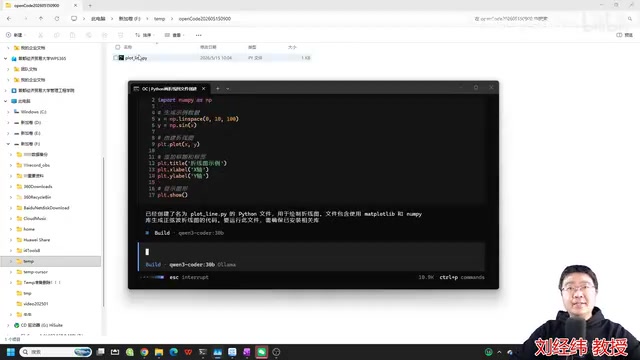
OpenCode calls the local Qwen3 Coder model to start generating code. The entire process runs on your machine—it works even offline with no cloud API calls. Within seconds, the model generates a complete Python code file and saves it to your current working directory.
Automatic Debugging Demo: AI Fixes Your Bugs
Code generation is just the beginning. What really impresses about this setup is its automatic debugging capability.
In our demo, the generated line chart program displayed garbled Chinese characters on first run—a classic issue with matplotlib's font handling in Python. Instead of searching Stack Overflow yourself, just tell the AI:
"The program runs and draws a chart, but Chinese text appears as garbled characters. Please fix it."
The AI automatically identifies the root cause, precisely inserts Chinese font configuration into the code (usually just two lines), then automatically re-runs the program to verify the fix.
It's worth diving deeper into the technical details of this garbled text issue. matplotlib is the most widely used data visualization library in the Python ecosystem, but its default font (typically DejaVu Sans) doesn't include Chinese character sets, causing Chinese text in charts to display as square blocks. This problem is extremely common in the Chinese developer community—practically every Python data analysis beginner's "first pitfall." The fix typically involves manually specifying a font that contains Chinese characters, such as SimHei or Microsoft YaHei on Windows, or PingFang SC on macOS. The AI's ability to precisely fix this issue demonstrates the advantage of coding LLMs in handling "high-frequency common problems"—these issues appear extensively in training data with numerous Q&A solutions, so the model has developed very reliable fix patterns.
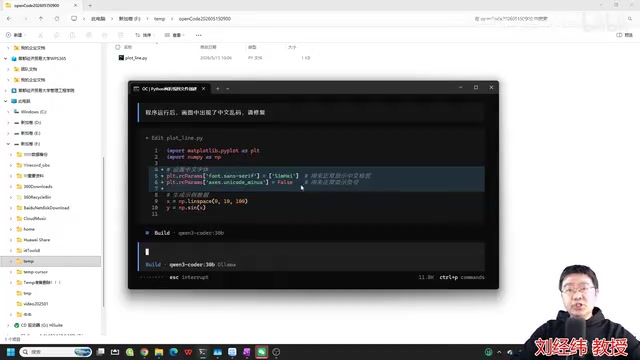
After the fix, Chinese labels on the line chart display correctly. The AI also outputs a repair summary clearly explaining what was changed and why. This closed-loop experience of "write code → run program → find issue → auto-fix" is virtually indistinguishable from paid tools.
Why Recommend This Local Deployment Setup?
Completely Free with No Hidden Costs
Ollama is open-source and free. OpenCode is open-source and free. Qwen3 Coder is open-source and free. All computation runs on your local GPU or CPU with zero API call costs. Compared to Cursor Pro at $20/month and GitHub Copilot at $10/month, the long-term savings are substantial.
From a cost structure perspective, choosing between local deployment and cloud APIs is fundamentally a tradeoff between cost structure, response latency, privacy, and model capability. Cloud APIs (like OpenAI and Anthropic) offer cutting-edge closed-source model capabilities but charge per token—GPT-4o, for instance, costs about $2.50 per million input tokens, and costs accumulate quickly with heavy use. Cursor Pro's $20 monthly fee also includes request limits, with overage charges beyond that. Local deployment has near-zero marginal costs (just electricity), but requires upfront hardware investment and model capability is limited by local compute power. However, with dual advances in model quantization technology and open-source model capabilities, this gap is shrinking rapidly. For everyday code generation, script writing, and bug fixing at moderate complexity, a locally quantized 30B model already delivers a satisfying experience—cloud models only show clear advantages for extremely complex architectural design or ultra-long context reasoning.
Complete Code Privacy Control
All code and data stays on your own machine and never gets uploaded to any cloud server. This is especially critical if you're developing projects involving trade secrets or internal enterprise systems.
Feature Coverage for Daily Development
Based on hands-on testing, this setup delivers the following core capabilities:
- Natural language code generation: Describe requirements in plain language, and AI outputs complete, runnable code
- Smart debugging and fixing: Analyzes error messages, locates issues, and automatically modifies code
- One-click execution: Run programs directly in the terminal to see results
- Multi-turn iterative refinement: Continuously improves code based on feedback until requirements are met
A Growing Tool Ecosystem
Models on Ollama aren't limited to OpenCode—they're also compatible with Cline, Aider, and various other open-source AI coding tools, as well as emerging paradigms like Vibe Coding. As the open-source community continues investing, the selection of available models and tools will only grow.
Vibe Coding, mentioned here, is a concept coined by OpenAI co-founder Andrej Karpathy in early 2025. It refers to developers describing requirements entirely in natural language while AI generates all the code—the developer writes no code directly, only describing intent, reviewing results, and requesting changes. This paradigm represents the evolution of AI coding tools from "assisted coding" to "autonomous coding." Related tools include Aider, which focuses on modifying existing code repositories through terminal conversations with Git integration and multi-file editing support, and Cline, a VS Code plugin that provides a Cursor-like experience but supports custom model backends. Together, these tools form an increasingly mature open-source AI coding ecosystem, with Ollama serving as the unified local model runtime layer—a critical bridge connecting these tools to open-source models.
Hardware Requirements for Running AI Coding Models Locally
To run the Qwen3 Coder 30B parameter model, your computer should meet at least these specifications:
| Hardware | Recommended Spec | Notes |
|---|---|---|
| RAM | 32GB or more | Model loading requires significant memory |
| GPU | NVIDIA discrete GPU (8GB+ VRAM) | GPU inference is much faster, but CPU-only works too |
| Storage | 20–30GB free space | For storing model weight files |
If your computer's specs are on the lower end, you can fall back to 7B or 14B parameter models. Code generation quality will be somewhat reduced, but they're still adequate for simpler programming tasks.
Conclusion: The Era of Democratized AI Coding Has Arrived
Local LLM deployment for AI coding has evolved from a niche experiment into a genuine productivity tool. Ollama eliminates the deployment barrier, Qwen3 Coder delivers code generation quality rivaling commercial models, and OpenCode completes the interactive experience.
Together, they enable every developer to use AI coding at zero cost—no subscriptions, no internet dependency, no data leak concerns.
If you're an individual developer or small team lead, I strongly recommend spending 30 minutes trying this setup. Saving money is one thing, but more importantly: your code, your data, and your AI tools are all entirely in your own hands.
Related articles
 Tutorials
ChatGPT Plus Subscription Guide: Are GPT-5.5, image-2, and Codex Worth the Upgrade?
A detailed look at ChatGPT Plus features — GPT-5.5, image-2, and Codex — with a Plus vs Pro comparison and a complete step-by-step subscription guide for users outside the US.
 Tutorials
Harness AI Engineering in Practice: Using Claude Code to Master Enterprise-Level E-Commerce Development
Deep dive into Harness AI Engineering: master enterprise e-commerce development with Claude Code using the Rules, Skills, Wiki, and Changes framework.
 Tutorials
Cursor + Codex Dual-IDE Collaboration: A Practical Methodology for Open-Source Project Customization
A complete methodology for open-source project customization based on real-world experience, detailing the Cursor+Codex dual-IDE workflow, seven-stage process, MVP validation, and AI source code reading techniques.