OpenAI Codex 2.0 Deep Dive: From Coding Assistant to All-Purpose AI Agent

OpenAI upgrades Codex into an AI Agent that can control computers and span the full software development lifecycle
OpenAI released a major Codex update, repositioning it from a coding assistant to an AI Agent covering the entire software development life cycle. Core new features include Computer Use (controlling screens and interfaces), SSH remote connections, GitHub code review integration, built-in image generation, and long-term memory with automated scheduling capabilities. Over 3 million developers use it weekly, and free users get limited-time access, though some features remain macOS-only or in Alpha.
OpenAI just released a major update to Codex, and its significance goes far beyond a routine version iteration. Codex is no longer just a coding assistant sitting inside your IDE helping you write code—it's been repositioned as an AI Agent that can operate across the entire software workflow. An AI Agent refers to an AI system capable of autonomously perceiving its environment, formulating plans, executing actions, and adjusting behavior based on feedback. Unlike traditional chatbots, an Agent doesn't just operate in a "one question, one answer" conversational mode—it has the ability to perform multi-step reasoning, invoke tools, and execute continuously. 2024-2025 is widely regarded in the industry as the "Year of the Agent," with companies like OpenAI, Anthropic, and Google all upgrading their large models from conversational tools to Agent platforms. OpenAI's official blog named this update "Codex for Almost Everything"—a title that reveals their ambition.
The Core Change: Codex Can Now Control Your Computer
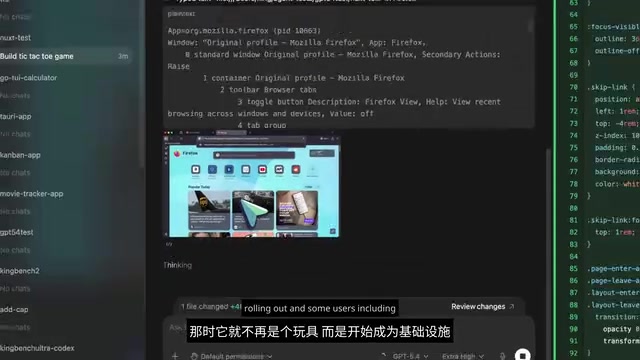
The most eye-catching feature of this update is Computer Use. Codex can now operate your computer in the background—it can see the screen, click on interface elements, type content, and even interact with applications using its own cursor.
Computer Use is one of the most cutting-edge capabilities in the AI Agent space in recent years. Its core principle involves letting the AI model capture screen content (typically as pixel-level screenshots fed into a multimodal model), understand the current interface state, and then output operation commands such as mouse coordinates, click actions, and keyboard inputs. This technology was first publicly demonstrated by Anthropic in October 2024 alongside the release of Claude 3.5 Sonnet, and Google DeepMind's Mariner project has been exploring a similar direction. Unlike traditional API calls or command-line operations, Computer Use simulates the way humans interact with graphical user interfaces (GUI), meaning it can operate any application with an interface without depending on whether that application provides a programming interface. This is a critical step in AI's evolution from "generating text" to "executing actions."
Why does this matter? Because real software development work goes far beyond writing code. Developers routinely need to check frontend rendering, test workflows, repeatedly interact with applications, open documentation, view screenshots, compare outputs, and handle miscellaneous tasks that can't be solved through APIs. Previously, all of this required manual effort from developers—now Codex can handle it.

Additionally, OpenAI has added a built-in browser to Codex, allowing you to comment directly on pages and more precisely guide the Agent's behavior. For frontend development, game UI design, product prototyping, and similar scenarios, this means you no longer need the repetitive cycle of "generate code → switch windows → check results → switch back to modify." Instead, you can stay in the same workflow and keep pushing forward.
A Comprehensive Upgrade to the Developer Toolchain
For professional developers, the toolchain integration in this Codex update deserves even more attention. OpenAI states that Codex now supports the following capabilities:
- Handling Code Review Comments on GitHub
- Opening multiple terminal tabs to process development tasks in parallel
- Connecting to remote development machines via SSH (Alpha stage)
- Improved file previews supporting PDFs, spreadsheets, slides, and documents
- A new summary panel for tracking plans, sources, and progress
Among these, the SSH (Secure Shell) remote connection capability is particularly noteworthy. SSH is an encrypted network protocol that allows developers to securely connect to and operate remote servers via the command line. In modern software development, a significant amount of work isn't done on local machines—developers frequently need to connect to cloud development machines (such as AWS EC2, Google Cloud VM), internal company development servers, or GPU clusters for model training and deployment. Codex's support for SSH connections means it's no longer limited to operating on local files—it can directly execute commands, edit code, and run tests in remote environments. This is especially important for teams using containerized development environments (such as Docker, Kubernetes) or remote development tools (such as VS Code Remote).

Real software development isn't just about writing code—it also involves reading comments, reviewing diffs, opening documentation, auditing outputs, processing review feedback, and switching between different environments. The Software Development Life Cycle (SDLC) encompasses the complete process from requirements analysis, design, coding, testing, deployment, to maintenance. Previous AI programming tools (such as early versions of GitHub Copilot) primarily focused on the "coding" phase—specifically code completion and generation. But coding may only account for 30%-40% of a developer's time in the overall SDLC, with the remaining time spent on code review, debugging, documentation writing, requirements communication, deployment configuration, and project management. The focus of this update is precisely to cover more of the software development life cycle—not just coding, not just debugging, but encompassing the entire cycle.
Frankly, this is the right direction. What's most frustrating about many AI programming tools isn't that they write bad code—it's that once a task becomes a real project involving multiple files, PR feedback, browser verification, design changes, documentation screenshots, remote machines, and approvals—the workflow breaks down.
Image Generation: Filling the Visual Gap
Codex can now directly invoke OpenAI's image generation models within its workflow. This means you no longer need to switch to a separate tool to create assets, prototypes, concept art, or visual creatives—all of this can be completed within the same task flow.
This is more important than it sounds. A lot of product and frontend work gets blocked by visual issues—you need placeholder images, icons, rough prototypes, or even game assets. Now the Codex Agent can help with these too, further reducing the cost of context switching.
Long-Term Memory and Automation: The True Evolution of an Agent
The most forward-looking aspects of this Codex update are the Automations and Memory features.
OpenAI has expanded automation capabilities, allowing Codex to reuse existing conversation threads and retain context over time. More critically, it can schedule future work for itself and then continue execution at a later point in time. In other words, Codex doesn't have to start from scratch every time—it can potentially pick up where it left off days or even weeks later.
The Memory feature is currently in preview. Codex can remember your preferences, correction habits, and project context. From a technical perspective, one of the core limitations of large language models is the finite context window—even the most advanced models can only process a limited length of text in a single conversation. When a conversation ends or the context is cleared, the model "forgets" all previous interactions. The essence of the Memory feature is building a persistent knowledge storage layer outside the model, typically combining vector databases and Retrieval-Augmented Generation (RAG) technology to encode and store user preferences, project context, historical decisions, and other information, retrieving and injecting it into the current conversation when needed. The challenge lies in precisely determining which information is worth remembering, when to invoke memories, and how to prevent outdated information from interfering with current decisions.
OpenAI also states that Codex can proactively suggest useful next actions based on your project context, plugins, and memory.
In other words, Codex won't wait for you to craft the perfect prompt every time—it's gradually becoming a development partner that's always by your side and understands your work habits.
Pricing and Access: Free Users Can Use Codex Too
On the pricing front, OpenAI's strategy is worth noting. Codex is already included in ChatGPT's Plus, Pro, Business, Enterprise, and EDU plans. More importantly, ChatGPT Free and Go users can also use Codex for a limited time.

Paid plans enjoy higher Codex usage quotas, and for Teams, Business, and Enterprise users, a pay-per-usage option is now available. OpenAI has also made significant improvements to prompt engineering, including better onboarding prompts, more reasonable tool usage patterns, more action-oriented execution logic, and less wasteful token consumption.
Combining broader access, better prompts, and improved Agent behavior, the result is clear: even users who aren't spending big money have a better chance of getting useful work done with Codex. This is significant for students, indie developers, and hobbyist creators.
Codex Adoption Data: 3 Million Developers Using It Weekly
OpenAI revealed that over 3 million developers use Codex every week. Earlier in April, they also stated that Codex usage in ChatGPT Business and Enterprise has grown sixfold since January.
Regardless of your stance on the AI coding wave, the data shows that developers are indeed finding real value in tools that can do more than just output code snippets. To understand the weight of this number, consider some context: GitHub Copilot reported approximately 1.5 million paid users by the end of 2024, while the total number of developers on the GitHub platform exceeds 100 million. Codex's 3 million weekly active developers means it has become one of the largest-scale AI programming tools in the world.
Known Limitations of the Current Version
Of course, not everyone can immediately take full advantage of this Codex update:
- Computer Use is initially available only on macOS
- Memory and personalized suggestions are still being rolled out gradually
- Enterprise users, EDU users, and users in the EU and UK will receive some features later
- SSH connections are still in Alpha stage
- The Codex desktop app has been pushed to Windows, but the new computer control features are temporarily macOS-only
From Feature to Infrastructure: The Future Direction of Codex
I believe this is the first time Codex has started to feel less like a "feature" and more like a true operational layer for technical work. It's not perfect yet, it's not finished, and it certainly requires human oversight—but the direction is very clear.
OpenAI wants Codex to help you with coding, reviewing, testing, browsing, asset generation, project tracking, long-running tasks, and tool-connected workflows—all in one place. The real value isn't in how high the model's benchmark scores are, but in what the model can actually accomplish in real environments—reviewing PR comments, opening browsers, inspecting files, invoking memory, connecting to tools, and then continuing to execute on its own.
Placing this Codex upgrade within the broader competitive landscape of AI programming tools, the current major players include: GitHub Copilot (Microsoft/OpenAI ecosystem, deeply integrated with VS Code), Cursor (an independent AI IDE known for multi-file editing and Agent mode), Windsurf (an AI IDE from Codeium), and Anthropic's Claude Code (a command-line Agent tool). Each is approaching the transition from "AI programming assistant → AI development Agent" from a different angle. Codex's differentiation lies in being directly embedded in the ChatGPT ecosystem, having the largest user base, and unlocking GUI operations through Computer Use—a capability that other tools haven't yet implemented at scale.
We're moving from "AI that can answer questions" to "AI that can actually participate in work." If OpenAI continues to improve prompts, tools, memory, and reliability, Codex is very likely to become one of the most practical AI programming products for developers.
Key Takeaways
- Codex 2.0 adds Computer Use functionality, enabling it to control computer screens, click, and type in the background, covering real development work beyond coding
- The toolchain has been comprehensively upgraded with support for GitHub code review, SSH remote connections, multiple terminal tabs, file previews, and image generation
- Memory and Automations features have been introduced, allowing Codex to retain long-term context, remember user preferences, and proactively schedule and continue unfinished tasks
- Free tier and Go users can use Codex for a limited time, with over 3 million weekly active developers and usage growing sixfold since January
- Codex is transforming from a coding assistant into an operational layer spanning the entire software development life cycle, though some features still have platform and regional limitations
Related articles
 Tech Frontiers
A Rare Quiet Day in AI: Recursive Self-Improvement Stirs Beneath the Surface
A rare quiet day in AI sees multiple sources go silent simultaneously. Behind the calm, Recursive Self-Improvement (RSI) research continues. What this means for the industry.
 Tech Frontiers
Reve 2 vs. Ideogram 4: A Deep Dive into Layout Control in AI Image Generation
A deep comparison of Reve 2 and Ideogram 4's layout control capabilities, covering technical approaches, real-world use cases, and industry trends for designers and creators.
 Tech Frontiers
In the Weights: Check Your Influence Score in the AI World
In the Weights is an AI influence search engine that quantifies your presence in the AI world with a score. Explore how it evaluates practitioners and what it means for digital identity.