UI-UX-Pro-Max-Skill: A Professional UI Design Skill Pack for AI Coding Assistants

An AI design skill pack that lets developers generate professional UI design systems in seconds
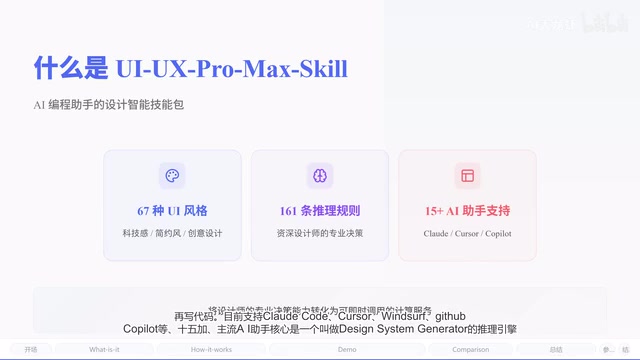
UI-UX-Pro-Max-Skill is an open-source AI design skill pack that provides design reasoning capabilities for AI coding assistants like Cursor and Claude Code. With 67 built-in UI styles, 161 industry color schemes, and anti-pattern detection rules, it generates complete design systems in seconds from natural language descriptions, helping developers without design backgrounds produce professional-grade UI.
Your Backend Is Fire, But Your UI Looks Like 2005?
For many developers, writing business logic is second nature—but when it comes to interface design, things fall apart: clashing colors, chaotic font pairings, layouts that lack any sense of aesthetics. UI-UX-Pro-Max-Skill was created to solve exactly this pain point.
It's an open-source AI design skill pack built specifically for AI coding assistants like Cursor, Claude Code, and GitHub Copilot. These three tools represent the mainstream paradigms of AI-assisted programming today: Cursor is an AI-native IDE deeply rebuilt on VSCode; Claude Code is Anthropic's command-line tool excelling at multi-step reasoning for complex tasks; and GitHub Copilot is the go-to embedded code completion tool in the Microsoft/OpenAI ecosystem. Their shared limitation? They're great at generating logic code but lack systematic design aesthetic judgment—UI-UX-Pro-Max-Skill fills this gap as a "design brain" plugin.
In simple terms, it transforms years of professional decision-making expertise from senior UI/UX designers into an instantly callable computational service. The project has already earned 4.5K+ Stars on GitHub with over 450K monthly downloads, making it one of the hottest open-source projects in the AI-assisted design space.
Core Capability: Not a Template Library, But a Design Reasoning Engine
Unlike typical UI component libraries, the core of UI-UX-Pro-Max-Skill is a reasoning engine called the Design System Generator.
To understand this engine, you first need to grasp the concept of a "Design System." Design systems originated from practices at major companies like Google Material Design and Apple Human Interface Guidelines. They're not just component libraries—they're complete frameworks encompassing design principles, visual specifications, and interaction patterns. Traditionally, building a design system requires designers and front-end engineers to collaborate for weeks or even months. The Design System Generator essentially converts this process into a computable reasoning task, achieving instant generation through a pre-encoded industry knowledge graph.
It comes built-in with:
- 67 UI styles: From minimalism to cyberpunk, covering mainstream design languages
- 161 industry color schemes: Carefully curated for different industry scenarios
- 57 font pairings: Validated heading + body font combinations
- 161 industry reasoning rules: This is the most critical part—the AI no longer guesses blindly but makes design decisions before writing code
It currently supports Claude Code, Cursor, Windsurf, GitHub Copilot, and 15 other mainstream AI assistants, covering virtually all major development scenarios.
Generate a Complete Design System in Four Steps
The entire workflow takes just four steps, completing in mere seconds:
Step 1: Describe Your Needs in Natural Language
Simply describe what you want to build in plain language, such as "Build an office joke generator website where users enter a topic and get three funny jokes."
Step 2: Five-Dimensional Parallel Search
The system simultaneously launches five search dimensions: product type matching, style recommendation, color scheme, landing page pattern, and font pairing. This design draws from Multi-path Retrieval architecture in information retrieval—in traditional sequential decision-making, each step depends on the previous result and can easily fall into local optima. Parallel search allows each dimension to match independently, with decisions fused at the reasoning layer. This closely resembles the "recall-ranking-fusion" three-stage architecture of modern recommendation systems. Essentially, it constrains the LLM's output space through engineering, making results more consistent and predictable. Each dimension is backed by extensive data—not random combinations, but industry best practices.
Step 3: Reasoning Engine Decision-Making
This step is where the core differentiation lies. The engine applies industry rules, matches product types, applies style priorities, and filters industry anti-patterns to ultimately generate design decisions.
The concept of "Anti-Pattern" originates from software engineering, referring to solutions that seem reasonable but actually lead to problems. They're equally prevalent in UI design: the "purple/pink gradient" that AI tools frequently generate has become a visual marker of "cheap AI-generated feel," undermining a product's professional credibility. Using highly saturated reds in healthcare, or overly playful cartoon illustrations for financial products—these are classic industry anti-patterns. Automated anti-pattern detection means the system not only tells you "what to do" but explicitly tells you "what not to do"—which is especially critical for developers lacking design experience.
Step 4: Output a Complete Design System
The final output includes: design patterns, style definitions, color schemes, typography effects, anti-patterns to avoid, and a pre-delivery checklist. When the AI receives this system, it writes code directly, producing results far superior to going in "bare."
Real-World Example: Office Joke Generator Website
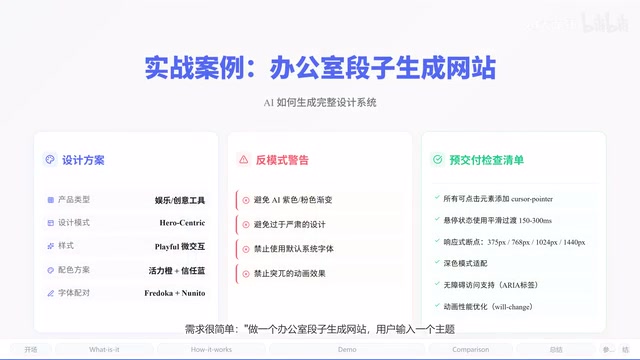
Using the "office joke generator website" as an example, the reasoning engine's output is highly specific and professional:
- Product type match: Identified as entertainment/creative tool category, recommending Hero-centric pattern with Interactive Demo to showcase functionality
- Style recommendation: Playful Micro Interactions—a joke website should obviously be fun
- Color scheme: Energetic orange + trust blue paired with neutral gray—warm yet professional, suitable for office contexts
- Font pairing: Fredoka + Nunito, a friendly rounded font combination with one-click Google Fonts import
- Anti-pattern warning: Avoid AI purple/pink gradients; don't use overly serious design elements
- Pre-delivery checklist: Add cursor: pointer to all clickable elements, use 150-300ms smooth transitions for hover states, responsive coverage from 375-1440px
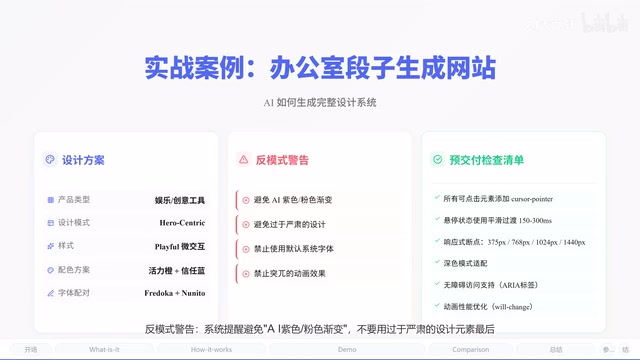
These recommendations cover both macro design direction and micro implementation details—developers can take them and implement directly.
Efficiency Comparison with Traditional Design Workflows
| Dimension | Traditional Approach | UI-UX-Pro-Max-Skill | |------|----------|--------------------|} | Design system generation | Days | Seconds | | Industry adaptation | Depends on designer experience | 161 rules auto-matched | | Anti-pattern detection | Manual review | Automatic industry taboo filtering | | Code output | Manual slicing and annotation | Directly generates production-ready code |
For indie developers and small teams, this means skipping the entire "find a designer → get proposals → iterate repeatedly" cycle.
Related articles
 Product Reviews
The Programmer's Desk Setup Guide: Building a Workspace That Feels Like Home
Discover how programmers build productive, comfortable workspaces. From multi-monitor setups to ergonomic design, explore the desk philosophy that drives focus and flow.
 Product Reviews
Qoder vs Cursor Real-World Comparison: Which $20/Month AI IDE Is Better?
Hands-on comparison of Qoder vs Cursor AI IDEs: Agent autonomy, human interaction count, and architecture decisions. Qoder needed only 2 interactions vs Cursor's 8.
 Product Reviews
Cursor Cloud Agent Demo: Eliminating Bottlenecks Across the Entire Software Development Lifecycle
Deep analysis of Cursor's Cloud Agent demo showing how cloud VMs, automated test artifacts, and a full-chain control plane systematically eliminate human bottlenecks across the software development lifecycle.