ZhiMa AI Coder: A Vibe Coding Desktop Client That Manages All Four Major CLIs

ZhiMa AI Coder is a desktop client that unifies management of multiple CLI coding assistants.
ZhiMa AI Coder is a desktop management client that unifies four major terminal-based coding assistants: Claude Code, CodeX, Gemini CLI, and OpenCode. It addresses CLI tool efficiency pain points around multi-account switching, configuration management, and session recovery, offering features like multi-account isolation, one-click profile switching, Token consumption tracking, session export/clone/compress, MCP management, voice input, and cloud sync across Windows, macOS, and Linux.
The Pain Point: CLIs Are Powerful, But the Busywork Is Overwhelming
If you're a developer who heavily uses terminal-based coding assistants like Claude Code, CodeX, Gemini CLI, or OpenCode, you've surely encountered these frustrating operations:
- Resuming yesterday's conversation requires manually typing a long UUID
- Switching between work and personal accounts means logging out, logging in, and restarting the terminal
- Switching to a proxy API requires finding config files to modify API Keys and Base URLs, only to discover stale keys still lurking in
settings.json - Multiple accounts sharing the same
.claudeconfiguration with no way to isolate them - Wanting to use voice input instead of typing, but the native CLI doesn't support it
- Switching computers or reinstalling the OS means losing all configurations and history
These pain points have deeper roots. Tools like Claude Code, CodeX, and Gemini CLI represent a trend of AI coding assistants shifting from graphical interfaces back to the command line — they run directly in the terminal, access the local file system, execute Shell commands, invoke Git operations, and integrate seamlessly with developers' native workflows. Compared to web-based tools like ChatGPT or Claude.ai, CLI tools excel in programmability and automation — they can batch-process tasks through pipes and scripts, and integrate into CI/CD pipelines. However, precisely because these tools were born from a "built by developers, for developers" mindset, their configuration management and account switching UX often remains at a power-user level, creating clear efficiency bottlenecks for professional developers juggling multiple accounts and projects.
These aren't problems with CLIs themselves — the power of CLIs shouldn't be buried under busywork. ZhiMa AI Coder is a desktop management client built specifically to solve these pain points.
Core Feature Overview
ZhiMa AI Coder is a desktop client that unifies management of four major platforms — Claude Code, CodeX, Gemini CLI, and OpenCode — with support for Windows, macOS, and Linux. Its core features include:
- Session Management: Multi-tab sessions with support for creating, cloning, compressing, and exporting
- Multi-Account Isolation: Each instance can be configured with different accounts, completely independent
- Token Cost Tracking: Built-in dashboard for real-time consumption monitoring
- Configuration Profiles: One-click switching between official, proxy, and domestic vendor APIs
- Code Snippets & Prompt Templates: Quick-fill commonly used prompts
- MCP Management: Built-in common MCPs with one-click activation
- Voice Input + AI Refinement: Speak naturally, and AI automatically optimizes your input into professional prompts
- Sync & Backup: WebDAV cloud sync and encrypted text migration
- Mobile Companion: Monitor progress and send commands from your phone
Multi-Account & Configuration Profiles: No More Repeated Logins
Configuration Profile Management
In settings, you can create multiple configuration profiles for each platform. Click "Add," select the corresponding platform, enter the Base URL, display name, and API Key, choose the authentication method, then click Create. After creation, click "Test" to verify the connection is working, then click "Activate" to switch.

Multi-Instance Support
ZhiMa AI Coder supports running multiple instances. Right-click the taskbar icon to open a new instance, and each instance can be configured with a different account. Instances also support "Import from Other Instance" for account configurations, enabling true multi-account isolation — one terminal with your work account, another with your personal account, completely independent.
Environment Variable Priority Notice
It's important to note that system environment variables take priority over configuration profiles. If a switch doesn't seem to take effect, check whether environment variables are overriding the configuration. You can verify the currently active account and connection address by entering the /status command.
Token Dashboard & Session Management
Consumption Tracking
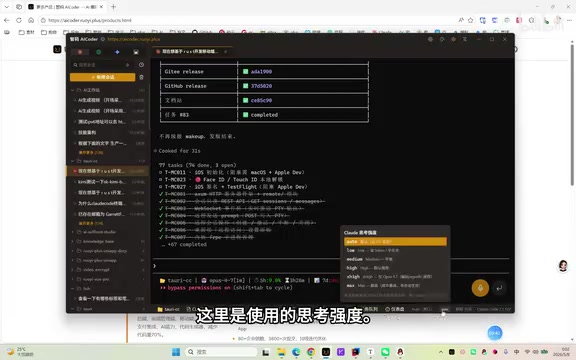
The built-in dashboard provides a Token consumption overview, including cache reads and model usage statistics. The bottom status bar displays real-time information about the current directory, Git branch, active model, quota usage percentage, and reset countdown. For example, you might see "OPS 4.7 model, 84% of 7-day quota used, 3 hours 22 minutes until reset."
Thinking Intensity Levels
Multiple thinking intensity levels are supported: auto, low (Token-saving), medium (balanced), high, x-high, and max. Generally, x-high is recommended, switching to max only for complex problems.
Task Queue
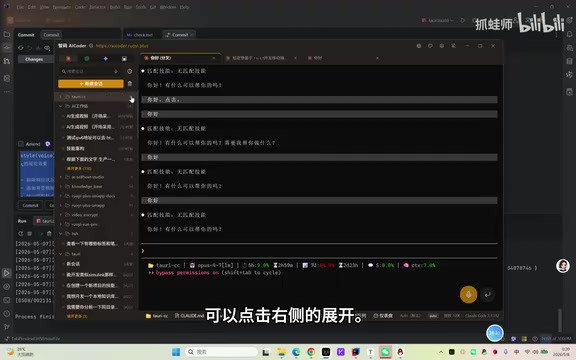
While the AI is executing a task, you can pre-add follow-up instructions in the task queue. After the AI completes the current task, it will automatically execute queued tasks in order, eliminating the need to wait and manually input each one.
Advanced Session Operations
Right-clicking a session reveals a rich set of operations:
- Export: Supports Markdown, HTML, and JSON formats; export individual sessions or entire directories
- Clone: Create a fork based on the current session and continue asking questions on a new branch
- Compress: Manually compress when Claude Code's built-in compression fails, preventing context overflow
- Checkpoint: Create checkpoints for easy code rollback
- AI Memory Summary: Automatically save/load project history memory
- Recycle Bin: Deleted sessions are retained for 7 days and can be restored at any time
To understand the importance of the "compress" operation, you need to understand the context window mechanism of large language models. When processing conversations, models rely on a "Context Window" — the maximum amount of text a model can "see" at once. Take Claude 3.5 Sonnet as an example: its context window is 200K tokens (approximately 150,000 Chinese characters). When a long coding session accumulates extensive code, error logs, and conversation history, the context approaches this limit, causing the model to "forget" earlier information or refuse to continue responding. The essence of the "compress" operation is having the AI generate a summary of the conversation history, retaining key information with fewer tokens, thereby freeing up context space — this is especially critical when working on long-cycle development tasks in large projects.
MCP Management: A Unified Interface for the AI Tool Ecosystem
ZhiMa AI Coder includes built-in common MCPs with one-click activation. MCP (Model Context Protocol) is an open protocol introduced by Anthropic in late 2024, designed to standardize how AI models interact with external tools and data sources. Think of it as the "USB port" of the AI world.
Related articles
 Product Reviews
The Programmer's Desk Setup Guide: Building a Workspace That Feels Like Home
Discover how programmers build productive, comfortable workspaces. From multi-monitor setups to ergonomic design, explore the desk philosophy that drives focus and flow.
 Product Reviews
Qoder vs Cursor Real-World Comparison: Which $20/Month AI IDE Is Better?
Hands-on comparison of Qoder vs Cursor AI IDEs: Agent autonomy, human interaction count, and architecture decisions. Qoder needed only 2 interactions vs Cursor's 8.
 Product Reviews
Cursor Cloud Agent Demo: Eliminating Bottlenecks Across the Entire Software Development Lifecycle
Deep analysis of Cursor's Cloud Agent demo showing how cloud VMs, automated test artifacts, and a full-chain control plane systematically eliminate human bottlenecks across the software development lifecycle.