10 Recommended Open-Source Claude Code Tools for May 2025

10 curated open-source Claude Code tools covering Token optimization, knowledge management, and frontend design.
Over the past month, the Claude Code ecosystem has seen a surge of open-source tools. This article highlights 10 of the most valuable projects across three categories: efficiency optimization (Kiman Scale saves tokens through concise output and may improve code quality; CodeBurn tracks token consumption with optimization suggestions), knowledge management (Graphify builds code knowledge graphs to dramatically reduce token usage; Code Video enables Claude to process video input), and frontend design (OpenDesign as a free Claude Design alternative, Impeccable 3.0 for real-time style editing, Design Extract for pulling complete design systems from any website).
Over the past month, open-source tools around the Claude Code ecosystem have been springing up like mushrooms after rain. From Token optimization to knowledge graphs, from frontend design to job-hunting automation, these tools are redefining AI programming workflows. This article highlights 10 of the most valuable open-source projects—nearly all of which were released within the last 30 days.
Efficiency Optimization: Doing More with Fewer Tokens
Understanding Token Economics Tokens are the basic units that large language models use to process text, roughly corresponding to 3/4 of an English word or about 1-2 Chinese characters. Companies like OpenAI and Anthropic charge by token count—Claude 3.5 Sonnet's input tokens cost approximately $3/million, and output tokens approximately $15/million. For developers who frequently use APIs, token costs can reach hundreds or even thousands of dollars per month. This pricing model has spawned an entire "token economics" optimization track: how to accomplish tasks of equal quality with fewer tokens without sacrificing output quality has become one of the core competitive dimensions for AI programming tools.
1. Kiman Scale — Making Claude Code Output More Concise
Kiman Scale is the most popular project on this list, earning over 50,000 GitHub Stars in its first month of release. Its core concept is extremely simple: through a Scale file, it makes Claude Code's output concise and powerful, eliminating verbose responses.
Kiman offers three tiers: Lite, Full, and Ultra, allowing users to choose their preferred level of conciseness. Although the official claim is approximately 75% savings on output tokens, in reality it only changes the wording style of the output without affecting the model's thinking process or input information volume—the actual comprehensive savings are around 5%.
However, Kiman's real value may not lie in saving money. A March 2025 paper titled Brevity Constraints Reverse Performance Hierarchies in Language Models found that when powerful models are forced to give more concise answers, they are actually more likely to give correct answers—because they don't "talk themselves into" erroneous reasoning chains through verbose expression. This finding aligns with the "Occam's Razor" principle in cognitive science: constraints often stimulate more precise thinking. Being able to save tokens while potentially improving code quality makes this nearly zero-cost optimization tool worth trying for every developer.
5. CodeBurn — AI Programming Token Consumption Tracker
CodeBurn tracks token usage costs and performance metrics across 16 AI coding tools. Compared to Claude's built-in Usage panel, CodeBurn's dashboard is much richer: it breaks down consumption by Activity, Project, Model, commands, and MCP servers, not only displaying token usage but also converting it directly into dollar amounts.
More importantly, CodeBurn doesn't just tell you where your money went—it also provides optimization suggestions to help you reduce unnecessary token consumption. For developers paying via API, this is an essential cost management tool.
Knowledge Management: Helping AI Better Understand Your Code Projects
2. Graphify — Code Project Knowledge Graph Builder
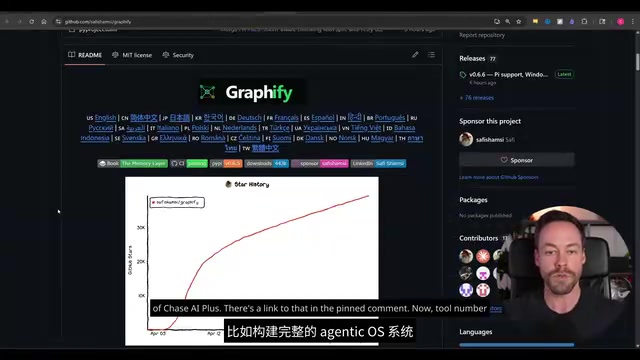
Graphify builds knowledge graphs by reading project files, giving Coding Agents a clearer understanding of project structure. Compared to directly reading raw files, Graphify claims to reduce token consumption by 71.5x per query.
Graph RAG Technical Principles RAG (Retrieval-Augmented Generation) is a technical architecture that combines external knowledge bases with LLMs. Traditional RAG uses vector embeddings for semantic retrieval—converting text into high-dimensional vectors and finding relevant snippets by calculating cosine similarity. Graph RAG builds on this by constructing entity relationship graphs, abstracting functions, classes, and modules in code as nodes, and call relationships, inheritance relationships, and dependencies as edges. This structured representation can more precisely capture complex associations like "function A calls method C of module B," rather than relying solely on semantic similarity for retrieval. Microsoft's 2024 GraphRAG paper demonstrated that graph-structured retrieval significantly improves accuracy over traditional vector retrieval when handling complex relational queries—this is precisely the technical foundation behind Graphify's claimed dramatic reduction in token consumption: precise retrieval means there's no need to stuff large amounts of irrelevant context into prompts.
Unlike the well-known Oxygen, Graphify is closer to a true Graph RAG system (like LightRAG). It's multimodal, capable of processing PDFs, screenshots, diagrams, and even extracting information from videos via Whisper. However, it doesn't use embeddings, positioning itself between tools like Cline and full RAG systems. If you like Cline's simplicity but want stronger file understanding capabilities, Graphify is an excellent middle ground.
3. Code Video — Enabling Claude Code to "Watch" Videos
Claude's Sonnet and Opus models don't natively support video input. Code Video uses a clever workaround: it extracts video frames using FFmpeg at a set frame rate, transcribes audio via Whisper, and then combines both to feed into Claude Code.
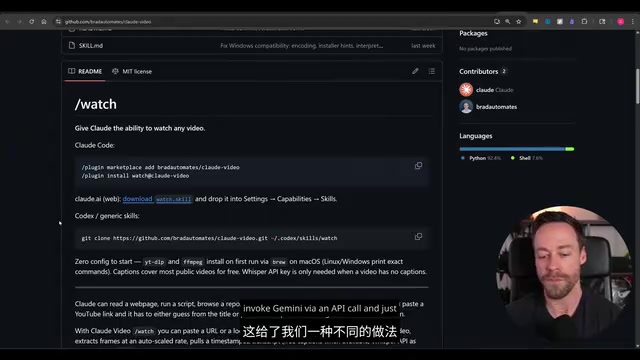
Whisper and Multimodal Information Extraction Whisper is an automatic speech recognition (ASR) model open-sourced by OpenAI in 2022, supporting transcription and translation in 99 languages. Its core advantages are strong robustness against noisy environments and accents, and it can run entirely locally without API calls. Code Video's technical approach is essentially a "modality reduction" strategy: decomposing video—a continuous medium that LLMs cannot directly process—into static frame sequences (visual) and text transcription (language), two forms the model can understand. FFmpeg is the industry-standard open-source audio/video processing framework supporting virtually all mainstream formats, making it possible to complete the entire processing pipeline locally without any paid APIs.
The frame budget adjusts dynamically based on video length—30 frames for a 30-second video, but only 100 frames for videos over 10 minutes. While processing of long videos still has limitations, it provides a video processing solution that doesn't depend on Gemini, taking Claude Code's multimodal capabilities one step further.
Frontend Design: Say Goodbye to AI-Generated "Rough Draft" Interfaces
4. OpenDesign — Open-Source Claude Design Alternative
OpenDesign is an open-source clone of Claude Design that can be used locally for free with any Coding Agent. It fully replicates Claude Design's interface layout, supports creating prototypes and slides, and adds extra features like image-related API calls.
Under the hood, OpenDesign integrates four open-source projects: WashDesign (terminal-based Claude Design clone), Gusion PowerPoint Scale (PPT generation and export), OpenCode Design, and Motica, plus a toolkit containing 31 skills. If you've used up your Claude Design quota for the week, this is a perfect free alternative.
6. Impeccable 3.0 — Real-Time Frontend Style Editing in the Browser
Impeccable isn't a new tool, but the 3.0 version released last week brought significant updates. It comes with a Scale containing 23 commands specifically designed to optimize a website's visual presentation.
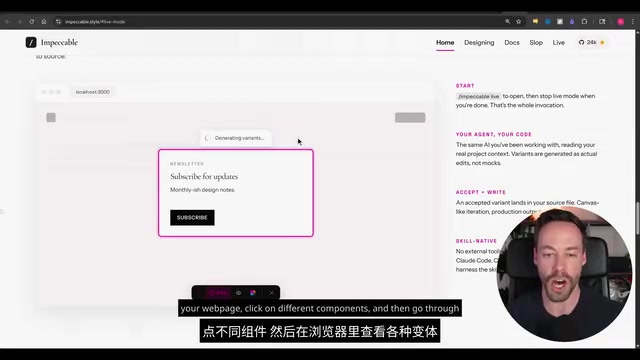
The standout feature of version 3.0 is real-time mode: you can open a webpage directly in the browser, click on different components, and view various design variants in real time. The official website also provides before-and-after comparisons for each command, letting you visually see the difference between AI-generated "rough styles" and the optimized results. These seemingly minor adjustments, accumulated together, can truly transform a website's look and feel.
7. Design Extract — Extract Complete Design Systems from Any Website
The previously viral Awesome Design MD (70,000 Stars) collected design breakdowns of many popular websites, but the selection was inherently limited. Design Extract takes it further: it applies the same design extraction capability to any website.
Simply point the tool at a target website, and it will use a headless browser to capture layout systems, responsive interaction states, animation language, component structures, brand tone, and other complete design elements, generating a design scheme that can be imported into your editor.
Headless Browsers and Design System Extraction A headless browser is a browser instance that runs without a graphical interface, capable of fully executing JavaScript and handling dynamically rendered content—something traditional HTTP crawlers cannot replace. The core value of Design Extract is that it extracts not visual screenshots, but structured design language: by analyzing CSS variables, computed styles, DOM hierarchy, and animation properties, it can reverse-engineer a complete Design Tokens system—including color systems, spacing patterns, typography hierarchy, and interaction states. This methodology aligns with Figma's "design system" approach.
Related articles
 Product Reviews
The Programmer's Desk Setup Guide: Building a Workspace That Feels Like Home
Discover how programmers build productive, comfortable workspaces. From multi-monitor setups to ergonomic design, explore the desk philosophy that drives focus and flow.
 Product Reviews
Qoder vs Cursor Real-World Comparison: Which $20/Month AI IDE Is Better?
Hands-on comparison of Qoder vs Cursor AI IDEs: Agent autonomy, human interaction count, and architecture decisions. Qoder needed only 2 interactions vs Cursor's 8.
 Product Reviews
Cursor Cloud Agent Demo: Eliminating Bottlenecks Across the Entire Software Development Lifecycle
Deep analysis of Cursor's Cloud Agent demo showing how cloud VMs, automated test artifacts, and a full-chain control plane systematically eliminate human bottlenecks across the software development lifecycle.