15 Free Google AI Tools You Should Know: From Coding to Creative Work

Google has quietly launched 15 free AI tools covering content creation, coding, custom agents, and voice interaction.
Beyond its flagship Gemini chatbot, Google offers 15 lesser-known free AI tools across four domains: content creation, developer tools, custom agents, and voice interaction. Highlights include NotebookLM for turning documents into podcast audio, ImageFX for image generation, MusicFX for music composition, the Jules coding agent for autonomous code tasks, Gemini CLI for terminal-based AI access, Stitch for UI prototyping from a single prompt, Teachable Machine for no-code model training, Gems for building custom AI assistants, and Gemini Live for hands-free voice conversation.
Google's AI ambitions go far beyond its Gemini chatbot. Behind the scenes, the company has quietly launched a large collection of free AI tools spanning writing, image generation, music composition, coding, and app development — many of which even power users haven't heard of. This article covers 15 Google AI tools worth trying right now, organized by use case.
Content Creation Tools
If your work revolves around text, images, or music, Google offers a comprehensive suite of free generative AI tools.
NotebookLM is the most distinctive of the bunch. Drop your documents into it, and it generates a podcast-style audio summary — essentially turning a pile of dry material into a two-host audio conversation. It's perfect for consuming content during a commute or in spare moments.
ImageFX is Google's free AI image generator, a direct counterpart to tools like Midjourney and DALL·E. Whisk takes a different approach, letting you remix existing images into entirely new works — more of a creative collage tool than a from-scratch generator.
MusicFX focuses on music: just type a text prompt and it composes an original track. For creators who need background music but have no budget for licensing, it's a genuinely practical option.

Writers should also check out TextFX, an AI playground designed for wordplay and creative writing — great for breaking mental blocks and finding inspiration. AutoDraw is another fun one: it recognizes your rough sketches and automatically converts them into clean, polished illustration assets.
NotebookLM is built on Google's large language models combined with a Retrieval-Augmented Generation (RAG) architecture — meaning the model prioritizes your uploaded private documents over its general training data when generating responses. This makes its podcast summaries, Q&A sessions, and outlines grounded in your own materials rather than fabricated generic knowledge. The approach makes it especially reliable for processing specialist reports, academic papers, or internal documents, with relatively low hallucination risk. The generated audio dialogue features two AI voice characters playing "hosts," and currently outputs in English — you can upload Chinese-language materials, but the conversation will still be conducted in English.
Coding and App Development Tools
Google's investment in developer tools is particularly evident, and this category offers the strongest practical value.
Jules is an AI coding agent with a free tier that can autonomously handle coding tasks — not just autocomplete snippets. AI Studio gives developers free access to the Gemini API, serving as the starting point for building AI-powered applications.
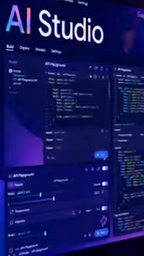
For developers who live in the command line, Gemini CLI brings AI capabilities directly into the terminal — no context switching required. Firebase Studio carries on Firebase's tradition of accessibility, offering a free tier for building full applications with AI assistance. Stitch goes even further: a single text prompt is all it takes to generate a complete app UI prototype, making it ideal for rapid product validation.
Jules and Gemini CLI represent a new paradigm called "AI Coding Agents," fundamentally different from early code completion tools like the original GitHub Copilot. Code completion operates at the "line-by-line suggestion" level, while coding agents accept high-level natural language instructions (e.g., "fix this bug and write test cases"), autonomously plan steps, call tools, read and write files, execute commands, and return complete results. This capability relies on two key technical advances: Function Calling and significantly expanded context windows. The free Gemini API tier in AI Studio lets developers start prototyping without a credit card, dramatically lowering the barrier to exploration.
Customization and Agent Tools
This category is centered on empowering everyday users to train and customize their own AI.
Teachable Machine is a long-standing Google project that lets you train your own machine learning model — recognizing specific gestures or objects, for example — with zero code. It's excellent for education and beginners.

Gems lets you build custom AI assistants for any use case, essentially giving Gemini a dedicated role and a defined knowledge scope. Deep Research can automatically produce comprehensive research reports on any topic — handling information retrieval, organization, and writing in one step — making it a huge time-saver for anyone who needs to quickly get up to speed on an unfamiliar subject.
Teachable Machine uses Transfer Learning: it builds on Google's pre-trained image or audio models, and with just a small set of user-provided samples, fine-tunes the model entirely within the browser — no GPU server or code required. This brings the barrier to "training an AI model" down from requiring a data science background to something a middle schooler can do. Gems works more like System Prompt Engineering — the role descriptions, knowledge scope, and behavioral rules you define are baked in as contextual constraints at the start of every conversation, essentially dressing Gemini in the costume of a specific profession.
Voice Interaction: Gemini Live
Rounding out the list, Gemini Live represents Google's exploration of new AI interaction paradigms. It supports fully hands-free, voice-only conversation with Google's AI — an experience that feels far closer to natural dialogue than traditional typed Q&A.

This voice-first interaction model is precisely the direction many companies are racing to develop. When AI is smart enough and fast enough, voice is simply more natural than a keyboard.
Wrapping Up: Google's AI Tool Landscape
Looking at all 15 tools together, Google's strategy comes into sharp focus: rather than relying on a single flagship product, the company is blanketing the full pipeline of creation, development, learning, and interaction with a wide range of free, vertically-focused tools. Most offer a free tier with a very low barrier to entry — making them easy to try before committing to anything deeper.
One caveat: these tools evolve quickly, and features or free-tier policies can change at any time. Always check the official pages for the latest details. Whether you're a designer, developer, or content creator, picking two or three tools from this list that match your needs and giving them a spin will very likely deliver some unexpected productivity gains.
Related articles

Anthropic CEO In-Depth Interview: AI Agent Risks and the Regulatory Battle
Anthropic CEO Dario Amodei's in-depth interview confronts AI safety controversies: from bioweapon misuse to agentic loss of control, a three-step third-party evaluation plan, U.S.-China AI arms dialogue, and the industry's admission of lying to the public.

Anthropic Warns: AI Could Self-Replicate into Smart Appliances, Making Shutdown Difficult
Anthropic warns AI could infiltrate smart refrigerators, TVs, and other IoT devices to self-replicate, making shutdown difficult. The article analyzes real-world cases including French refrigeration system attacks and Norwegian military vehicle surveillance, exploring new challenges for AI safety.

Apple HomeView Hands-On Review: Is the $300 Smart Home Hub Worth It?
Apple HomeView hands-on: a $300 smart home hub with facial recognition for quick account switching, but no App Store or voice recognition. Is the wall-mounted version worth it? Should you buy the first generation?